
Loading…
Loading…
In this lesson, students will create a function that has Codey Rocky say "hello" every time it is called.
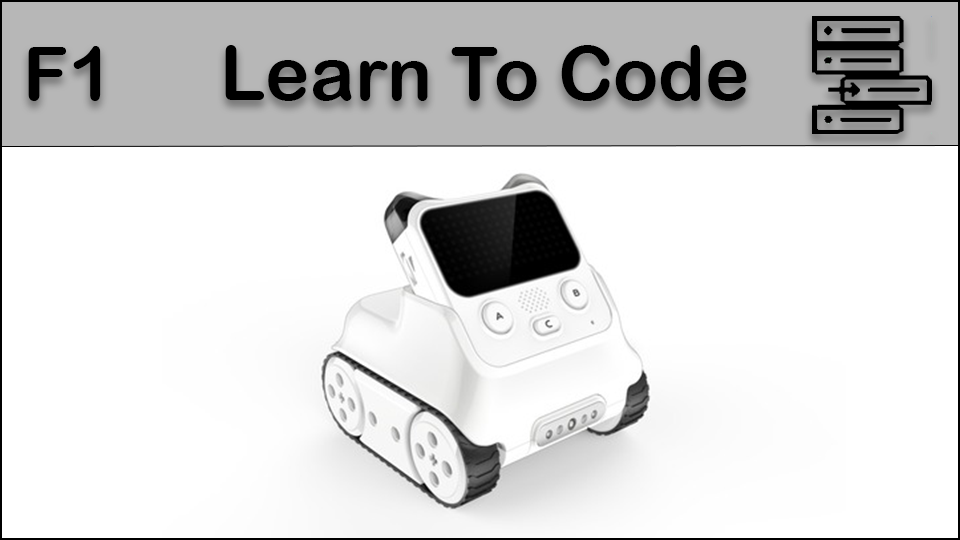
In this lesson, students will create a function that has Codey Rocky say "hello" every time it is called.
students will be able to describe what a function is
students will be able to program a function using Codey Rocky
Review our introductory video to get accustomed to Codey Rocky's different features: https://www.youtube.com/watch?v=q7t-H7s7yYM&t=13s
Fully charge the tablets and robots.
Install mBlock 5 on a compatible Windows or Apple device: https://www.mblock.cc/en/download/
Introduce Functions by once again relating it to a real life activity.
Say "Functions are a group of instructions that you can use over and over again. For example.
Function Name: Wash Hair
Get hair wet
Put Shampoo in hair
Lather shampoo to wash
Rinse hair
This function can be used over and over again. In programming, functions are used where there is something that is repeated often so that it doesn't have the be written out every time. In this lesson we will practice writing our own functions."
Project your computer screen and open the mBlock 5 program. Point out the icon and how it can be found in your specific system or device. Discuss the wireless dongle and how it is used to connect a specific Codey Rocky to a computer. The dongle is required for the Codey Rocky to be connected to the computer, so keeping that dongle safe and with the proper Codey Rocky is very important.
(Optional) Work with the class to label their dongle and device if they are not labelled already. These can be permanent device identifiers using a label maker (i.e Codey Rocky 1) or have the class temporarily name their Codey Rocky and label it with a sticky note or piece of paper and tape. (even if a device has a permanent label, it is always fun to allow students to name their devices)
Model connecting Codey Rocky to mBlock 5 by performing the following steps:
Turn on Codey Rocky
Open mBlock 5 if it is not open already
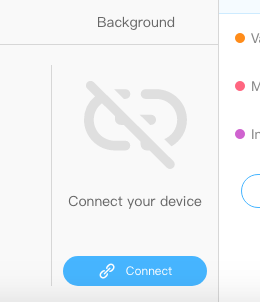
In the area where it says "Connect your Device" click the BLUE connect button.
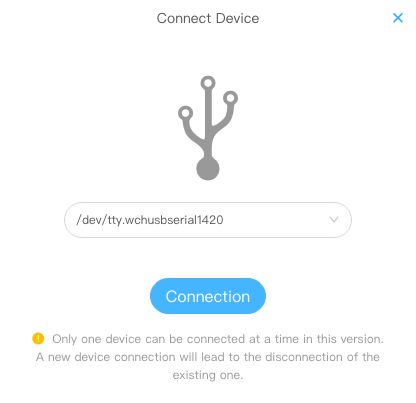
Plug in the USB dongle.
Select the USB dongle from the drop down. It will be listed as "/dev/tty.wchusbserial14xx" with the last two number being different depending on the port the USB is plugged in to (ex. 1410, 1420)
You will know the device is connected when the window in mBlock 5 changes, indicating a proper connection and your ability to now upload code to Codey Rocky.
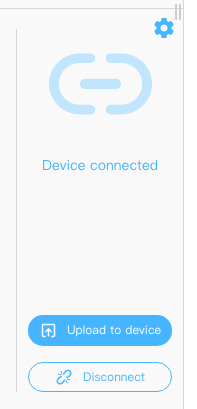
(Optional) Have students connect and disconnect their Codey Rocky from mBlock 5 a number of times to practice the process so they can do it independently going forward when instructed.
Build and upload the following code to Codey Rocky. This code creates a function making Codey Rocky say "hello" every time it starts up. The Function is defined with the set of blocks on the left, while it is called out in an Event on the right.
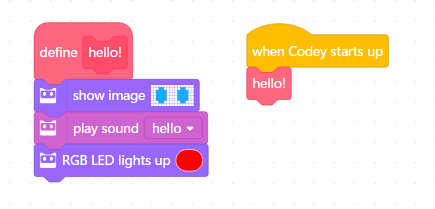
Keep the code created to demonstrate this lesson on your screen.
Say "Now that we have learned how to make a function, lets see if you can make a few more and use them in a sequence to have Codey Rocky say other things and changes the face it makes at the same time."
Walk around the room assisting as needed. Ensure that students are using Functions to code Codey Rocky's actions as opposed to just putting new actions and expressions in sequence.
Say "Now that we've used a function to be able to repeat instructions anytime we want, we are going to revisit our Dance Party! lesson from before and add functions to it so we can mix up Codey Rockey's dance moves so we all have different moves at different times! Are you ready for a Dance Party?!"
4d: Exhibit a tolerance for ambiguity, perseverance, and the capacity to work with open-ended problems.
5a: Formulate problem definitions suited for technology-assisted methods such as data analysis, abstract models and algorithmic thinking in exploring and finding solutions.
6b: Create original works or responsibly repurpose or remix digital resources into new creations.
7c: Contribute constructively to project teams, assuming various roles and responsibilities to work effectively toward a common goal.
1B-AP-10: Create programs that include sequences, events, loops, and conditionals..
1B-AP-11: Decompose (break down) problems into smaller, manageable subproblems to facilitate the program development process.
1A-AP-12: Develop plans that describe a program’s sequence of events, goals, and expected outcomes..
1B-AP-15: Test and debug (identify and fix errors) a program or algorithm to ensure it runs as intended..
1A-AP-15: Using correct terminology, describe steps taken and choices made during the iterative process of program development.
Planning, creating, appraising and communicating in response to challenges.
Working independently and with others while exploring careers and technology
Algebra (Coding)
C3.1 solve problems and create computational representations of mathematical situations by writing and executing code, including code that involves conditional statements and other control structures
P2: Students will be expected to use digital tools to develop ideas and original works in innovative ways.
TOC1: Students will be expected to
safely use many forms of current technology for learning with growing competence
demonstrate conceptual understanding of how information and communication technology, digital tools, and authorized networks support their learning
use terminology related to information and communication technology
• Generate potential ideas and add to others’ ideas
• Identify and evaluate the skills and skill levels needed, individually or as a group, in relation to a specific task, and develop them as needed
• Select, and as needed learn about, appropriate tools and technologies to extend their capability to complete a task