
Loading…
Loading…
In this lesson, students will use a speed variable to slowly increase the speed of Codey Rocky and display a warning light when it is going too fast! At max speed, Codey Rocky will pretend to explode!
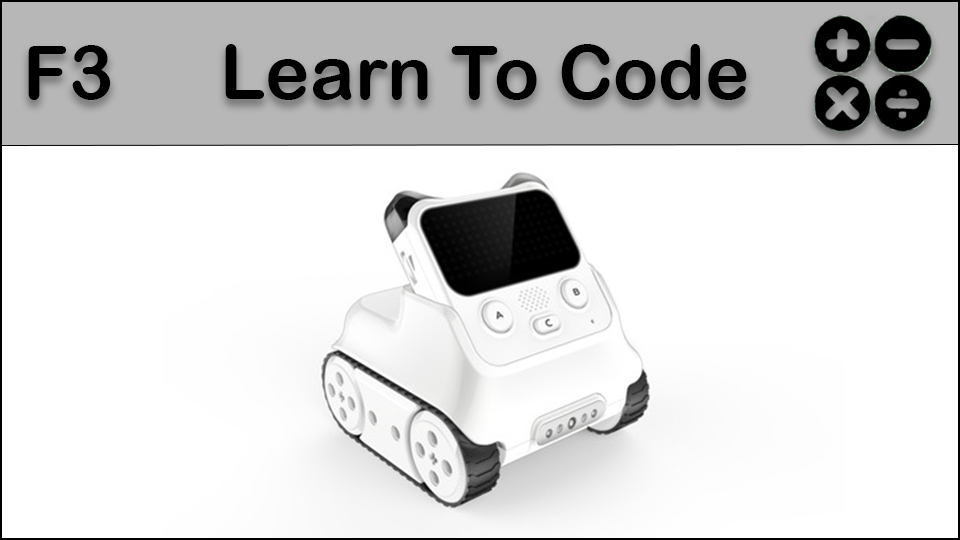
In this lesson, students will use a speed variable to slowly increase the speed of Codey Rocky and display a warning light when it is going too fast! At max speed, Codey Rocky will pretend to explode!
students will be able to describe what a variable is
students will be able to program a variable using Codey Rocky
Review our introductory video to get accustomed to Codey Rocky's different features: https://www.youtube.com/watch?v=q7t-H7s7yYM&t=13s
Fully charge the tablets and robots.
Install mBlock 5 on a compatible Windows or Apple device: https://www.mblock.cc/en/download/
Elements of lessons in Sequences, Events, and Conditionals are all contained in Faster! Review these concepts, referring to the real life examples and the activities the students participated in during those lessons.
Project your computer screen and open the mBlock 5 program. Point out the icon and how it can be found in your specific system or device. Discuss the wireless dongle and how it is used to connect a specific Codey Rocky to a computer. The dongle is required for the Codey Rocky to be connected to the computer, so keeping that dongle safe and with the proper Codey Rocky is very important.
(Optional) Work with the class to label their dongle and device if they are not labelled already. These can be permanent device identifiers using a label maker (i.e Codey Rocky 1) or have the class temporarily name their Codey Rocky and label it with a sticky note or piece of paper and tape. (even if a device has a permanent label, it is always fun to allow students to name their devices)
Model connecting Codey Rocky to mBlock 5 by performing the following steps:
Turn on Codey Rocky
Open mBlock 5 if it is not open already
In the area where it says "Connect your Device" click the BLUE connect button.
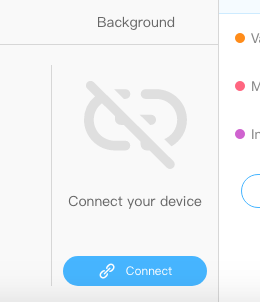
Plug in the USB dongle.
Select the USB dongle from the drop down. It will be listed as "/dev/tty.wchusbserial14xx" with the last two number being different depending on the port the USB is plugged in to (ex. 1410, 1420)
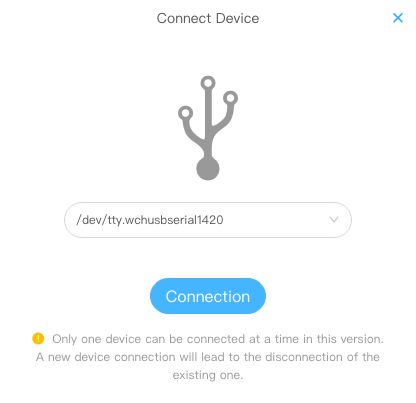
You will know the device is connected when the window in mBlock 5 changes, indicating a proper connection and your ability to now upload code to Codey Rocky.
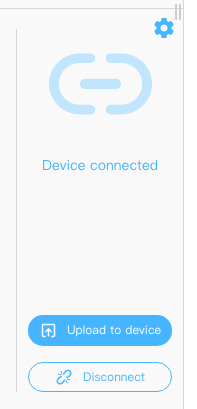
(Optional) Have students connect and disconnect their Codey Rocky from mBlock 5 a number of times to practice the process so they can do it independently going forward when instructed.
A critical aspect of learning Variables is differentiating them from Loops and Functions. Ask student to describe a Loop, which is a sequence that can be repeated, and describe a Function, which is sequence that can be called on as needed, over and over again.
Introduce Variables as a defined item which can stores information and can be changed.
Say "Think of a variable like a scoreboard at a sporting event. If we name one of the items in the scoreboard Leafs, and the other Canadians, when the Leafs or Canadians score a goal, the number related to that variable will change when the score changes."
Say "We will use a variable to have Codey Rocky speed away and when it gets too fast it will pretend to crash!"
Create a variable called "speed" - this is the container we will use to help us decide when Codey Rocky will crash.
Replicate the code below, feel free to adjust the incremental speed increases to accommodate your space and time for Codey Rocky to drive and "crash"
Keep the code created on screen and allow students to replicate it and run it.
Once students have a working code, encourage them to modify it. Options include:
Setting the initial speed to 100 and slowly slow Codey Rocky down, with the Conditional being to have Codey Rocky stop when it reaches 0.
Have students modify some of the novelty elements of the code, such as how Codey Rocky "crashes"
Say "In our final lesson on Variables we will use Codey Rocky's upper body to have an infrared battle. Like tag, with robots!"
4d: Exhibit a tolerance for ambiguity, perseverance, and the capacity to work with open-ended problems.
5a: Formulate problem definitions suited for technology-assisted methods such as data analysis, abstract models and algorithmic thinking in exploring and finding solutions.
6b: Create original works or responsibly repurpose or remix digital resources into new creations.
7c: Contribute constructively to project teams, assuming various roles and responsibilities to work effectively toward a common goal.
1B-AP-10: Create programs that include sequences, events, loops, and conditionals..
1B-AP-11: Decompose (break down) problems into smaller, manageable subproblems to facilitate the program development process.
1A-AP-12: Develop plans that describe a program’s sequence of events, goals, and expected outcomes..
1B-AP-15: Test and debug (identify and fix errors) a program or algorithm to ensure it runs as intended..
1A-AP-15: Using correct terminology, describe steps taken and choices made during the iterative process of program development.
Planning, creating, appraising and communicating in response to challenges.
Working independently and with others while exploring careers and technology
Algebra (Coding)
C3.1 solve problems and create computational representations of mathematical situations by writing and executing code, including code that involves conditional statements and other control structures
P2: Students will be expected to use digital tools to develop ideas and original works in innovative ways.
TOC1: Students will be expected to
safely use many forms of current technology for learning with growing competence
demonstrate conceptual understanding of how information and communication technology, digital tools, and authorized networks support their learning
use terminology related to information and communication technology
• Generate potential ideas and add to others’ ideas
• Identify and evaluate the skills and skill levels needed, individually or as a group, in relation to a specific task, and develop them as needed
• Select, and as needed learn about, appropriate tools and technologies to extend their capability to complete a task