Loading…
Loading…
Cue robot (1 per group)
tablets or compatible devices (1 per group)
Sketch Kit marker attachment (1 per group)
Sketch Kit dry erase markers (1 set per group)
[optional] Wonder Whiteboard Mat
butcher paper (1 per every 2 groups)
Conditional Design Slides
Drawing Rules Suggestions
blank paper
coloured markers
index cards
Before this lesson, it is recommended that students:
complete the Introduction to Sketch Kit lesson.
practice programming Cue to draw lines using the Sketch Kit.
be able to accurately identify and measure distances and angles.
know how to program loops and functions in the Cue app.
Fully charge the devices and robots.
Install the Wonder Workshop Cue app on each tablet.
Arrange the classroom to make room for the Wonder Whiteboard Mat or butcher paper and accommodate partner and small-group work.
Cut out each of the Drawing Rules and make sure that there are enough rules available for each group. Feel free to make up your own rules if you need more.
Review how to attach the Sketch Kit marker attachment to Cue and insert a marker.
Refer to the Start Here Card that came with your Sketch Kit or visit the Wonder Workshop website for instructions and images to guide you.
1. Ask, “What are functions, and why would you use them in your programs?”
Sample response: “Functions are snippets of code that you can call at different points in your program. They help make your program more efficient and easy-to-understand.”
2. Divide the class into groups and distribute robots, devices, Sketch Kit marker attachments, Sketch Kit dry erase markers, and butcher paper.
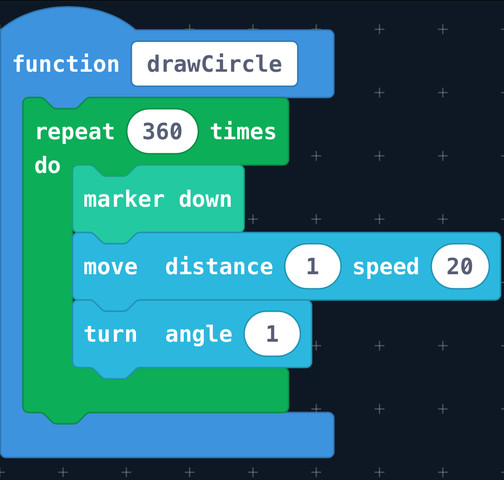
3. Project Slide 2 from the Conditional Design Slides and ask students to program a function that would result in Cue sketching a circle.
Have students write their responses.
Ask the class to share their responses.
Reveal the sample program on Slide 3.
Sample Program:
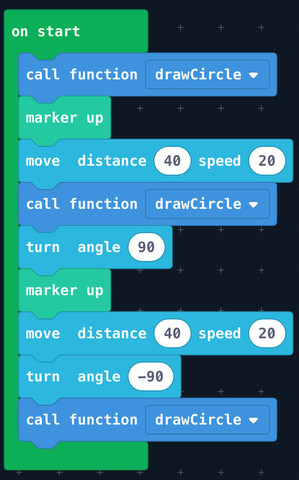
4. Project Slide 4 from the Conditional Design Slides and ask students to program Cue to sketch a three-circle pattern using the drawCircle function and a repeat block.
Ask the class to share their responses.
Reveal the sample program on Slide 5.
Sample Program:
5. Ask, “What is a loop, and why would you use it in your program?”
Sample response: “Loops repeat the code contained within the loop a specific number of times and help you avoid repeating the same code multiple times.”
6. Say, “Functions and loops both repeat snippets of code. What is the difference between them?”
Sample response: “Functions can be given titles—which helps with organization—while loops cannot. When a function is called, it runs through once, while a loop repeats a specified number of times.”
What is a function, and why would you use it in your program? (Sample response: “Functions are snippets of code that you can call at different points in your program. They help make your program more efficient and easy-to-understand.”)
What is a loop, and why would you use it in your program? (Sample response: “Loops repeat the code contained within the loop a specific number of times and help you avoid repeating the same code multiple times.”)
What is the difference between functions and loops? (Sample response: “Functions can be given titles—which helps with organization—while loops cannot. When a function is called, it runs through once, while a loop repeats a specified number of times.”
1. Distribute two pieces of a paper and a colored marker to each student.
2. Project Slide 6 from Conditional Design Slides and say, “Today, we will be programming Cue to make algorithmic art, which is simply art that’s been created using a set of rules or codes. We will start by looking at an artwork by Conditional Design Group, a team of graphic designers from the Netherlands who produce visual patterns by following rules they designed. To get a sense of their work, we are going to recreate one of their pieces: A Perfect Circle.”
Say, “Draw a circle on your paper and pass the paper to someone else. Then, on your new paper, take 10 seconds to draw a circle larger than the previous one. Repeat this activity 6–10 times.”
Ask students to reflect on the experience of making the artwork and the differences between each of the circle drawings they worked on.
3. Project Slide 7 from Conditional Design Slides and say, “Another Conditional Design Group drawing empowers us to make our own rules. I am going to hand out many different drawing rules. Some of the rules are very specific, like ‘only use squares’ and some of them are more abstract like ‘everything must be random.’ They are designed to be open to interpretation so don’t worry about following the rule the correct way—just start drawing something.”
Pass a drawing rule out to each student.
Ask students to make a drawing based on the rule they received and then pass their rule to someone next to them. Have them repeat this activity 6–10 times.
Ask students to share their artwork with a partner and to identify any rules they might recognize.
[Optional] Collect the artwork to display alongside the artwork they will program Cue to draw at the end of the lesson.
4. Ask, “How was the experience of making these algorithmic artworks similar to programming Cue?”
Sample response: “Both algorithmic drawings and programming use a set of rules or commands. In the algorithmic drawings, we repeated the same rule a number of times, which was similar to loops in programming.”
1. Show Slide 8 from Conditional Design Slides and say, “Conditional Design Group is unusual because their algorithms don’t rely on computers. Many algorithmic artists use hardware and software to make their drawings. For example, Harvey Moon uses little drawing robots to sketch images based on data. Today, we’ll be making our drawings using Cue with the Sketch Kit.”
2. Project your device’s screen and open the Cue app.
Navigate to the Code with Block and JavaScriptⓇ section.
3. Say, “Let’s create a very simple program using repeat, move, and turn blocks.”
Demonstrate how to make the sample program below:
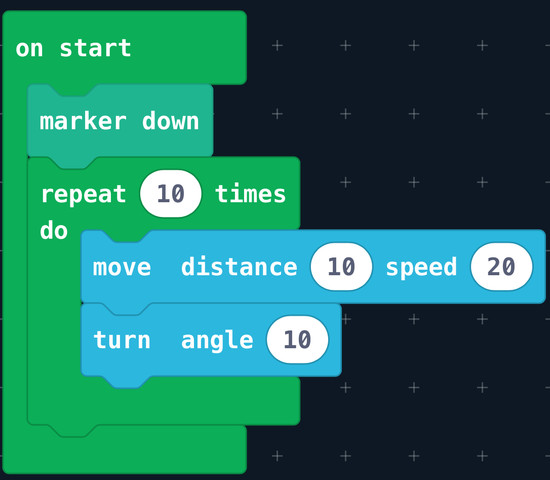
Ask, “By looking at the code, what kind of shape or line do you predict Cue will draw?”
4. Attach the Sketch Kit marker attachment to Cue and insert a marker.
Place Cue on a Whiteboard Mat or piece of butcher paper.
5. Run the program and compare predictions with the actual drawing:
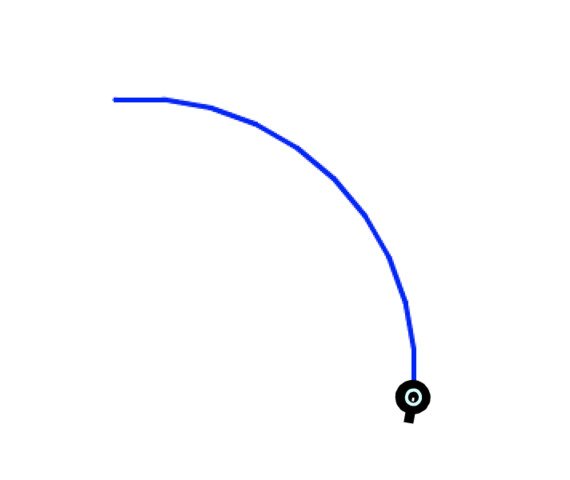
6. Say, “To make this drawing more complex, I want Cue’s turn angle to change with each repetition. In order to do this, I will need to use a variable. Variables are used in programming to store a number value. You can think of variables like luggage. When you go on a vacation, you might bring a lot of stuff with you—clothing and electronics and books— but you pack it all in a suitcase to make traveling more organized and efficient. In this case, the suitcase is the variable and the stuff inside it are the numbers. Throughout your vacation, you can add things to your luggage or take things out, but the suitcase stays the same. With variables, you set the value at the beginning of the program and can change the value at any time throughout the program. Let’s try placing a variable in our program to see what happens."
Demonstrate how to create a variable and name it Turn.
Demonstrate how to drag the Turn variable into the turn angle block to replace the 10.
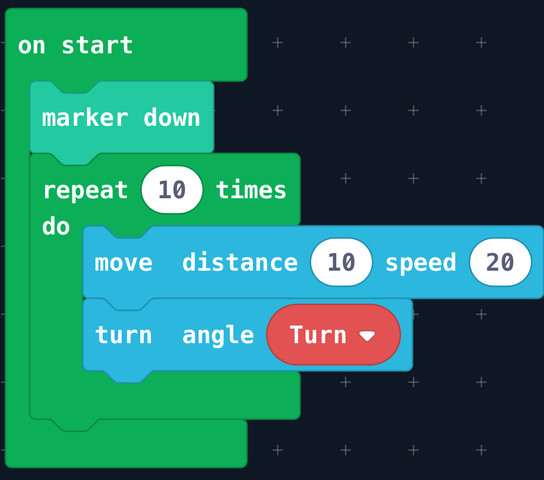
Say, “Right now, our variable is like an empty suitcase. There’s nothing inside of it. Let’s assign a value to our Turn variable by using a set to block.”
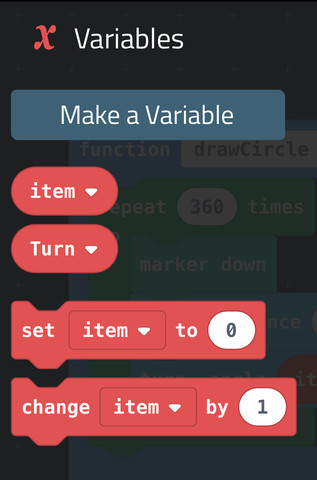
Demonstrate how to drag a set to block into your program and assign the variable Turn the value of 10.
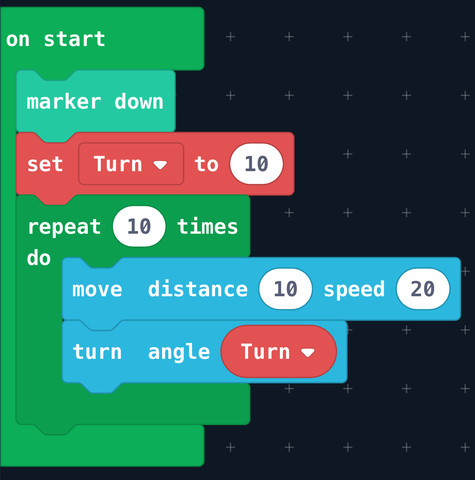
7. Say, “The great thing about variables is that the information stored inside of them can change over time. If we add a change by block inside the loop, then Cue will turn at a different angle each time.”
Demonstrate where to find the change by block and how to add it to your program.
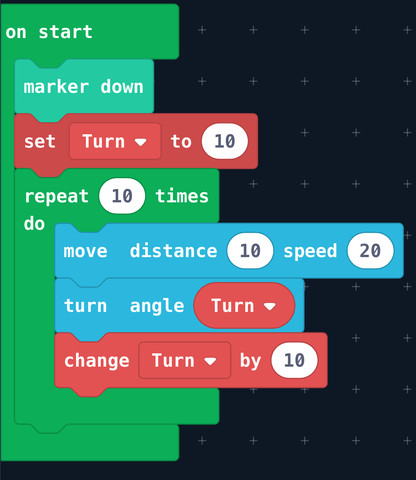
8. Say, “In this case, we’ve programmed Cue to move 10 cm and turn at an angle and to repeat that combination of actions 10 times. In the first repetition, at what angle will Cue turn? On the second repetition? What about the final repetition?"
Sample response: “On the first repetition, Cue will turn at 10°. On the second repetition, Cue will turn at 20°. By the final repetition, Cue will turn at 100°.”
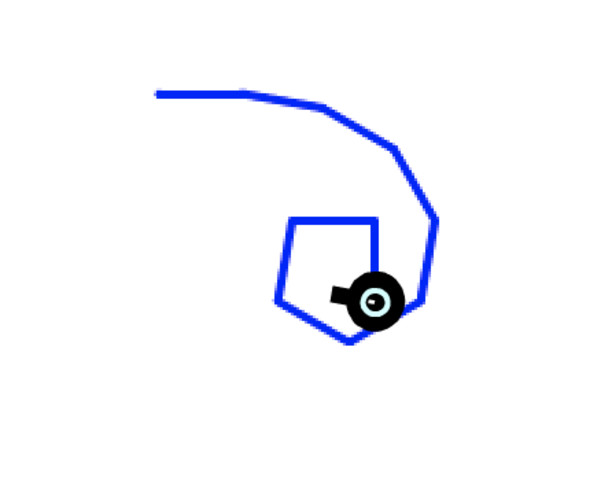
9. Ask, “By looking at this code, what kind of shape or line do you predict that Cue will draw?”
Run the program and compare predictions with actual drawing:
1. Say, “Sometimes algorithmic artists create rules for drawings that make it impossible to predict the final outcome. We can do that, too, if we add a pick random block as one of our values.”
Say, “Like a variable block, you can replace any number in your program with a pick random block. Instead of programming Cue to repeat 10 times, let’s program Cue to repeat a random number of times.”
Demonstrate how to add a pick random block to the repeat block.
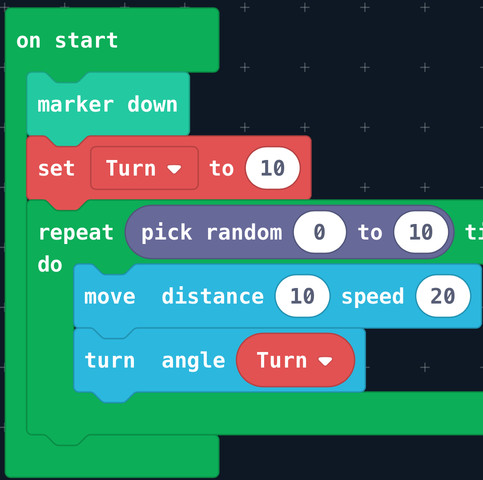
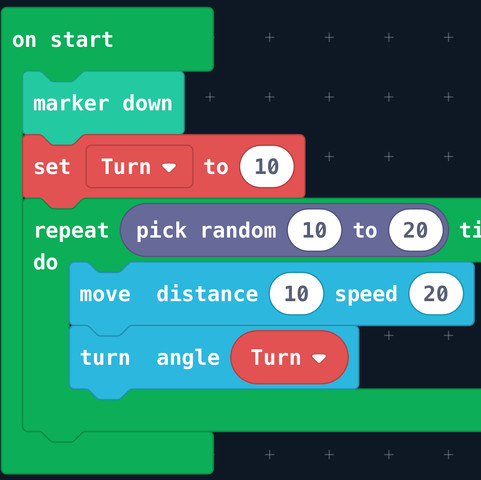
2. Say, “Random number blocks ask you to input a range (a minimum and maximum number) and then the computer selects a random number from within that range. These blocks default to a 0-10 range, but I changed it to 10-20because I wanted more repetitions.”
Run the program and ask students if they can figure out which number the computer randomly picked.
What is a variable, and why is it useful? (Sample response: “Variables are containers that store numbers in our programs. We can give variables labels and change the numbers they store over time. They are useful because they help keep our program more organized.”)
What is the difference between a ‘set to’ and a ‘change by’ variable block? (Sample response: “A set to block assigns a variable a specific number value, whereas a change by block changes the variable by a specific amount.”)
What does a pick random block do? (Sample response: “A pick random block randomly chooses a number value between a minimum and maximum value.”)
1. Distribute index cards and pencils.
2. In their groups, ask students to write a program that combines marker down, loops, variables, move, and turnblocks.
Ask students to replace at least one value with a pick random block.
3. Pass out a Drawing Rule to each group and say, “Now we’re going to incorporate a drawing rule into our programs like we did at the beginning of class. You must interpret the rule and use a variable and pick random block in your program.”
Have students add blocks to their program based on their interpretation of their drawing rule.
4. On an index card, ask students to draw a prediction of the shape or line that Cue will draw.
Choose one program to run in front of the class, comparing the group’s prediction with the drawing that Cue ended up sketching. If Cue’s drawing does not look like the group’s prediction, debug with the class.
5. Have all groups run their programs and compare them against their predictions.
Have students adjust their programs as necessary so Cue’s drawing ends up looking more like their predictions.
Ask groups to write a new drawing rule on an index card and trade with another group.
2. Ask groups to add to their programs based on the drawing rule they’ve received.
3. Once every group has debugged their program, ask them to trade butcher paper with another group and run their program next to/on top of the previous group’s artwork.
Discuss The Principles of Design (Balance, Emphasis, Movement, Proportion, Pattern, Rhythm, Unity, and Variety) with the class and ask groups to write a program that showcases one of these principles.
1. Have each group present their artwork to the class.
2. Ask how they interpreted their drawing rule and what challenges they encountered while programming.
Encourage students to give feedback to other groups based on their programs and/or the design of the final sketch.
3. [Optional] Collect all of the group drawings and hang them on a display wall alongside the collaborative drawings made earlier in class.
CCSS.MATH.CONTENT.6.EE.A.2: Write, read, and evaluate expressions in which letters stand for numbers.
CCSS.MATH.CONTENT.6.EE.A.2.A: Write expressions that record operations with numbers and with letters standing for numbers.
CCSS.MATH.CONTENT.6.EE.B.6: Use variables to represent numbers and write expressions when solving a real-world or mathematical problem; understand that a variable can represent an unknown number, or, depending on the purpose at hand, any number in a specified set.
3-5-ETS1-2: Generate and compare multiple possible solutions to a problem based on how well each is likely to meet the criteria and constraints of the problem.
MS-ETS1-3: Analyze data from tests to determine similarities and differences among several design solutions to identify the best characteristics of each that can be combined into a new solution to better meet the criteria for success.
1B-AP-09: Create programs that use variables to store and modify data.
1B-AP-10: Create programs that include sequences, events, loops, and conditionals.
2-AP-13: Decompose problems and subproblems into parts to facilitate the design, implementation, and review of programs.
2-AP-15: Seek and incorporate feedback from team members and users to refine a solution that meets user needs.
2-AP-17: Systematically test and refine programs using a range of test cases.
4D: Exhibit a tolerance for ambiguity, perseverance and the capacity to work with open-ended problems.
5A: Formulate problem definitions suited for technology-assisted methods such as data analysis, abstract models and algorithmic thinking in exploring and finding solutions.
5C: Break problems into component parts, extract key information, and develop descriptive models to understand complex systems or facilitate problem-solving.
6C: Communicate complex ideas clearly and effectively by creating or using a variety of digital objects such as visualizations, models or simulations.
7C: Contribute constructively to project teams, assuming various roles and responsibilities to work effectively toward a common goal.
Patterns and Relations
1. Represent and describe patterns and relationships, using graphs and tables.
Shape and Space
1. Demonstrate an understanding of angles by:
identifying examples of angles in the environment
classifying angles according to their measure
estimating the measure of angles, using 45°, 90° and 180° as reference angles
determining angle measures in degrees
drawing and labelling angles when the measure is specified.
5. Describe and compare the sides and angles of regular and irregular polygons.
6. Perform a combination of translations, rotations and/or reflections on a single 2-D shape, with and without technology, and draw and describe the image.
7. Perform a combination of successive transformations of 2-D shapes to create a design, and identify and describe the transformations.
CTF is planning, creating, appraising and communicating in response to challenges.
I plan in response to challenges.
I make decisions in response to challenges.
I adapt to change and unexpected events.
I solve problems in response to challenges.
I create products, performances or services in response to challenges.
I appraise the skills, knowledge and technologies used to respond to challenges.
I communicate my learning.
CTF is working independently and with others while exploring careers and technology.
I determine how my actions affect learning.
I develop skills that support effective relationships.
I collaborate to achieve common goals.
Shape and Space
3. Perform geometric constructions, including:
perpendicular line segments
parallel line segments
perpendicular bisectors
angle bisectors.
Perform and describe transformations (translations, rotations or reflections) of a 2-D shape in all four quadrants of a Cartesian plane (limited to integral number vertices).
CTF is planning, creating, appraising and communicating in response to challenges.
I plan in response to challenges.
I make decisions in response to challenges.
I adapt to change and unexpected events.
I solve problems in response to challenges.
I create products, performances or services in response to challenges.
I appraise the skills, knowledge and technologies used to respond to challenges.
I communicate my learning.
CTF is working independently and with others while exploring careers and technology.
I determine how my actions affect learning.
I develop skills that support effective relationships.
I collaborate to achieve common goals.
Shape and Space
Describe the characteristics of 3-D objects and 2-D shapes, and analyze the relationships among them.
Describe and analyze position and motion of objects and shapes.
CTF is planning, creating, appraising and communicating in response to challenges.
I plan in response to challenges.
I make decisions in response to challenges.
I adapt to change and unexpected events.
I solve problems in response to challenges.
I create products, performances or services in response to challenges.
I appraise the skills, knowledge and technologies used to respond to challenges.
I communicate my learning.
CTF is working independently and with others while exploring careers and technology.
I determine how my actions affect learning.
I develop skills that support effective relationships.
I collaborate to achieve common goals.
Reasoning and analyzing
Use logic and patterns to solve puzzles and play games
Use reasoning and logic to explore, analyze, and apply mathematical ideas
Estimate reasonably
Demonstrate and apply mental math strategies
Use tools or technology to explore and create patterns and relationships, and test conjectures
Model mathematics in contextualized experiences
Understanding and solving
Apply multiple strategies to solve problems in both abstract and contextualized situations
Develop, demonstrate, and apply mathematical understanding through play, inquiry, and problem solving
Visualize to explore mathematical concepts
Engage in problem-solving experiences that are connected to place, story, cultural practices, and perspectives relevant to local First Peoples communities, the local community, and other cultures
Communicating and representing
Use mathematical vocabulary and language to contribute to mathematical discussions
Represent mathematical ideas in concrete, pictorial, and symbolic forms
Connecting and reflecting
Reflect on mathematical thinking
Connect mathematical concepts to each other and to other areas and personal interests
increasing and decreasing patterns, using expressions, tables, and graphs as functional relationships
Applied Technologies:
- Select, and as needed learn about, appropriate tools and technologies to extend their capability to complete a task.
- Identify the personal, social, and environmental impacts, including unintended negative consequences, of the choices they make about technology use.
- Identify how the land, natural resources, and culture influence the development and use of tools and technologies.
SS1: Demonstrate an understanding of angles by:
identifying examples of angles in the environment
classifying angles according to their measure
estimating the measure of angles using 45°, 90° and 180° as reference angles
determining angle measures in degrees
drawing and labelling
SS3: Develop and apply a formula for determining the:
perimeter of polygons
area of rectangles
volume of right rectangular prisms.
SS5: Describe and compare the sides and angles of regular and irregular polygons.
SS6: Perform a combination of translation(s), rotation(s) and/or reflection(s) on a single 2-D shape, with and without technology, and draw and describe the image.
SS7: Perform a combination of successive transformations of 2-D shapes to create a design, and identify and describe the transformations.
SS3: Perform geometric constructions, including:
perpendicular line segments
parallel line segments
perpendicular bisectors
angle bisectors.
SS5: Perform and describe transformations (translations, rotations or reflections) of a 2-D shape in all four quadrants of a Cartesian plane (limited to integral number vertices).
PR1: Graph and analyze two-variable linear relations.
Spatial Sense
E2.2 use a protractor to measure and construct angles up to 360°, and state the relationship between angles that are measured clockwise and those that are measured counterclockwise
Algebra
C3.1 solve problems and create computational representations of mathematical situations by writing and executing code, including code that involves conditional statements and other control structures
C3.2 read and alter existing code, including code that involves conditional statements and other control structures, and describe how changes to the code affect the outcomes and the efficiency of the code
Spatial Sense
E1.1 describe and classify cylinders, pyramids, and prisms according to their geometric properties, including plane and rotational symmetry
Algebra
C3.1 solve problems and create computational representations of mathematical situations by writing and executing code, including code that involves events influenced by a defined count and/or sub-program and other control structures
C3.2 read and alter existing code, including code that involves events influenced by a defined count and/or sub-program and other control structures, and describe how changes to the code affect the outcomes and the efficiency of the code
Spatial Sense
E1.3 use scale drawings to calculate actual lengths and areas, and reproduce scale drawings at different ratios
Algebra
C3.1 solve problems and create computational representations of mathematical situations by writing and executing code, including code that involves the analysis of data in order to inform and communicate decisions
C3.2 read and alter existing code involving the analysis of data in order to inform and communicate decisions, and describe how changes to the code affect the outcomes and the efficiency of the code
P6.3 Extend understanding of patterns and relationships by using expressions and equations involving variables.
a. Analyze patterns arising from the determination of perimeter of rectangles and generalize an equation describing a formula for the perimeter of all rectangles.
SS6.1 Demonstrate understanding of angles including:
identifying examples
classifying angles
estimating the measure
determining angle measures in degrees
drawing angles
applying angle relationships in triangles and quadrilaterals.
SS6.2 Extend and apply understanding of perimeter of polygons, area of rectangles, and volume of right rectangular prisms (concretely, pictorially, and symbolically) including:
relating area to volume
comparing perimeter and area
comparing area and volume
generalizing strategies and formulae
analyzing the effect of orientation
solving situational questions.
SS6.5 Demonstrate understanding of single, and combinations of, transformations of 2-D shapes (with and without the use of technology) including:
identifying
describing
performing
SS7.3 Demonstrate an understanding of 2-D relationships involving lines and angles.
Identify, with justification, line segments on a diagram that are parallel or perpendicular.
Use technology to construct parallel lines, perpendicular lines, angle bisectors, and perpendicular bisectors.
Use geometric constructions to create a design or picture, and identify the constructions present in the design.
6SS1 Demonstrate an understanding of angles by:
identifying examples of angles in the environment
classifying angles according to their measure
estimating the measure of angles, using 45°, 90° and 180° as reference angles
determining angle measures in degrees
drawing and labelling angles when the measure is specified
6SS3 Develop and apply a formula for determining the:
perimeter of polygons
area of rectangles
volume of right rectangular prisms.
6SS6 Perform a combination of translations, rotations and/ or reflections on a single 2-D shape, with and without technology, and draw and describe the image.
7SS3 Perform geometric constructions, including:
perpendicular line segments
parallel line segments
perpendicular bisectors
angle bisectors.
SS1 Demonstrate an understanding of angles by:
identifying examples of angles in the environment
classifying angles according to their measure
estimating the measure of angles using 45°, 90 and 180° as reference angles
determining angle measures in degrees
drawing and labelling angles when the measure is specified
SS3 Develop and apply a formula for determining the:
perimeter of polygons
area of rectangles
volume of right rectangular prisms.
SS6 Perform a combination of translation(s), rotation(s) and/or reflection(s) on a single 2-D shape, with and without technology, and draw and describe the image.
SS3 Perform geometric constructions, including: perpendicular line segments; parallel line segments; perpendicular bisectors; angle bisectors
6.SS.1 Demonstrate an understanding of angles by
identifying examples of angles in the environment
classifying angles according to their measure
estimating the measure of angles using 45º, and 90º, and 180º as reference angles
determining angle measures in degrees
drawing and labelling angles when the measure is specified
6.SS.3 Develop and apply a formula for determining the
perimeter of polygons
area of rectangles
volume of right rectangular prisms
6.SS.6 Perform a combination of transformations (translations, rotations, or reflections) on a single 2-D shape, and draw and describe the image.
7.SS.3 Perform geometric constructions, including
perpendicular line segments
parallel line segments
perpendicular bisectors
angle bisectors
describe angles as a measure of rotation (turn)
identify and classify angles as acute, obtuse, right, straight, or reflex
explain, using models, how the perimeter of any polygon (2-D shape) can be determined
generalize a formula for calculating perimeter (distance around the outside)
model, identify, and describe a combination of transformations (flips, slides, or turns) on 2-D shapes
P2: Students will be expected to use digital tools to develop ideas and original works in innovative ways.
TOC1: Students will be expected to
safely use many forms of current technology for learning with growing competence
demonstrate conceptual understanding of how information and communication technology, digital tools, and authorized networks support their learning
use terminology related to information and communication technology
Perform geometric constructions, including:
perpendicular line segments,
parallel line segments,
perpendicular bisectors,
angle bisectors.
GCO1: Students will be expected to design, develop, evaluate, and articulate technological solutions
GCO2: Students will be expected to operate and manage technological systems
Describes quadrilaterals (e.g. parallel segments, perpendicular segments, right angles, acute angles, obtuse angles)
Observes and produces frieze patterns and tessellations
using translations