Loading…
Loading…
FIRST LEGO League introduces younger students to real-world engineering challenges by building LEGO-based robots to complete tasks on a thematic playing surface. FIRST LEGO League teams, guided by their imaginations and adult coaches, discover exciting career possibilities and, through the process, learn to make positive contributions to society.
Design, build, test and program robots using LEGO MINDSTORMS® technology
Apply real-world math and science concepts
Research challenges facing today’s scientists
Learn critical thinking, team-building and presentation skills
Logics Academy, in partnership with FIRST Robotics Canada is pleased to offer courses to achieve curriculum based learning objectives in an engaging, inquiry based, and experiential way. This method of delivery has proven to improve engagement, retention, and deeper understanding of core math, science and language knowledge and skills. Through this course, a student can progress with no background in programming an EV3 Robot to confidently participate as part of a team in a FIRST LEGO League event!


When are the next FIRST LEGO League Ontario Regional competitions?
When are the FIRST LEGO League Ontario Provincial competitions?
When are the next FIRST LEGO League Ontario Practice events?
"I have always enjoyed building with LEGO and have participated in FIRST LEGO League for the past 5 years. It is exciting to see all the capabilities of the robots with their sensors and programming. I am looking forward to FIRST Robotics Competition to expand my knowledge and possibly shape my educational and career choices.”
— Brandon McAuley, FIRST LEGO League Team Member
"I find this is a great program and think all schools should be a part of the FIRST LEGO League program."
— FIRST LEGO League Coach
"To introduce myself, my name is Brent Freer. My wife, Laurie and I coach team 1787 “Sensored” (Bluewater Robotics). This is our third year coaching. FIRST LEGO League is an awesome program. We continually hear from parents that this program offers opportunities for kids that don’t play sports. The day they want to go to school is “robotics day”I look forward to next year and more."
– Brent, FIRST LEGO League Coach for team 1787 "Sensored"
Our mission is to inspire young people to pursue further studies and careers in the field of science, technology and engineering. Our vision is of a world which celebrates success in science, technology and engineering and in which young people dream of becoming science and technology heroes. We pursue our mission primarily through running robotics competitions for school-age students at the elementary, junior high school and senior high school level.
We believe that as a society we face enormous challenges, and that to confront these challenges, we will need the full benefit of the energy, talent and dedication of our next generation of scientists, engineers and technologists.
We believe that in any community, we encourage what we celebrate. When we celebrate success in sports, we motivate youth to excel in sports. When we celebrate success in entertainment and the arts, we motivate youth to excel as entertainers and artists.We believe it is important to celebrate, at the high school level and earlier, participation in and success in science, technology and engineering, in order to inspire young people to pursue further studies and careers in these areas.
We believe that our prosperity as a society is driven by our productivity. For our society to be as productive as it can be, it must be as innovative as it can be. Investing in programs that encourage young people to develop related skills is one of the most important investments our society can make.
Gracious Professionalism™: We instill this value at every opportunity. We expect, require and reward on-field and off-field conduct that models the best values of professional respect and courtesy.
Coopertition®: Our programs are designed so that to succeed, teams must be able to cooperate with other teams as well as compete with other teams. This is an important real world skill. The principles of “gracious professionalism™” and coopertition™ work hand in hand.
judged awards: We make significant efforts to recognize and reward accomplishment, whether or not it is reflected in success on the playing field. We make it clear that our most prestigious awards are our judged awards. We deliberately seek judges of considerable standing and seniority (e.g., in the FRC context, university professors, engineering vice presidents) so that students know, when making presentations to such judges or when receiving an award from them, that the award is truly a meaningful one.
indirect learning: Our mission is to inspire, not to formally educate, but participation in one of our events involves the application of a remarkable range of creative and analytical skills, as well as the development of valuable social intelligence skills. Students must learn to problem-solve collectively, as members of a team, while under constraints of time, cost, weight, size, game rules and regulations and other restrictions.
learning from mentors: We believe that much valuable learning takes place when students work side to side with adult mentors who are taking time from their professional careers to share their knowledge of and enthusiasm for science, technology and engineering with students. We work hard to put strong mentoring relationships in place. We value mentors as teachers and as role models.
Respect for diversity, inclusion and volunteerism: Participating students fully reflect the diversity of contemporary Ontario society. Our program is volunteer led and volunteer delivered. Part of our mandate is to encourage more young women to consider careers in science, technology and engineering and we appear to be having some success in this regard.
LEGO EV3 Education Version (Recommended)

LEGO EV3 Home Version (Limited)

Sorting Guides
EV3 Expansion Set 45560 (NOT required)
Label each LEGO Bin
Label each EV3 Brick
Create and label a Spare Bin to store each robot, or each partially build robot.
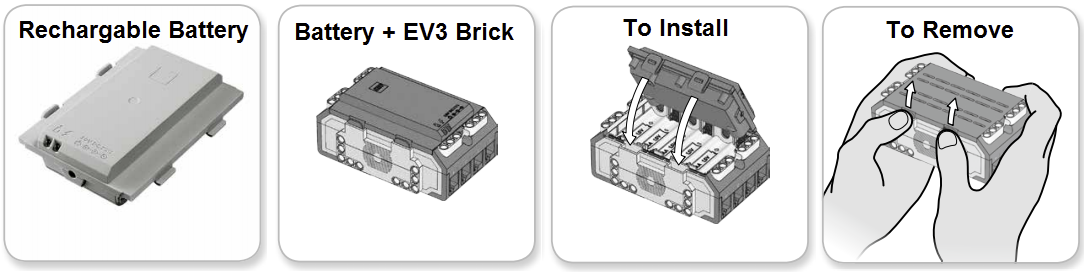
Using the enclosed power adaptor cord, connect the Rechargeable Battery to a wall outlet.
When you plug the uncharged battery into a wall socket, a red light will be lit.
When charging is complete, the red light will go out and the green light will be illuminated.
The recharging process will generally take three to four hours.
Charge the batteries when the robots are not being used so they are ready for the next class
It is safe to leave the batteries charging overnight.
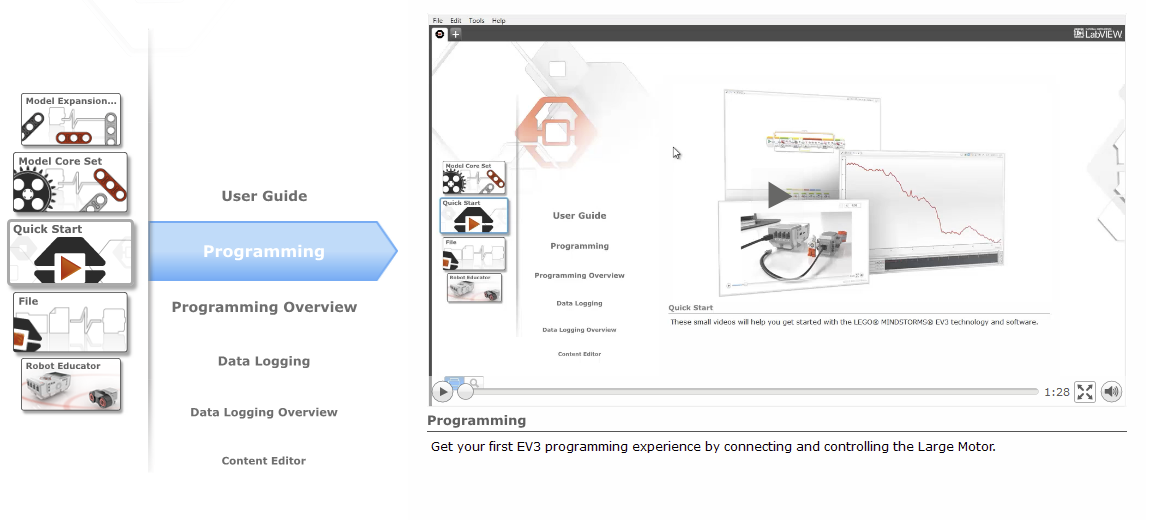
In the LEGO EV3 Education Software navigate to Quick Start > Programming for the Programming Quick Start Video
(Alternatively) Connect the USB cable from the EV3 Brick to the computer. Make sure the EV3 Brick has a charged battery inside and is turned on.
Run a simple program to test the connection.
Assign a name to each EV3 Brick on using the screen and buttons, or the EV3 Software.
The EV3 Brick name especially important for Bluetooth when using Tablets
When the EV3 Brick is connected, look for a text field next to the "Brick Information" icon at bottom right in the code editor. (You may have to click the small triangle to the left of the three vertical EV3 buttons to expand the info window). Default name is "EV3". Just click in that text field and edit.
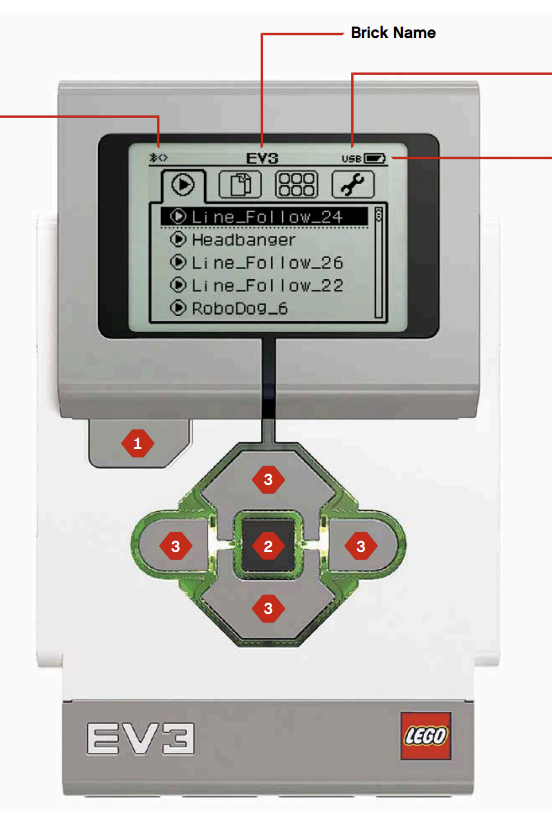
To turn the EV3 Brick off, press the Back button (button 1 above) until you see the Shut Down screen.
The Abort X will already be selected.
Use the Right button to select the Accept check mark, then press the Center button for OK.
Your EV3 Brick is now turned off.

Logics Academy, in partnership with FIRST Robotics Canada is pleased to offer this course to achieve curriculum based learning objectives in an engaging, inquiry based, and experiential way. This method of delivery has proven to improve engagement, retention, and deeper understanding of core math, science and language knowledge and skills.
The EV3 robotics platform is a great tool to allow students to discover, design, and display their knowledge of curriculum learning goals. Students also gain important coding skills along the way that will prepare them for the future. Through this course, students will gain experiences that relate to their mathematics and science curriculum objectives that they can draw upon throughout the year.
Through this course, a student can progress with no background in programming an EV3 Robot to confidently participate as part of a team in a FIRST LEGO League event.
This course consists of eight lessons that begin with the building of the educational robot, and end with a culminating challenge. The lessons can be run independently, but work best in succession to progressively build upon and develop coding & problem-solving skills for students of varying degrees of familiarity with programming an EV3 robot. Each lesson teaches the student a new coding tool, which is then used to demonstrate, or discover the curriculum based learning objectives.
The coding portion of the lessons will teach students to control a robot to stop at an object, move in a controlled manner, use sensors to follow a line, and finally create a board game which tests their overall proficiency.
The curriculum based objectives in each lesson have a common mathematics thread, but specific lessons also touch on many core sciences and language learning objectives as well. An activity sheet guides the students through the curriculum investigation, and asks them thoughtful questions about their journey.
All resources are provided for complete lesson delivery, including lesson plan, building instructions, and student activity sheets. In addition to the LEGO EV3 educational kit and software, you will need a few common items such as chart paper, markers, masking tape, electrical tape, elastics, string, and scissors.
Coding
Creating Sounds
Displaying Images
Controlling the Brick Status Light
Wait Block, Delay Code for a Specific Amount of Time
Creating Sequences of Actions
Science
Physical attributes are indicative of an organisms’ place in the ecosystem
Coding
Drive Motor Control
Move Block
Steering
Navigating Obstacles
Point Turns
Single-Motor Turns
Curved Turns
Math
Coordinates
Calibration
Coding
Grab, Move and Release an Object
Medium Motor Control
Setting the Power/Speed of a Motor
Moving a Motor a Specific Number of Degrees
Math
Unbalanced forces are needed for things to change speed
Balanced forces do not always mean things stop moving
Coding
Reading Data from the Ultrasonic (Distance) Sensor
Detect Changes in Sensors (Change Mode)
Compare the Value of a Sensor (Compare Mode)
Using The Wait Block to Delay the Code with a Sensor Condition
Math
Discrete vs continuous data
Coding
Reading Data From the Gyro (Angle) Sensor
Performing Exact Turns using the Gyro Sensor
Exploring Sensor Accuracy
Compensating for Sensor Errors
Math
Mean (Average)
Accretion of errors
Coding
Reading Data From The Colour Sensor
Calculating an Appropriate Threshold Value
Using the Port View App
Reading Colour Data
Stopping on a Black Line
Stopping on a Specific Colour Line
Setting Default Actions when no Colour is Detected
Science
Estimating percentages
Different types of measurement
Coding
Switches
Loops
Using a Loop and Switch Combination for State-Based Programming
Creating a Line-Following Algorithm for a Black Line
Optimizing Line-Following for Smoother Motion
Optimizing Line-Following for Faster Speeds
Following a Gray Line
Math
Circuits (Components, parallel and series)
Application of Previous Concepts
Final Assessment
The role of the educator in this environment is to act as a coach or mentor as the students work together and progress through the self-guided activities.
Learning alongside the students is encouraged.
Every lesson has the same format to assist with ease of delivery and clarity for everyone involved.
Each lesson includes the following sections:
Materials
LEGO Kit to Student Ratios
Purchasing of any additional materials
Classroom Setup
Floor space
Desk arrangement
Student groups
LEGO Kit preparation
Coding activity
Preparation specific to the Coding Activity
STEAM Activity
Preparation specific to the STEAM Activity
Description
Introduce the lesson
Remind students of any logistical considerations
Get Started
Direct students to the appropriate lesson in the Robot Educator embedded in the LEGO EV3 Education Software
Skip this section if you are using the LEGO EV3 Home Version
Video
An introductory video of what the robot will do after the Building and Coding Activities
Skip this section if you are using the LEGO EV3 Home Version
Lesson 8 has no video
Students will start their activities by using the LEGO components to build the Driving Base or a specific attachment (Cuboid, Medium Motor, etc)
If the lessons are being completed in sequence, the students can often re-use what they have built from previous lessons
There are 3 ways for students to access building instructions:
Robot Educator: "Build It" Instructions are embedded in the LEGO EV3 Education Software
Printed Booklet: A printed booklet is included in each LEGO EV3 Education Core Set
PDF: Available through this site for printing or download to student devices
Interactive Animation
Use a "Click Blocks to Play" animation to understand how the code in the "Test It" section will work
Skip this section if you are using the LEGO EV3 Home Version
Lesson 1 and Lesson 8 have no Interactive Animation
"Test It"
Students view an example code from the Robot Educator in the LEGO EV3 Education Software
(Alternatively) Example code is presented on a projector
Students recreate the code on their own device in the EV3 software
Students then download the code and observe the resulting behavior of the robot
If the robot does not do what was expected, students should double check that their code is correct
The robot behavior should be demonstrated to the educator before proceeding to the the next section
"Modify it"
Students use the code from the "Test It" section as a starting point
The code must be modified to achieve another objective outlined in the lesson
The robot behavior should be demonstrated to the educator before proceeding to the the next section
The "modify it" task can be communicated verbally, on a projector, or using the Robot Educator in the LEGO EV3 Education Software.
Commenting
Ensure that each group takes the time to describe the robot’s behavior in their own words, while running the program
This encourages the students to reflect on what they see and how it relates to the programming blocks
The comments should be presented to the educator before proceeding to the next section
Challenges
Students are given specific challenges that will require starting a new code from scratch
The challenges will require them to apply what they have learned in the previous sections
The robot behavior should be demonstrated to the educator before proceeding to the the next section
Challenge instructions can be communicated verbally or via projector
Extension
An additional challenge is provided for eager students.
Challenge
Students participate in an activity which incorporate aspects of STEAM (Science, Technology, Engineering, Arts, and Math)
Student Worksheet
The Student Worksheet will help guide the students through the activity
The students will use their robot and new coding skills to learn/reinforce specific ministry objectives in Science and/or Math
Extension
An additional challenge is provided for eager students
Question Sheet
Print and have the students complete the Question Sheet
The Question Sheet will reflect on the Coding, Science and Math objectives.
Answer Key
Take up the questions as a group
Have students share their learning. Go over any common issues or misconceptions
Discussion Questions
Additional questions for group discussion
Clean Up
Disassemble any accessories not required for the next lesson
The Driving Base can remain assembled until the end of the course. It is used in every lesson
Don't forget to plug in the batteries for the next lesson
Assessment
Have students review their friend’s worksheet, or hand in the sheet
The goal is to have the questions from the activity sheet be only assessment left at the end of the class
Use the "LEGO EV3 Education" version of the software: It is more convenient if the students are using the LEGO EV3 Education version of the software as this has all of the building instructions and guides for the programming component. For those not using the education software, a document detailing the steps is provided.
Define roles when working in pairs: As in most classroom students will be working in small groups, it may be beneficial to have defined roles for the students at certain times throughout the lesson to make sure everyone is getting the full experience. Also, switching groups often can be beneficial to mix up student chemistry. You can also then decide whether you want each student answering all of the questions, or if they are submitting it as a group.
Create a folder for each student's worksheets: If you are handing out the student activity sheets, a student folder where they can organise and collect them as the course progresses is recommended.
Use a naming convention when saving code: If students will be starting to code, and then stopping before they are complete, having a cloud based solution where students can save their code, using a name convention such as (Student1FirstName_Student2FirstName_Lesson #) can be very useful, so that you don’t need to keep track of which device each group was using.
Keep a common robot configuration throughout the course: As the lesson progresses for the first time, it asks students to add sensors. The EV3 ‘edubot’ can work fine with all of the sensors attached so there is no need to disassemble the robot after the first build.
Plan for storage and charging: Make sure you have a planned strategy for the students to 1) access the robots 2) store the robots and 3) charge the robots. This is not difficult but to avoid issues, students must be diligent and well trained.
Review directional language as it pertains to the robot: Students have some common misconceptions when programming with EV3. For example, when you tell a robot to turn, it turns relative to itself, not the student.
The "Wait" block is key to using sensors: The course really comes down to understanding the use of the wait block in EV3 code. Put simply, the wait block is a gate that will keep previous blocks running, or simply pause the code until something happens. A wait block can be used with any sensor.
There are many solutions to the same problem: It is beneficial to review and understand the sample solution code prior to the class. Keeping in mind though, that there are other correct solutions then the ones provided.
The assessment tracking sheet is designed to help the teacher paint a picture of the student’s successes as the lesson is unfolding, and hopefully see the differences between the achievement of the coding learning objectives and the curriculum objectives. The goal is to assess the students during the lesson by observing as they are working on their challenges, answering questions and checking off how well they’ve done each section. This will hopefully reduce the amount of assessment time after the lesson. After the lesson, you can mark their activity sheets, for their completeness, correctness, and comprehension questions.
Print one per lesson