
Loading…
Loading…
Dive deeper into the world of robotics with a lesson designed to stretch your logical reasoning and sensor application skills to their limits.
Level: Advanced
Dive deeper into the world of robotics with a lesson designed to stretch your logical reasoning and sensor application skills to their limits. In this advanced journey, students will face intricate puzzles that require precise movements and the smart integration of various sensors and the robotic arm to navigate and manipulate their environment effectively. This lesson builds on foundational coding techniques, pushing students to develop innovative solutions and use advanced programming constructs. By tackling these complex challenges, students will refine their understanding of sensor technology, enhance their strategic thinking, and gain valuable insights into the collaborative potential of code and robotics hardware, preparing them for real-world robotics applications and competitions.
This lesson plan is structured using the 5E framework, a widely recognized instructional model consisting of five phases: Engage, Explore, Explain, Elaborate, and Evaluate. The 5E framework systematically engages students in inquiry-based learning, encouraging active exploration and comprehension of complex topics.
In the lesson, students will:
Understand and apply logical reasoning to solve complex puzzles in the FTC Simulator, integrating sensors and movement strategies.
Master advanced coding techniques, including conditional logic and loops, for precise robotic navigation and task execution.
Combine robotics principles, like sensor use and manipulative controls, to strategically achieve objectives in challenging scenarios.
Post-it notes or a brainstorming collaborative app like Microsoft Whiteboard, Google Jamboard or Apple Freeform.
Devices for your students (Windows computers, Mac computers, ChromeBook)
Google Chrome or Microsoft Edge (Chromium version) Web Browser
Access to the FTC Simulator website (https://ftcsim.org)
Students account created for each of your students
Projector or interactive whiteboard
To captivate your students’ attention and ignite their curiosity about solving complex problems, use your projector or interactive whiteboard to share an engaging video showcasing an animal—like a raven—employing tools to navigate through complex problems. This approach visually engages learners and sets a compelling real-world context, demonstrating the application of problem-solving skills across different species. It’s a unique way to introduce the concept of analytical thinking and creativity, encouraging students to draw parallels between the animal’s strategies and their upcoming tasks in solving puzzles and coding challenges. https://youtu.be/cbSu2PXOTOc?si=TJbrJTzxjqkTVYO0
Ask students whether they know of other animals that exhibit behaviours akin to humans in their ability to solve puzzles. They may mention:
Chimpanzees: Known for their ability to use tools and solve complex problems, chimpanzees can provide excellent examples of intelligence and adaptability.
Crows: Similar to ravens, crows display remarkable problem-solving skills and the ability to use tools, making them exciting subjects for demonstrating cognitive abilities.
Octopuses: These sea creatures are renowned for their intelligence, including escaping from enclosures, unscrewing jars, and using tools.
Elephants: Elephants are known for their memory and intelligence, demonstrating problem-solving abilities such as using sticks to reach food or creating plugs to drink water from holes.
Dolphins: With complex social behaviours and communication, dolphins exhibit problem-solving skills, such as using sponges while foraging.
Parrots: Some parrot species, like the African Grey, are adept at mimicking human speech and show the ability to solve puzzles and use tools.
Pigs: Pigs have shown they can learn and perform a variety of tasks that require cognitive skills, including manipulating objects and playing video games with their snouts.
Following the video presentation, provide post-it notes to your students and encourage them to engage in a brainstorming session to find examples in their daily lives where they must solve complex puzzles. Instruct students to jot down one idea per post-it note. Allocate a designated area on your classroom wall for students to affix their ideas. Once they have generated several ideas, have them gather at the sharing space to attach their post-it notes. If an idea has already been posted on the wall, they can place it atop the existing one, while if the concept still needs to be represented, they should find an available spot to display it.
Here are some of the ideas that they may come up with:
Scheduling and Time Management: Balancing schoolwork, extracurricular activities, and personal time requires students to prioritize tasks and manage their time effectively, much like solving a puzzle to fit everything into their daily schedule.
Route Planning: Deciding the best route to school, sports practice, or a friend’s house, especially when juggling multiple stops or considering traffic and transportation options, involves strategic planning and optimization.
Packing for Trips: Figuring out how to pack efficiently for a trip, choosing what to bring based on weather, activities planned, and luggage space, requires spatial reasoning and prioritization skills.
Budgeting and Money Management: Allocating their allowance or earnings from part-time jobs to cover expenses like entertainment, savings, and purchases involves calculation, foresight, and decision-making.
Group Projects: Coordinating roles, tasks, and schedules with peers for school projects demands negotiation, compromise, and strategic planning to meet deadlines and achieve goals.
Meal Planning and Cooking: Deciding what to cook, considering nutritional balance, ingredient availability, and prep time, requires planning and problem-solving, especially when cooking for multiple people or with dietary restrictions.
Game Strategy: Playing strategy-based video games or board games where they must make decisions based on opponents’ moves, possible outcomes, and available resources.
Homework and Study Planning: Breaking down study material into manageable parts for review, especially when preparing for exams, and deciding what subjects to focus on requires analytical thinking and prioritization.
Home Organization and Cleaning: Deciding the most efficient way to clean or organize their room, considering what supplies are needed and in what order tasks should be completed, involves problem-solving and planning.
Solving Tech Troubles: Troubleshooting issues with a computer, smartphone, or software demands diagnostic thinking, researching solutions, and sometimes creative workarounds.
Facilitate a discussion by raising thought-provoking questions, including:
What steps do you take when facing a complex problem, you’ve never encountered before? (e.g. First, I try to break the problem down into smaller parts that I understand. Then, I look for patterns or similar problems I’ve solved before to apply what I know. If I still need help, I’ll ask for help or look up resources online.)
Can you think of a time when solving a puzzle or problem in a video game helped you solve a real-life problem? (e.g., Yes, in a game I played, I had to figure out how to navigate through a maze by remembering landmarks. This helped me when trying to find my way around a new school by remembering specific landmarks.)
How do you feel when you encounter a problem that seems unsolvable? How do you deal with that frustration? (e.g., I feel overwhelmed at first, but I’ve learned that taking a break and returning to it later helps a lot. Sometimes, the solution comes to me when I’m not actively thinking about it.)
Do you prefer solving puzzles alone or with others? Why? (e.g., I prefer solving puzzles with others because we can share different ideas and solutions that I might have yet to think of on my own. Celebrating together is also more fun when we figure it out.)
How can solving complex puzzles help you in your future career or life?
(e.g., Solving complex puzzles teaches me how to think critically and creatively. These skills are essential in any career because they help you find innovative solutions to challenges and adapt to new situations.)
How do you think technology has impacted our ability to solve complex problems?
(e.g. Technology has made it easier to access information and collaborate with others worldwide. It’s also introduced new types of problems to solve, like coding challenges, which can be fun and rewarding.)
Explain that in the upcoming lesson, students will delve into the intricacies of coding robots in FTC Sim, using various innovative strategies to overcome obstacles and accomplish their objectives effectively.
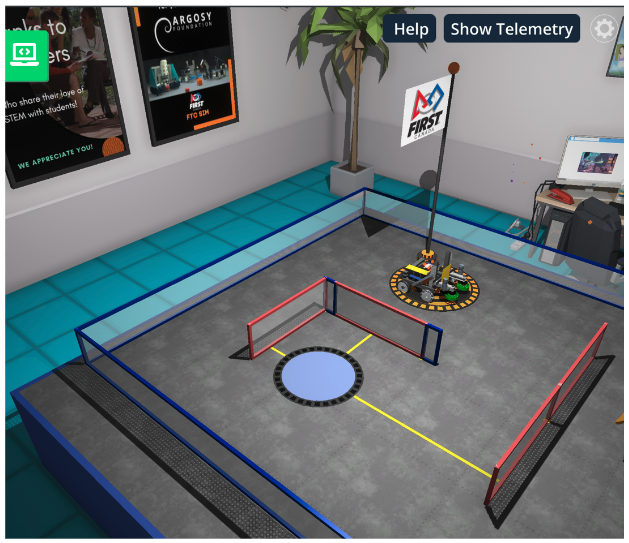
Please encourage students to start their hands-on learning experience with the FTC Simulator platform by navigating to the provided link, https://ftcsim.org/. Have them log in using their unique username and password. Once logged in, direct them to the “Courses” section and guide them to choose the course titled “FTC Puzzles.” Let students know that this course will teach them the skills to code and control self-driving robots effectively, focusing on complex puzzles.
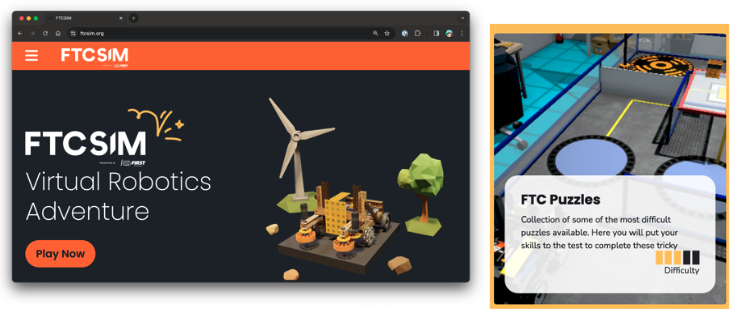
Within the FTC Puzzles section, guide students to access the puzzle titled “5-Options”
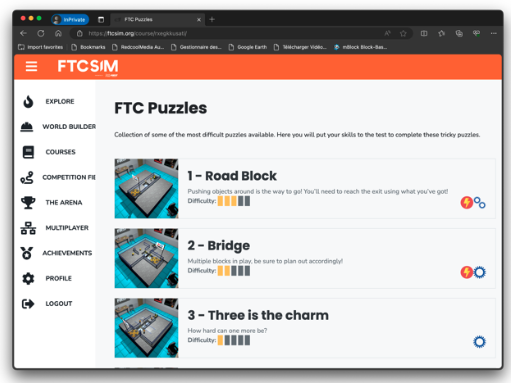

Invite students to start the code for the “Options” puzzle. Explain that the robot needs to get on the trigger to activate the trigger pad and then move away from it. Add that timing will be extremely important here as moving back at the wrong moment could close back all the gates.
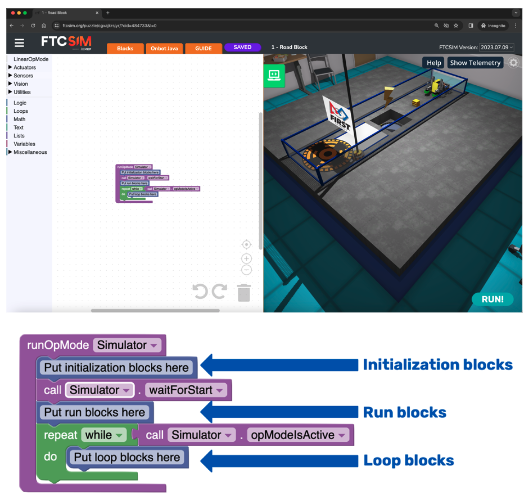
To access the coding panel, click on the green computer icon on the screen’s left side. You’ll notice that a sample code is already present. Remind your students of the basic structure of the code, as seen in the first lesson:
Initialization Blocks: This section contains information the robot needs before starting its tasks.
Run Blocks: Most of the code you write will be placed in this section, where the robot’s main actions are defined.
Loop Blocks: These blocks are used for tasks that must be repeated multiple times. However, for this lesson, we’ll only work with initialization and run blocks. The loop section can be discarded to maintain a cleaner code structure.
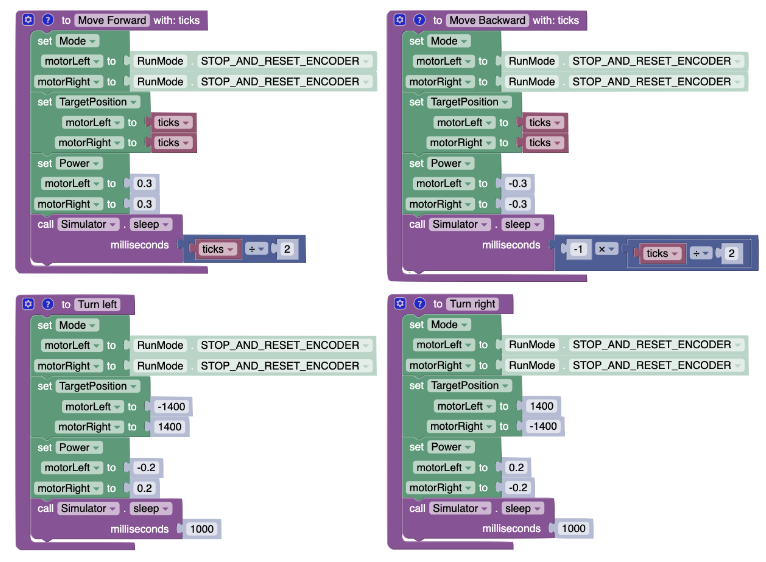
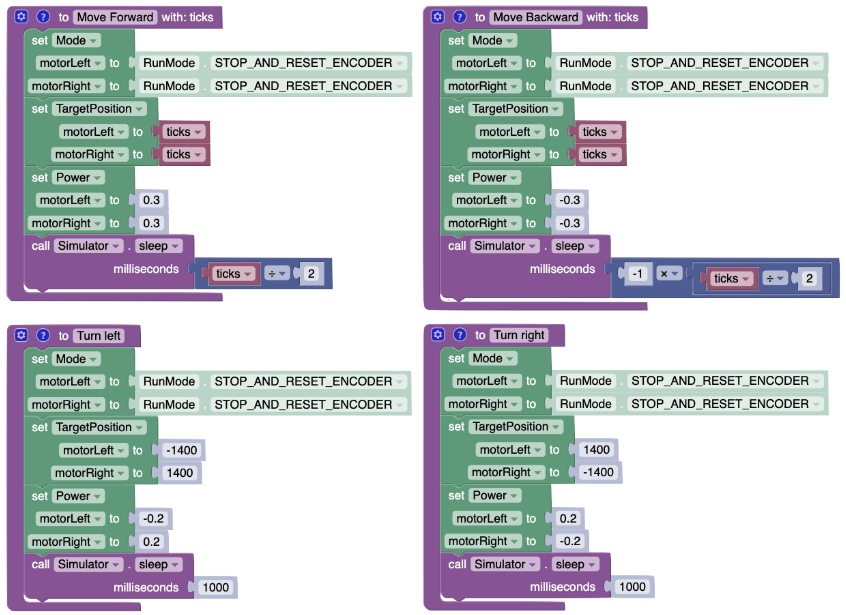
Encourage students to create functions for moving forward and moving backward, and turning so that they can re-use them during the entire puzzle. If they need to review how to create and use functions, they can review lessons #4 and #5. Here are some examples for all four movement directions:
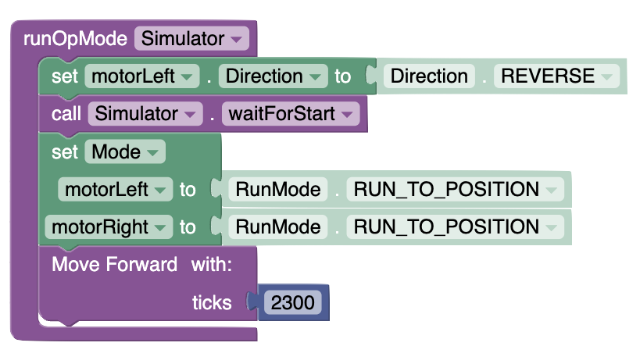
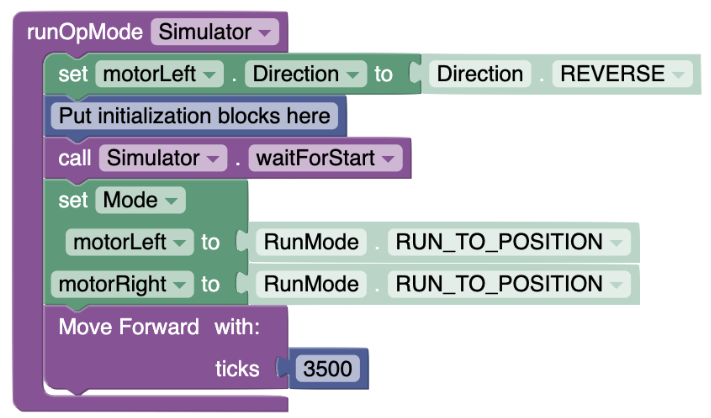
Then, students should start coding their robot to move toward the trigger pad. It should be a simple movement forward. (Keep in mind that to use this code, students must have created the functions above).
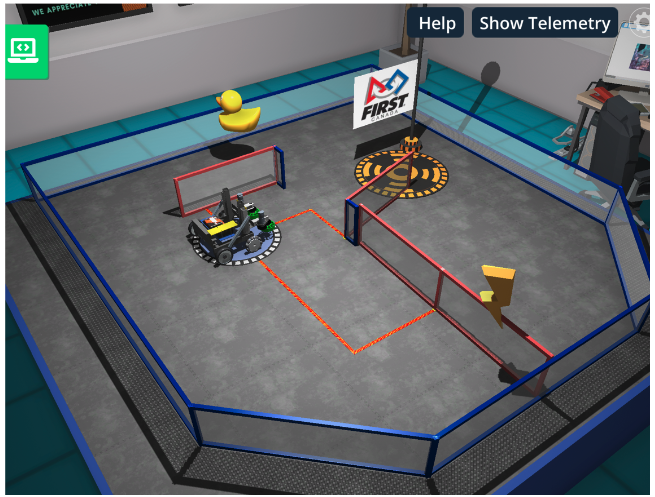
The code should take the robot on the pad. Have students observe what happens with the gates while the robot is on the pad. They should realize that if they move away from the pad at the wrong moment, all the gates may be closed again. They need to time it properly.
Encourage students to add the backward movement and test out what they get.
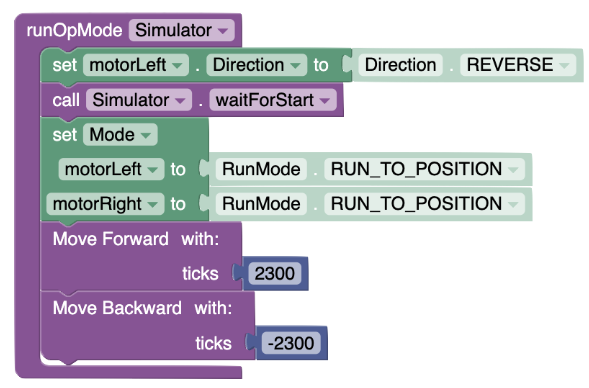
They will probably end up with something like this:
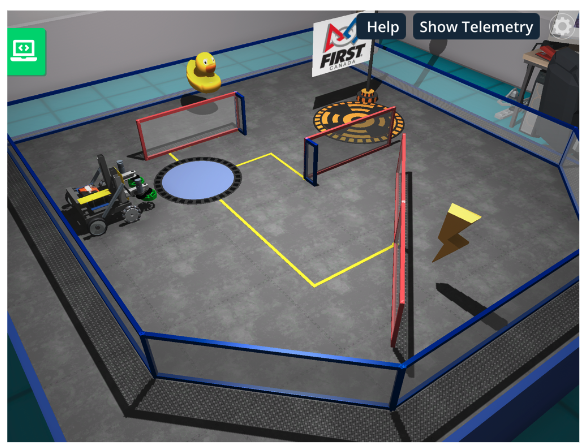
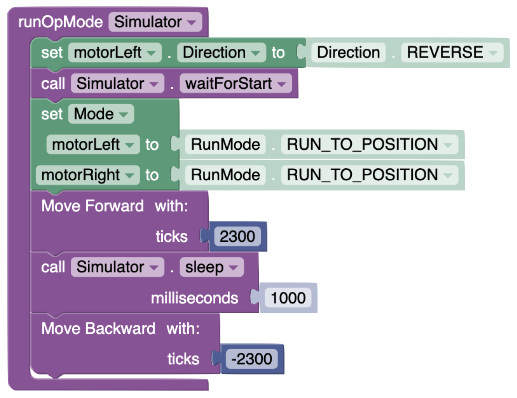
It is alright, as turning left and right to get the rubber ducky and reach the pad is possible. However, the lightning bolt is not easily accessible. By tweaking the timing, students should realize that opening both is possible. Here is an example of code that works:
They should get the gates aligned like this:
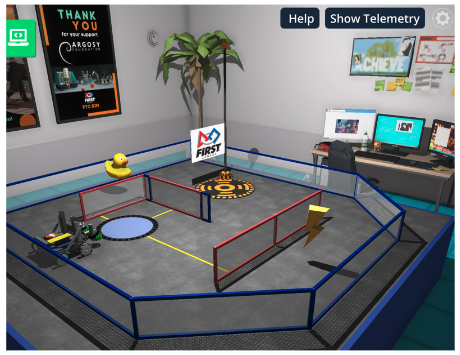
From there, students just need to navigate to the pad. Let’s do it by collecting the rubber ducky on the left. Encourage students to verbalize their pseudocode before they code it:
Turn left 90 degrees
Move forward for a very short distance
Turn right 90 degrees
Move forward for a longer distance
Turn right 90 degrees
Move forward for a short distance
Their code could look like this:
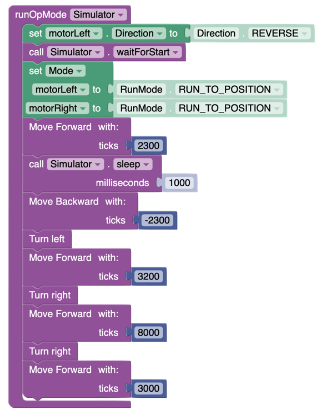
Now, in this solution, they are not picking up the lightning bolt. Encourage your students to keep working on the puzzle until they collect both the rubber ducky and the lightning bolt. Also, ask students if they have solved the puzzle using other strategies. Remind students that there are often multiple ways to reach the goal.
Explain that this puzzle could also be solved using the ultrasonic (distance) sensor to determine when the robot can drive. Ask students if they solved the problem using the ultrasonic sensor.
Encourage your students to navigate to the next puzzle in the “Puzzles” section: 6—Combine and Conquer.

Explain that in this puzzle, they will need to activate the pad near the rubber ducky to open the gate and also have something on the pad near the yellow block to open the gate to access the final pad to raise the flag.
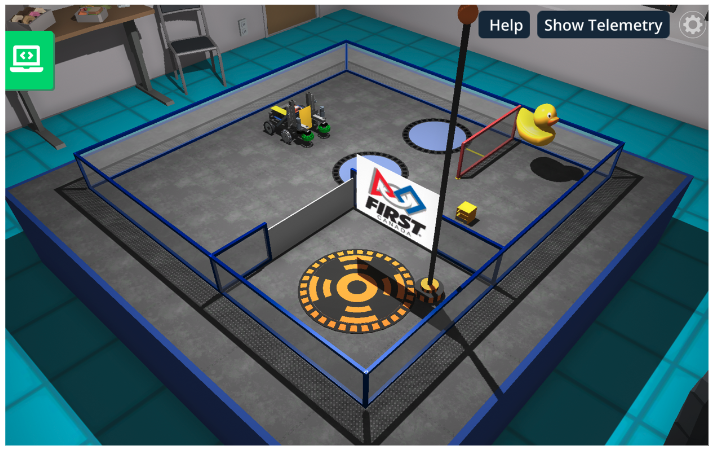
Have students discuss possible strategies to solve the puzzle. To start, encourage students to create their functions to move forward, move backward, turn left and turn right.
Have them just move on the pad before the robot to test what happens. This should help them see how the puzzle works and how the gate behaves.
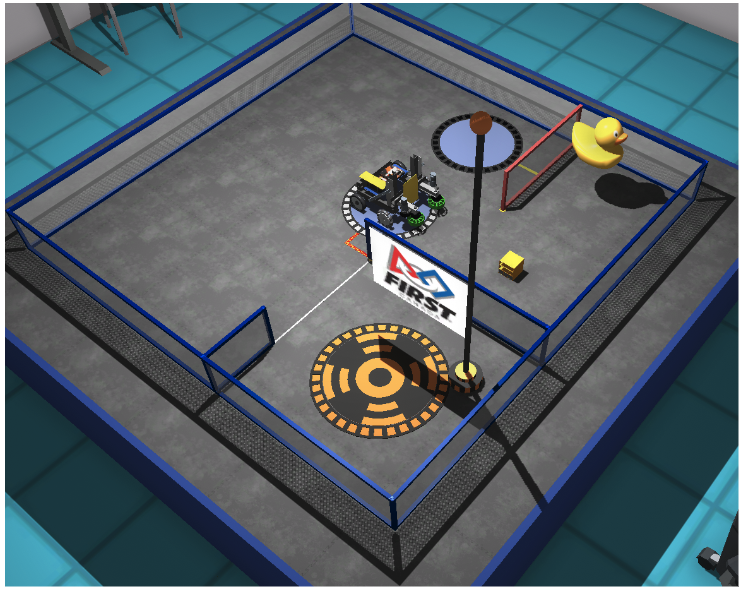
They will realize that this trigger pad opens the gate where the flag is located. Then, encourage students to add code to see what happens when their robot gets on the second trigger pad.
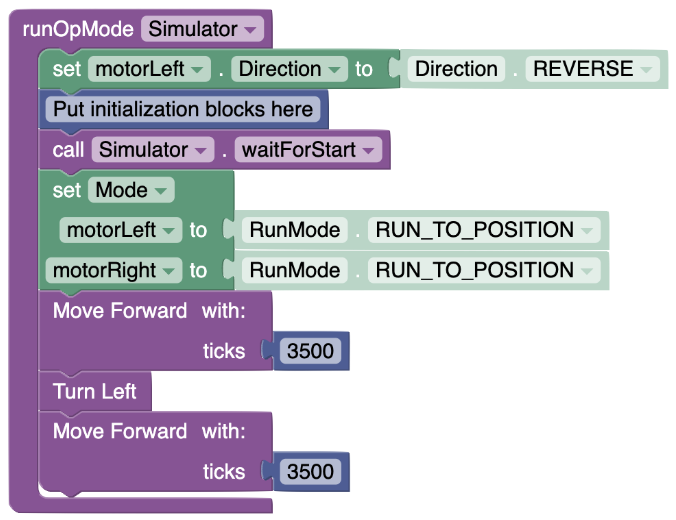
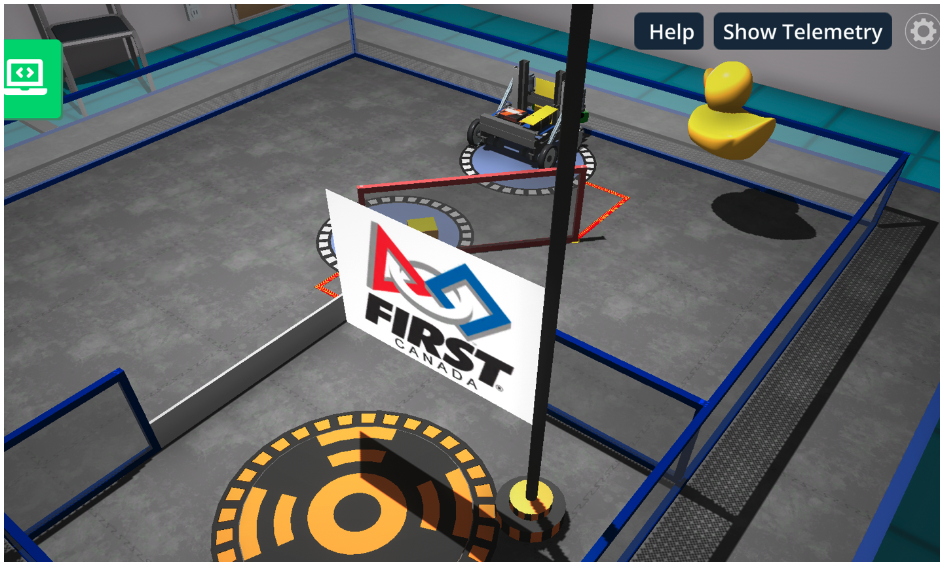
Students will see the red gate starting to rotate and eventually push the yellow block on the first trigger pad. They should realize that if they leave the trigger pad at this point, it keeps the yellow block keeps the blue gate open. They can then collect the rubber ducky and get to the flag.
This code should give enough time for the gate to bring the yellow block on the first trigger pad and then move the robot back.
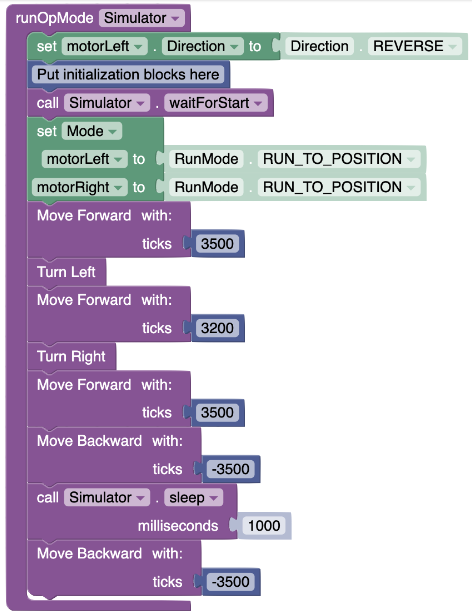
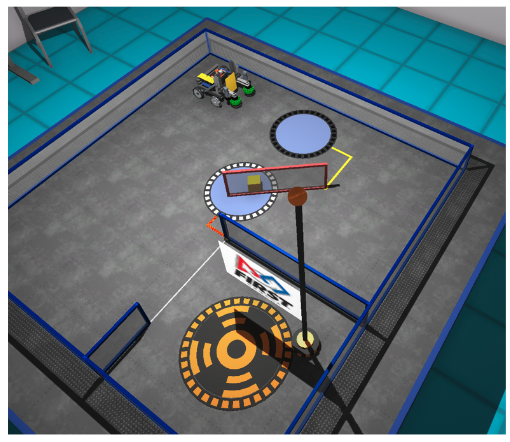
At this point, students should get to the final pad fairly quickly by turning right, moving forward, turning left and moving forward.
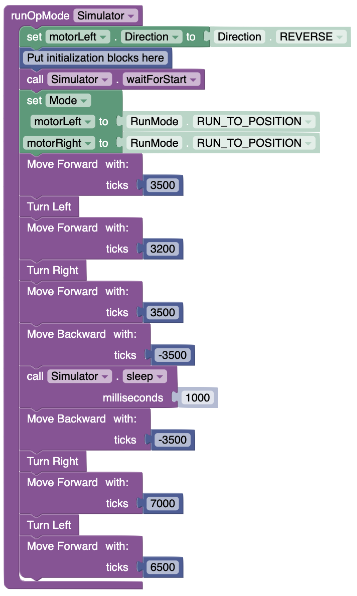
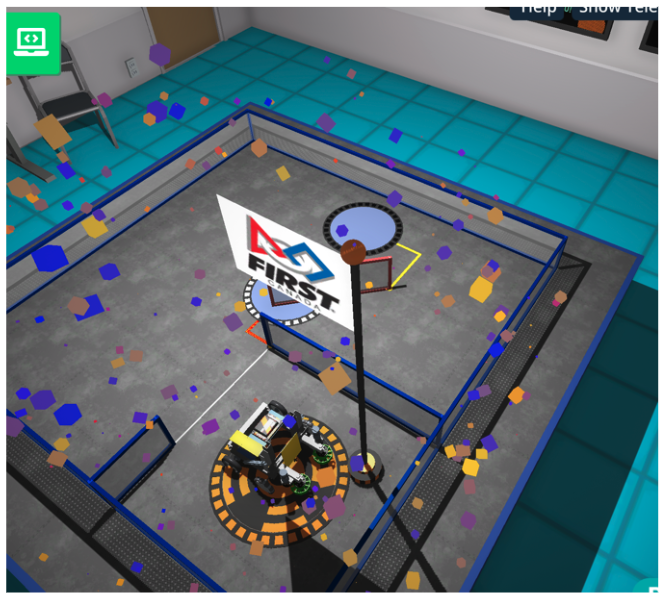
Encourage students to explain how they have solved the problem, especially if they had a different solution. Encourage students to try to increase the speed of execution of their solution.
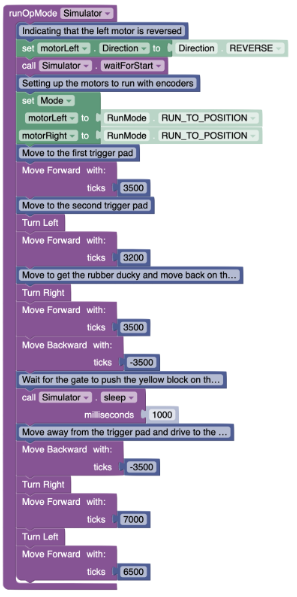
Invite students to add comments to their code to explain the various coding blocks they have used. The comment blocks are blue and available in the “Miscellaneous” section. Explain that software engineers work as teams and need to document their code with comments to ensure their colleagues can follow what their code means. Here is an example of the main code for the second puzzle (Puzzle 6—Combine and Conquer) with comments added to it.
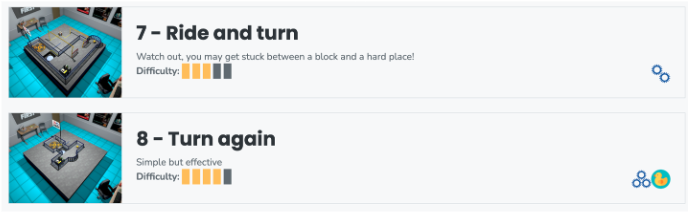
Encourage students to apply their newly acquired skills to tackle FTC Puzzles #7 and #8. These puzzles offer more complex challenges for students. For puzzle #7, students must test out the various game elements and use proper timed movements or the ultrasonic sensor (distance sensor) to avoid getting caught by the turning gates.For puzzle #8, students will need to use the front motor to grab this block without the grabby to pull it and put it in the pit.
Assessment of the lesson should be done through observations and conversations with students while they are coding. Evaluating the lesson’s effectiveness should encompass observing students as they engage in coding and engaging in meaningful dialogues with them about their thought processes, challenges, and strategies. This approach allows for a deeper understanding of their comprehension and application of the concepts taught, including how they troubleshoot problems and refine their code to achieve desired movements and navigation with the virtual robot. Through these interactions, educators can gauge each student’s grasp of the material, provide targeted feedback, and adjust instruction as needed to support learning outcomes.
Here is a list of “look-fors” to guide your observations and your assessment:
Engagement and Participation: Observe whether students are actively engaged with the task, experimenting with the code, and participating in discussions or asking questions.
Problem-Solving Skills: Note students’ ability to identify problems in their code, debug errors, and apply logical reasoning to overcome challenges.
Application of Instructions: Check if students are correctly applying the instructions and guidelines provided for the lesson, such as using the correct blocks or code syntax for movement, navigation, and use of sensors.
Creativity and Innovation: Look for creative approaches or innovative solutions students might be applying in their coding strategies, beyond the basic requirements of the lesson.
Motor Control Understanding: Observe students’ comprehension of how motor controls affect the robot’s movement, including speed, direction, and the execution of turns or specific maneuvers.
Use of Rotary Encoders: Assess students’ proficiency in using rotary encoders to achieve precise movement control, including setting target positions, adjusting speed, and resetting encoders for subsequent movements.
Use of Functions: Evaluate students’ ability to effectively implement functions to segment code, promote code reuse, and enhance code readability, demonstrating an understanding of modular programming principles.
Inputs Handling: Monitor how students handle inputs within their code, ensuring they correctly use variables or parameters to make their code adaptable to different scenarios and configurations.
Reaction to Failure: Pay attention to how students react to failure or unexpected outcomes, looking for resilience, persistence, and a willingness to experiment and learn from mistakes.
Logical Reasoning: Assess students’ ability to apply logical reasoning to analyze the puzzle, break it down into manageable steps, and devise effective strategies to solve it.
Algorithmic Thinking: Observe students’ capacity to develop algorithms to guide the robot’s actions systematically, considering various factors such as timing, sensor data, and environmental conditions.
Efficiency in Code: Evaluate the efficiency of students’ code in terms of readability, organization, and execution speed, assessing their use of functions, loops, and conditional statements to optimize performance.