Loading…
Loading…
Level: Intermediate
Dive deeper into precision movements with this lesson in the FTC Simulator, focusing on the intricate control of movements using rotary encoders. This lesson transitions from traditional power-driven commands to the fine-tuned operation of rotary encoders, offering students hands-on experience in programming for precision. They will learn the fundamentals of encoder integration, exploring how to program these motors to control the robot’s parts with high precision. Through practical exercises, students will master the art of using encoders for detailed tasks, such as precise positioning and controlled movements, enhancing their robots’ capabilities.
This lesson plan is structured using the 5E framework, a widely recognized instructional model consisting of five phases: Engage, Explore, Explain, Elaborate, and Evaluate. The 5E framework systematically engages students in inquiry-based learning, encouraging active exploration and comprehension of complex topics.
In the lesson, students will:
Understand the operational principles of rotary encoders and their advantages in robotics.
Program rotary encoders in the FTC Simulator to achieve precise control over robot movements.
Enhance problem-solving skills by tackling real-world scenarios that require precise movement and control.
Post-it notes or a brainstorming collaborative app like Microsoft Whiteboard, Google Jamboard or Apple Freeform.
Devices for your students (Windows computers, Mac computers, ChromeBook)
Google Chrome or Microsoft Edge (Chromium version) Web Browser
Access to the FTC Simulator website (https://ftcsim.org)
Students account created for each of your students
Projector or interactive whiteboard
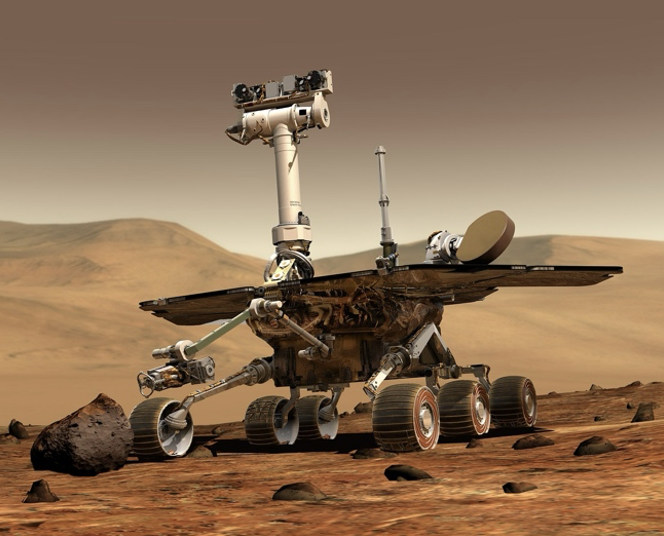
To captivate your students’ attention and ignite their curiosity about driving precisely, use your projector or interactive whiteboard to share an engaging video featuring automated driving robots such as the ones used in a warehouse, which can be found at this link: https://youtu.be/a77XyUI-zXo?si=iDntZW7R-a3kjbZO. Online retailers leverage highly precise robots in their warehouses to streamline the sorting and transporting of goods. They use advanced navigation and manipulation technology to pick, pack, and sort items efficiently with remarkable speed and accuracy. Additionally, a video showcasing a rover maneuvering on Mars could highlight the critical importance of precise navigation in such environments: https://youtu.be/P4boyXQuUIw?si=Cd-yrCe31Ow13HO4.
Following the video presentation, provide post-it notes to your students and encourage them to engage in a brainstorming session exploring various applications of very precise robots. Their ideas can include the precision of the driving base or the precision of a robotic arm. Instruct students to jot down one idea per post-it note. Allocate a designated area on your classroom wall for students to affix their ideas. Once they have generated several ideas, have them gather at the sharing space to attach their post-it notes. If an idea has already been posted on the wall, they can place it atop the existing one, while if the concept still needs to be represented, they should find an available spot to display it.
Here are some of the ideas that they may come up with:
Precision-guided drones for agriculture.
Robotic surgery assistants.
Autonomous underwater exploration vehicles.
Precision-guided warehouse robots for inventory management.
Automated quality control robots in manufacturing.
Precision-guided robotic arms for 3D printing.
Self-driving cars with advanced navigation systems.
Precision-guided delivery drones.
Robotic companions for the elderly or people with disabilities.
Precision-guided robots for sorting recyclables in waste management.
High-precision robotic chefs for culinary tasks.
Automated window cleaning robots for skyscrapers.
Robotic landscaping for precise lawn and garden maintenance.
Robotic arms for microelectronics assembly.
Autonomous robots for hazardous material handling.
Robotic pharmacists for precise medication dispensing.
Assisting with assembly tasks in manufacturing plants
Loading and unloading cargo on ships or airplanes
Assisting with rescue operations in disaster zones
Assisting with space exploration missions, such as repairs on satellites or spacecraft
Facilitate a discussion by raising thought-provoking questions, including:
How does precision in robotics impact safety and efficiency in industrial settings? (e.g., Precision in robotics can significantly increase safety by reducing human exposure to dangerous tasks and environments. It also improves efficiency by performing tasks faster and with fewer errors, which can lead to cost savings and higher productivity.)
In what ways could precision robotics transform healthcare, especially in surgeries? (e.g., Precision robotics could revolutionize healthcare by performing surgeries with a level of accuracy that minimizes risks and improves patient outcomes. They can operate in small areas without the fatigue or tremor issues humans might have, potentially reducing recovery times and complications.)
How can precision robotics advance space exploration, and what challenges might they address? (e.g., Precision robotics can handle the harsh conditions of space, performing tasks accurately in environments too dangerous for humans. They can repair satellites, explore planetary surfaces for signs of life, and construct habitats. The main challenges include ensuring they can operate autonomously and withstand extreme temperatures and radiation.)
Consider the role of precision robotics in disaster response. How could they be used, and what are the limitations? (e.g., Robots can navigate through the rubble, detect heat signatures of survivors, and deliver aid in disaster zones where it’s too risky for human responders. However, their effectiveness is limited by battery life, the need for remote control or autonomous operation, and their ability to adapt to unpredictable environments.)
How might precision robotics change the future of personal transportation? (e.g., Precision robotics could lead to fully autonomous vehicles, reducing human error-related accidents and optimizing traffic flow. The challenge will be creating systems that can safely interact with human-driven vehicles and pedestrians and addressing legal and insurance issues related to autonomy.)
Can precision robotics lead to new forms of art and creative expression? (e.g., Artists can use precision robotics to explore new mediums and techniques, pushing the boundaries of traditional art forms. Robots can execute intricate designs with exact precision, allowing for the creation of complex sculptures, paintings, and installations that reflect a fusion of technology and creativity.)
Explain that self-driving robots and vehicles often need to have very precise movements as they navigate complicated terrain. Mention that the upcoming lesson will focus on coding robots in FTC Sim using encoders instead of relying on power and time.
Please encourage students to start their hands-on learning experience with the FTC Simulator platform by navigating to the provided link, https://ftcsim.org/. Have them log in using their unique username and password. Once logged in, direct them to the “Courses” section and guide them to choose the course titled “FTC Movement.” Let students know that in this course, they will gain the skills to code and control self-driving robots effectively, focusing on using rotary encoders for movement.
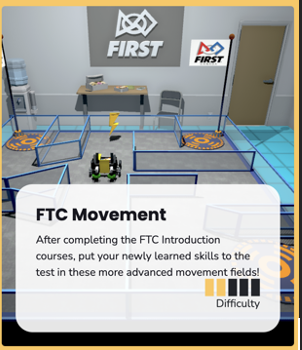
Within the FTC Movement section, guide students to access the puzzle titled “5-L”
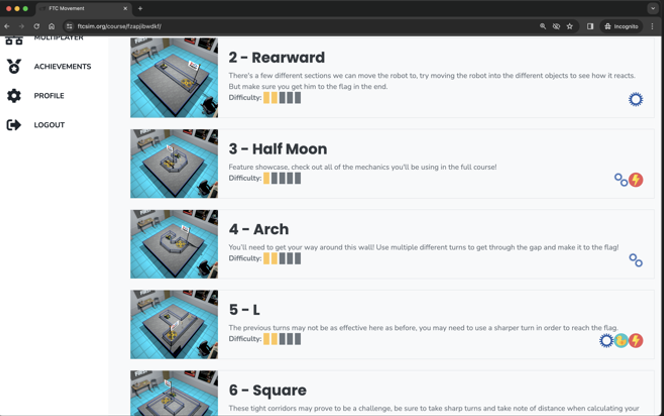

Before students start coding, clarifying the mechanics of movement utilized in the initial three lessons is essential. These movements relied on power (or speed) and time parameters. Specifically, the operation involved setting the power of the two left and right motors within a range of 0 to 1.0, coupled with a designated duration controlled by the sleep block. However, it’s crucial to recognize a drawback associated with this approach to movement: external factors influencing wheel rotations can lead to variations in the actual distance travelled by the robot. For example, differences in surface conditions, such as slipperiness or the presence of dust particles, can hinder the robot’s speed, causing it to cover less distance than anticipated within the allotted time frame. Factors like a low battery can also impact motor speed, further contributing to deviations from the intended distance travelled.
Explain that rotary encoders will be used this time instead of using power and time to solve the puzzle. Add that rotary encoders are sensors that track and measure the rotation of an object, typically used to determine the position, speed, and direction of rotation of a shaft or wheel. Explain that by using the encoder, you can get the exact number of wheel rotations that you want.
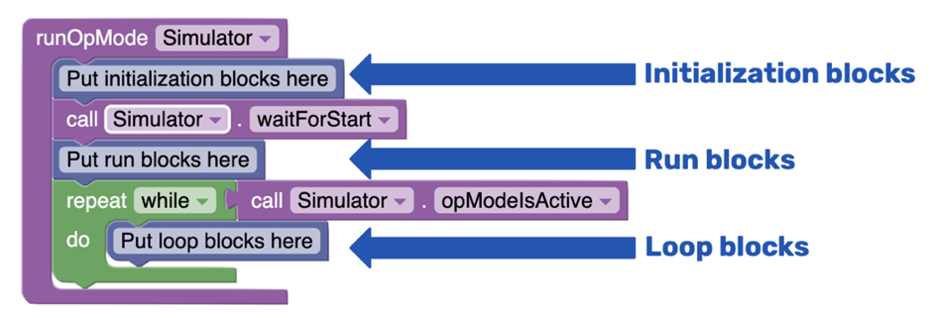
To access the coding panel, click on the green computer icon on the screen’s left side. You’ll notice that there’s already a sample code present. Remind your students of the basic structure of the code, as seen in the first lesson:
Initialization Blocks: This section contains information the robot needs before starting its tasks.
Run Blocks: Most of the code you write will be placed in this section, where the robot’s main actions are defined.
Loop Blocks: These blocks are used for tasks that must be repeated multiple times. However, for this lesson, we’ll only work with initialization and run blocks. The loop section can be discarded to maintain a cleaner code structure.
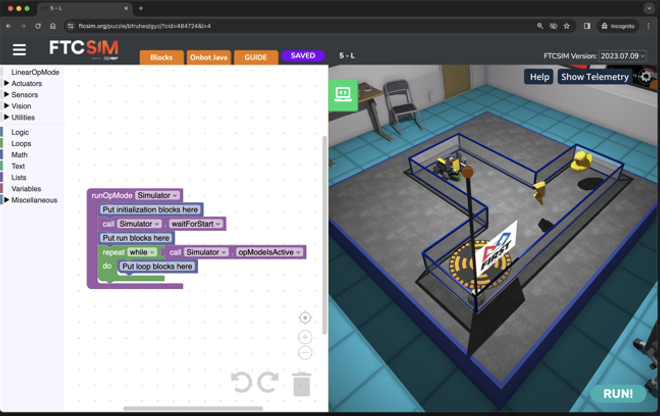
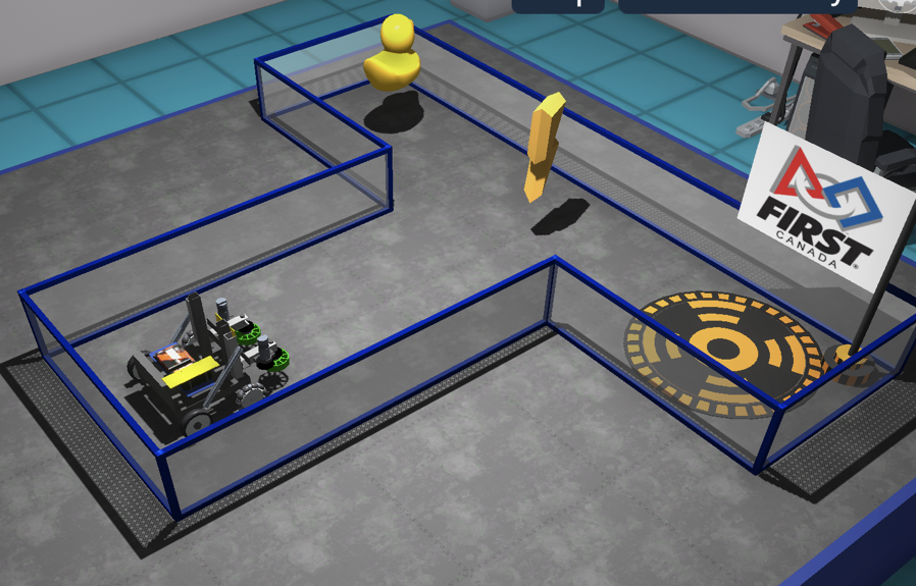
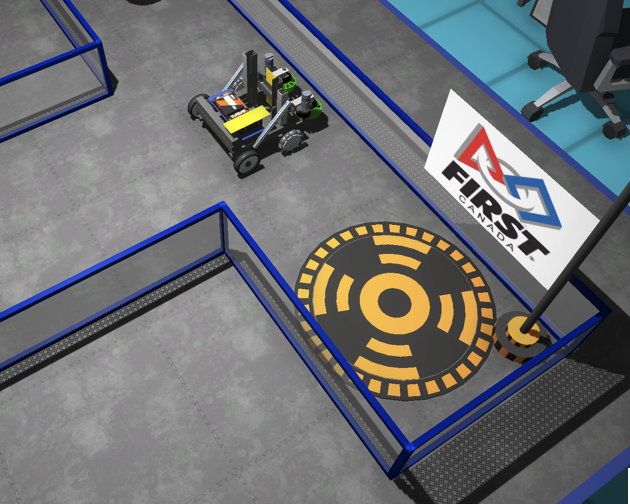
Explain that in this puzzle, the robot’s objective is to travel in a straight line, then turn right 90 degrees, and then move in a straight line to reach the final pad to raise the flag. Show the students how the robot will move to form an L-shaped path.
Ask the students to practise using the rotary encoders to move at various distances. Explain that to use the encoder; they must first set the RunMode for their wheel to “RUN_TO_POSITION.” Then, they need to set the target position for each wheel. Then, the robot will move to the indicated position by starting the wheel at the desired speed.
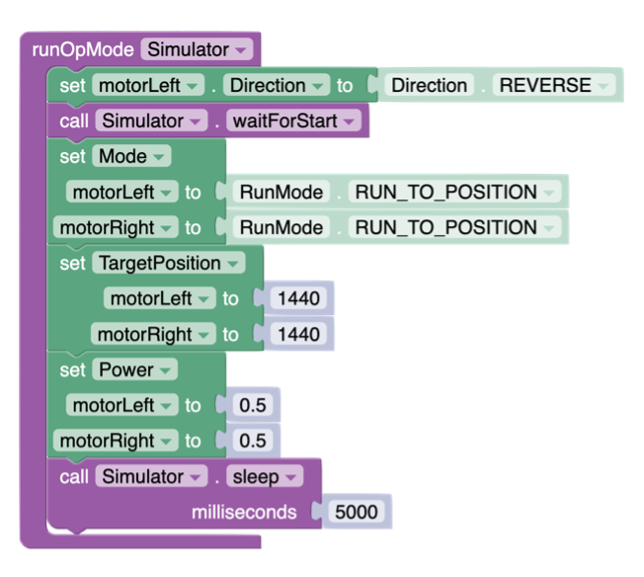
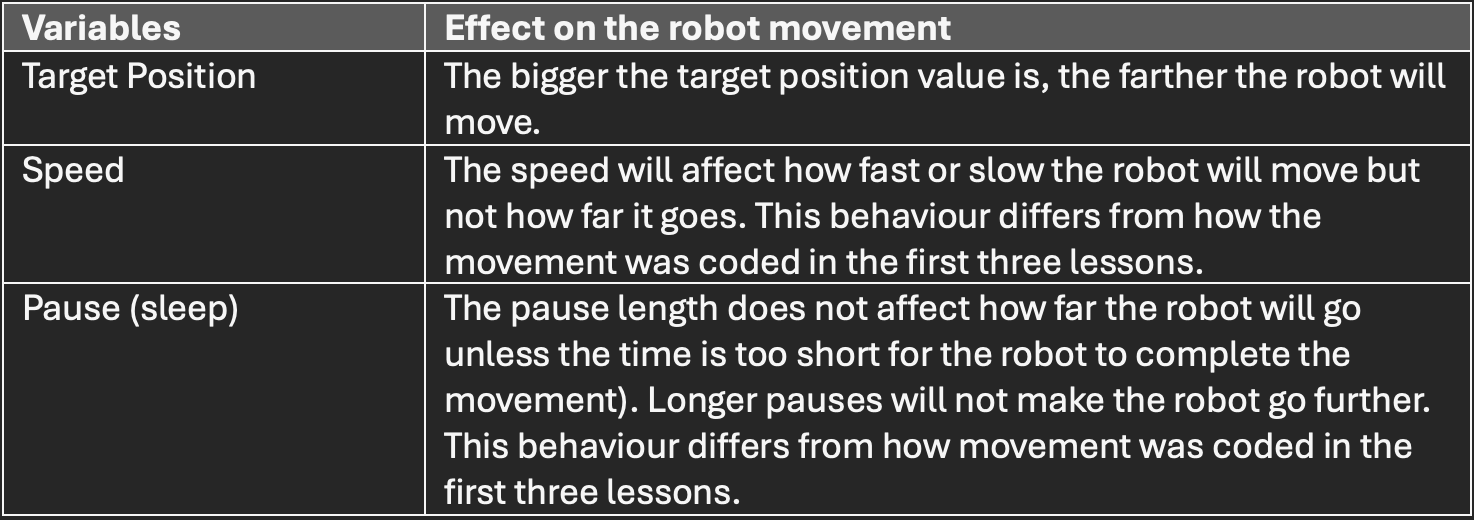
Add that the wait at the end of the code gives time for the robot to perform the movement but does not affect how far the robot will go. Ask students to describe what the robot does when the following variables are changed:

The students should arrive at the following conclusions:
Students should realize that 1440 ticks is considered one wheel rotation. This is an example of the distance covered with one wheel rotation or a position of 1440 ticks.
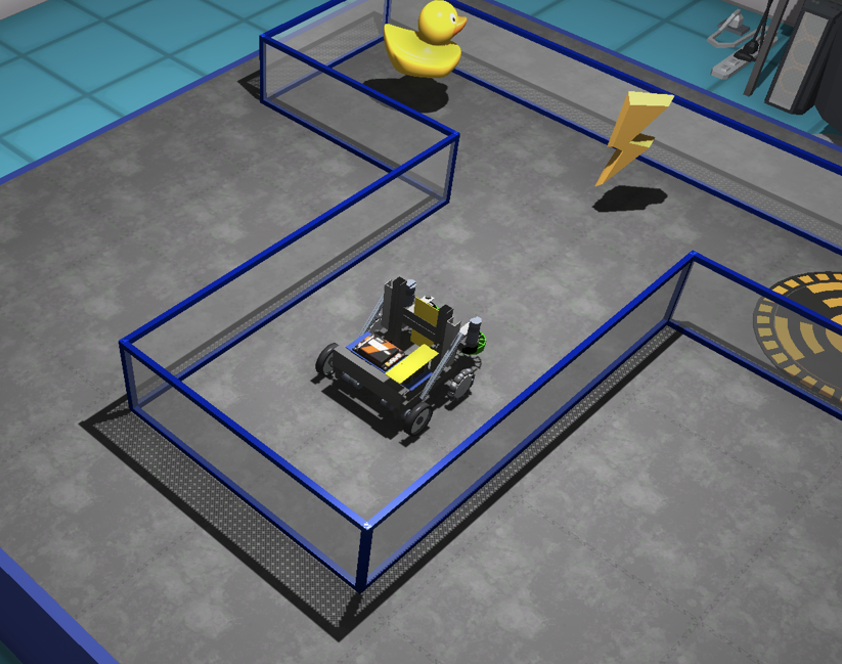
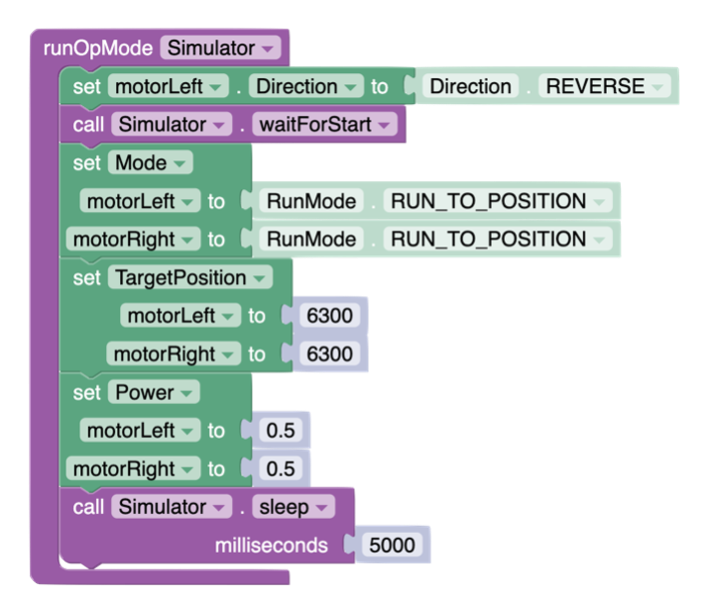
Ask students to find the exact distance they need, through trial and error, to get to the end of the L and get ready to turn right. They should come up with a value between 6000 and 6500 ticks.
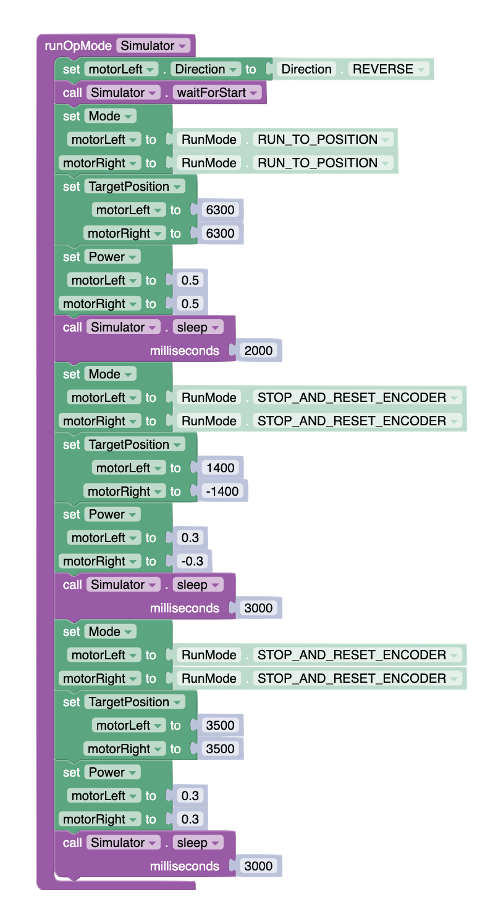
Explain that after a movement, the encoders must be reset for the next movement. This is achieved by using the RunMode “STOP_AND_RESET_ENCODER”. Then, the code to make the robot turn 90˚can be added. In this case, the target position of the left wheel will be positive, and the target position of the right wheel will be negative. That will make the left wheel go forward, and the right wheel goes backward, forcing the robot to make a right turn. The wheel’s speed will also need to be set to positive for the left wheel and negative for the right wheel.
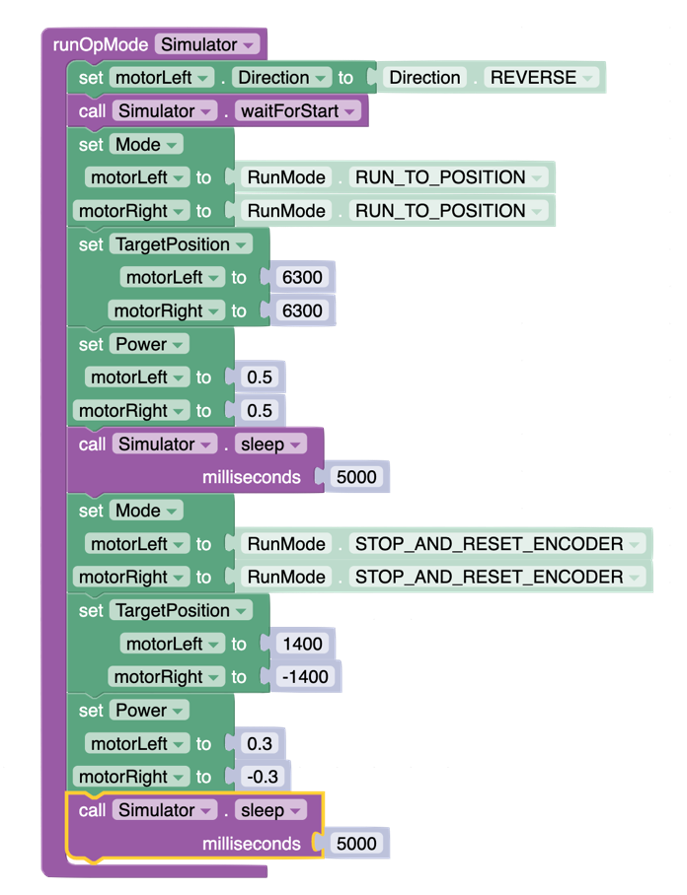
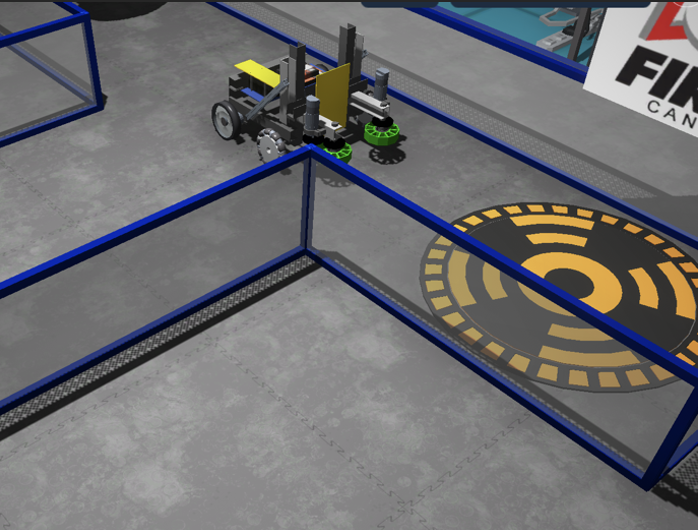
After adding a wait block (sleep) long enough for the robot to perform the full 90˚ turn. Students may want to adjust the first pause as with a 5-second pause, the robot may wait for too long before turning. In the code below, the time has been adjusted to 2 seconds.
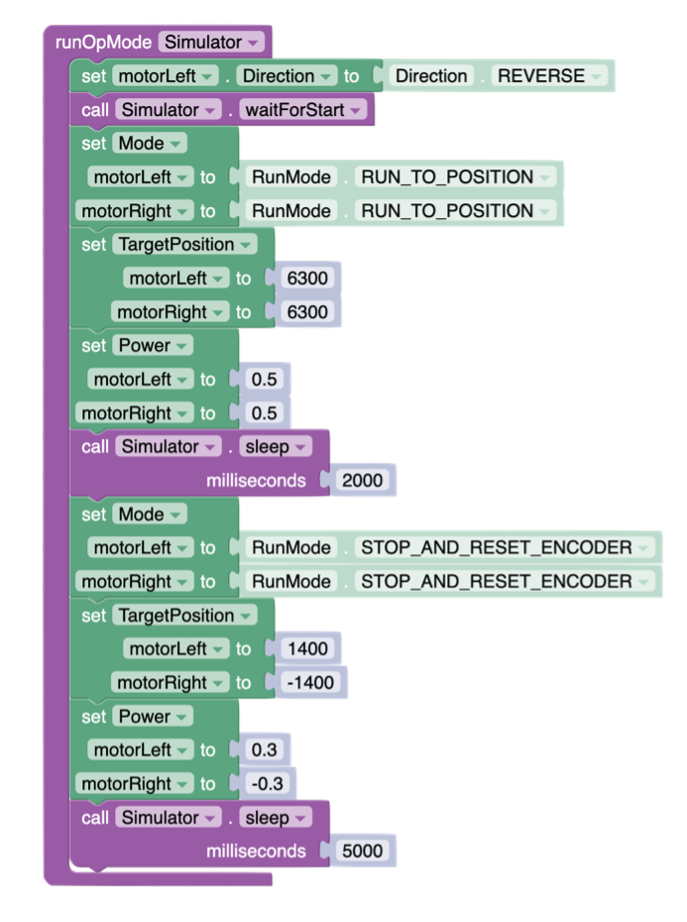
Encourage students to finish solving the puzzle by going in a straight line. They will need to reset the encoder and set the target position to two positive values and add two positive values for the speed on each wheel. This should take them to the final pad to raise the flag.
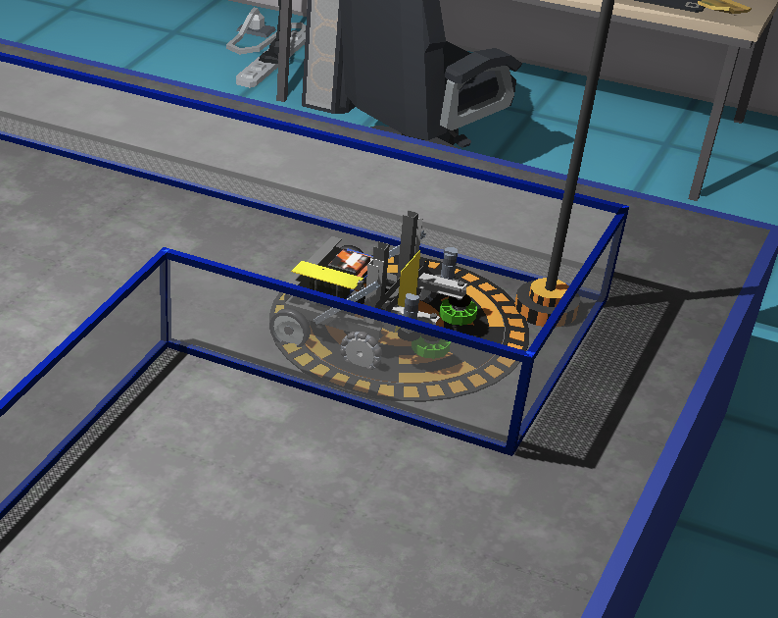
This sample code will get the robot on the final pad.
Once students have completed the challenge successfully, encourage them to add code to collect the rubber ducky as a bonus.
Demonstrate how to create functions to segment the code. Explain that this code can be split in three parts:
Move forward 6300 ticks
Turn right 90˚
Move forward 3500 ticks
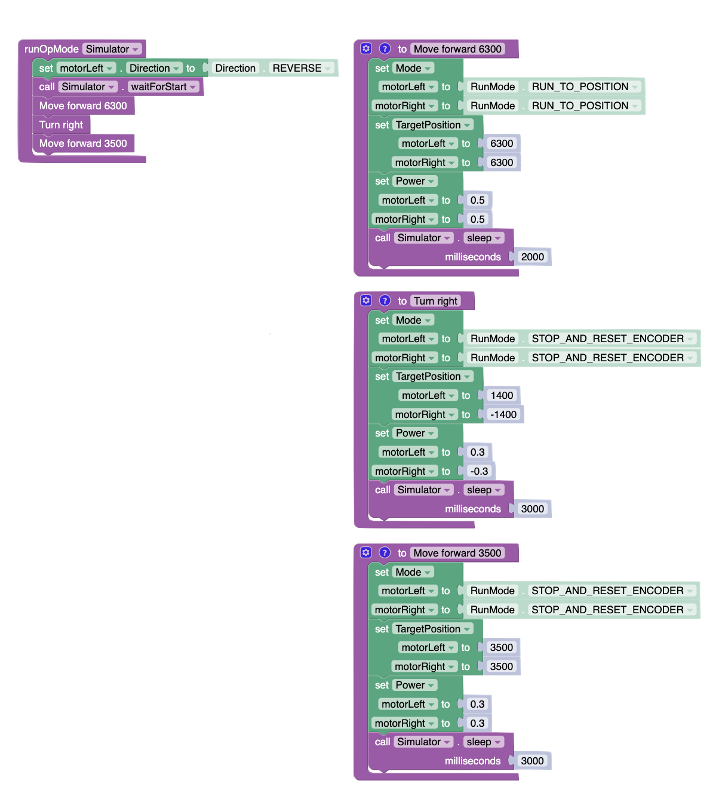
Explain that the functions are available under the “Miscellaneous” section as “RobotFunctions”. Invite students to drag three functions and rename them by changing the text for “do something”
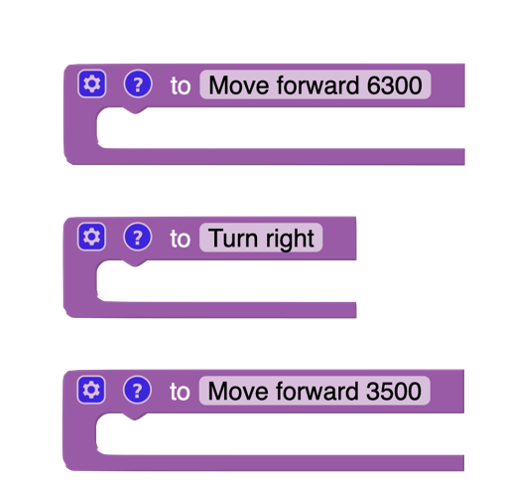
Then, in each function, encourage students to bring the corresponding code.
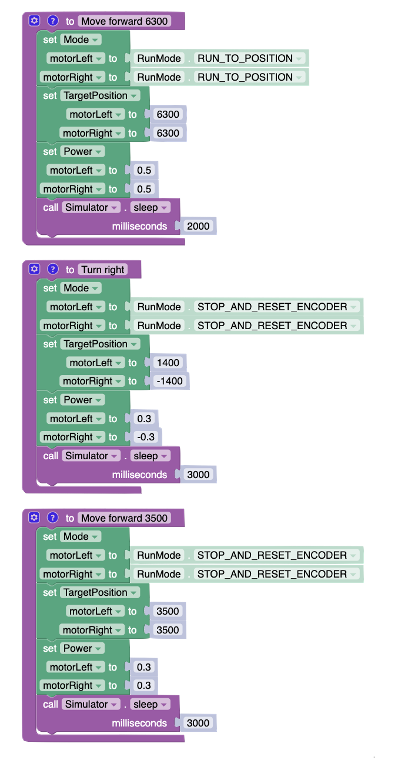
Nothing will happen when students try the code because the main code is empty. Encourage students to add the three functions in order in the main code.
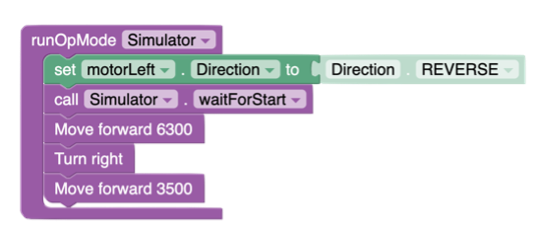
Encourage students to recognize that the code functions identically to previous iterations but with significantly improved readability and organization, making it much simpler to troubleshoot and modify.
Encourage your students to navigate to the next puzzle in the “movement” section: 6—Square

Explain that in this puzzle, they will need to move the robot in the shape of a square. They should realize that it’s basically like the L puzzle but needs to be repeated more than once.
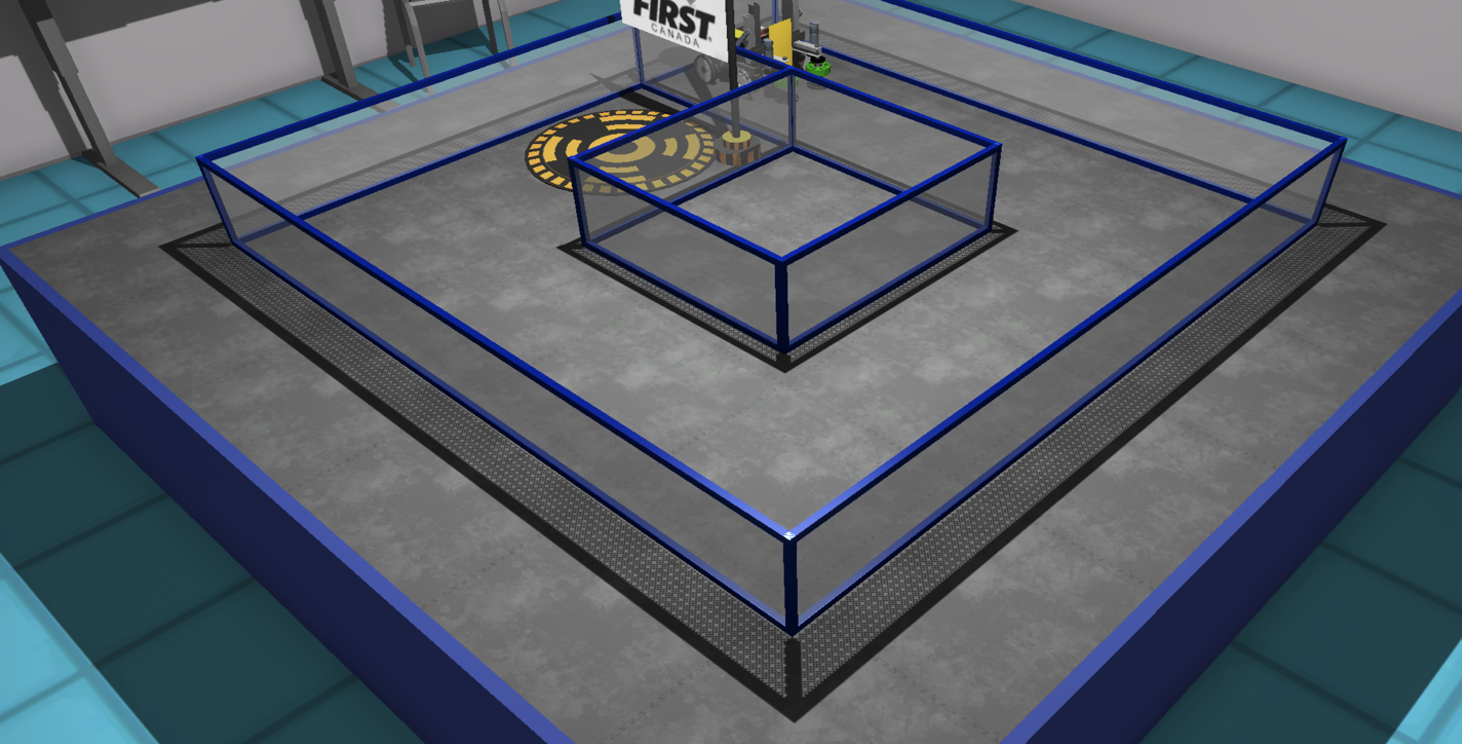
Have students brainstorm the pseudocode to bring the robot to that position. Explain that the pseudocode is a simplified, informal way of programming that outlines an algorithm without using the syntax of a specific coding language.
Move in a straight line
Turn right 90°
Move in a straight line
Turn right 90°
Move in a straight line
Turn right 90°
Move in a straight line a shorter distance than the first three
Have students do some pattern recognition here. They should realize that instead of coding repeatedly, they can use a loop to repeat specific steps. Have them do the first part, which is to move in a straight line and turn right 90 degrees. They can use what they have learned in the previous puzzle to solve this one faster. Here is an example of a code that works.
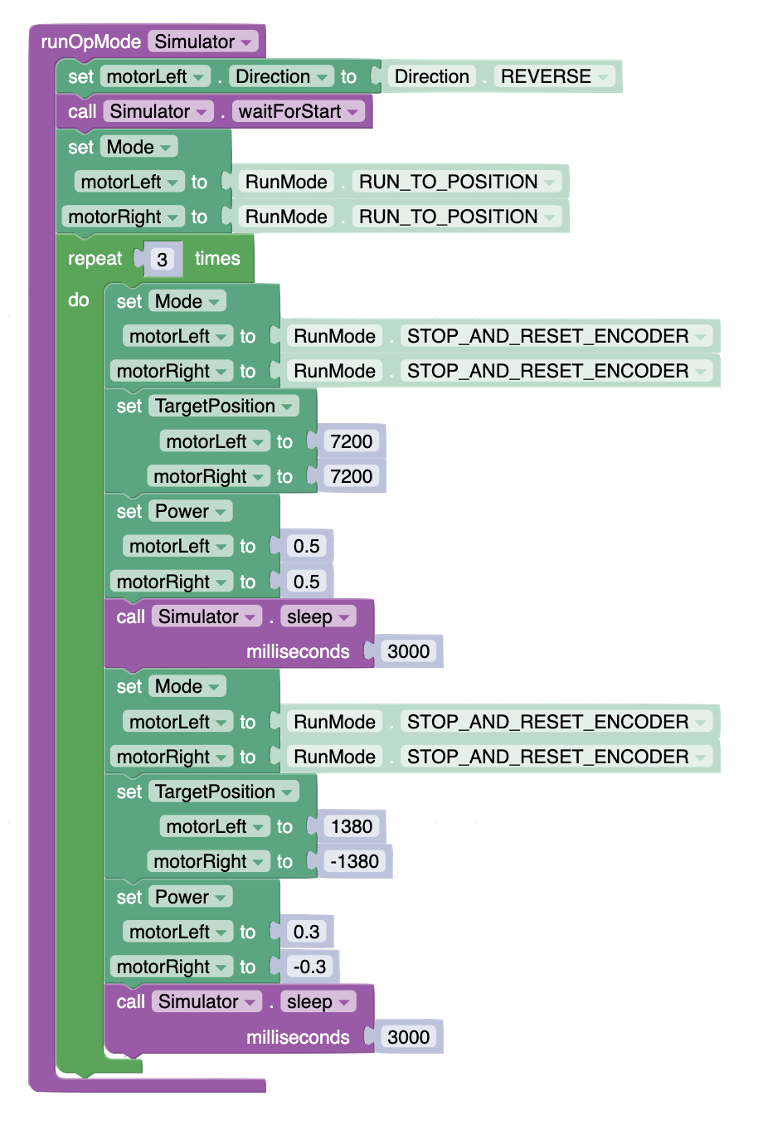
Students should now conclude that, at this point, the robot only needs to move forward a short distance. By adding this code outside of the loop (because this last segment doesn’t need to be repeated), the robot should end up on the final pad and raise the flag.
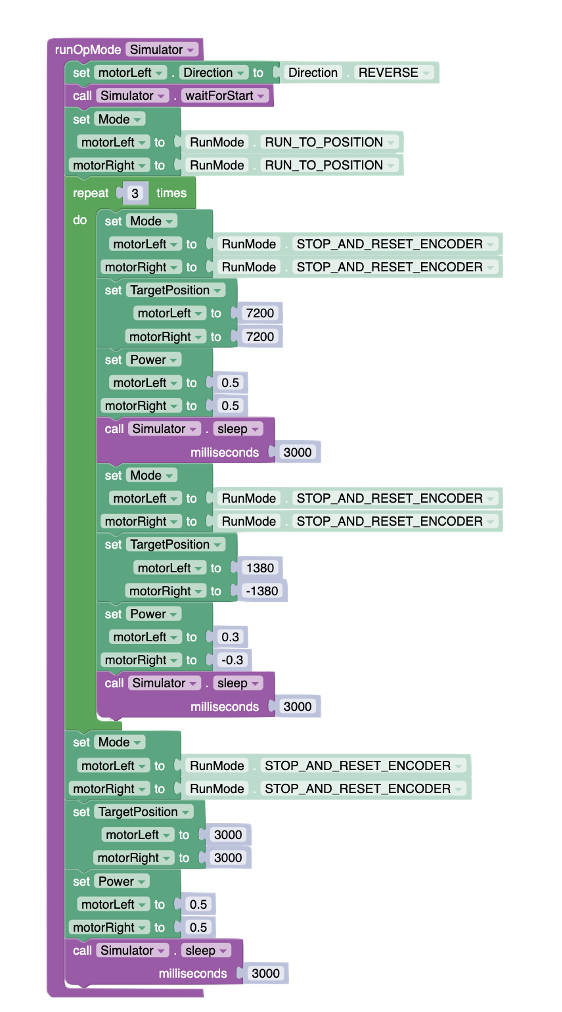
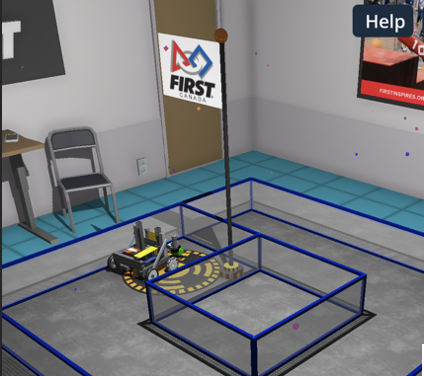
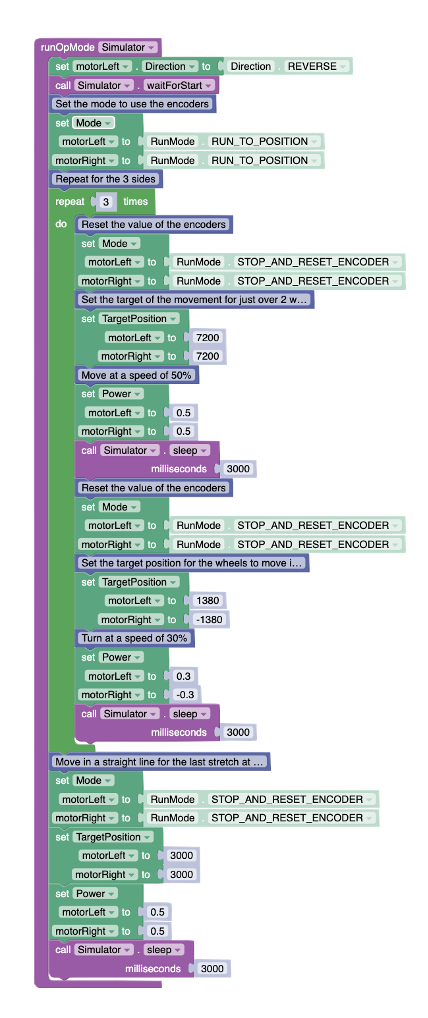
Invite students to add comments to their code to explain the various coding blocks they have used. The comment blocks are blue and available in the “Miscellaneous” section. Explain that software engineers work as teams and need to document their code with comments to ensure their colleagues can follow what their code means. Here is an example of the second version of the code for the second puzzle (Puzzle 6—Square) with comments added to it.
Get students to communicate their solutions to the first two puzzles by asking probing questions such as:
What is the purpose of using rotary encoders? (e.g., Rotary encoders track and measure rotation, enabling precise control over the position, speed, and direction of robot movement.)
Why is code organization important when coding? (e.g., Organized code improves readability and makes troubleshooting and modifying code easier for programmers.)
How do external factors influence robot movement, and how can rotary encoders overcome these challenges? (e.g., External factors like surface conditions and battery levels can affect robot movement. Using tools like rotary encoders helps ensure accurate navigation despite these challenges.)
What role do functions play in coding? (e.g., Functions segment code into reusable blocks, promoting modularity and simplifying complex tasks into manageable components.)
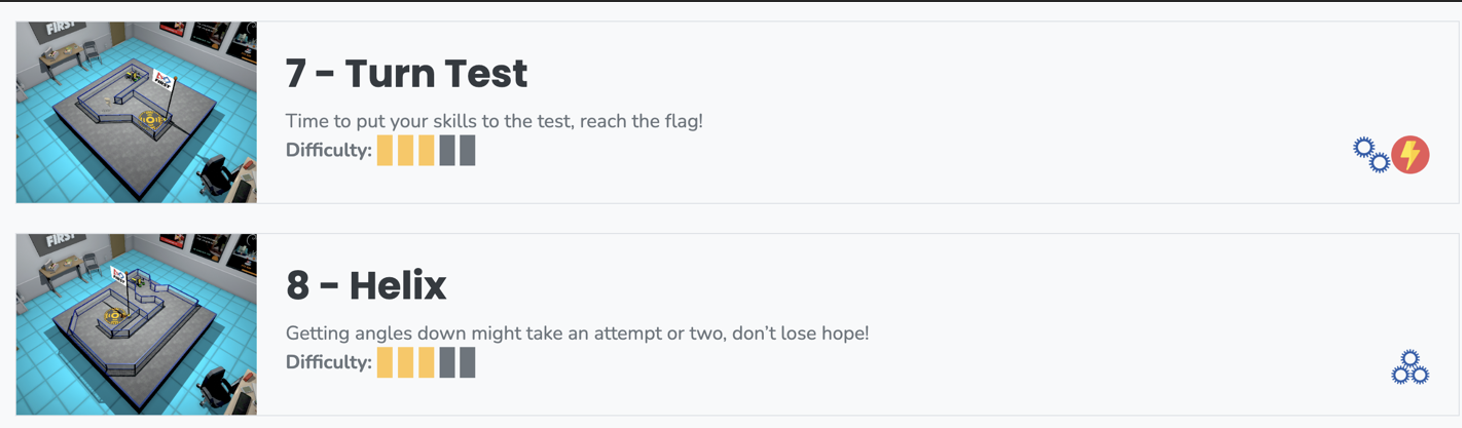
Encourage students to apply their newly acquired skills to tackle FTC Movement puzzles #7 and #8. In these challenges, they must deepen their understanding of encoder operations and robot movements. While Puzzle #7 (Turn Test) and Puzzle #8 (Helix) are similar to the two puzzles solved in this lesson, they involve angles that are more difficult than a 90˚ turn. It will also involve moving in a straight line with various distances.
Assessment of the lesson should be done through observations and conversations with students while they are coding. Evaluating the lesson’s effectiveness should encompass observing students as they engage in coding and engaging in meaningful dialogues with them about their thought processes, challenges, and strategies. This approach allows for a deeper understanding of their comprehension and application of the concepts taught, including how they troubleshoot problems and refine their code to achieve desired movements and navigation with the virtual robot. Through these interactions, educators can gauge each student’s grasp of the material, provide targeted feedback, and adjust instruction as needed to support learning outcomes.
Here is a list of “look-fors” to guide your observations and your assessment:
Engagement and Participation: Observe whether students are actively engaged with the task, experimenting with the code, and participating in discussions or asking questions.
Problem-Solving Skills: Note students’ ability to identify problems in their code, debug errors, and apply logical reasoning to overcome challenges.
Application of Instructions: Check if students are correctly applying the instructions and guidelines provided for the lesson, such as using the correct blocks or code syntax for movement, navigation, and use of sensors.
Creativity and Innovation: Look for creative approaches or innovative solutions students might be applying in their coding strategies, beyond the basic requirements of the lesson.
Motor Control Understanding: Observe students’ comprehension of how motor controls affect the robot’s movement, including speed, direction, and the execution of turns or specific maneuvers.
Use of Rotary Encoders: Assess students’ proficiency in using rotary encoders to achieve precise movement control, including setting target positions, adjusting speed, and resetting encoders for subsequent movements.
Use of Functions: Evaluate students’ ability to effectively implement functions to segment code, promote code reuse, and enhance code readability, demonstrating an understanding of modular programming principles.
Reaction to Failure: Pay attention to how students react to failure or unexpected outcomes, looking for resilience, persistence, and a willingness to experiment and learn from mistakes.