
Loading…
Loading…
Explore the realm of autonomous robotics with a hands-on lesson in the FTC Simulator, where students dive into the world of self-driving robots equipped with grabbers.
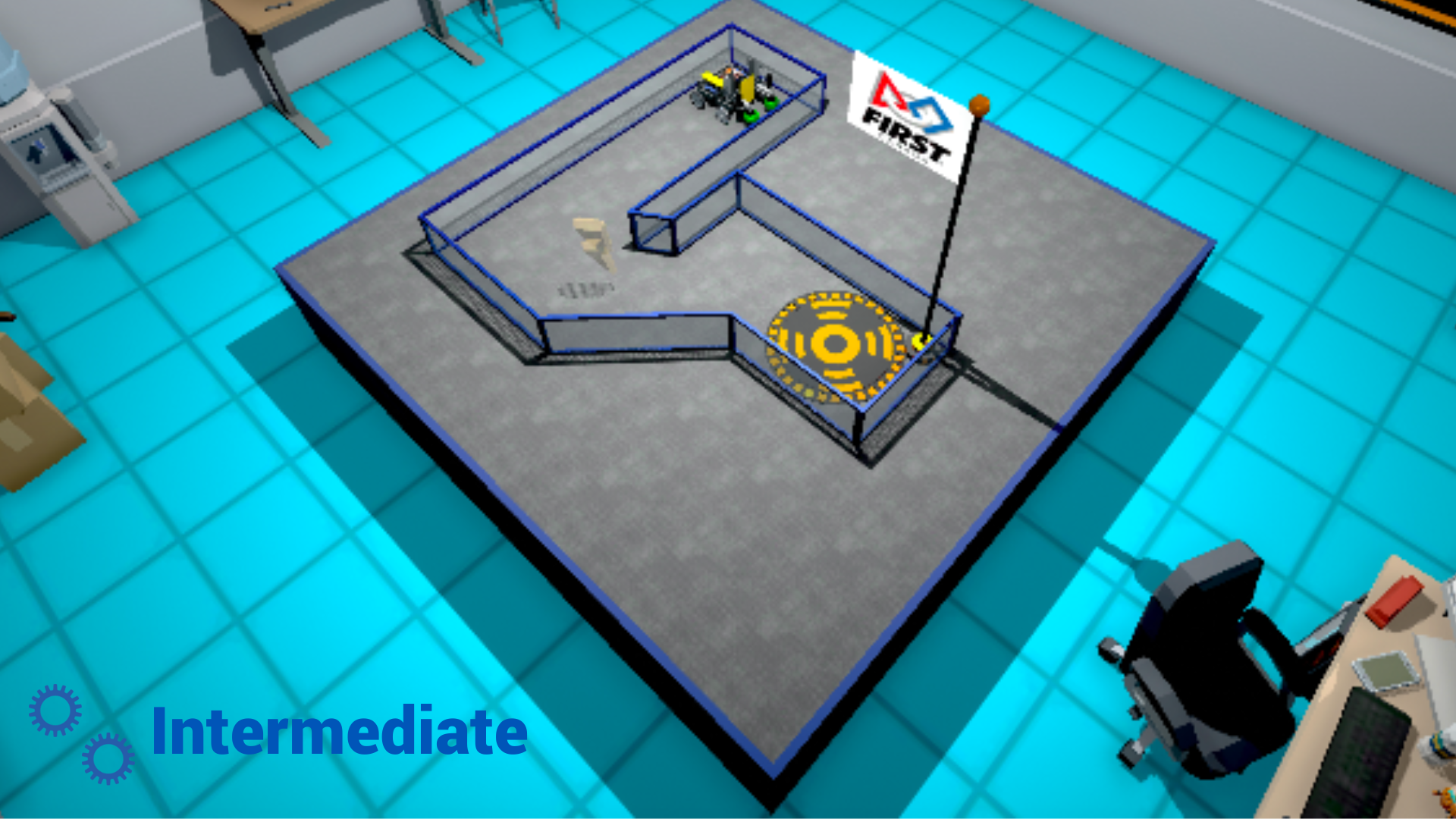
Level: Intermediate
Explore the realm of autonomous robotics with a hands-on lesson in the FTC Simulator, where students dive into the world of self-driving robots equipped with grabbers. This session delves into the crucial role of mechanical manipulation in autonomous navigation, focusing on integrating and coding a grabber at the front of the robot. Students will discover how to program the grabber to interact with objects, adding a new dimension to their robots’ capabilities. Through engaging activities, they will learn how to control the grabber’s movements and use them to pick up and manipulate objects autonomously, further enhancing their understanding of robotic autonomy and integrating mechanical components with coding skills.
This lesson plan is structured using the 5E framework, a widely recognized instructional model consisting of five phases: Engage, Explore, Explain, Elaborate, and Evaluate. The 5E framework systematically engages students in inquiry-based learning, encouraging active exploration and comprehension of complex topics.
In the lesson, students will:
Master the integration and coding of a grabber at the front of their robot in the FTC Simulator, empowering the robot to manipulate objects and interact with its environment autonomously;
Understand the significance and practical application of mechanical manipulation in autonomous navigation, enabling their robots to perform precise tasks such as object retrieval and placement;
Refine their ability to synthesize mechanical actions with coding instructions in real time, augmenting their robot’s capability to navigate and manipulate its surroundings with accuracy and agility.
Post-it notes or a brainstorming collaborative app like Microsoft Whiteboard, Google Jamboard or Apple Freeform.
Devices for your students (Windows computers, Mac computers, ChromeBook)
Google Chrome or Microsoft Edge (Chromium version) Web Browser
Access to the FTC Simulator website (https://ftcsim.org)
Students account created for each of your students
Projector or interactive whiteboard
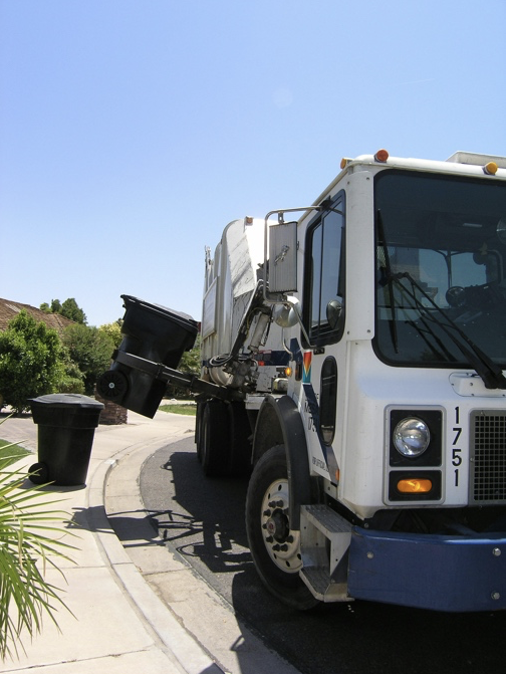
To captivate your students’ attention and ignite their curiosity about using a grabber, use your projector or interactive whiteboard to share an engaging video featuring automated trash collection using a robotic arm, which can be found at this link: https://youtu.be/uCTyasDmWrs?si=y_UOKpt9aPj7Gmx_. Automated garbage collection with a robotic arm involves using a mechanical arm mounted on a vehicle to autonomously pick up and deposit waste bins, streamlining the collection process while reducing the need for manual labour.
Following the video presentation, provide post-it notes to your students and encourage them to engage in a brainstorming session exploring various applications of robotic arms on robots or autonomous vehicles. Instruct students to jot down one idea per post-it note. Allocate a designated area on your classroom wall for students to affix their ideas. Once they have generated several ideas, have them gather at the sharing space to attach their post-it notes. If an idea has already been posted on the wall, they can place it atop the existing one, while if the concept still needs to be represented, they should find an available spot to display it.
Here are some of the ideas that they may come up with:
Sorting and organizing packages in warehouses
Assisting with assembly tasks in manufacturing plants
Conducting inspections in hazardous or hard-to-reach areas
Harvesting crops in agricultural fields
Cleaning and maintaining public spaces such as parks or streets
Handling materials on construction sites
Loading and unloading cargo on ships or airplanes
Conducting research in scientific laboratories
Assisting with rescue operations in disaster zones
Assisting with space exploration missions, such as repairs on satellites or spacecraft
Conducting archaeological excavations with precision and care
Assisting with entertainment tasks, such as puppetry or animatronics
Conducting underwater exploration and research
Assisting with environmental cleanup efforts, such as collecting litter or debris
Performing tasks in hazardous environments, such as nuclear facilities or contaminated areas.
Facilitate a discussion by raising thought-provoking questions, including:
How might robotic arms revolutionize the efficiency of tasks in industries like manufacturing or logistics? (e.g. Robotic arms can drastically increase productivity by performing repetitive tasks with precision and speed, freeing up human workers for more complex responsibilities.)
What ethical considerations should be considered when deploying robotic arms in sensitive environments or industries? (e.g. We need to consider issues like job displacement, safety regulations, and the potential impact on human workers’ livelihoods.)
In what ways can robotic arms contribute to sustainability efforts in industries like agriculture or waste management? (e.g. Robotic arms can optimize resource usage, reduce waste, and improve efficiency, leading to more sustainable practices overall.)
What potential risks or challenges are associated with relying heavily on robotic arms for essential tasks? (e.g. Technical failures, cybersecurity threats, and the potential for misuse or malfunction are significant concerns that need to be addressed.)
What are some potential applications of robotic arms in everyday life outside of industrial or commercial settings? (e.g. Robotic arms could assist individuals with disabilities, perform household chores, or even serve as personal assistants in the future.)
How might the development of collaborative robots (cobots) that can work alongside humans impact the future of work and industry? (e.g. Cobots have the potential to enhance productivity, safety, and efficiency by collaborating with human workers rather than replacing them entirely.)
Explain that self-driving robots and vehicles sometimes incorporate grabbers that can be programmed. Mention that the upcoming lesson will focus on coding robots in FTC Sim using grabbers to move objects.
Please encourage students to start their hands-on learning experience with the FTC Simulator platform by navigating to the provided link, https://ftcsim.org/. Have them log in using their unique username and password. Once logged in, direct them to the “Courses” section and guide them to choose the course titled “FTC Grabby.” Let students know that in this course, they will gain the skills to code and control self-driving robots effectively, focusing on using the grabber to move objects.
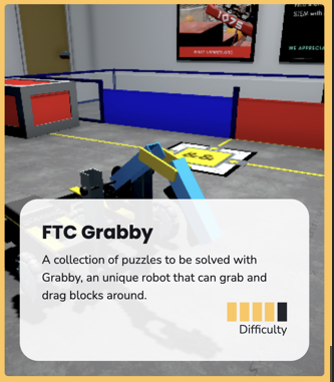
Within the FTC Grabby section, guide students to access the initial puzzle titled “1-Put on Top.”
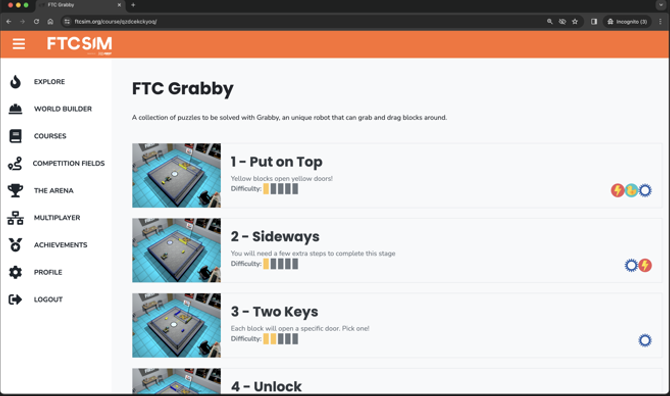

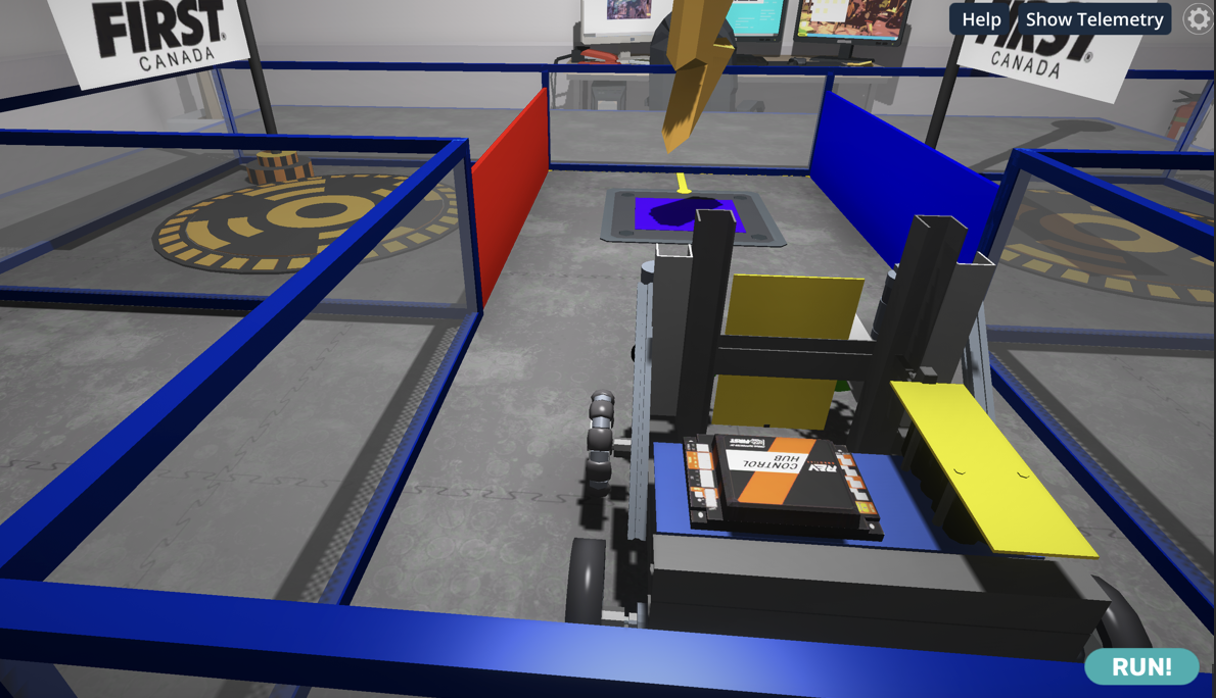
Before students start coding, give them some time to explore the structure of the new robot, including the grabby. Ask students what they think the grabby must do to pick up the block. They should notice that it must go up first, get close to the yellow brick and then go down.
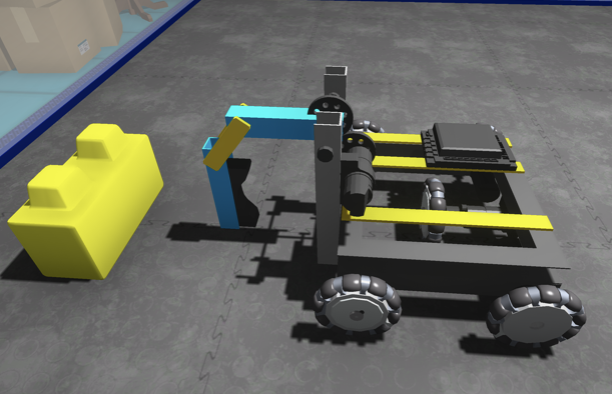
Explain that one or more servo motors usually control a robotic arm. Add that a servo motor allows precise control of angular position, used in robotic arms to move and position specific joints or segments with accuracy and stability.
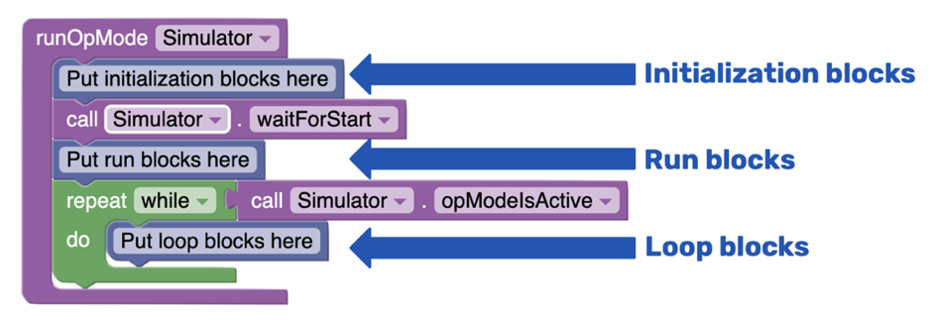
To access the coding panel, click on the green computer icon on the screen’s left side. You’ll notice that there’s already a sample code present. Remind your students of the basic structure of the code, as seen in the first lesson:
Initialization Blocks: This section contains information the robot needs before starting its tasks.
Run Blocks: Most of the code you write will be placed in this section, where the robot’s main actions are defined.
Loop Blocks: These blocks are used for tasks that must be repeated multiple times. However, for this lesson, we’ll only work with initialization and run blocks. The loop section can be discarded to maintain a cleaner code structure.
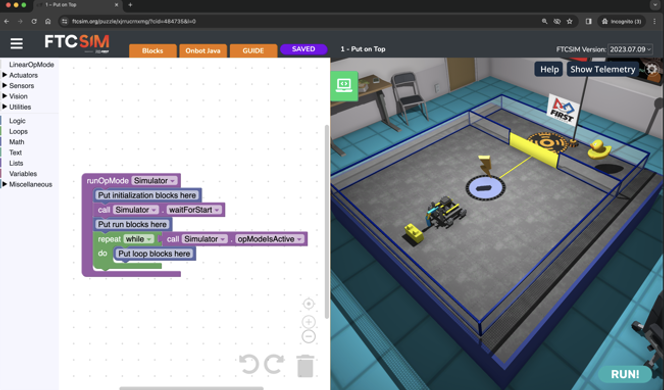
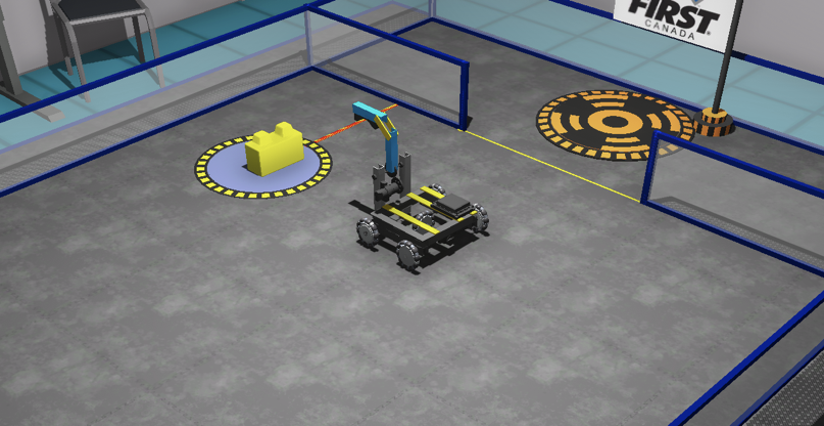
Explain that in this puzzle, the robot’s objective is to travel until it reaches the yellow brick, pick it up and bring it onto the pad to trigger the gate’s opening. Then, the robot can go to the final pad to raise the flag.
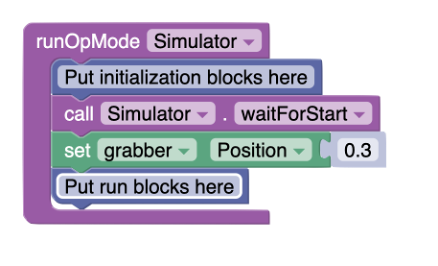
Ask the students to practise using the grabby by moving it up and down. Explain that to move the grabby, they must bring a servo block from the Actuators section. Have them try the following code and encourage them to change the value for the position.
Ask students to describe what the grabby looks like at different positions by filling out a table like this one:

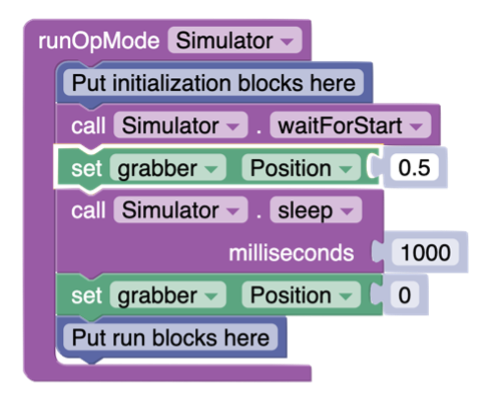
Explain to the students that they will now pull it up, wait 1 second and then pull it back down using the following code:
Explain that for this puzzle, they need to bring the grabby up, move it just in front of the brick, and then move it down. Give them time to add the robot movement to the code. Here is a sample code that works:
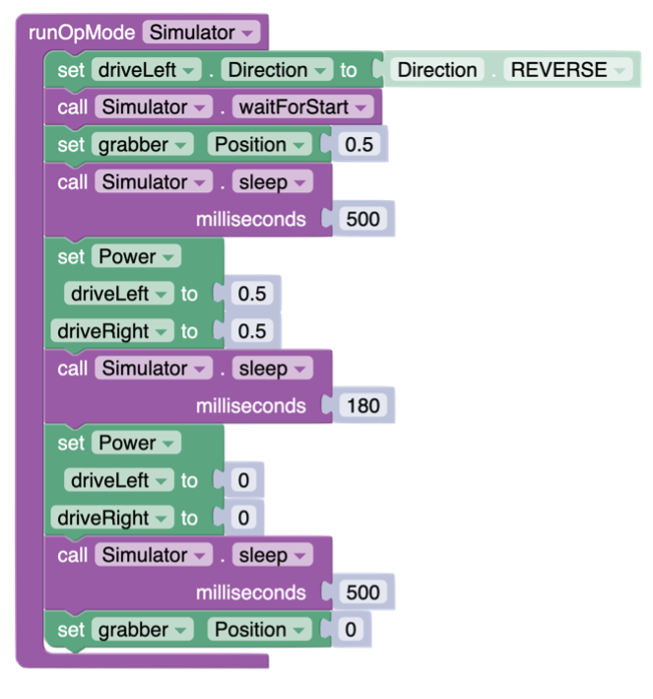
Students should realize that pauses are needed for the grabber not to start moving too quickly.
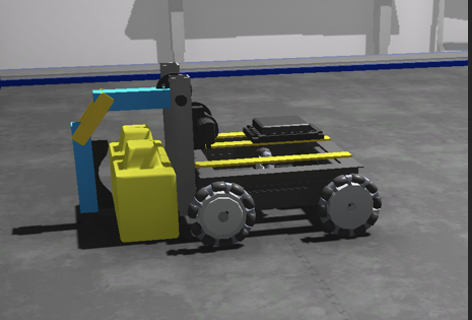
Invite students to now code the robot movement (backward) to bring the block on the trigger pad and then lift the grabby to release the block. Their code should look like this:
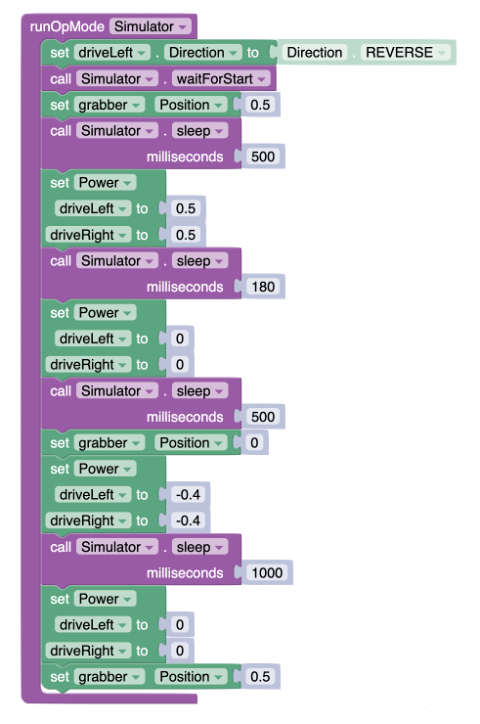
In this code, the robot is going backward at a speed of 40% for 1 second (1000 milliseconds). Encourage students to try different speeds and times to position the yellow brick properly on the trigger pad.
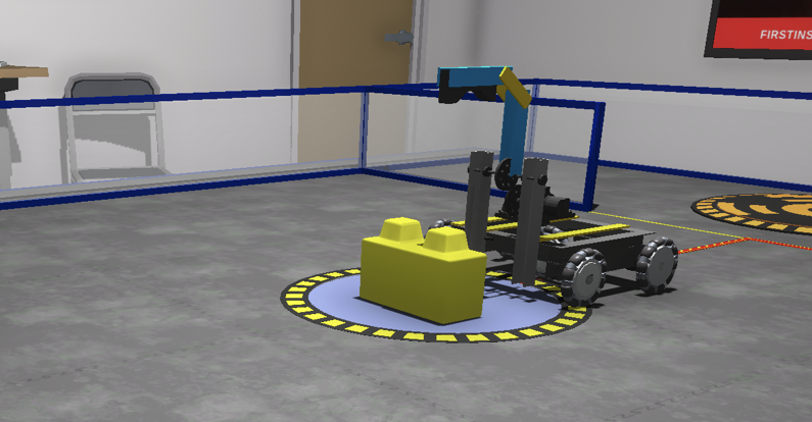
Tell the students that the puzzle is almost complete now that the gate is open. They only need to move backward to reach the final pad with the flag. Here is a code to complete the challenge:
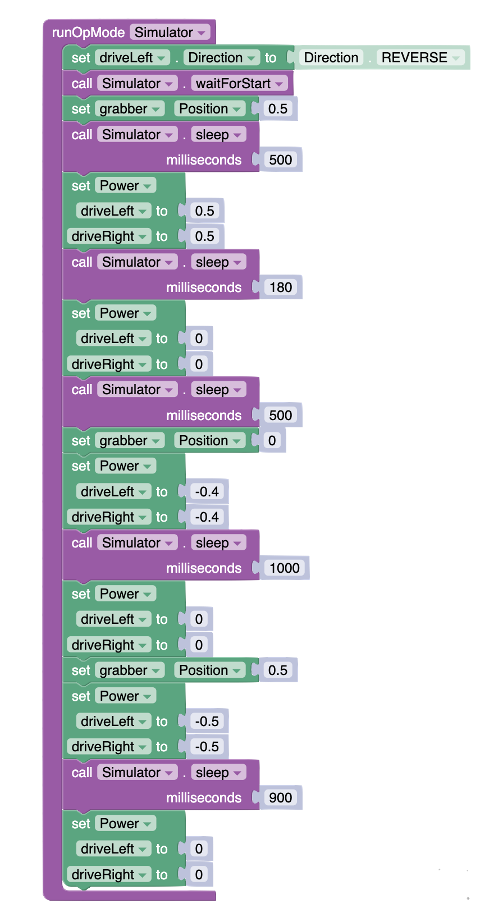
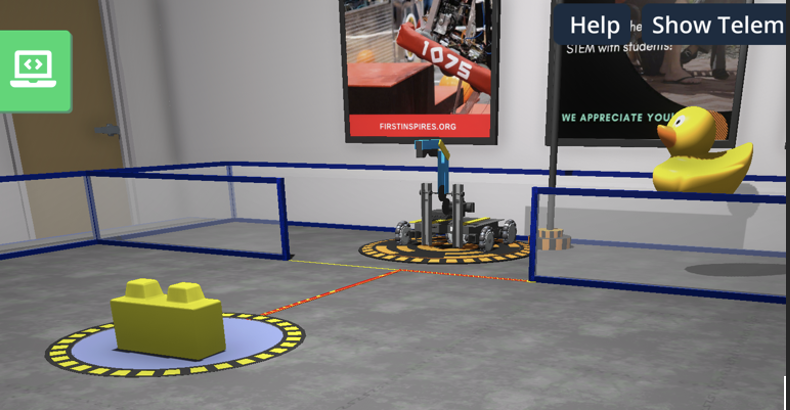
This sample code uses a speed of 50% backward for 900 milliseconds. Students can adjust speed and time to reach the same distance. Challenge your student to keep working on the puzzle to get the rubber ducky for bonus points!
Encourage your students to navigate to the second puzzle using the grabber: 2—Sideways

Explain that in this puzzle, they will need to move the yellow brick on the trigger pad the same way they did for puzzle 1, but in this case, the movement involved to succeed in the mission is a bit more complicated. Encourage students to brainstorm different ways to complete the task.
Explain that one way is to position the robot just in front of the yellow brick to push it on the trigger pad.
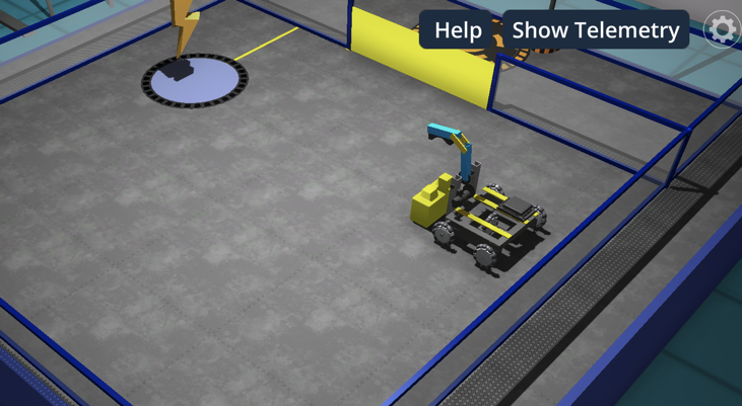
Have students brainstorm the pseudocode to bring the robot to that position. Explain that the pseudocode is a simplified, informal way of programming that outlines an algorithm without using the syntax of a specific coding language.
Lift up grabber
Turn right 90°
Move forward in a straight line a certain distance
Turn left 90°
Move forward in a straight line a similar distance from the previous move
Turn left 90°
Move forward in a straight line a very short distance
Bring down grabber
Have students create the code to get into position and grab the yellow brick based on that pseudocode. Here is an example of a code that works.
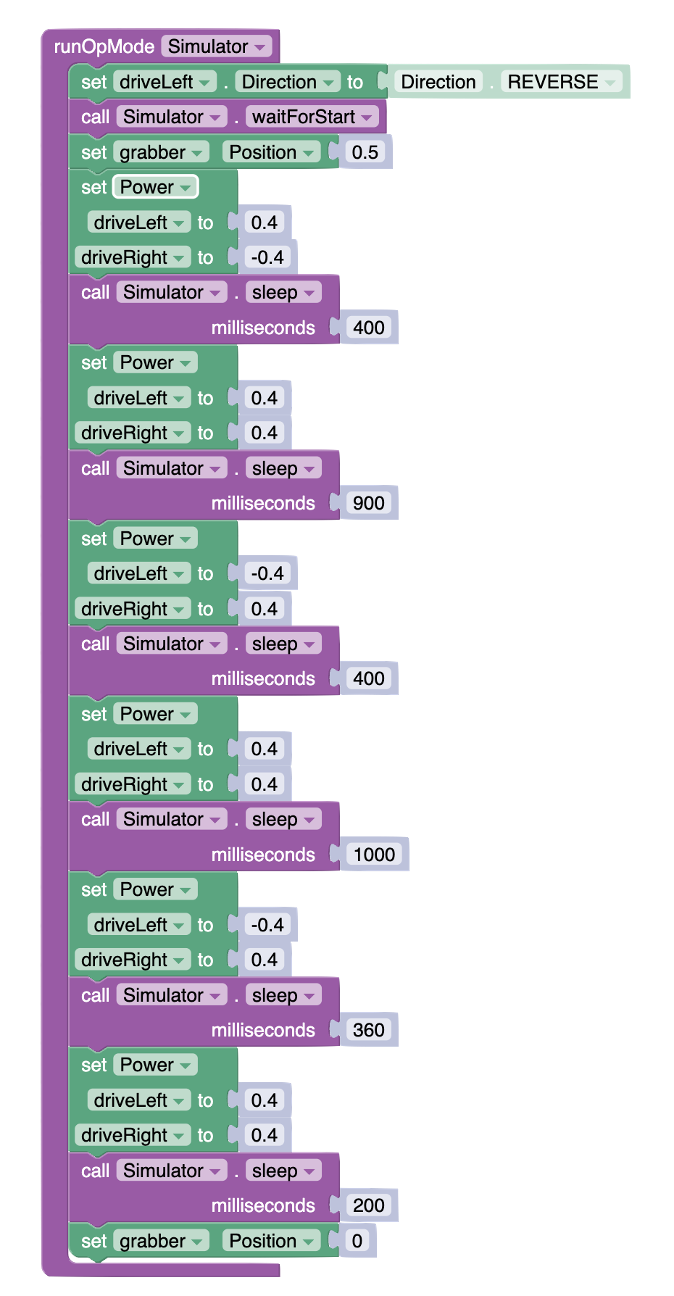
Explain that the next step is to push the yellow brick on the trigger pad. Encourage students to add the code to push it there, release the grabber, and move back, ready to enter the fenced-in area. Here is an updated code that works:
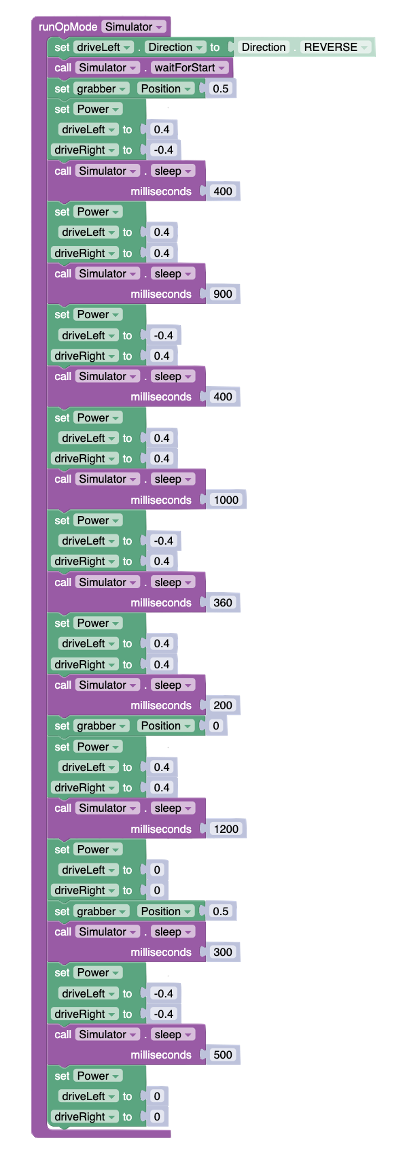
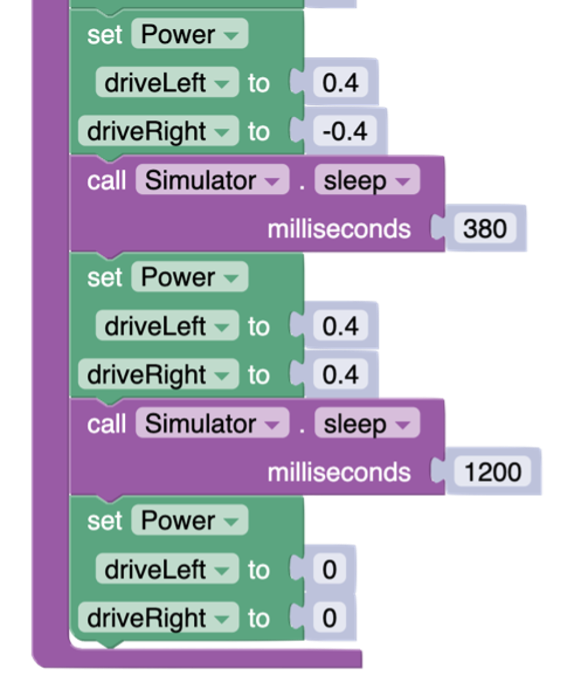
Students should now conclude that at this point, the robot only needs to turn right at 90° and move forward.
Adding the following movement blocks at the end should work:
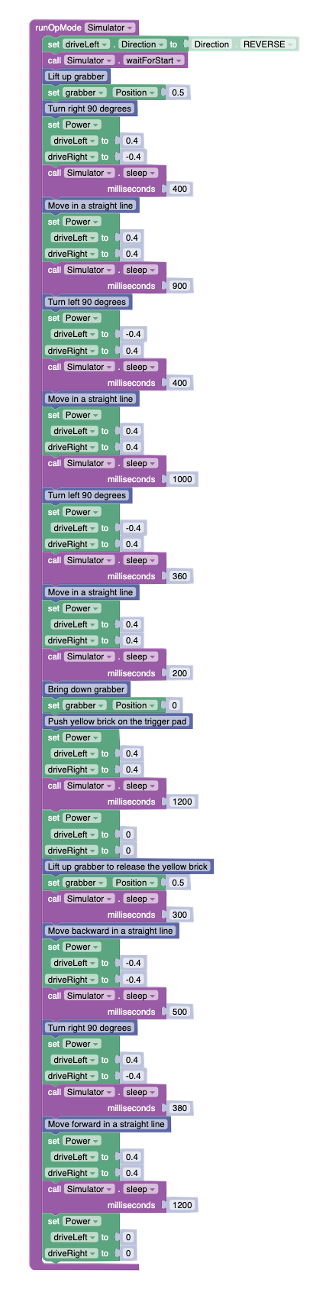
Invite students to add comments to their code to explain the various coding blocks they have used. The comment blocks are blue and available in the “Miscellaneous” section. Explain that software engineers work as teams and need to document their code with comments to ensure their colleagues can follow what their code means. Here is an example of the second version of the code for the second puzzle (Puzzle 2—Sideways) with comments added to it.
Get students to communicate their solutions to the first two puzzles by asking probing questions such as:
How does integrating a grabber into a robot enhance its ability to interact with the environment? (e.g. It allows the robot to manipulate objects physically, enabling tasks like picking up, moving, and placing items autonomously.)
What are the key factors to consider when programming a robotic grabber for precise tasks? (e.g. Factors include the grabber’s speed, the precision of movement, the timing of actions, and the physical properties of the objects being manipulated.)
Can you describe a scenario where the precise control of a grabber would be critical to a robot’s mission? (e.g. In a rescue operation where a robot must carefully navigate through debris to retrieve sensitive or hazardous materials without causing further damage.)
How do mechanical actions like those of a grabber combine with coding instructions to achieve a desired outcome? (e.g. Mechanical actions are executed through coding instructions that specify the sequence, duration, and intensity of movements, ensuring the robot performs tasks accurately as intended.)
Reflecting on the FTC Simulator’s “FTC Grabby” activity, what skills have you gained in programming and controlling self-driving robots with a grabber? (e.g. I’ve learned how to integrate servo motor control with spatial navigation to manipulate objects precisely, enhancing the robot’s autonomous capabilities.)
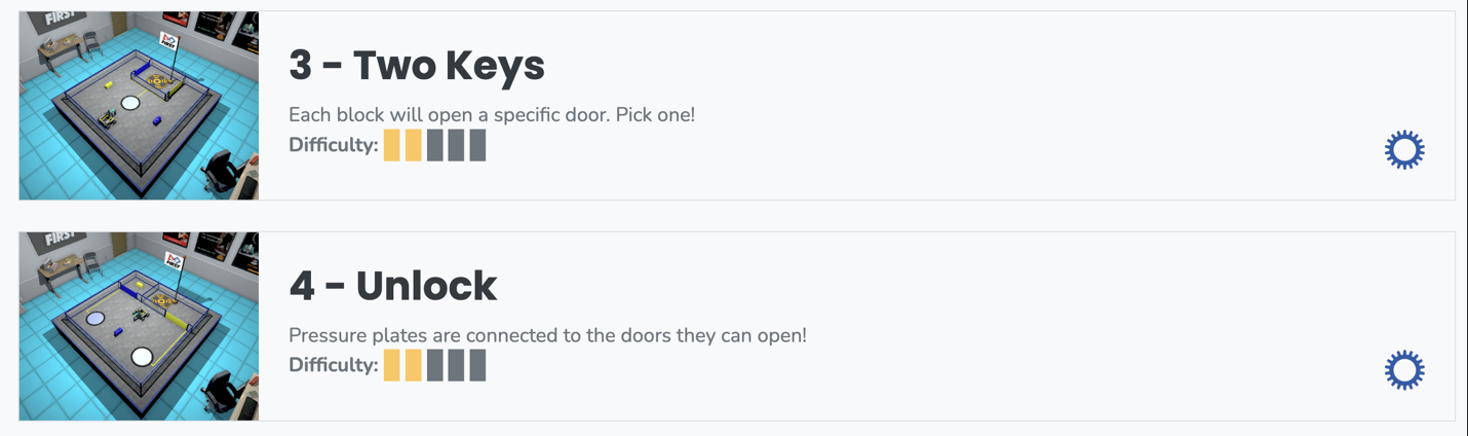
Encourage students to apply their newly acquired skills to tackle FTC Grabby puzzles #3 and #3. They must deepen their understanding of grabber operations and robot movements in these challenges. While puzzle #3 (Two Keys) is similar to the second puzzle, it involves choosing which brick to use to unlock the door. Puzzle #4 (Unlock) is similar to Puzzle #2 but requires a chain of events. The blue brick will open a gate to access the yellow brick. Then the yellow brick can be used as a key to open the yellow gate to finish the puzzle.
Assessment of the lesson should be done through observations and conversations with students while they are coding. Evaluating the lesson’s effectiveness should encompass observing students as they engage in coding and engaging in meaningful dialogues with them about their thought processes, challenges, and strategies. This approach allows for a deeper understanding of their comprehension and application of the concepts taught, including how they troubleshoot problems and refine their code to achieve desired movements and navigation with the virtual robot. Through these interactions, educators can gauge each student’s grasp of the material, provide targeted feedback, and adjust instruction as needed to support learning outcomes.
Here is a list of “look-fors” to guide your observations and your assessment:
Engagement and Participation: Observe whether students are actively engaged with the task, experimenting with the code, and participating in discussions or asking questions.
Problem-Solving Skills: Note students’ ability to identify problems in their code, debug errors, and apply logical reasoning to overcome challenges.
Application of Instructions: Check if students are correctly applying the instructions and guidelines provided for the lesson, such as using the correct blocks or code syntax for movement, navigation, and use of sensors.
Creativity and Innovation: Look for creative approaches or innovative solutions students might be applying in their coding strategies, beyond the basic requirements of the lesson.
Motor Control Understanding: Observe students’ comprehension of how motor controls affect the robot’s movement, including speed, direction, and the execution of turns or specific maneuvers.
Understanding of Grabber Mechanics: Students should be able to describe how a grabber on a robot functions mechanically. This includes understanding the role of servo motors in controlling the grabber’s movements, such as lifting and lowering to manipulate objects.
Reaction to Failure: Pay attention to how students react to failure or unexpected outcomes, looking for resilience, persistence, and a willingness to experiment and learn from mistakes.