Loading…
Loading…
Cue robot (1 per group)
tablets or compatible devices (1 per group)
graph paper
metric sticks (1 per group)
pencils (1 per student)
[Optional] Sketch Kit marker attachment (1–2 per class)
[Optional] Sketch Kit dry erase markers (1–2 sets per class)
Wonder Whiteboard Mat and/or butcher paper (1 sheet per group)
[Optional] materials to create a drawing attachment, if Sketch Kit unavailable (e.g., cardboard sheets and rolls, pipe cleaners, foam packing, tape, rubber bands, paper clips, etc.)
Before this lesson, it is recommended that students:
have experience programming movement, custom sounds, loops, and events in the Cue app.
practice programming Cue to draw using the Sketch Kit.
be able to calculate the area of squares, rectangles, and triangles.
know how to determine the angles of squares, rectangles, and equilateral triangles.
have practiced finding the area of composite shapes by composing and decomposing them.
Fully charge the devices and robots.
Install the Wonder Workshop Cue app on each device.
1. Review the concept of area with the students.
Say, “Area is the number of square units needed to cover a given surface. In this lesson, we will measure area in square centimeters.”
2. Write or ask a student volunteer to write the formula to calculate the area of squares, rectangles, and other parallelograms on the board: length x width = ___ sq. cm.
3. Write or ask a student volunteer to write the formula to calculate the area of a triangle on the board: ½ x base x height = ___ sq. cm.
4. Review how to determine the area of a composite shape by decomposing it:
Break apart the composite shape into shapes you know.
Figure out the dimensions of each smaller shape.
Calculate the area of each smaller shape.
Add the areas up.
5. Draw various shapes—including composite shapes—and their measurements on the board.
Have student volunteers determine the area of each shape.
1. Ask, “What is a loop?”
Sample response: “A loop is a set of instructions programmed to repeat X number of times.”
Ask, “When would you use a loop in your program?”
Sample response: “When I want Cue to repeat a set of instructions.”
2. Ask, “What is an event?”
Sample response: “An event is an action that triggers Cue to perform the next statement.”
Ask, “What are some examples of events in the Cue app?”
Sample response: “Examples of some events include: wait until front left obstacle seen, when button main up, when clap heard, etc. “
1. Say, “Today, you will design a two-dimensional house composed of various shapes. Then, you will program ‘Cue the architect’ to draw the blueprint of the house using the Sketch Kit/a writing attachment you create. In order to help Cue sell the house, you will need to determine its total area. Finally, you will program Cue to present the house to the class.”
2. Say, “Before Cue draws the blueprint for our house, we have to design it.”
Model drawing the outline of a house on a piece of butcher paper. Make sure the house is composed of a variety of shapes (e.g., squares, rectangles, triangles), as well as composite shapes. See the example below:
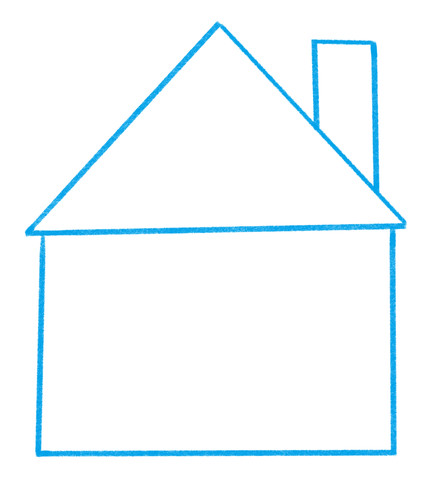
3. Ask students to identify some of the shapes they see. (Sample response: “Rectangle, triangle.”)
Ask students to identify a composite shape and the shapes into which it could be broken apart. (Sample response: “The chimney is a composite shape. It could be broken into a right triangle and a rectangle.)
4. Divide the house into shapes. (In the example above, this would be a rectangle, a triangle, and a composite shape that consists of a rectangle and a triangle.)
Measure and write the dimensions (lengths and angles) of each shape.
5. Work with students to determine the total area of the house by:
Determining the area of each individual shape.
Adding up the area of all shapes.
1. Project your device screen and open the Cue app.
Navigate to the Code with Block & JavaScriptⓇ section. Then select Create New.
Tell students that they may complete their own programs in Block, JavaScript, or Wonder.
2. Attach the Sketch Kit marker attachment to Cue and insert a marker.
Model programming Cue to draw one of the shapes in the house on graph paper.
For example, ask, “What blocks could we use to program a rectangle?” (Sample response: “Move distance, turn angle, and repeat blocks.”)
Ask, “What types of angles would we need to include in our program?” (Sample response: “90° degree angles.”)
Create a program based on the students’ suggestions.
Place Cue on the Whiteboard Mat or another sheet of butcher paper and press play to have Cue draw the shape.
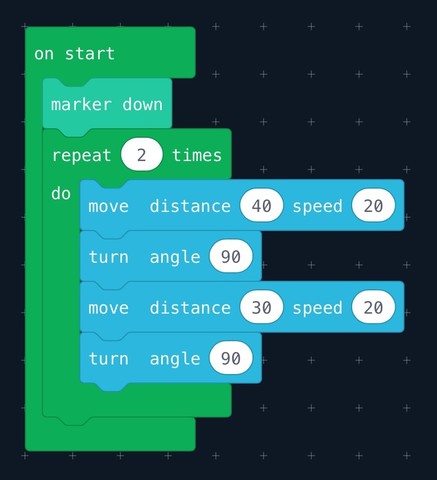
3. Ask students to suggest how they would program Cue to draw the other shapes that comprise the house and the connections between each shape, so that the end result would be an outline of a house similar to the one you planned on your graph paper.
4. Say, “Once Cue has designed and ‘built’ your house, Cue must try to sell it! Add to your program to have Cue present the house. What blocks could you include in this program?” (Sample response: “Lights, face patterns, sounds, and animations.”)
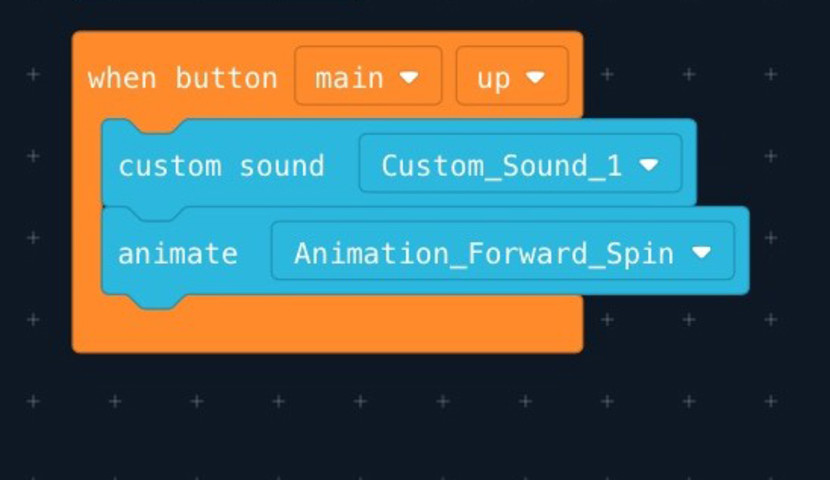
Say, “Record a custom sound to state the total area of the house. Also, be sure to include at least one eventin your program. What are some events you could include?” (Sample response: “We could include an event like when button main up or wait until clap heard.”)
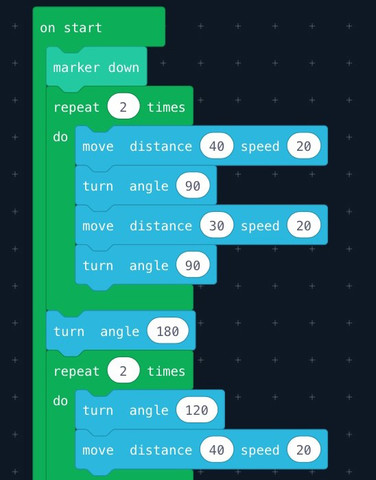
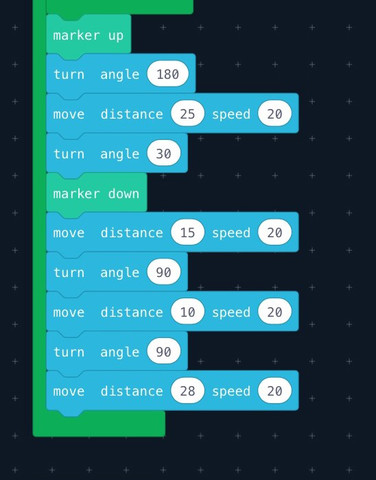
5. Run your program (see sample shown below) and compare your initial sketch of the house to Cue’s drawing.
Work with students to adjust the program, if necessary.
Sample Program:
1. Have students form groups.
Distribute Cue robots, devices, pencils, metric sticks, Sketch Kits marker attachments, Sketch Kit dry erase markers, butcher paper, and Whiteboard Mats (if available).
If Sketch Kits are unavailable, have students select recycled materials and create their own drawing accessory.
2. Have groups work together to design a two-dimensional house, as modeled above, by:
Drawing the outline of a house composed of various shapes on graph paper.
Measuring and writing the dimensions of each shape.
Determining the total area of the house by calculating the area of each shape—including composite shapes—and adding them up.
Programming Cue to draw the house.
Comparing Cue’s drawing to their initial sketch and adjusting their programs, if necessary.
3. Tell students that they must include at least one loop in their program.
4. Once students have completed their programs and Cue has drawn their house, have them add to their programs to have Cue present their house.
Encourage students to use a combination of actions, such as lights, face patterns, sounds, movements, and animations.
Make sure that they record a custom sound to state the total area of their house.
Make sure that they include at least one event in their program.
Have each group run their program with Cue on a new sheet of butcher paper.
Have groups provide positive and constructive feedback on each other’s drawings, programs, and any created attachments.
Ask students to describe the challenges they faced in programming Cue and how they resolved them.
Use our Evaluation Rubric to review students’ work and presentations.
CCSS.Math.Content.6.G.A.1: Find the area of right triangles, other triangles, special quadrilaterals, and polygons by composing into rectangles or decomposing into triangles and other shapes; apply these techniques in the context of solving real-world and mathematical problems.
CCSS.Math.Content.7.G.A.2: Draw (freehand, with ruler and protractor, and with technology) geometric shapes with given conditions. Focus on constructing triangles from three measures of angles or sides, noticing when the conditions determine a unique triangle, more than one triangle, or no triangle.
CCSS.MATH.CONTENT.7.G.B.5: Use facts about supplementary, complementary, vertical, and adjacent angles in a multi-step problem to write and solve simple equations for an unknown angle in a figure.
CCSS.Math.Content.7.G.B.6: Solve real-world and mathematical problems involving area, volume and surface area of two- and three-dimensional objects composed of triangles, quadrilaterals, polygons, cubes, and right prisms.
CCSS.ELA-LITERACY.SL.6.1: Engage effectively in a range of collaborative discussions (one-on-one, in groups, and teacher-led) with diverse partners on grade 6 topics, texts, and issues, building on others' ideas and expressing their own clearly.
CCSS.ELA-LITERACY.RST.6-8.3: Follow precisely a multistep procedure when carrying out experiments, taking measurements, or performing technical tasks.
CCSS.ELA-LITERACY.RST.6-8.4: Determine the meaning of symbols, key terms, and other domain-specific words and phrases as they are used in a specific scientific or technical context relevant to grades 6-8 texts and topics.
CCSS.ELA-LITERACY.RST.6-8.7: Integrate quantitative or technical information expressed in words in a text with a version of that information expressed visually (e.g., in a flowchart, diagram, model, graph, or table).
MS-ETS1-1: Define the criteria and constraints of a design problem with sufficient precision to ensure a successful solution,
MS-ETS1-2: Evaluate competing design solutions using a systematic process to determine how well they meet the criteria and constraints of the problem.
1B-AP-10: Create programs that include sequences, events, loops, and conditionals.
1B-AP-16: Take on varying roles, with teacher guidance, when collaborating with peers during the design, implementation, and review stages of program development.
1B-AP-17: Describe choices made during program development using code comments, presentations, and demonstrations.
2-AP-13: Decompose problems and subproblems into parts to facilitate the design, implementation, and review of programs.
2-AP-15: Seek and incorporate feedback from team members and users to refine a solution that meets user needs.
2-AP-17: Systematically test and refine programs using a range of test cases.
1A: Articulate and set personal learning goals, develop strategies leveraging technology to achieve them and reflect on the learning process itself to improve learning outcomes.
1B: Build networks and customize their learning environments in ways that support the learning process.
1C: Use technology to seek feedback that informs and improves their practice and to demonstrate their learning in a variety of ways.
4D: Exhibit a tolerance for ambiguity, perseverance and the capacity to work with open-ended problems.
5A: Formulate problem definitions suited for technology-assisted methods such as data analysis, abstract models and algorithmic thinking in exploring and finding solutions.
5C: Break problems into component parts, extract key information, and develop descriptive models to understand complex systems or facilitate problem-solving.
6C: Communicate complex ideas clearly and effectively by creating or using a variety of digital objects such as visualizations, models or simulations.
6D: Students publish or present content that customizes the message and medium for their intended audiences.
7C: Contribute constructively to project teams, assuming various roles and responses.
- describe and compare the angles and sides of regular polygons and irregular polygons.
- generalize the sum of interior angles for triangles and quadrilaterals.
- Component 10 (iii) - MEDIA AND TECHNIQUES: Students will use media and techniques, with an emphasis on more indirect complex procedures and effects in drawing, painting, print making, sculpture, fabric arts, photography and technographic arts.
CTF is planning, creating, appraising and communicating in response to challenges.
I plan in response to challenges.
I make decisions in response to challenges.
I adapt to change and unexpected events.
I solve problems in response to challenges.
I create products, performances or services in response to challenges.
I appraise the skills, knowledge and technologies used to respond to challenges.
I communicate my learning.
CTF is working independently and with others while exploring careers and technology.
I determine how my actions affect learning.
I develop skills that support effective relationships.
I collaborate to achieve common goals.
Reasoning and analyzing
Use logic and patterns to solve puzzles and play games
Use reasoning and logic to explore, analyze, and apply mathematical ideas
Estimate reasonably
Demonstrate and apply mental math strategies
Use tools or technology to explore and create patterns and relationships, and test conjectures
Model mathematics in contextualized experiences
Understanding and solving
Apply multiple strategies to solve problems in both abstract and contextualized situations
Develop, demonstrate, and apply mathematical understanding through play, inquiry, and problem solving
Visualize to explore mathematical concepts
Engage in problem-solving experiences that are connected to place, story, cultural practices, and perspectives relevant to local First Peoples communities, the local community, and other cultures
Communicating and representing
Use mathematical vocabulary and language to contribute to mathematical discussions
Represent mathematical ideas in concrete, pictorial, and symbolic forms
Connecting and reflecting
Reflect on mathematical thinking
Connect mathematical concepts to each other and to other areas and personal interests
perimeter of complex shapes
area of triangles, parallelograms, and trapezoids
angle measurement and classification
triangles
Applied Technologies:
- Select, and as needed learn about, appropriate tools and technologies to extend their capability to complete a task.
- Identify the personal, social, and environmental impacts, including unintended negative consequences, of the choices they make about technology use.
- Identify how the land, natural resources, and culture influence the development and use of tools and technologies.
SS1: Demonstrate an understanding of angles by:
identifying examples of angles in the environment
classifying angles according to their measure
estimating the measure of angles using 45°, 90° and 180° as reference angles
determining angle measures in degrees
drawing and labelling
SS2: Demonstrate that the sum of interior angles is:
180° in a triangle
360° in a quadrilateral.
SS3: Develop and apply a formula for determining the:
perimeter of polygons
area of rectangles
volume of right rectangular prisms.
SS4: Construct and compare triangles, including:
scalene
isosceles
equilateral
right
obtuse
acute
SS5: Describe and compare the sides and angles of regular and irregular polygons.
SS6: Perform a combination of translation(s), rotation(s) and/or reflection(s) on a single 2-D shape, with and without technology, and draw and describe the image.
SS7: Perform a combination of successive transformations of 2-D shapes to create a design, and identify and describe the transformations.
SS3: Perform geometric constructions, including:
perpendicular line segments
parallel line segments
perpendicular bisectors
angle bisectors.
SS5: Perform and describe transformations (translations, rotations or reflections) of a 2-D shape in all four quadrants of a Cartesian plane (limited to integral number vertices).
PR1: Graph and analyze two-variable linear relations.
Spatial Sense
E2.2 use a protractor to measure and construct angles up to 360°, and state the relationship between angles that are measured clockwise and those that are measured counterclockwise
Algebra
C3.1 solve problems and create computational representations of mathematical situations by writing and executing code, including code that involves conditional statements and other control structures
C3.2 read and alter existing code, including code that involves conditional statements and other control structures, and describe how changes to the code affect the outcomes and the efficiency of the code
Spatial Sense
E1.1 describe and classify cylinders, pyramids, and prisms according to their geometric properties, including plane and rotational symmetry
Algebra
C3.1 solve problems and create computational representations of mathematical situations by writing and executing code, including code that involves events influenced by a defined count and/or sub-program and other control structures
C3.2 read and alter existing code, including code that involves events influenced by a defined count and/or sub-program and other control structures, and describe how changes to the code affect the outcomes and the efficiency of the code
Spatial Sense
E1.3 use scale drawings to calculate actual lengths and areas, and reproduce scale drawings at different ratios
Algebra
C3.1 solve problems and create computational representations of mathematical situations by writing and executing code, including code that involves the analysis of data in order to inform and communicate decisions
C3.2 read and alter existing code involving the analysis of data in order to inform and communicate decisions, and describe how changes to the code affect the outcomes and the efficiency of the code
P6.3 Extend understanding of patterns and relationships by using expressions and equations involving variables.
a. Analyze patterns arising from the determination of perimeter of rectangles and generalize an equation describing a formula for the perimeter of all rectangles.
SS6.1 Demonstrate understanding of angles including:
identifying examples
classifying angles
estimating the measure
determining angle measures in degrees
drawing angles
applying angle relationships in triangles and quadrilaterals.
SS6.2 Extend and apply understanding of perimeter of polygons, area of rectangles, and volume of right rectangular prisms (concretely, pictorially, and symbolically) including:
relating area to volume
comparing perimeter and area
comparing area and volume
generalizing strategies and formulae
analyzing the effect of orientation
solving situational questions.
SS6.5 Demonstrate understanding of single, and combinations of, transformations of 2-D shapes (with and without the use of technology) including:
identifying
describing
performing
SS7.3 Demonstrate an understanding of 2-D relationships involving lines and angles.
Identify, with justification, line segments on a diagram that are parallel or perpendicular.
Use technology to construct parallel lines, perpendicular lines, angle bisectors, and perpendicular bisectors.
Use geometric constructions to create a design or picture, and identify the constructions present in the design.
6SS1 Demonstrate an understanding of angles by:
identifying examples of angles in the environment
classifying angles according to their measure
estimating the measure of angles, using 45°, 90° and 180° as reference angles
determining angle measures in degrees
drawing and labelling angles when the measure is specified
6SS3 Develop and apply a formula for determining the:
perimeter of polygons
area of rectangles
volume of right rectangular prisms.
6SS6 Perform a combination of translations, rotations and/ or reflections on a single 2-D shape, with and without technology, and draw and describe the image.
7SS3 Perform geometric constructions, including:
perpendicular line segments
parallel line segments
perpendicular bisectors
angle bisectors.
SS1 Demonstrate an understanding of angles by:
identifying examples of angles in the environment
classifying angles according to their measure
estimating the measure of angles using 45°, 90 and 180° as reference angles
determining angle measures in degrees
drawing and labelling angles when the measure is specified
SS3 Develop and apply a formula for determining the:
perimeter of polygons
area of rectangles
volume of right rectangular prisms.
SS6 Perform a combination of translation(s), rotation(s) and/or reflection(s) on a single 2-D shape, with and without technology, and draw and describe the image.
SS3 Perform geometric constructions, including: perpendicular line segments; parallel line segments; perpendicular bisectors; angle bisectors
6.SS.1 Demonstrate an understanding of angles by
identifying examples of angles in the environment
classifying angles according to their measure
estimating the measure of angles using 45º, and 90º, and 180º as reference angles
determining angle measures in degrees
drawing and labelling angles when the measure is specified
6.SS.3 Develop and apply a formula for determining the
perimeter of polygons
area of rectangles
volume of right rectangular prisms
6.SS.6 Perform a combination of transformations (translations, rotations, or reflections) on a single 2-D shape, and draw and describe the image.
7.SS.3 Perform geometric constructions, including
perpendicular line segments
parallel line segments
perpendicular bisectors
angle bisectors
describe angles as a measure of rotation (turn)
identify and classify angles as acute, obtuse, right, straight, or reflex
explain, using models, how the perimeter of any polygon (2-D shape) can be determined
generalize a formula for calculating perimeter (distance around the outside)
model, identify, and describe a combination of transformations (flips, slides, or turns) on 2-D shapes
P2: Students will be expected to use digital tools to develop ideas and original works in innovative ways.
TOC1: Students will be expected to
safely use many forms of current technology for learning with growing competence
demonstrate conceptual understanding of how information and communication technology, digital tools, and authorized networks support their learning
use terminology related to information and communication technology
Perform geometric constructions, including:
perpendicular line segments,
parallel line segments,
perpendicular bisectors,
angle bisectors.
GCO1: Students will be expected to design, develop, evaluate, and articulate technological solutions
GCO2: Students will be expected to operate and manage technological systems
Describes quadrilaterals (e.g. parallel segments, perpendicular segments, right angles, acute angles, obtuse angles)
Observes and produces frieze patterns and tessellations
using translations