
Loading…
Loading…
Students are introduced to computer programming with a discussion of key concepts such as what code is and how it comes together to create a computer program, as well as the importance of sequences in programming.
Students are introduced to computer programming with a discussion of key concepts such as what code is and how it comes together to create a computer program, as well as the importance of sequences in programming.
Understand the meaning of computer programs, code, and sequences.
Create sequenced programs that control the movement of mBots.
Practice an iterative approach to design and problem solving.
Class set of mBots and devices
Masking tape
Protractor
Install mBlock on all devices.
Fully charge mBots/devices.
See the Teacher's Guide to become familiar with the mBot hardware and the mBlock software.
Arrange classroom to allow lots of floor space for testing programs.
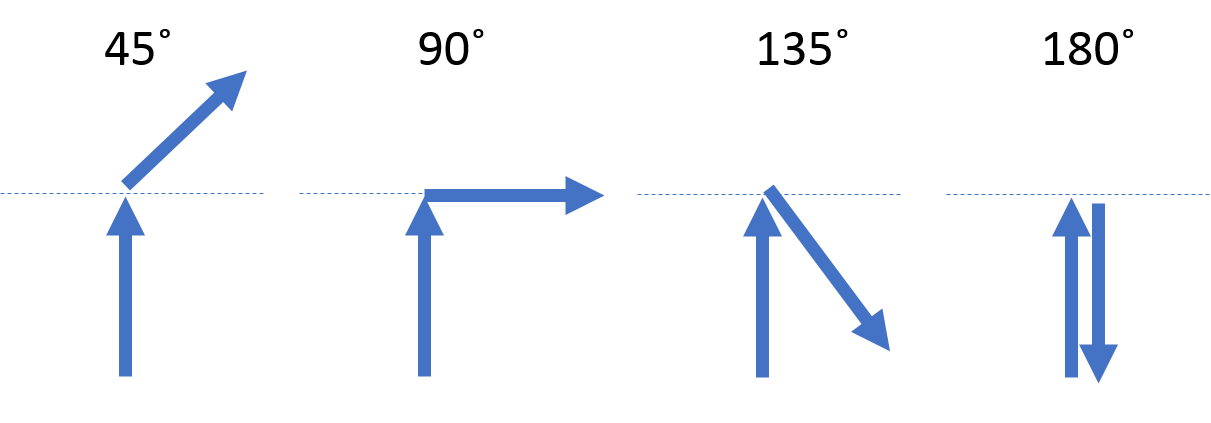
Using the masking tape and protractor create lines on the floor representing the following turns: 45, 90, 135, and 180 degrees. See example below:
Ask, "What is a computer program?" Sample Response: A computer program is a set of instructions that allows a computer to complete a task.
Ask, "What are some examples of computer programs and the tasks that they are used for?" Sample response: Student answers will vary as there are nearly infinite examples. Just some include: all of the apps on one's phone or computer or the navigation feature of a car GPS, and the many programs that make up a video game.
Say, "In computer programming, "code" refers to the instructions themselves. How we write the code will depend on the programming language we are using. To program our mBots, we will be using mBlock, a powerful Learn-to-Code program that allows us to use and display lines of code as blocks that can easily be moved around the screen."
Say, "You will be creating computer programs to control robots, specifically, mBots! Combining robots with programming allows us to easily see the results of our programs. You will learn many different programming concepts and tools to make amazing programs! You will also become an expert problem-solver by learning to break larger problems down into smaller components, thinking through challenges logically, and testing/improving your solutions! Let's get started!
Introduce the main features of the mBot including motors, lights, sounds, and sensors. See the Teacher's Guide for details about mBot's hardware and features.
Say, "We will have a chance to use all of these features, but today we will focus on controlling the motors."
Say, "Today we will use mBlock to create instructions for our mBots. This is mBlock!"
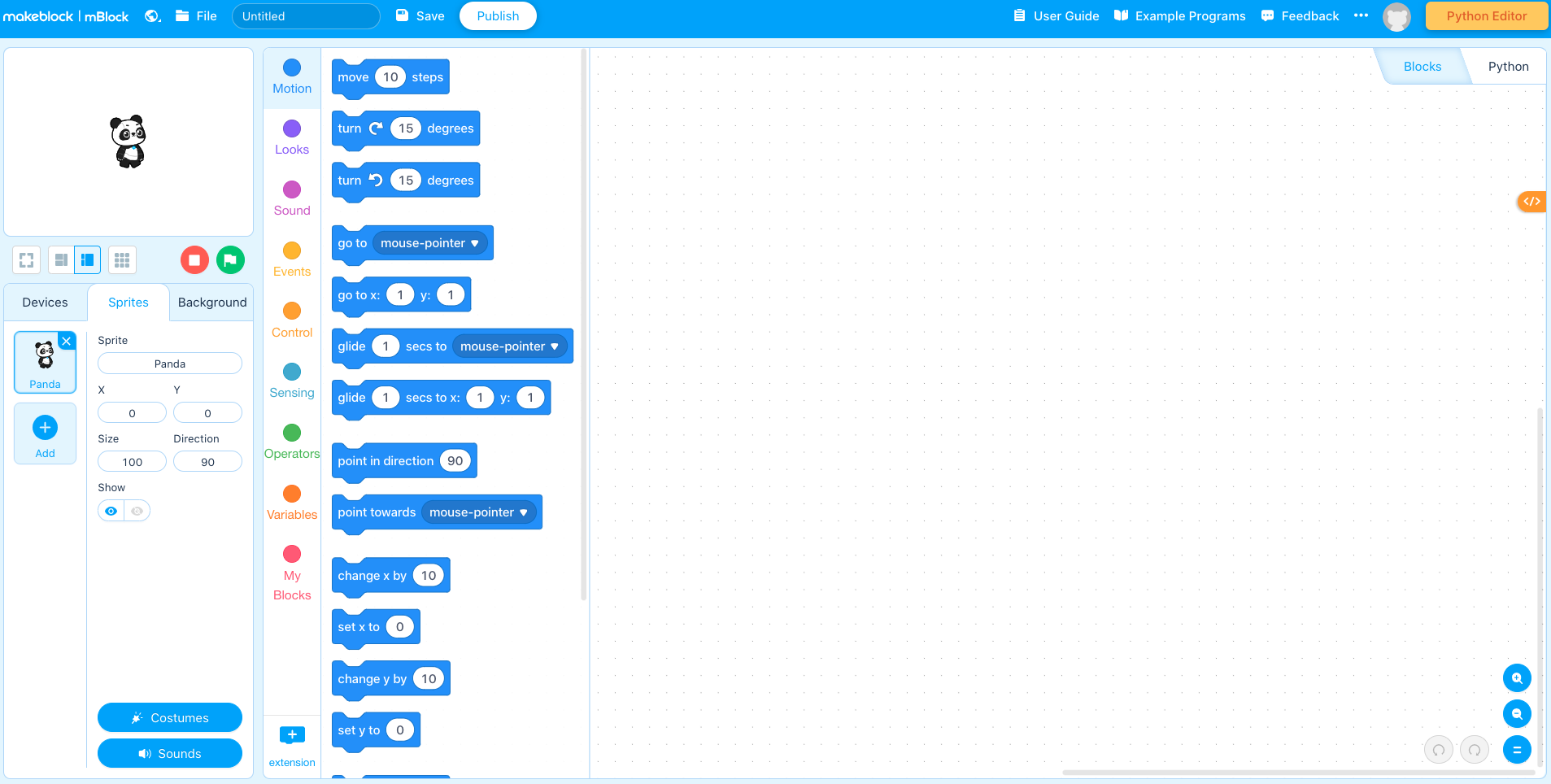
Say, "mBlock is based on drag and drop blocks, where you pull them in from the side and place them in the grey space, like so."
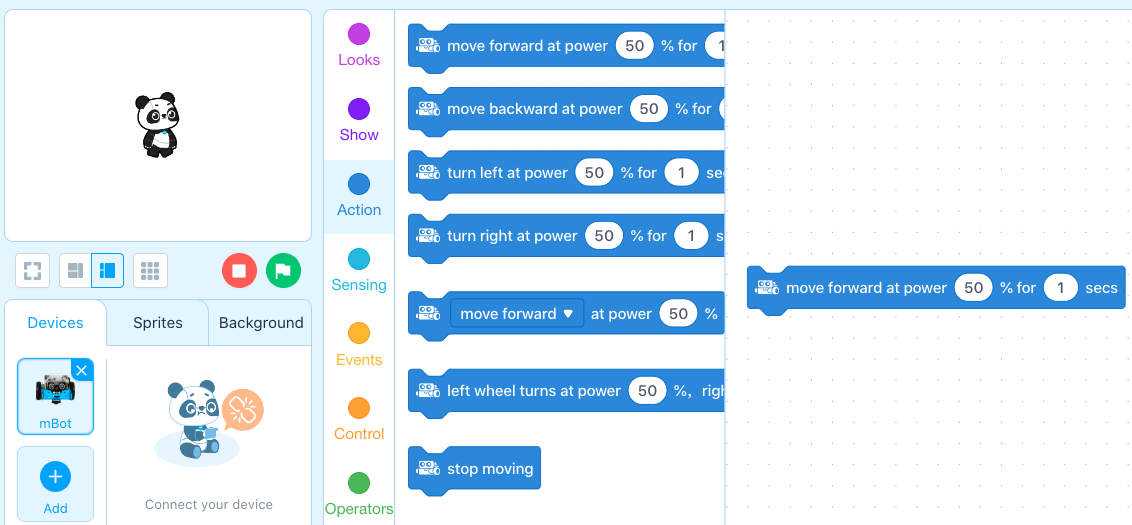
Say, "You will find the blocks you need by looking in the different coloured tabs. Today we will focus on blocks from the Action and Control tabs."
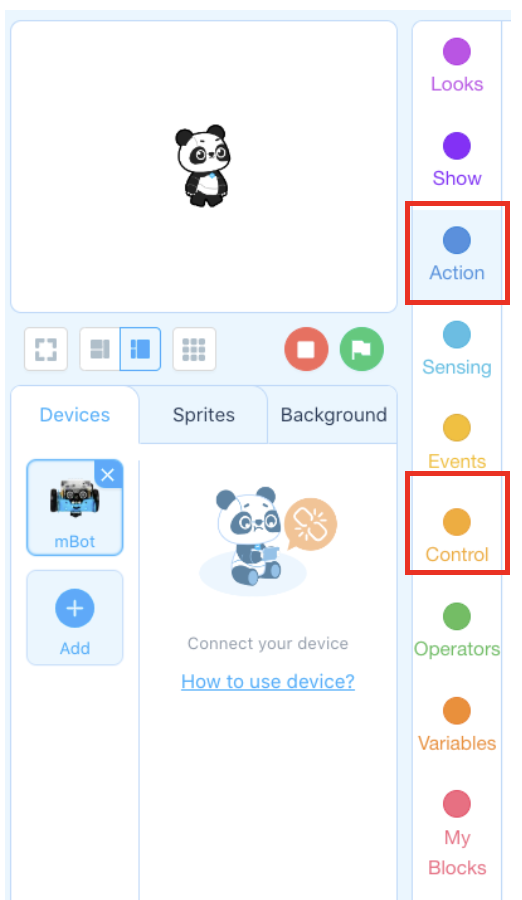
Say. "Here is an example of a simple computer program! This program uses move commands from the Action tab and "wait" blocks from the Control tab."
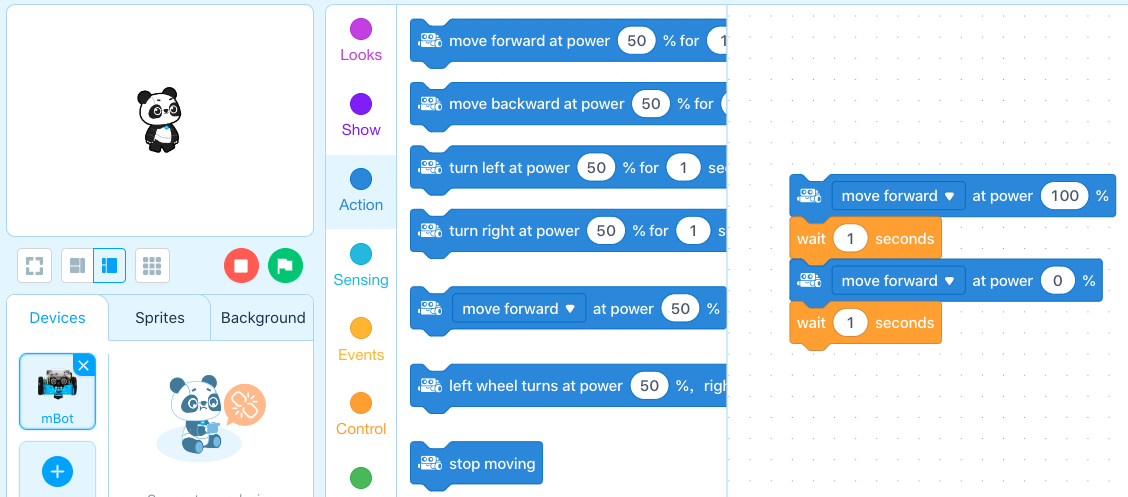
Ask, "What do you think this program will make the robot do?" Answer: This will make the robot move forward for one second, then stop.
Point out that the wait blocks are used to control when code (i.e. each block) is run. "Running" code means that we are sending our program to the mBot for execution.
Ask, "What do you think would happen if we removed the wait block from between the two motor commands?" Sample answer: In this case, the robot would move forward for a split second, then stop.
What is a computer program?
What is code?
What does code look like in mBlock?
How does one create a program for mBot in mBlock?
What are the blocks in the Control tab used for?
Ask, "What is a sequence? How have you heard this word used before?" Briefly discuss student suggestions.
Say, "In computer programming, a sequence is a series of actions that happen in a set order. In this example program, how many actions are there? What are they?" Answer: There are two actions. (1) Move forward at power 100% for 1 second. (2) Move forward at power 0% or stop.
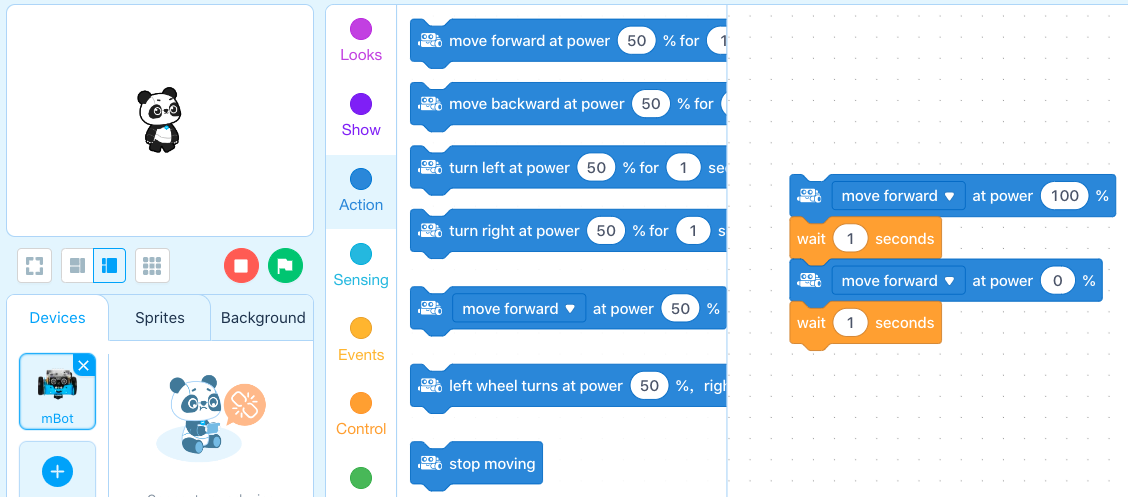
Say, "Sequences are an essential part of computer programming because many tasks must be completed with the same order of actions every time. Later, you will learn how to program actions to happen in parallel, or in a shifting order. For today, all of our programs will be sequences."
Say, "Your coding challenge is to create a a sequenced program with the following actions:"
Drive forward for 2 seconds.
Turn in any direction for two seconds.
Stop.
Say, "To complete your program, you will need the following blocks:"
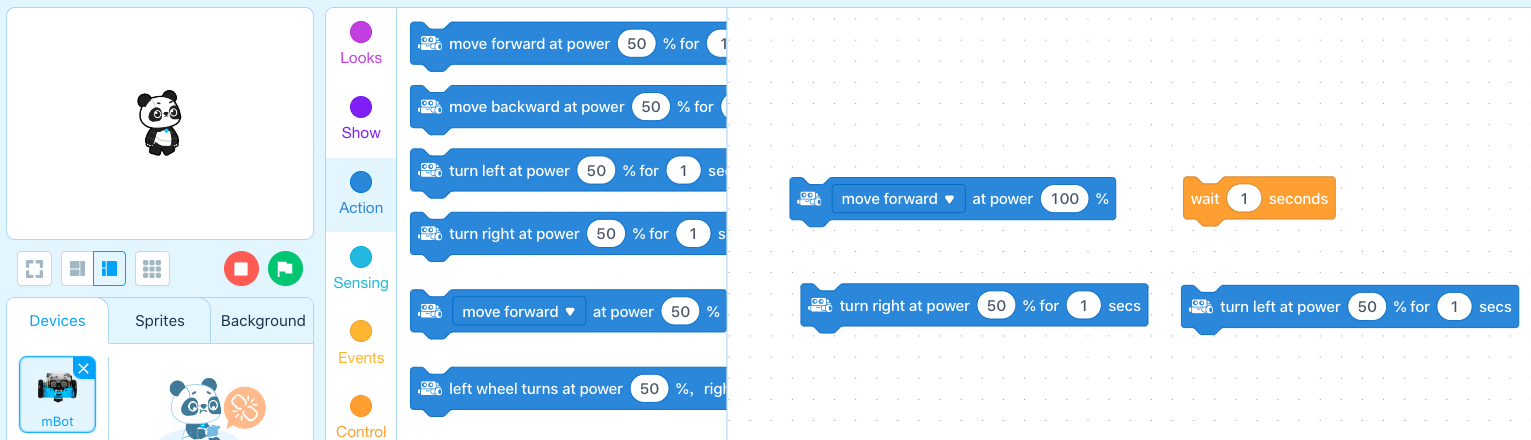
Say, "The "move forward at power ___ %" block is used to control the speed of each motor. By testing, improving, and re-testing your programs, you can calibrate the speed of each motor to achieve the desired actions."
Allow students time to create and test their programs. If some students finish early, have them start Coding Challenge #2.
Coding Challenge #1 - Example solution:
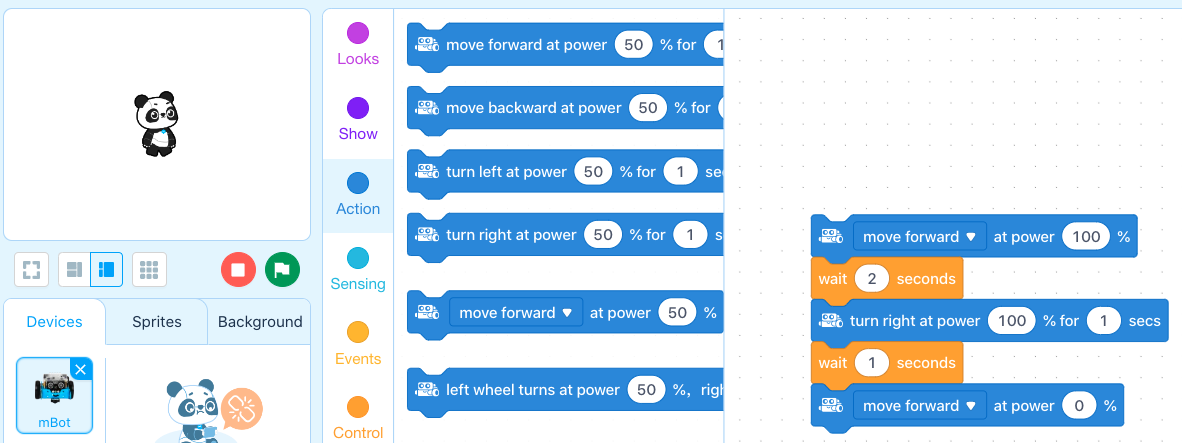
The second coding challenge is to create a program with four actions:
Drive forward for 1.5 seconds.
Make a 45-degree right turn.
Drive forward for 1 second.
Stop.
Have students test their code using the 45-degree reference tape on the floor. Hint to students that they can change the percentage of the turn power to achieve the desired action.
Coding Challenge #2 - Example solution:
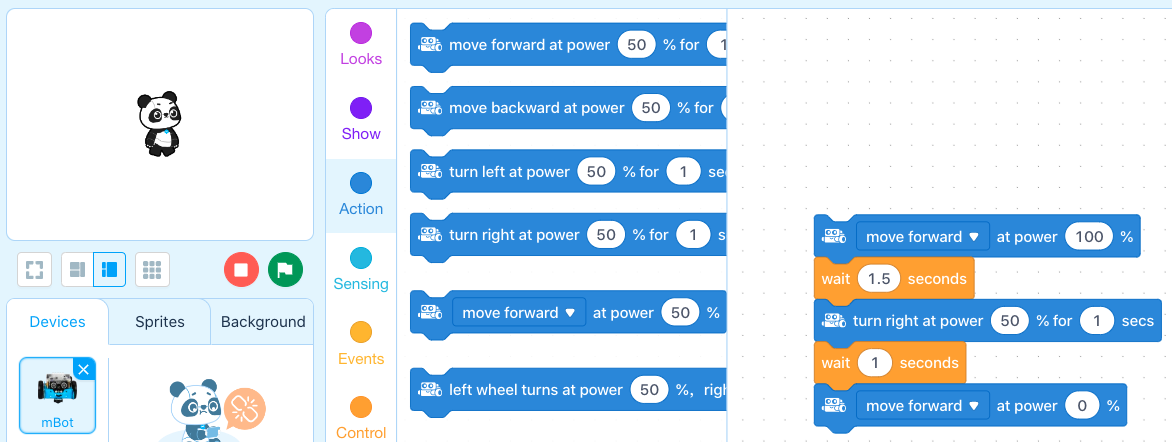
What is a sequence?
Are all computer programs sequences?
The third and final challenge of this lesson is to create a 5-action sequence that includes at least 2 of the following types of turns:
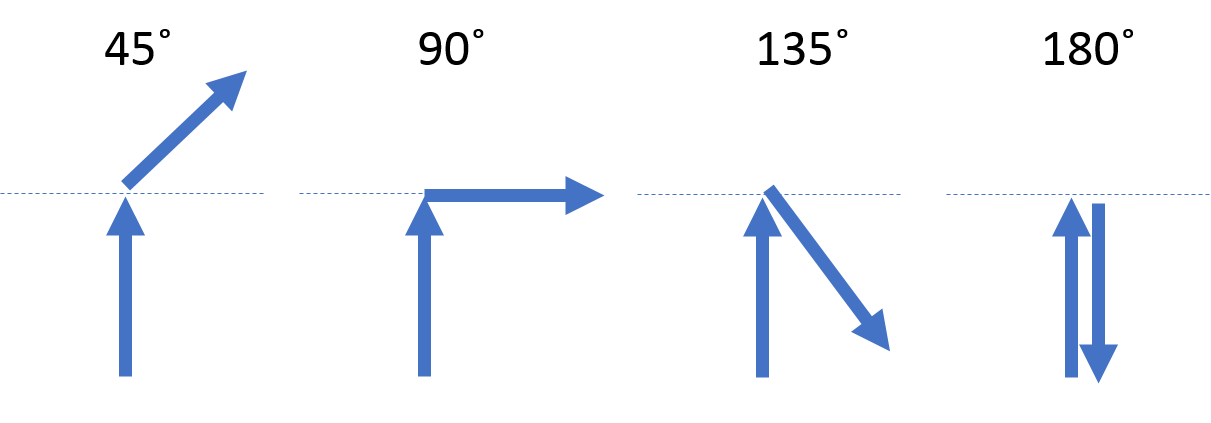
Have students use the tape on the floor as a reference for each turn.
Challenge #3 - Example solution:
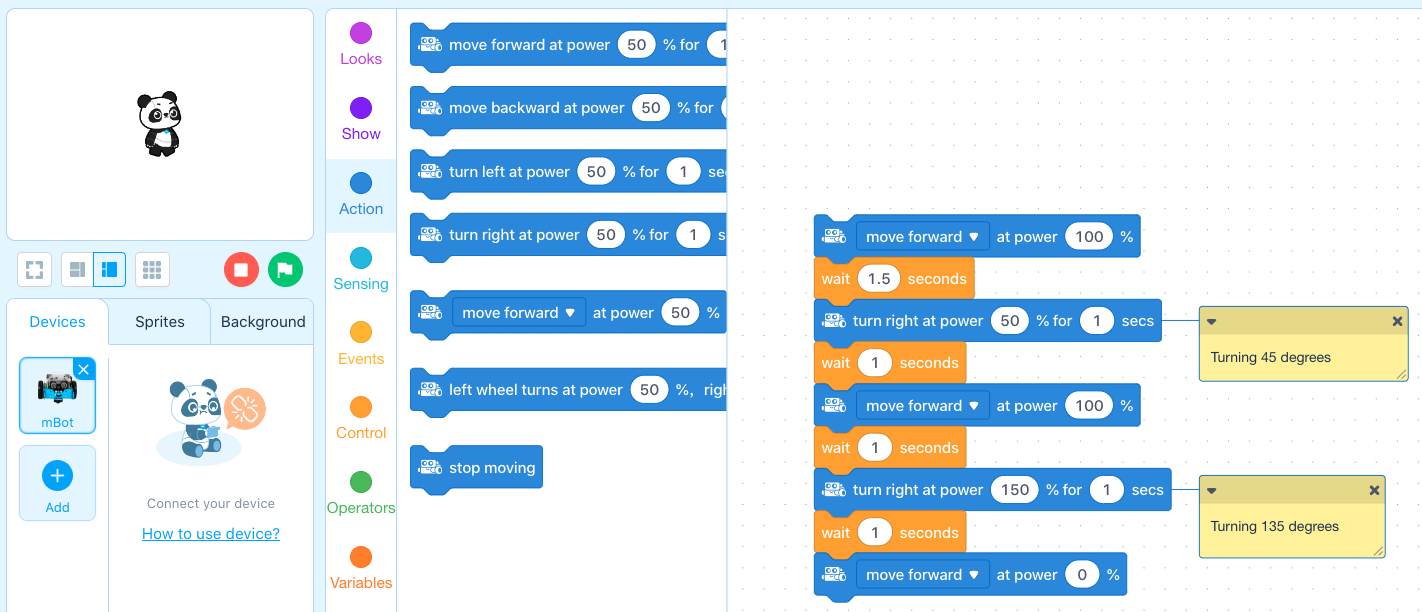
Ask, "What is a sequence? Is a computer program always a sequence?" Sample response: A sequence is a list or series of actions that occur in a defined order. Programs often contain sequences but do not have to. Many programs have actions that occur in shifting or looped orders.
Ask, "What are some examples of sequences in our everyday life?" Sample response: Parallel parking, pouring a bowl of cereal, brushing your teeth, tying your shoes, etc. These all represent examples of tasks that require the actions to be completed in the same order every time.
Ask, "Did your programs work the first time? What was your approach to designing a program that completed each challenge?" Sample response: The programs rarely work the first time. To complete the challenge, you need to brain storm, create the code, test, and improve the code until a solution is reached.
Use the Evaluation Rubric to review students' work.
[Optional] Share your students' work with the world using @logicsacademy and #mBot and #LearntoCode!
1A-AP-08: Model daily processes by creating and following algorithms (sets of step-by-step instructions) to complete tasks.
1B-AP-08: Compare and refine multiple algorithms for the same task and determine which is the most appropriate.
1B-AP-10: Create programs that include sequences, events, loops, and conditionals.
4a Students know and use a deliberate design process for generating ideas, testing theories, creating innovative artifacts or solving authentic problems.
5c Students break problems into component parts, extract key information, and develop descriptive models to understand complex systems or facilitate problem-solving.
5d Students understand how automation works and use algorithmic thinking to develop a sequence of steps to create and test automated solutions.
C5: Students will use technology to aid collaboration during inquiry.
C6: Students will use technology to investigate and/or solve problems.
F6: Students will demonstrate a basic understanding of the operating skills required in a variety of technologies.
Algebra (Coding)
C3.1 solve problems and create computational representations of mathematical situations by writing and executing code, including code that involves sequential, concurrent, repeating, and nested events
P2: Students will be expected to use digital tools to develop ideas and original works in innovative ways.
TOC1: Students will be expected to
safely use many forms of current technology for learning with growing competence
demonstrate conceptual understanding of how information and communication technology, digital tools, and authorized networks support their learning
use terminology related to information and communication technology
• Make changes and test again, repeating until satisfied with the product
• Use materials, tools, and technologies in a safe manner, and with an awareness of the safety of others, in both physical and digital environments
• Identify the skills required for a task and develop those skills as needed
• Use familiar tools and technologies to extend their capabilities when completing a task
• Demonstrate a willingness to learn new technologies as needed