
Loading…
Loading…
Students are introduced to the idea of recognizing larger patterns as a sequence of individual commands, as well as how to use the mBot LEDs.
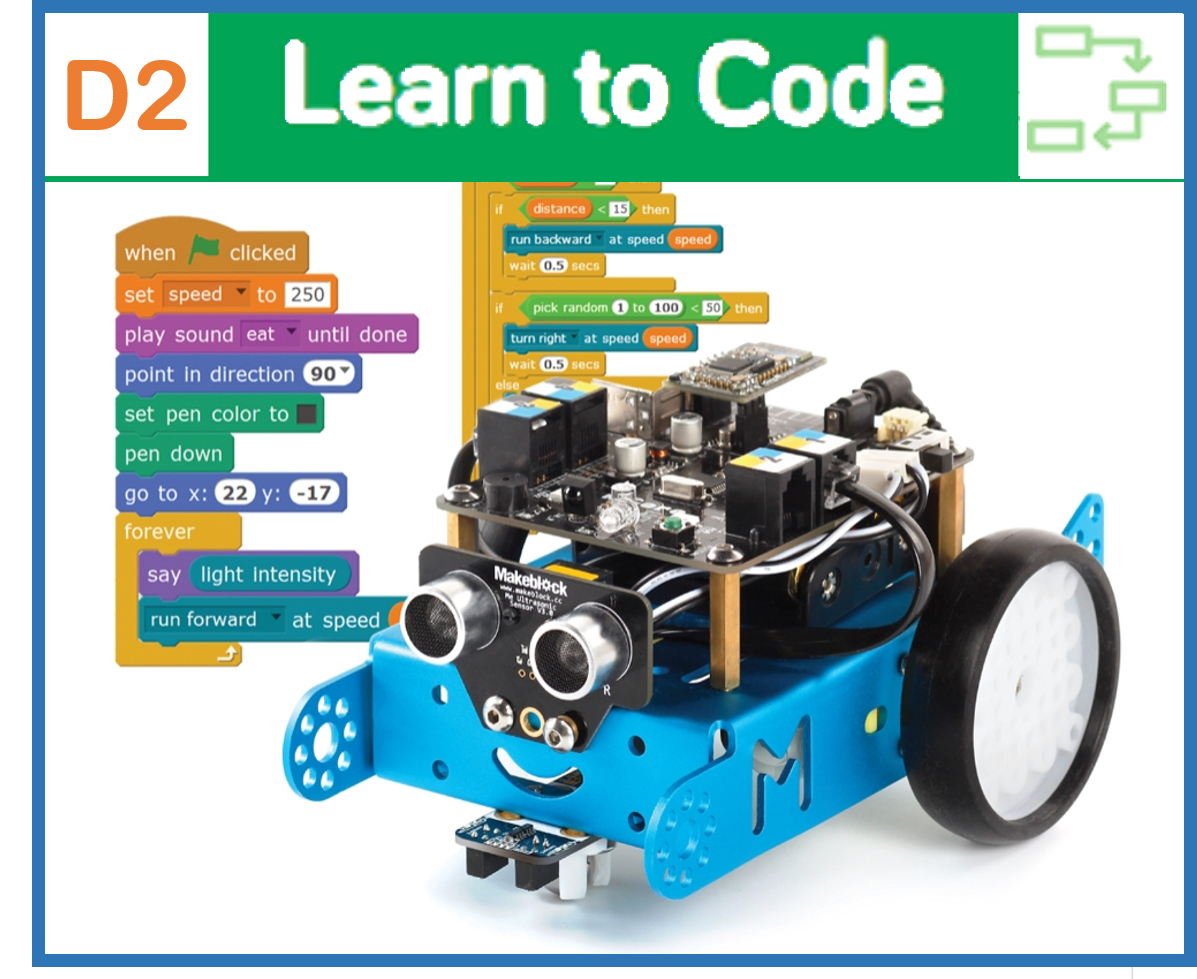
Students are introduced to the idea of recognizing larger patterns as a sequence of individual commands, as well as how to use the mBot LEDs. Students play the Reverse-Engineering Game! Students first create a sequence of 5 actions including motor commands and LED colours. Next, students pair up and observe their partner’s sequence. Each pair attempts to recreate each their partner's sequence, without seeing each other's code!
Practice identifying sequences and breaking larger actions down into their individual components.
Create sequenced programs that control the movement and colour of mBots.
Practice an iterative approach to design and problem solving.
Class set of mBots and devices (laptops, tablets, etc.)
A piece of paper for each group
A writing utensil for each group
Install mBlock on all devices.
Fully charge mBots/device.
See the Teacher's Guide (attached) to become familiar with the mBot hardware and the mBlock software.
New hardware this lesson: mBot LEDs.
Arrange classroom to allow lots of floor space for testing programs.
Ask, "What is a computer program?" Sample Response: A computer program is a set of instructions that allows a computer to complete a task.
Ask, "What is code? How do we use code to create computer programs in mBlock?" Sample Response: "Code" refers to the lines of written instructions that make up a program. In mBlock, code is displayed and used as blocks that can be dragged, dropped, and stacked on the screen to create a program for mBots.
Ask, "What is a sequence?" Sample response: In computer programming, a sequence is a series of actions that happen in a set order.
Ask, "What are some common examples of sequences from your daily routines?" Sample response: Walking to school, pouring a bowl of cereal, buttoning up a dress shirt, etc.
Ask, "What sequences have we already created for mBot?" Sample response: We created sequences which had the mBot drive forward and complete specific angled turns.
Ask, "In the last lesson, did your programs work the first time? What is a good approach to solving coding challenges?" Sample response: No. A good approach is to brainstorm a solution, create the program, test the program, and make improvements until a solution to the challenge is found.
Say, "Today we will take the concept of sequences even further! We will create new sequenced programs in mBlock that use a new component of the mBot's hardware: the LEDs. Once we have created our new programs, you will pair up with another student group and play the Reverse Engineering game!"
Ask, "What do you think is meant by Reverse Engineering?" Briefly discuss student suggestions and hint at the meaning by discussing what it means to engineer something. Answer: Reverse Engineering is the process of beginning with a finished product and breaking it down into smaller components to see how it is made, and recreating your own version.
Say, "This game will help us practice breaking larger tasks or activities into a set of smaller components or actions. This game will also highlight that the same robotic actions can sometimes be achieved with slightly different code. In computer programming, there are usually multiple ways of solving a problem. Let's get started!"
Demonstrate for students where the LEDs are found on the mBot. See the Teacher's Guide for additional details about this hardware.
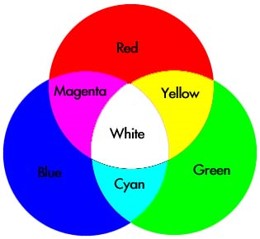
Say, "It would be impossible to create a display that could show all possible colours with each pixel. Instead, the three primary colours of light are used at varying intensities to create the illusion of a full range of colour. This works when the combined colours are very small or the viewer is far away. For example, this yellow square is a combination of red and green pixels. There are no yellow pixels!"

Say, "The mBots have lights that work like the pixels on a screen. You can change the intensity of Red, Green, and Blue colours to create any colour you want, similar to mixing paint. LEDs are often used in robotics because of their versatility!"
Demonstrate that the LED block can be found in the Show tab. Demonstrate how to change the Red, Green, and Blue (RGB) values to create different colours. For instance, combining green and blue will create cyan. Combining red and green will create yellow. Combining all three colours at the same intensity will create white light.
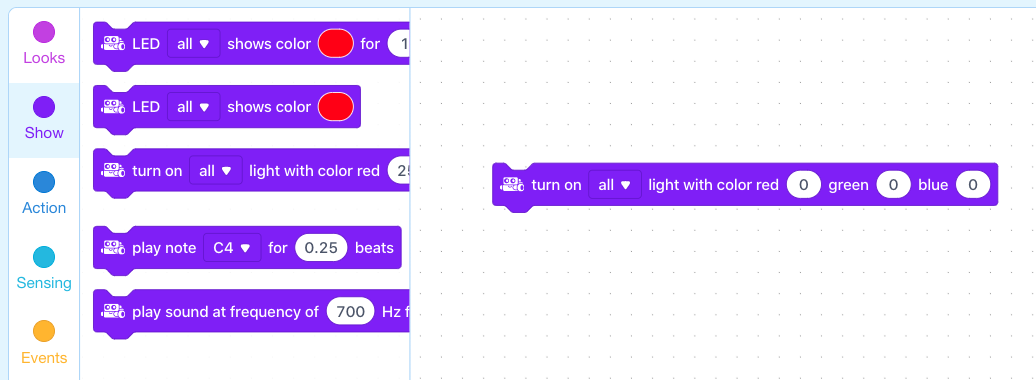
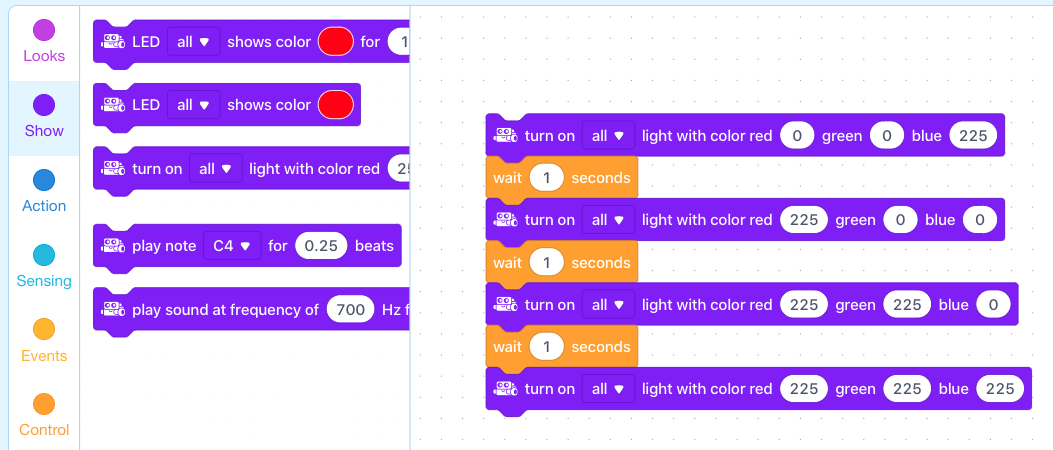
Say, "The timing of these lights can be controlled using the "wait" blocks in the Control tab."
Ask, "How many actions are part of this sequence? What do you think this example sequence will cause the mBot to do?" Answer: There are four actions. (1) Display blue light for 1 second. (2) Display red light for 1 second. (3) Display yellow light for 1 second. (4) Display white light.
What is a sequence?
What is reverse-engineering?
How would you create the illusion of yellow light using the "set led on board" block?
The first coding challenge is to create a 5-action sequence that displays a different colour as each action. If necessary, remind students how to connect their mBots to their devices and how to run their code (i.e. by clicking on the blocks of code).
Say, "To complete the first coding challenge, you will need the following types of blocks."
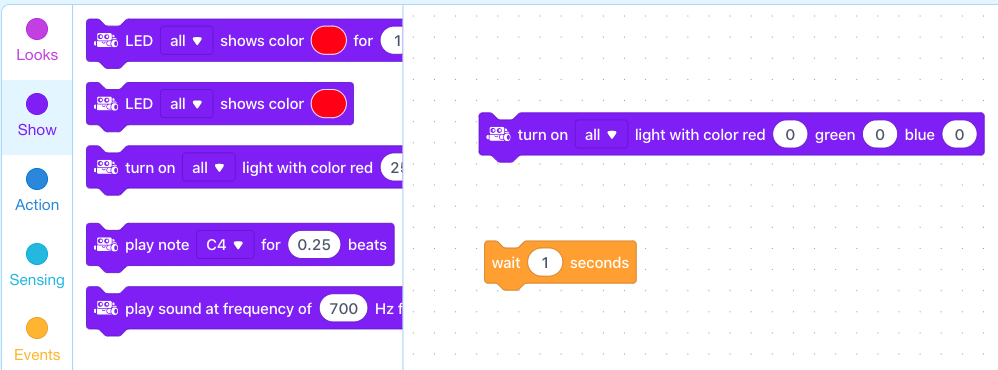
Allow students time to create and test their programs. As they finish, have them start Coding Challenge #2.
Coding Challenge #1 Example Solution:
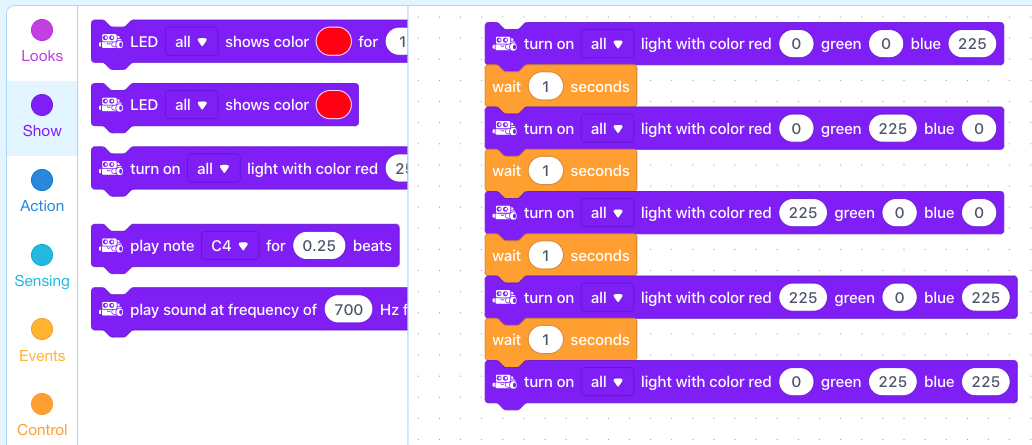
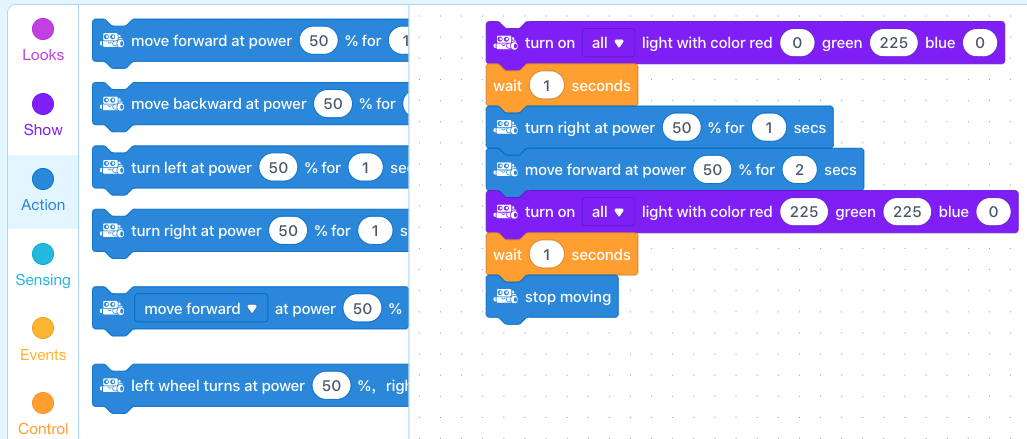
The second coding challenge is to create another 5-action sequence. This one should include the following actions, in any order:
Drive forward for 2 seconds.
Display green.
Display yellow.
Turn right for 1 second.
An action of your choice using the motors or LEDs.
Coding Challenge #2 Example Solution:
What is the second term in your sequence? What is the fourth?
How can you adjust the intensity of the lights? (Answer: Adjust the RGB values. Larger numbers means more light intensity.)
The instructions for the Reverse Engineering Game are as follows:
Have students create another 5-action sequence of their choice, making sure that they use both motor commands (action) and LEDs (show) in the sequence. This final action is not included in the 5 actions (i.e. it will be the sixth action).
Pair groups (or individuals if students are working with one mBot each).
Have students take turns observing the sequence of their partner's mBot, but make sure they don't see each other's code! Encourage students to write down their partner's sequence as they observe it, with as much detail as they can.
Once they have observed the sequence, they should start to "reverse-engineer" the program. This new program can be made beside their original program in the grey coding space of mBlock. Encourage students to continue to test the recreated programs against the originals as many times as their partner requires. The goal is to have the actions of the mBots be exactly alike. It is OK if program blocks do not match exactly!
Time permitting, have students share their programs with the rest of the group. Have them run the original and the recreated program simultaneously to show how close they have been able to get.
Ask, "What other sequences can you think of that involve colour and/or lights? Do you think these are controlled by a computer program?" Sample response: Some examples are: traffic lights, or other types of signalling such as the flashing red lights at a railway stop or even emergency signalling with Morse code. The timing of traffic lights are often controlled by a computer program.
Discuss, "What was your approach to reverse-engineering your partner's program?" Field student responses. A good approach is to observe the program several times and write down the actions of the sequence, as you see them. Then, continue with the iterative approach to problem solving that was reviewed at the beginning of the lesson. This includes creating the program, testing it against the original, noting the differences, improving the program, and repeating this process until the actions are well coordinated.
Use the Evaluation Rubric to review students' work.
[Optional] Share your students' work with the world on Twitter using @logicsacademy and #mBot and #LearntoCode!
1A-AP-11: Decompose (break down) the steps needed to solve a problem into a precise sequence of instructions.
1A-AP-14: Debug (identify and fix) errors in an algorithm or program that includes sequences and simple loops.
1A-AP-12: Develop plans that describe a program's sequence of events, goals, and expected outcomes.
5C Students break problems into component parts, extract key information, and develop descriptive models to understand complex systems or facilitate problem-solving.
5D: Understand how automation works and use algorithmic thinking to develop a sequence of steps to create and test automated solutions.
7C: Contribute constructively to project teams, assuming various roles and responsibilities to work effectively toward a common goal.
C5: Students will use technology to aid collaboration during inquiry.
C6: Students will use technology to investigate and/or solve problems.
F6: Students will demonstrate a basic understanding of the operating skills required in a variety of technologies.
Algebra (Coding)
C3.1 solve problems and create computational representations of mathematical situations by writing and executing code, including code that involves sequential, concurrent, repeating, and nested events
P2: Students will be expected to use digital tools to develop ideas and original works in innovative ways.
TOC1: Students will be expected to
safely use many forms of current technology for learning with growing competence
demonstrate conceptual understanding of how information and communication technology, digital tools, and authorized networks support their learning
use terminology related to information and communication technology
• Make changes and test again, repeating until satisfied with the product
• Use materials, tools, and technologies in a safe manner, and with an awareness of the safety of others, in both physical and digital environments
• Identify the skills required for a task and develop those skills as needed
• Use familiar tools and technologies to extend their capabilities when completing a task
• Demonstrate a willingness to learn new technologies as needed