
Loading…
Loading…
Students are introduced to a new fundamental coding concept, the Loop! Students are first challenged to create a sequence that has their mBot drive in a perfect square on the floor. Next, students are challenged to identify the “repeating unit” and place this inside of a loop, making their program much more efficient.
Students are introduced to a new fundamental coding concept, the Loop! Activity: Students are first challenged to create a sequence that has their mBot drive in a perfect square on the floor. Next, students are challenged to identify the “repeating unit” and place this inside of a loop, making their program much more efficient.
For students to understand and use a loop.
For students to understand why loops are a powerful tool in programming.
For students to practice pattern-recognition and breaking large problems down into their component parts.
Class set of mBots and devices
Install mBlock on all devices.
Fully charge mBots/devices.
See the Teacher's Guide (attached) to become familiar with the mBot hardware and the mBlock software.
Arrange classroom to allow lots of floor space for testing programs.
Ask, "What is a sequence?" Sample response: In computer programming, a sequence is a series of actions that happen in a set order.
Ask, "What programmed sequences have you created thus far for mBot?" Field student responses. In this level, thus far we have created sequences of motor and light commands.
Ask, "What blocks have you used thus far in mBlock? What are they used for?" Sample response: Thus far we have seen two sets of blocks for motor commands, the run forward block and the set motor speed blocks. We have used the set led on board block to control the coloured lights on mBlock, as well as the wait _ seconds block to control when each line of code is run.
Ask, "In mBot D1: Sequencing - Your First Program! how did you make sure your mBot drove in a straight line? How did you ensure it made the correct turn?" Sample response: To make sure the mBot drove in the correct way to complete the challenge, it was necessary to test and re-test the code and adjust the motor speeds and wait times with each test until a solution was found. This process is called calibrating the motor speed.
Say, "Today you will discover a new fundamental coding concept: the Loop! Loops are an incredibly powerful tool in programming because these allow computer programs to complete in seconds tasks that would take humans hours, days, or even years to complete by hand!"
Ask, "What do you think is meant by the term loop? What do you think it means in computer programming?" Sample response: A loop is a curved line that connects back to itself at the starting point, like a circle. In programming, a loop is a section of code that repeats.
Say, "To get started with loops, you will put your problem-solving and pattern-recognition skills to the test in a new challenge called, Square Dance! Let's begin!"
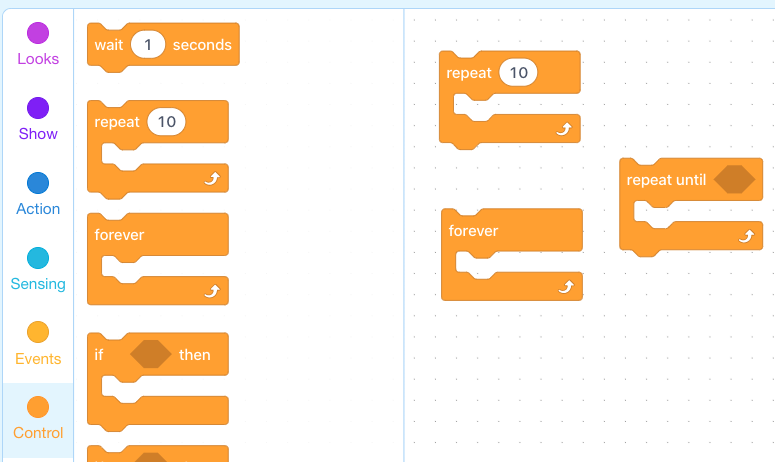
Say, "In mBlock, you can loop, or repeat, sequences of code using a Repeat block, which can be found in the Control tab. There are three types of Repeat blocks, which are shown here. The first is a Repeat # block, which allows the programmer (you!) to repeat a section of code a certain number of times. The second is a Repeat forever block, which continually repeats a section of code until the entire program is manually stopped. The third is a Repeat until block, which repeats a section of code until a certain condition is met. More on this later in the course! You will get a chance to use all of these blocks during this Learn to Code course, but today we will focus on the Repeat # block.
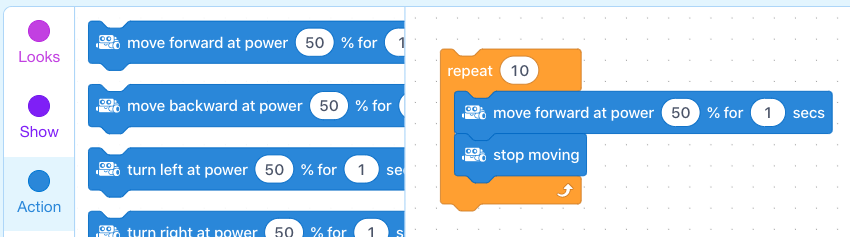
Say, "You can repeat a sequence of code simply by placing the whole section inside of the Repeat block, like so."
What is a loop in computer programming?
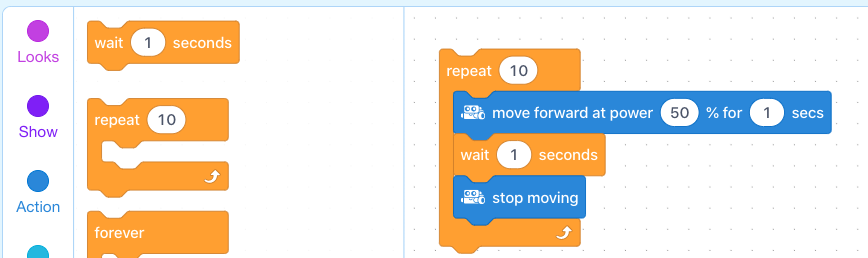
In this example, why do you think there is a wait block following the stop moving block. What would happen if the wait block was absent? Sample response: The Repeat block runs the code as if the top of the sequence were attached to the bottom of the sequence. With no wait block between the top and the bottom, the mBot would only stop for a split second before the next blocks were run.
Say, "The first coding challenge is for you to create a program that has the mBot drive in a perfect square (see example below) using only the set motor speed and wait blocks. No repeats yet! To do so, you will need to break down the overall pattern into the component parts."
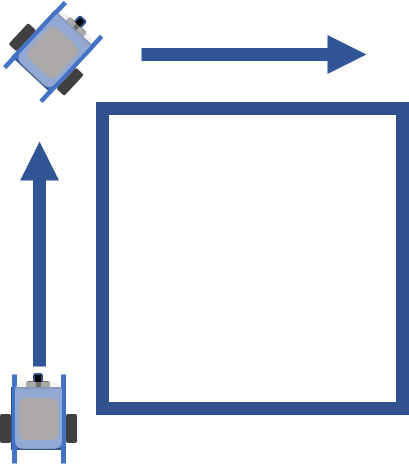
Ask, "What should be the first action of the square sequence? What is the second? What is the third?" Sample response: Set the motor speeds to the same speed to drive forward for a certain amount of time. The second is to make a 90-degree turn. The third is to move forward again for the same amount of time as the first action.
Coding Challenge #1 - Example Solution
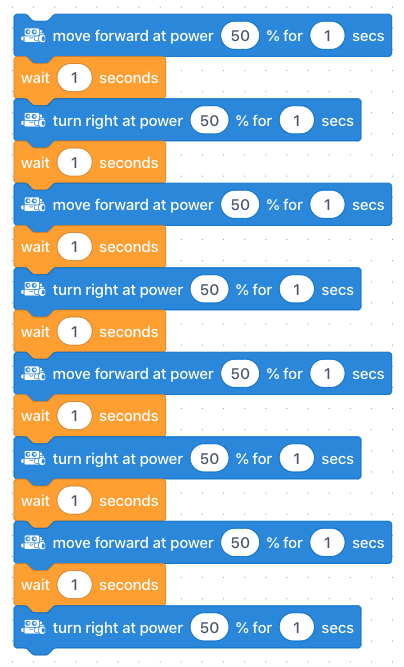
Say, "The trick to using loops effectively is to identify repeating patterns, or repeating units, in your code."
Ask, "What is the minimum amount of code from your current program that you could repeat to obtain the same result? Asked differently, what is the Repeating Unit in your code?" Sample response: The repeating unit is the sequence: (1) Drive forward, (2) Turn.
Say, "Your next coding challenge is to identify the repeating unit in your program, and place this code inside of a Repeat # block, to create a looped sequence that has your mBot drive in a perfect square.
Coding Challenge #2 - Example solution
Note: These values will need to be calibrated for each mBot. Copying this solution exactly will likely not produce a perfect square for everyone.
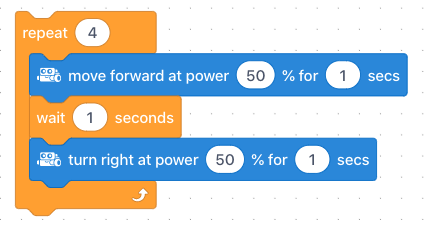
What is a repeating unit? Sample response: A repeating unit is a section of identical code that repeats within a sequence.
What two components of your code control the angle of the turn? Sample response: The motor speed and the wait time control the angle of the turn. Increasing speed and/or wait time will result in a larger angled turn.
Say, "Loops are useful because they make our code shorter, easier to read, and much easier for us to make changes that affect the entire program. Our final challenge will highlight these advantages."
Say, "In this challenge you will reprogram your mBot to drive in the path of one of the shapes below by modifying your looped program from Challenge #2. Hint! One of these paths requires more than one type of turn!"

Coding Challenge #3 - Example solution for triangle
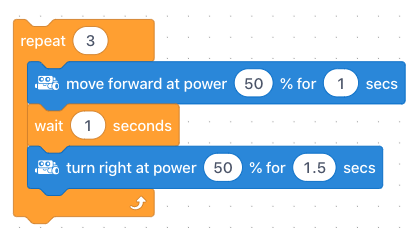
Coding Challenge #3 - Example solution for star outline (third shape from the left)
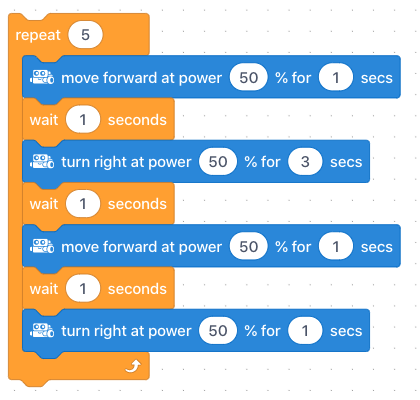
Ask, "How might loops help or hinder our ability to quickly change the mBot's path? How would making changes be different if our program was one long sequence of repeating units?" Sample response: With a loop, all that needs to be changed is the wait time value for one turn, and the number of repeats. This is much faster than changing the wait time values for each and every turn in a long sequence. Consider a program with 100 turns or 10,000 turns. Changing a key value that applies to each turn would be nearly impossible without structuring the program with a loop.
Ask, "What other benefits might using a loop provide?" Sample response: Students answers will vary. One additional benefit is that looping a sequence makes the code much shorter and easier to read. This makings finding and correcting errors much easier.
Discuss, "What was the most challenging part of designing a path for a perfect square? How did you overcome this challenge?"
Use the Evaluation Rubric to review students' work.
[Optional] Share your students' work with the world using @logicsacademy and #mBot and #LearntoCode!
1A-AP-10 Develop programs with sequences and simple loops, to express ideas or address a problem.
1A-AP-11 Decompose (break down) the steps needed to solve a problem into a precise sequence of instructions.
1A-AP-14 Debug (identify and fix) errors in an algorithm or program that includes sequences and simple loops.
4D Students exhibit a tolerance for ambiguity, perseverance and the capacity to work with open-ended problems.
5D: Understand how automation works and use algorithmic thinking to develop a sequence of steps to create and test automated solutions.
7C: Contribute constructively to project teams, assuming various roles and responsibilities to work effectively toward a common goal.
C5: Students will use technology to aid collaboration during inquiry.
C6: Students will use technology to investigate and/or solve problems.
F6: Students will demonstrate a basic understanding of the operating skills required in a variety of technologies.
Algebra (Coding)
C3.1 solve problems and create computational representations of mathematical situations by writing and executing code, including code that involves sequential, concurrent, repeating, and nested events
P2: Students will be expected to use digital tools to develop ideas and original works in innovative ways.
TOC1: Students will be expected to
safely use many forms of current technology for learning with growing competence
demonstrate conceptual understanding of how information and communication technology, digital tools, and authorized networks support their learning
use terminology related to information and communication technology
• Make changes and test again, repeating until satisfied with the product
• Use materials, tools, and technologies in a safe manner, and with an awareness of the safety of others, in both physical and digital environments
• Identify the skills required for a task and develop those skills as needed
• Use familiar tools and technologies to extend their capabilities when completing a task
• Demonstrate a willingness to learn new technologies as needed