
Loading…
Loading…
Students are introduced to another feature of loops: that one’s program can be slightly different each time it repeats. Students are introduced to randomization in programming. Students incorporate randomization into a looped sequence to have their mBot avoid being hit by human-tossed ping-pong balls!
Students are introduced to another feature of loops: that one’s program can be slightly different each time it repeats. Students are introduced to randomization in programming. Activity: Students incorporate randomization into a looped sequence to have their mBot avoid being hit by human-tossed ping-pong balls!
For students to discover that looped sequences can change with each time they repeat
For students to use an iterative approach to problem-solving and design
For students to get creative and use loops in a new way
Class set of mBots and devices
Class set of ping-pong balls (1 per group)
Install mBlock on all devices.
Fully charge mBots/devices.
See the Teacher's Guide [attached] to become familiar with the mBot hardware and the mBlock software.
Arrange classroom to allow lots of floor space for testing programs.
Ask, "What is a loop in programming?" Sample response: In programming, a loop is a section of code that repeats.
Ask, "Why are loops useful in programming?" Sample response: Loops are useful because they make our code shorter and easier to read, which makes code easier to change. Loops also allow us to create programs that can quickly complete repetitive tasks that would take humans much longer to do by hand.
Ask, "What are the different types of loops that we have discussed/used?" Sample response: Thus far we have discussed the Repeat # block, the Repeat forever block, and the Repeat until block. We have focused on the Repeat # block.
Say, "Today we will take the concept of loops even further! So far we have used loops to repeat a sequence of code, with each iteration (meaning each time the sequence is repeated) being identical to the last. Looping repeating units is a fantastic way to write concise and organized code, but much of the power and fun of using of loops is when each iteration is slightly different from the last. To explore this concept, we need to discover a new programming concept: randomization!"
Ask, "What do you think is meant by the term random? For instance, what does it mean for a number to be chosen randomly?" Sample response: Randomness is when something happens without a conscious decision for a particular outcome. If a number is chosen randomly, this means that all other numbers were equally likely to be chosen.
Say, "Today we will add an element of randomization to our looped sequences in a game of Robot Dodgeball! The goal will be to create a program that has your mBot move in a way that is unpredictable, even to the person who writes the code (you!). Let's get started!"
Say, "Today we will once again be using the Repeat # block. Recall, this block can be found in the Control tab."
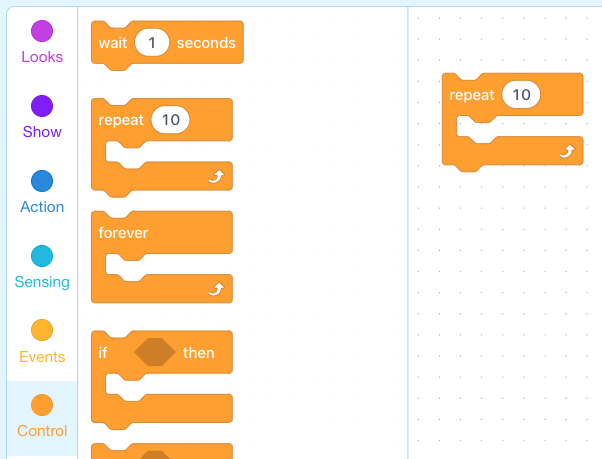
Say, "Today we will also be using a new programming tool, randomization. In this case we will use a new block to choose a random number. This block can be found in the green Operators tab. The Operators tab is filled with blocks that allow us to add logical and mathematical operations to our code, hence the term Operators. We will discuss Operators in greater detail in Levels E3 and E4 of this course. Today, we'll focus on the pick random # block."
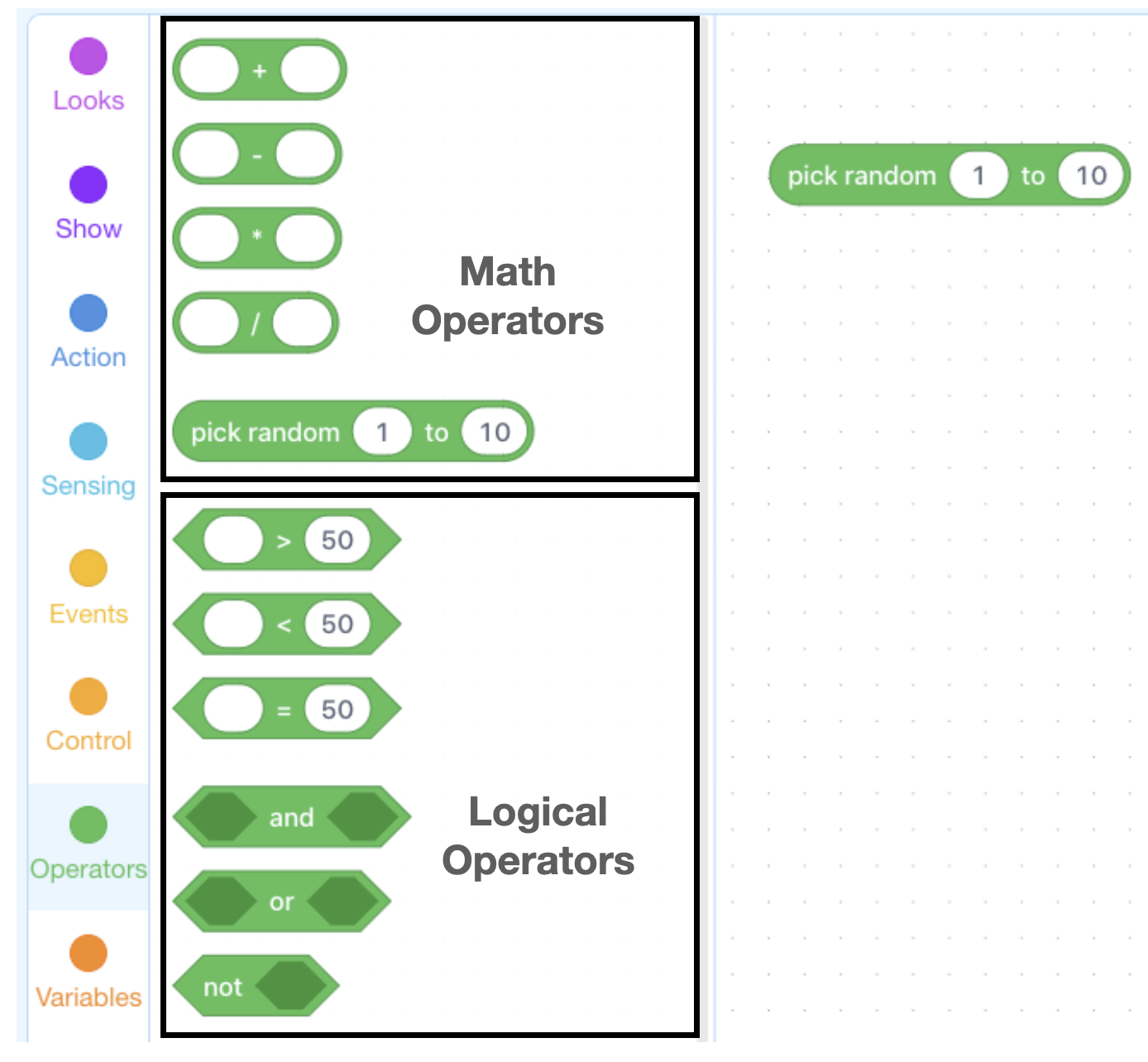
Say, "The pick random # block is a special type of block that can be placed inside of other blocks where numbers would normally go. Once inside of another block, the pick random # block will act as a number. Each time a program is run, the block will represent a random number from within the defined range, in this case, from 1-10."
Ask, "In this example code, how is the pick random # block being used? What does it represent?" Sample response: In this code, the pick random # block represents the wait time, which will be a number between 1 and 10.
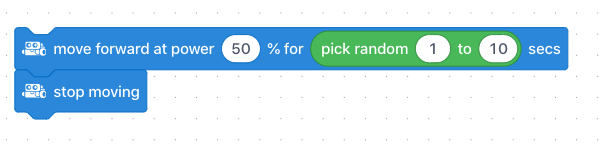
Ask, "Let's say I run this code and the mBot drives forward for 3 seconds. If I run the code a second time, will the wait time be the same?" Answer: Trick question! The wait time may or may not be the same. A random number between 1 and 10 will be chosen. The chosen number might be 3, but it is equally likely to be any other number between 1 and 10.
Ask, "Why doesn't the pick random # block click to other blocks? How it this block used?" Sample response: This block is rounded and is unable to click to other blocks because it is a value, not an action. Instead, the pick random # block can be placed inside of other blocks in the place of numbers.
Say, "Your first challenge is to create a looped sequence that has mBot complete a slightly different action each time your sequence repeats. To do so, you will need the following types of blocks."
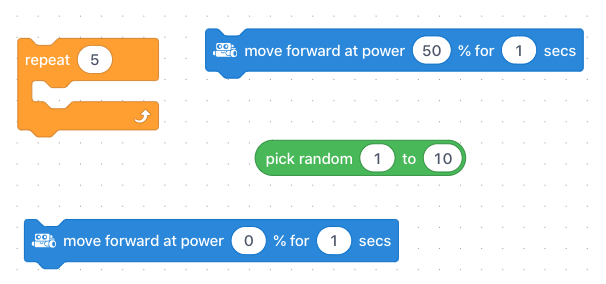
Challenge students to use the above blocks to create a sequence that:
Repeats 5 times
Has the mBot drive forward or turn for a random time between 0 and 2.5 seconds before stopping for a random time between 0 and 1.5 seconds.
Note for Educators: Using decimal numbers rather than integers within the pick random # block provides a much greater number of values that can be randomly chosen. For example, if a range of 1 to 3 is used, the only numbers that can be chosen are 1, 2, & 3. If the range includes a decimal number, mBlock will choose a random number within the range to the nearest thousandth (e.g. 1.183, 2.005 etc.).
Coding Challenge #1 - Example solution
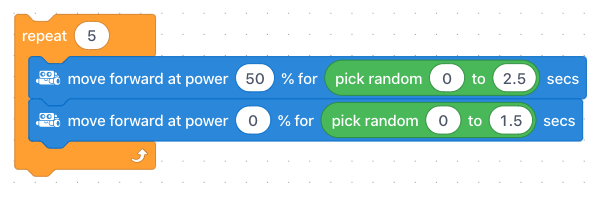
Say, "Now that you've had a chance to see your looped sequence with randomization in action, let's brainstorm some ideas for how to make the best possible Robot Dodgeball program. Remember, the goal is to create a program that has mBot move in an unpredictable way to avoid getting hit by the ping-pong balls."
Ask, "How might you change your program to make your mBot harder to hit?" Field student responses. Sample response: A good place to start would be to add a turning feature to the sequence, turning for a random number of seconds. Students might also consider having the mBot drive at a random speed.
Challenge students to use some of the ideas from the group brainstorm to modify their programs to make their mBot move in the most erratic and unpredictable way possible. Some suggestions are to:
Add a turn or multiple turns to the sequence
Have mBot drive at a random speed
Include a repeated sequence within the larger Repeat block that repeats a random number of times!
Coding Challenge #2 - Example solution
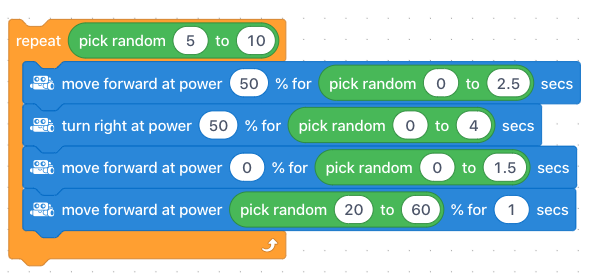
Ask, "The second time your program loops, will the number chosen by the pick random # block be the same as it was the first time the code ran? What about the fourth time it loops? The tenth?" Sample response: "Trick question! Each time the program loops, a random number is chosen. This means that each number is equally likely to be chosen. So, the same number might be chosen again, or a different number may be chosen."
Now is the time to put your dodging programs to the test! Have students stand back 2-3 meters from their mBots, run their programs, then attempt to hit the mBot with the ping-pong ball!
NOTE: Before beginning, students should change the Repeat block in their program from a Repeat # block to a Repeat forever block.
Encourage students to continue testing and improving their programs as they play the game.
Class-wide Version: For a giant game of Robot Dodgeball, have all the students place their mBots on the floor in a central area and run their programs at the same time. Have everyone stand 3 meters back from the mBots and begin tossing ping-pong balls. Once an mBot is hit, pause tossing and remove the mBot. The last one driving wins! It is a good idea at this point to remind students about the class rules for respect and safety (i.e. remind students not to throw the ping-pong balls at one another!).
Ask, "In what other ways could we use randomization with mBot?" Sample response: We could use the pick random # block with the coloured LEDs to choose random colours. We could also use it to choose random motor speeds.
Ask, "Can you think of any other examples of programs that use loops or randomization?" Sample response: Randomization is used extensively in video game design. For example, the movement of targets, enemy sprites, even background images often include an element of randomization. Randomization is also used extensively in scientific studies that choose random samples of a population.
Discuss, "What was the best way for you to use loops and randomization to create unpredictable movements for your mBot? Were there any ideas that, once tested, turned out differently than what you expected?"
Use the Evaluation Rubric to review students' work.
[Optional] Share your students' work with the world using @logicsacademy and #mBot and #LearntoCode!
1A-AP-10 Develop programs with sequences and simple loops, to express ideas or address a problem.
1A-AP-11 Decompose (break down) the steps needed to solve a problem into a precise sequence of instructions.
1A-AP-14 Debug (identify and fix) errors in an algorithm or program that includes sequences and simple loops.
4D Students exhibit a tolerance for ambiguity, perseverance and the capacity to work with open-ended problems.
5D: Understand how automation works and use algorithmic thinking to develop a sequence of steps to create and test automated solutions.
7C: Contribute constructively to project teams, assuming various roles and responsibilities to work effectively toward a common goal.
C5: Students will use technology to aid collaboration during inquiry.
C6: Students will use technology to investigate and/or solve problems.
F6: Students will demonstrate a basic understanding of the operating skills required in a variety of technologies.
Algebra (Coding)
C3.1 solve problems and create computational representations of mathematical situations by writing and executing code, including code that involves sequential, concurrent, repeating, and nested events
P2: Students will be expected to use digital tools to develop ideas and original works in innovative ways.
TOC1: Students will be expected to
safely use many forms of current technology for learning with growing competence
demonstrate conceptual understanding of how information and communication technology, digital tools, and authorized networks support their learning
use terminology related to information and communication technology
• Make changes and test again, repeating until satisfied with the product
• Use materials, tools, and technologies in a safe manner, and with an awareness of the safety of others, in both physical and digital environments
• Identify the skills required for a task and develop those skills as needed
• Use familiar tools and technologies to extend their capabilities when completing a task
• Demonstrate a willingness to learn new technologies as needed