
Loading…
Loading…
Students discover a new fundamental concept in computer programming: Events! Students discuss their definition, utility in programming in general, and how to use them in mBlock. Students explore the light and sound blocks (LEDs, play tones, show drawing) by using event blocks to trigger several different sequences. All of these events culminate in an mBot Dance Off!
Students discover a new fundamental concept in computer programming: Events! Students discuss their definition, utility in programming in general, and how to use them in mBlock.Activity: Students explore the light and sound blocks (LEDs, play tones, show drawing) by using event blocks to trigger several different sequences. All of these events culminate in an mBot Dance Off!
For students to understand what events are and how they are used in computer programming.
For students to practice creating events in mBlock.
For students to learn to use several new features of the mBot including sounds and the LED Matrix.
Class set of mBots and devices
Install mBlock on all devices.
Fully charge mBots/devices.
See the Teacher's Guide [attached] to become familiar with the mBot hardware and the mBlock software.
Arrange classroom to allow lots of floor space for testing programs.
Ask, "What is a sequence?" Sample response: In computer programming, a sequence is a series of actions that happen in a set order.
Ask, "What is a melody? Is a melody a sequence?" Sample response: "Yes! A melody is a series of musical notes that are played in a set order."
Ask, "How do I program mBot to display different coloured LEDs?" Sample response: You would use the set led on board block. To use this block, you set the values of red, green, and blue to create any colour you would like.
Ask, "What combination of red, green, and blue values would I need to create a yellow colour? What about purple? Sample response: To get yellow, you would need the green and red values to be roughly equal, with blue equal to zero. To get purple, you would need the blue and red values to be roughly equal, with green equal to zero.
Say, "Today you will discover a new fundamental coding concept: Events! Events are an important tool in computer programming because they allow the user of the program (often called, "the user") to control precisely when certain actions will be run."
Ask, "What do you think is meant by the term 'event' in programming?" Sample response: In programming, an 'event' is an action taken by the user that triggers a set of code to run."
Say, "Events are particularly useful in programs such as video games, where the actions of the character on the screen (also called the sprite) are determined by mouse-clicks or button-pushes by the user. Today we will use Events to control lights, music, and even images displayed by your mBot! Let's get started!"
This lesson uses the mBot coloured LEDs, the speakers, and the LED Matrix, or screen. Remind students where the LEDs are found on the mBot and point out the LED Matrix. Refer to the Teacher's Guide for additional information about this hardware.
Say, "In mBlock, sections of code can be triggered by key-presses, mouse-clicks, or other events using When blocks from the Events tab."
Say, "There are many different types of When blocks available in Scratch and mBlock, but we will focus on two types for this course. Each is activated by a different action by the user. The first is the When flag clicked block, which runs any attached code only when the green flag is clicked. The second is the When key pressed block, which runs attached code only when a chosen key on the keyboard is pressed. You can choose almost any key on your device! Today's coding challenges will focus exclusively on the When key pressed block."
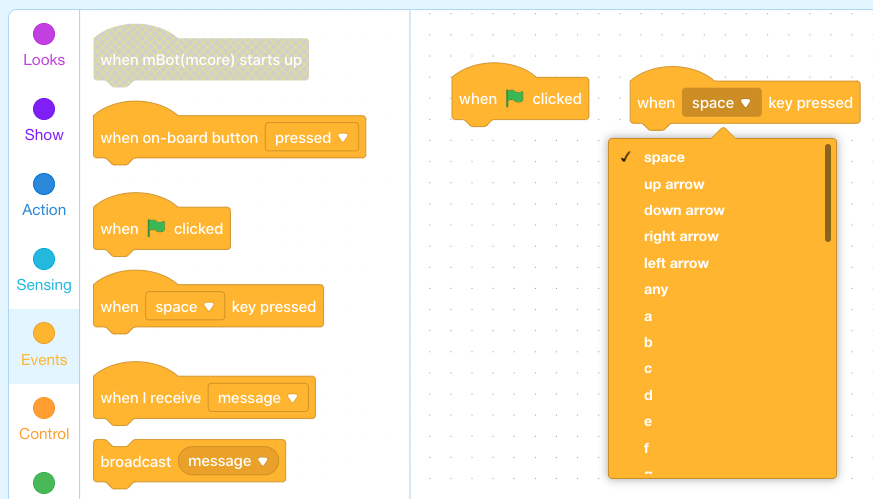
Say, "Event blocks can be used simply by attaching the sequence you would like to be triggered to the bottom of the When block, like so."
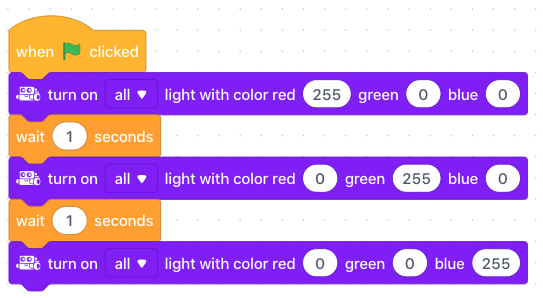
Say, "In this example, when the green flag is clicked, the mBot will complete the sequence below, which changes the coloured LEDs red, then green, then blue."
Ask, "What is an event in computer programming?"
Ask, "Why might events be useful in a program?"
Ask, How do you create an event in mBlock?"
Say, "The first coding challenge is for you to create your first three events using the When key pressed block and the coloured LEDs. Let's get started!"
Challenge students to create the following events:
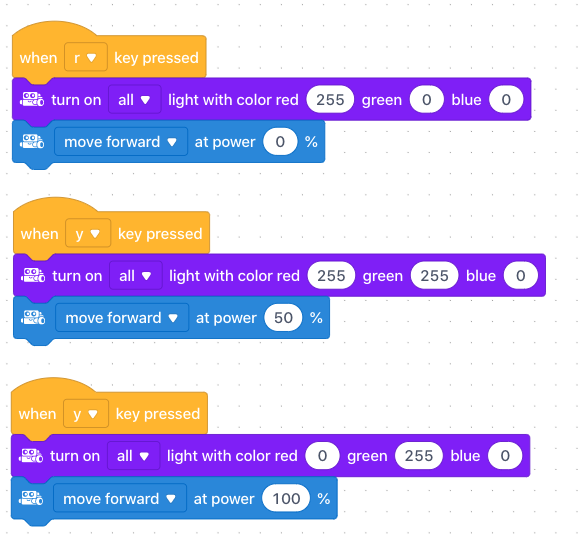
When 'R' is pressed, mBot displays red light and sets motor speeds to zero.
When 'Y' is pressed, mBot displays yellow light and drives at a slow speed.
When 'G' is pressed, mBot displays green light and drives at a fast speed.
HINT: Once students have created their first event, they can complete the challenge faster by duplicating their code and modifying the When and set led on board values, rather than grabbing new blocks from each tab. Duplicating code can be done by simply right-clicking a section of code, then choosing "duplicate", like so.
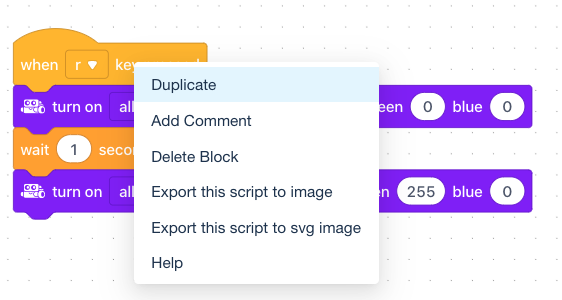
Coding Challenge #1 - Example solution
Say, "The second coding challenge is to create an event that plays an 8-note melody. This can be done using the play tone on note block in the Robots tab. This block allows you to choose a note on the major scale (C, D, E, F, G, A, B, C) and the beat, or how long the note is played. The length of the notes from shortest to longest are: Eighth, Quarter, Half, Whole, and Double."
Say, "To create a melody, simply create a sequence of notes! Here's an example:"
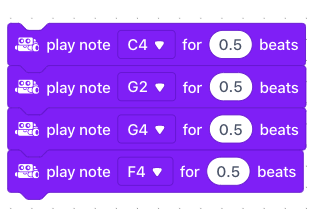
Coding Challenge #2 - Example solution
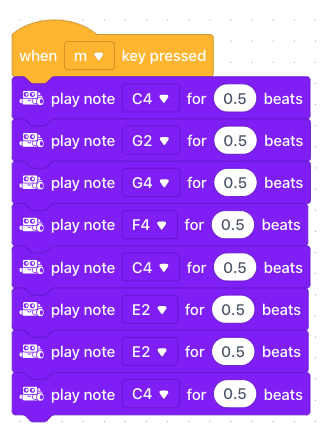
Ask, "How can you change the pitch of the notes using the play tone on note block?" Sample response: "You can choose notes with higher numbers. For example, C4 is a higher pitch than C2."
Say, "For your final coding challenge, you will get to explore mBot's LED Matrix, or screen. This is controlled using the show image block. The show image block allows you to create animations on the screen by choosing which lights on the screen will be turned on. To do this, click on the box on the right side of the block. For example, you could create a face! Or a person!"
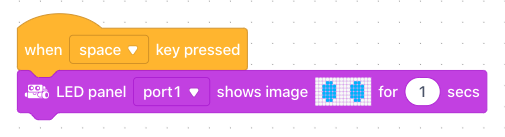
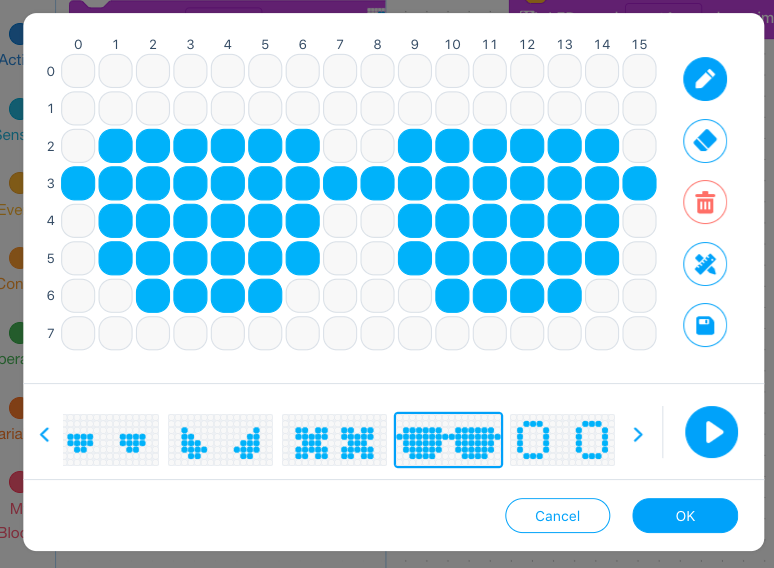
Say, "For this coding challenge, create two drawings that are triggered by two different event blocks."
Coding Challenge #3 - Example solution:
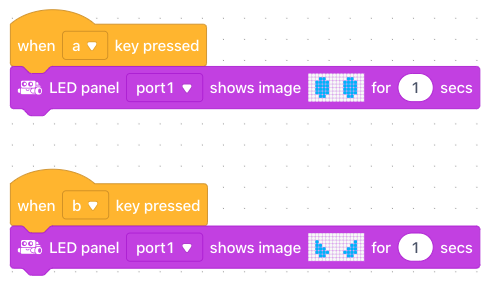
Time permitting, turn off the lights in the classroom, have students bring their mBots to a central location in the classroom and have everyone show off their lights and sound events in the dark!
Ask, "What are some programs you use in your daily life that you think might use events?" Field student responses. There are many examples. Just a few: The apps on your phone or tablet are opened only when the icon is touched on the screen. Crosswalk lights are often triggered by a pedestrian pushing a button. Video games have many examples. All of the buttons on a game controller will trigger programs within the game. These are all events!
Discuss, "What programs do you think you could create for your home that might use a robot programmed with an event?" Sample response: You could program a robot to open your blinds in the morning when you turn off your alarm.
Use the Evaluation Rubric to review students' work.
[Optional] Share your students' work with the world using @logicsacademy and #mBot and #LearntoCode!
1A-AP-10 Develop programs with sequences and simple loops, to express ideas or address a problem.
1A-AP-11 Decompose (break down) the steps needed to solve a problem into a precise sequence of instructions.
1A-AP-14 Debug (identify and fix) errors in an algorithm or program that includes sequences and simple loops.
4D Students exhibit a tolerance for ambiguity, perseverance and the capacity to work with open-ended problems.
7C: Contribute constructively to project teams, assuming various roles and responsibilities to work effectively toward a common goal.
• Make changes and test again, repeating until satisfied with the product
• Use materials, tools, and technologies in a safe manner, and with an awareness of the safety of others, in both physical and digital environments
• Identify the skills required for a task and develop those skills as needed
• Use familiar tools and technologies to extend their capabilities when completing a task
• Demonstrate a willingness to learn new technologies as needed
P2: Students will be expected to use digital tools to develop ideas and original works in innovative ways.
TOC1: Students will be expected to
safely use many forms of current technology for learning with growing competence
demonstrate conceptual understanding of how information and communication technology, digital tools, and authorized networks support their learning
use terminology related to information and communication technology
Algebra (Coding)
C3.1 solve problems and create computational representations of mathematical situations by writing and executing code, including code that involves conditional statements and other control structures.
Planning, creating, appraising and communicating in response to challenges.
Working independently and with others while exploring careers and technology