
Loading…
Loading…
Students take the concept of Events even further as they discover a new way to use events in mBlock. Students create a remote-control program that allows the user to navigate the mBot through student-made obstacle courses! The better the program, the faster they will be able to complete the course!
Students take the concept of Events even further as they discover a new way to use events in mBlock. Activity: Students create a remote-control program that allows the user to navigate the mBot through student-made obstacle courses! The better the program, the faster they will be able to complete the course!
For students to practice using events in a new way.
For students to understand the advantages and limitations of programming with events.
For students to practice an effective approach to design by brainstorming, creating, testing, and improving their programs.
Class set of mBots and devices
Class set of plastic cups (enough for each group to have 5-10 cups)
Masking tape
Install mBlock on all devices.
Fully charge mBots/devices.
See the Teacher's Guide [attached] to become familiar with the mBot hardware and the mBlock software.
Arrange classroom to allow lots of floor space for testing programs.
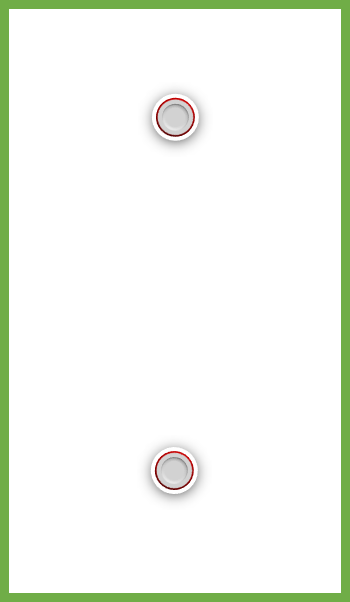
Set up a testing area using the masking tape and two cups, like so:
Ask, "What is an event in programming?" Sample response: An event is an action taken by the user that triggers a section of code to run.
Ask, "What are some examples of how we have used events thus far with mBot?" Sample response: We have used events to control when certain sequences will be run. For instance, pushing a key might cause the coloured LEDs to turn red.
Ask, "What blocks are used to create events in mBlock?" Sample answer: The When blocks are used to create events. They are found in the Events tab.
Say, "Today you will have a chance to get creative when designing your coding challenge solutions."
Ask, "As a reminder, what are the steps to effective problem-solving and design for programming challenges?" Sample response: A good approach to problem solving is to (1) Brainstorm, (2) Create, (3) Test, (4) Improve.
Say, "Today we will take the concept of events even further! We will create a new program that allows us to remotely control each movement the mBot makes. To do this, we will need to use a new type of Event block, the When on-board button released block. Once we have created, tested, and improved our programs to be the best they can be, you will have a chance to create your own obstacle course for mBot, and to navigate the obstacle courses made by your friends!"
Say, "This game will put your motor calibration skills to the test, You'll also have to get creative to improve your controls in order to complete the obstacle courses as quickly as you can! Let's get started!"
This lesson uses the mBot motors exclusively. Remind students that each motor can be controlled independently. This is important because calibrating each motor speed is an essential part of the lesson activity.
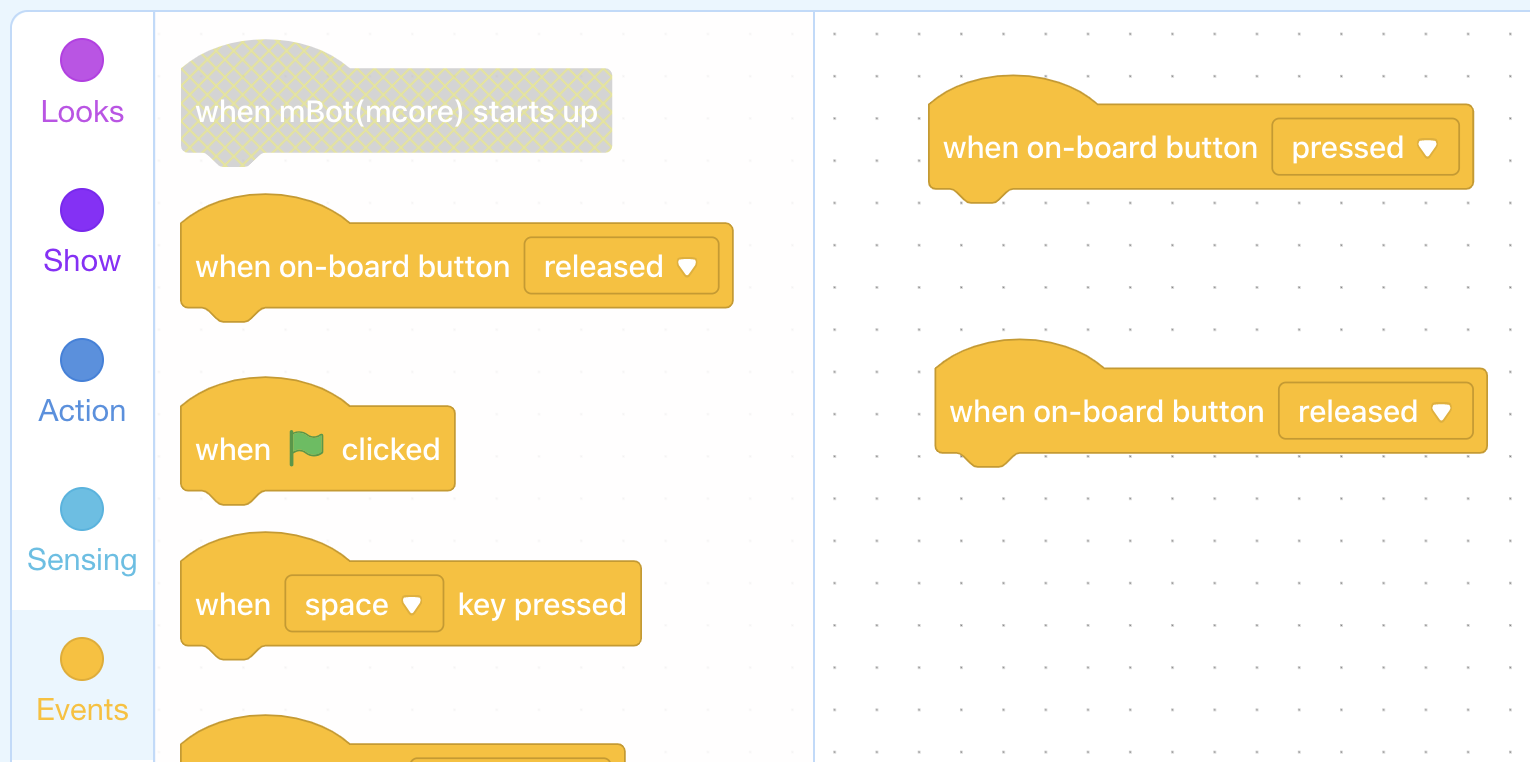
Say, "Today we will use a new type of Event block, the When on-board button released block."
Ask, "How do you think this block is different from the When on-board button pressed block? In what ways is it similar?" Sample response: This block is different because instead of activating the attached code by pressing the on-board button, the attached code is run when the butto is released. It is used in the same way: by attaching the desired sequence to the bottom of the block.
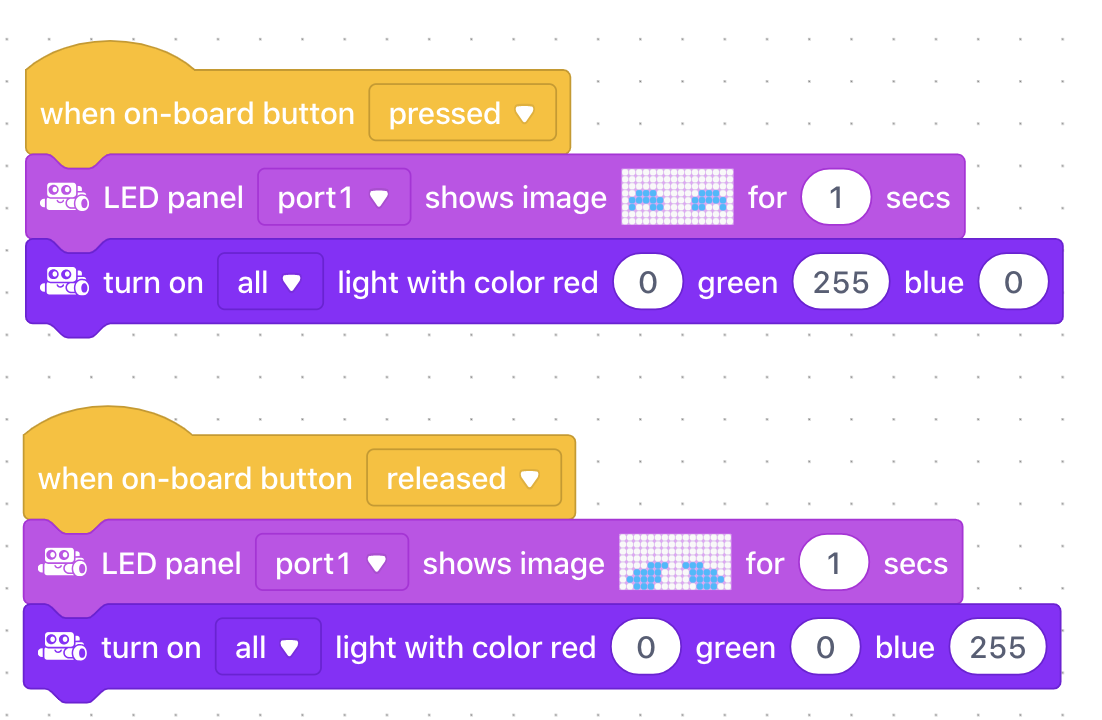
Ask, "In the following program, what do you think will happen when the on-board button is pressed? What will happen when the on-board button is released?" Sample response: "When the on-board button is pressed, all the LEDs will turn green and the LED matrix will display a happy face. When the on-board button is released, allthe LEDs will turn blue and the LED matrix will display a sad face."
Ask, "Why are events useful in programming?"
Ask, "How is the when on-board button released block different from the when on-board button pressed block? How is it the same?"
Ask, "What controls will be necessary in order to maneuver mBot through a complex obstacle course?" Sample response: At a minimum, we need to be able to make the mBot drive forward, turn left, and turn right when we push the appropriate keys."
If the students have not suggested this already,
Ask, "What if the mBot comes up against a dead end?" Sample response: Our program needs an event for stopping and moving backwards."
Say, "Your first coding challenge is to create basic remote-controls for your mBot using Event blocks and motor commands. "
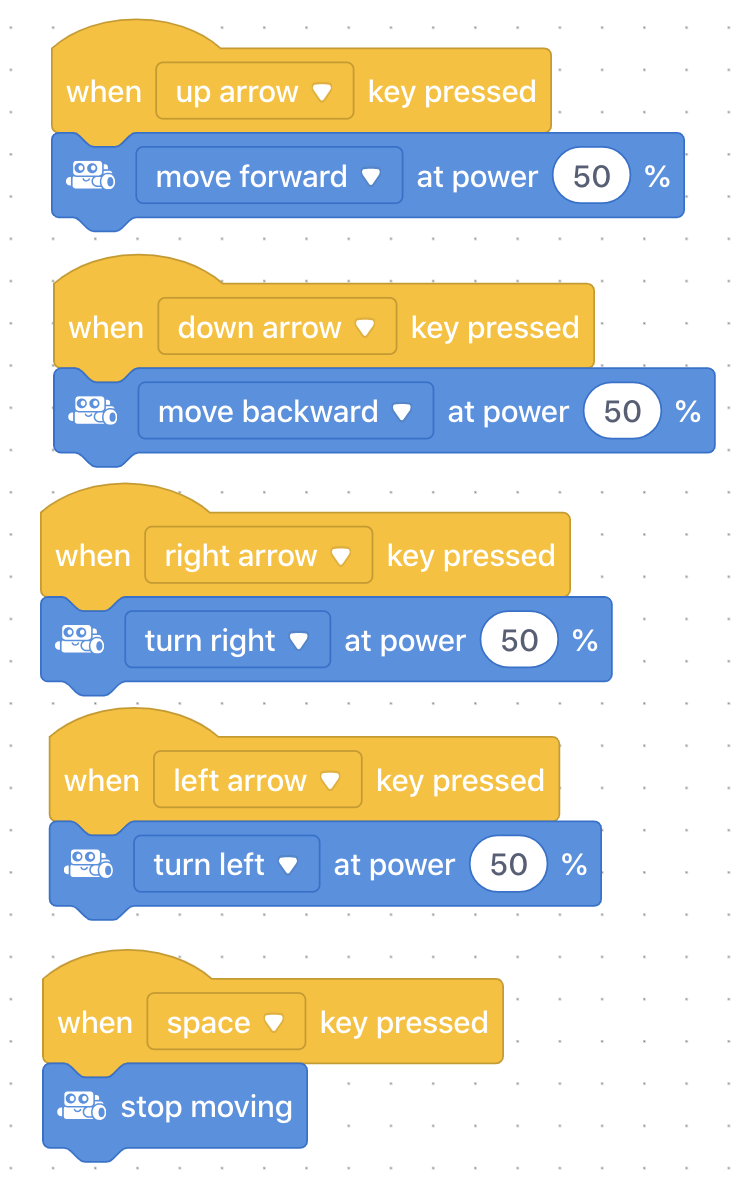
Challenge students to create the following events:
When "up arrow" is pressed, move forward in a straight line.
When "right arrow" is pressed, make a sharp right (i.e. one wheel stopped, the other moving).
When "left arrow" is pressed, make a sharp left
When "down arrow" is pressed, move backwards in a straight line
When "space" is pressed, stop
Encourage students to test their programs throughout the creation process on the testing course (see belo for suggested setup). For instance, students should try to chart this path around the cups using their remote control programs:
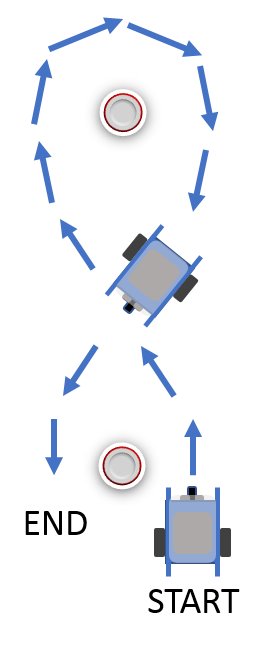
Coding Challenge #1 - Example solution
Say, "You may have noticed while testing that the stopping feature of our programs is not ideal. That's why your next coding challenge is to improve this aspect of the code! Instead of having to press the space key to stop, it would be much better if our mBots stopped after a set amount of time that works with your mBots movement and control. This is an intuitive way to organize our remote-control program because this way, when the user does nothing, the mBot also does nothing."
Challenge students to think about how to use the "move forward at power ___% for ___ secs" in their current code to make their mBot movements more controlled.
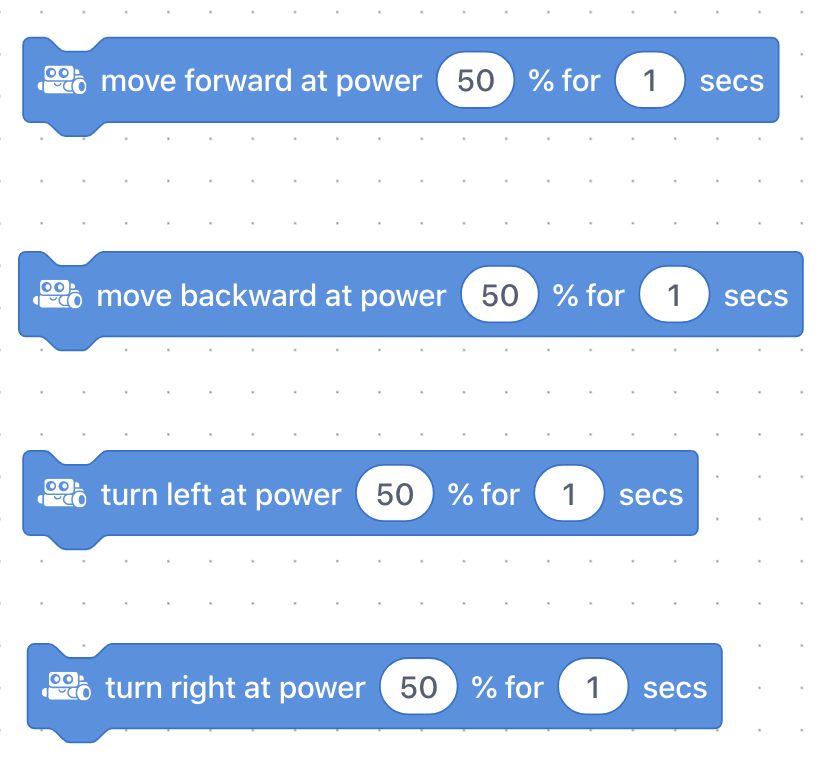
Coding Challenge #2 - Example solution
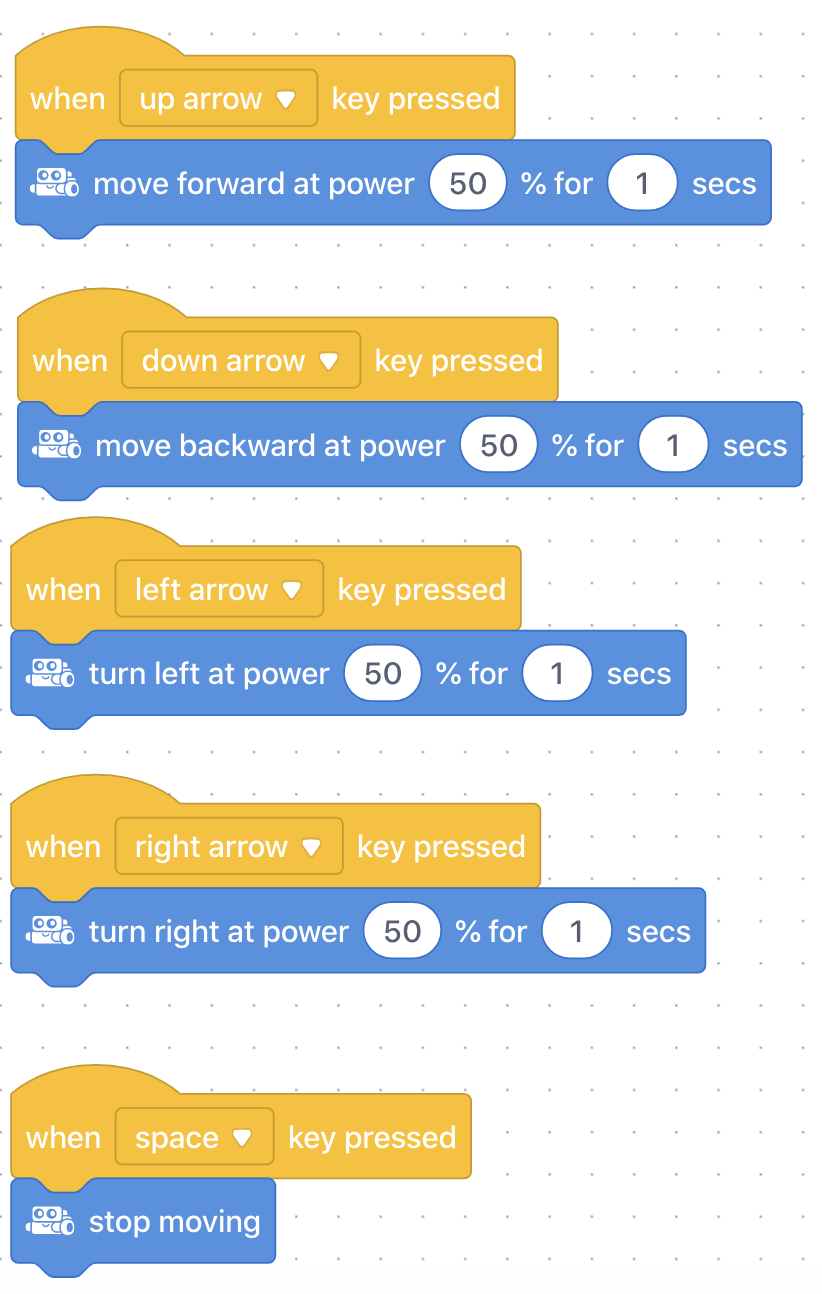
Encourage students to continue testing with the new addition to the program.
Ask, "What has been challenging thus far about creating a good remote control program?"
Ask, "How has adding a move forward at power ___% for ___ sec changed how easy it is to control the mBot?"
Ask, "How might your program be further improved?"
Say, "Now is your chance to create your very own obstacle course for mBot! Use the masking tape to create a border for your obstacle course and to mark the start and end of the course. Next, use the cups to create tricky obstacles for mBot! Try out your own course then be sure to try the courses of your classmates."
Say, "To complete the obstacle courses as quickly as possible, continue to add event controls to improve your mBot's maneuverability."
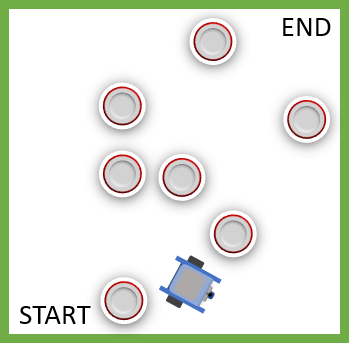
Coding Challenge #3 - Obstacle Course Setup example
Coding Challenge #3 - Example solution
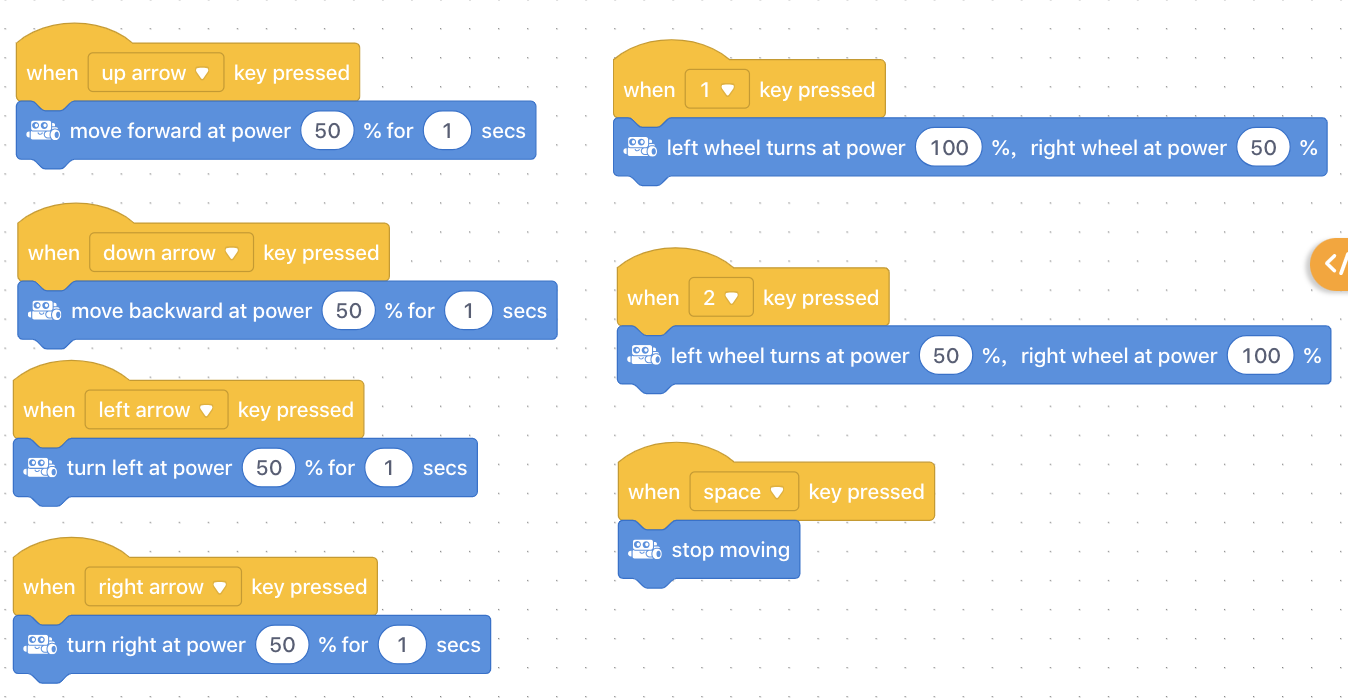
Discuss, "When might creating programs based entirely on events become inconvenient or frustrating for a user?" Discussion ideas: When tasks are repetitive or require constant vigilance by the user over a long period of time, events become inconvenient. In those cases, it is better for robots and programs to have some autonomy and the ability to make simple decisions for themselves. In the next lesson, we will begin to discover how to do this!
Ask, "How does testing your program help you improve it?"
Discuss, "What problems did you notice about your program when you tried to complete other students' courses? How did you improve your program to overcome those problems?"
Use the Evaluation Rubric to review students' work.
[Optional] Share your students' work with the world using @logicsacademy and #mBot and #LearntoCode!
1A-AP-10 Develop programs with sequences and simple loops, to express ideas or address a problem.
1A-AP-11 Decompose (break down) the steps needed to solve a problem into a precise sequence of instructions.
1A-AP-14 Debug (identify and fix) errors in an algorithm or program that includes sequences and simple loops.
4D Students exhibit a tolerance for ambiguity, perseverance and the capacity to work with open-ended problems.
5D: Understand how automation works and use algorithmic thinking to develop a sequence of steps to create and test automated solutions.
7C: Contribute constructively to project teams, assuming various roles and responsibilities to work effectively toward a common goal.
• Make changes and test again, repeating until satisfied with the product
• Use materials, tools, and technologies in a safe manner, and with an awareness of the safety of others, in both physical and digital environments
• Identify the skills required for a task and develop those skills as needed
• Use familiar tools and technologies to extend their capabilities when completing a task
• Demonstrate a willingness to learn new technologies as needed
P2: Students will be expected to use digital tools to develop ideas and original works in innovative ways.
TOC1: Students will be expected to
safely use many forms of current technology for learning with growing competence
demonstrate conceptual understanding of how information and communication technology, digital tools, and authorized networks support their learning
use terminology related to information and communication technology
Algebra (Coding)
C3.1 solve problems and create computational representations of mathematical situations by writing and executing code, including code that involves conditional statements and other control structures.
Planning, creating, appraising and communicating in response to challenges.
Working independently and with others while exploring careers and technology