
Loading…
Loading…
Students are introduced to conditions in programming including definitions, examples, how to create one using operators, and conditional loops in mBlock. Students create an "mBot Patrol" program that has their mBot alternate between scanning and patrolling on a timed loop sequence. Students practice using operators to create a condition.
Students are introduced to conditions in programming including definitions, examples, how to create one using operators, and conditional loops in mBlock. Activity: Students create an "mBot Patrol" program that has their mBot alternate between scanning and patrolling on a timed loop sequence. Students practice using operators to create a condition.
To introduce students to the concept and utility of programming with conditions.
For students to understand how to create condition using operators in mBlock
For students to practice design thinking while incorporating previously-learned concepts with a new concept: conditions
Class set of mBots and devices
Install mBlock on all devices.
Fully charge mBots/devices.
See the Teacher's Guide [attached] to become familiar with the mBot hardware and the mBlock software.
Arrange classroom to allow lots of floor space for testing programs.
Ask, "What are the three coding concepts that we have discussed and created programs using so far?" Sample response: We have discussed and created programs using sequences, loops, and events.
Say, "Today you will discover a a new fundamental coding concept: Conditions! Conditions are another extremely powerful tool in computer programming because they give our robots and programs some ability to 'think' for themselves and react to their environment autonomously! This is the main goal of robotics: to create robots that can complete simple and complex tasks without needing help from humans. Today we will begin to learn how this is done."
Ask, "What is a condition? Where have you heard this term used before and what do you think it means in computer programming?" Sample response: A condition is the way something is. This could be a situation, or the circumstances of one's environment. For example, people sometimes say, "Under one condition!" or "These are great weather conditions!" Field student answers for what they think it means in programming.
Say, "In programming, a condition means much the same as it does in regular language. It describes the state of something or some circumstance. The power of conditions is that, through clever programming, we can tell the robot how we would like it to react to certain conditions, or circumstances. Let's get started!"
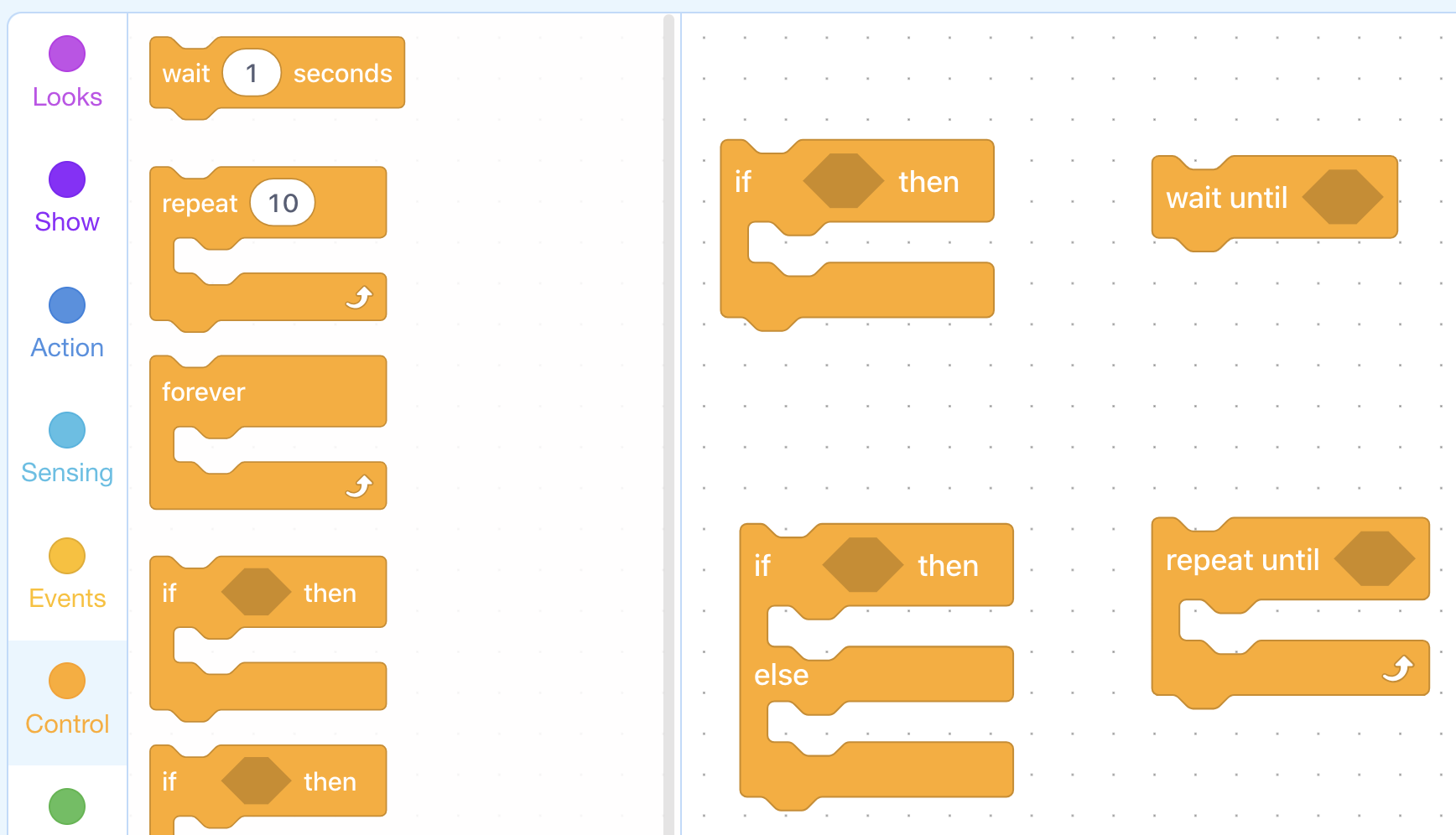
Say, "In mBlock, there are four blocks that allow us to define conditions, all of which are found in the Control tab. They are, (1) the IF-THEN block, (2) the IF-THEN-ELSE block, (3) the wait until block, and (4) the Repeat until block. Each of these has the same hexagonal space within them. This is where we can define our condition! You will have a chance to use the IF blocks in the next lesson. Today, we will focus on the Repeat until block."
Say, "To define a condition, we need to use an operator from the Operators tab. Note that some operator blocks are also hexagonal. These blocks are used to define conditions, and fit nicely into the Repeat until block (and the other conditional blocks), like so."
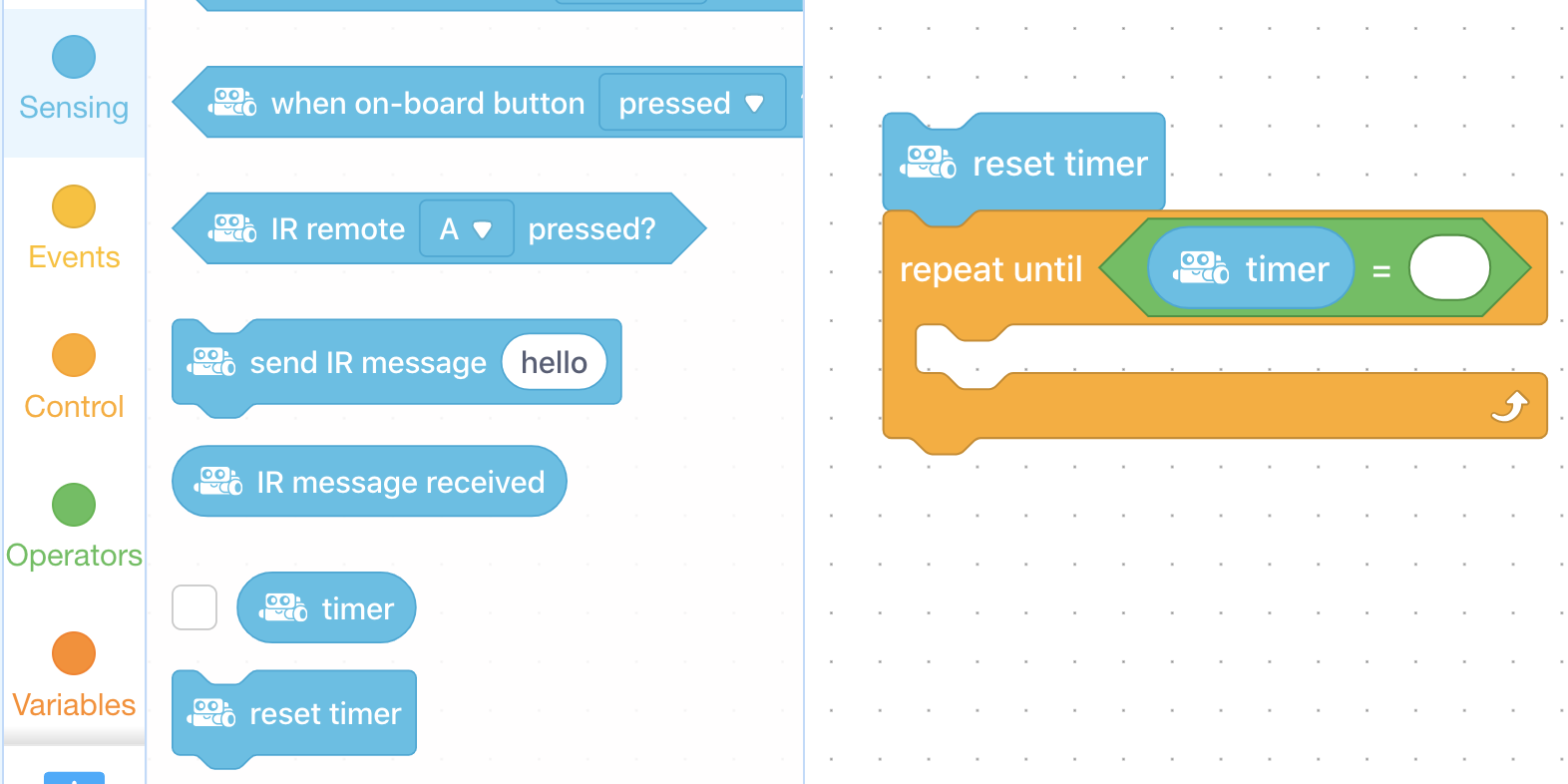
Say, "There are many ways to define a condition in mBlock. We may wish to define a condition involving one of the many sensors on the mBot, or we may wish to create a variable for our condition. You'll get a chance to use an mBot sensor in the next lesson, and we will discuss variables in Level F. Today, we will use the timer block to define our condition."
Say, "The timer is a block that counts continuously in seconds until it is reset back to zero, and is found in the Sensing tab. Similar to the pick random # block, the timer block can be placed inside of other blocks. We will use it to define our condition, like so."
Ask, "Can you describe, with as much detail as possible, what you think this program will have the mBot do?" Sample response: Once the flag is clicked, the timer will be reset to zero, then the sequence within the Repeat until block will repeat until the timer is equal to 10 seconds, then run the final show drawing block. In all, this program will make the LED Matrix flash rapidly between the two animations for 10 seconds, then display sunglasses.
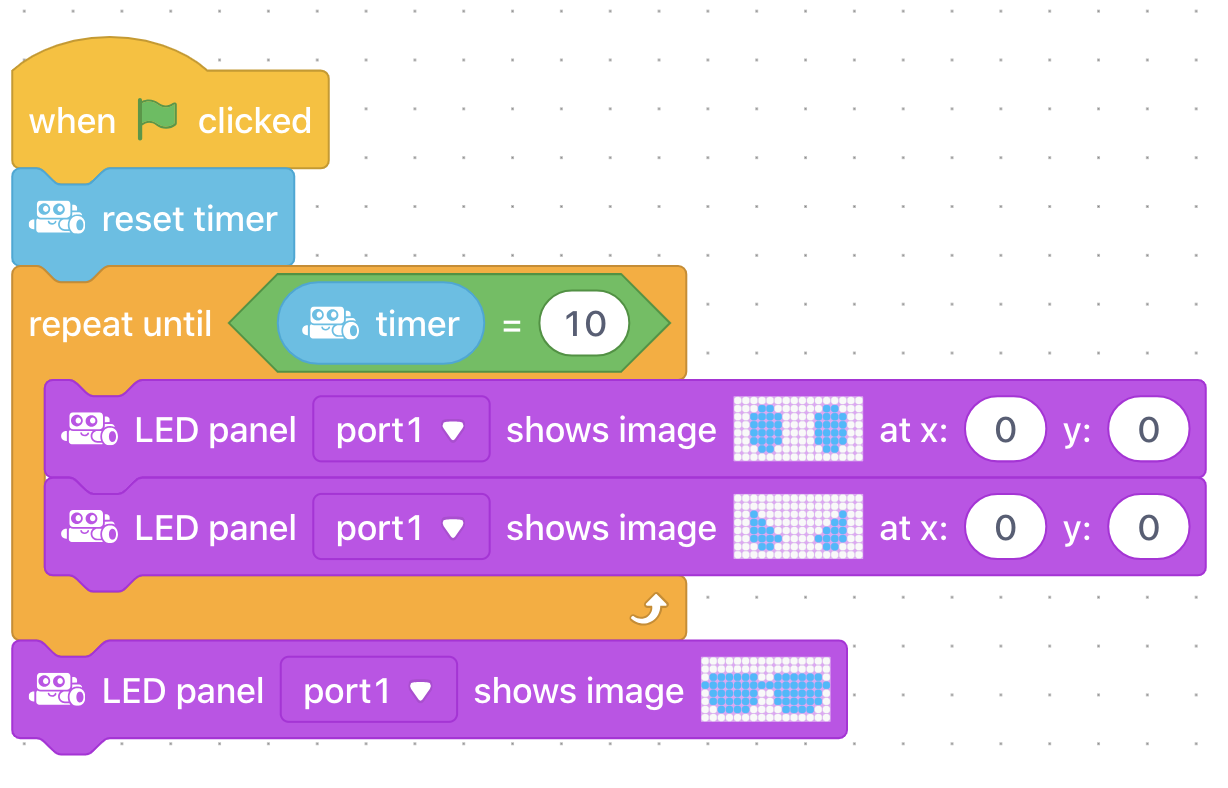
Say, "Notice that under the green flag you can see the numbers represented in the timer block. This is enabled by checking the box beside the timer block in the Sensing tab."
This lesson uses the mBot motors exclusively. Refer to the Teacher's Guide for additional information about this hardware.
Ask, "What is condition in computer programming?" Sample response: A condition is a situation or a circumstance that we can define, and program our robot to react to.
Ask, "What is the role of operators when programming conditions?" Sample response: Operators allow us to define the condition with logical statements like, repeat until =, or repeat until <.
Ask, "Why are conditions useful in computer programming?" Sample response: Conditions are useful because they allow us to create 'smarter' programs that can react to particular circumstances. This gives them greater autonomy, which means they can do more without human help.
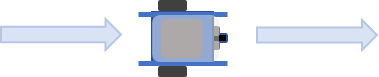
Say, "Your main challenge today is to turn your mBot into an automated guard by creating an "mBot Patrol" program! Your program will need to switch between Scanning and Patrolling phases, just like in this animation. Let's begin!"


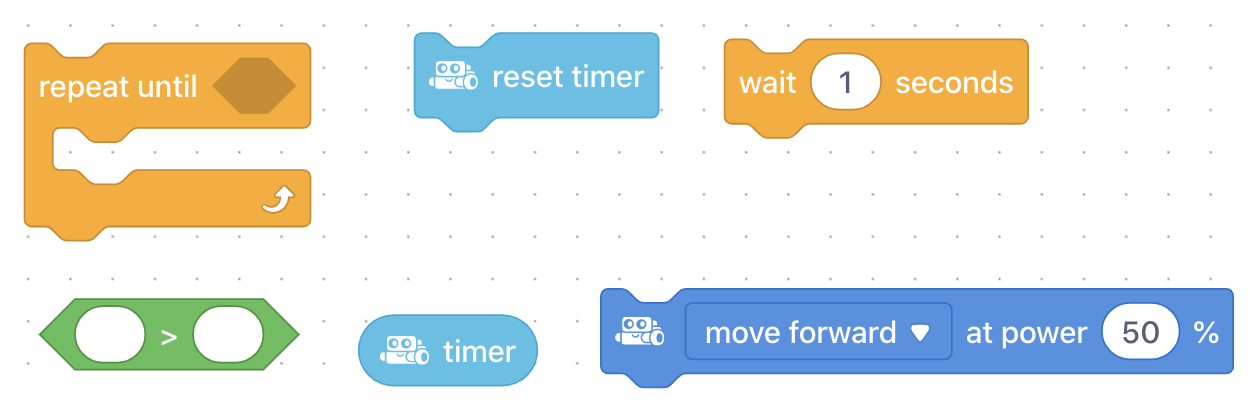
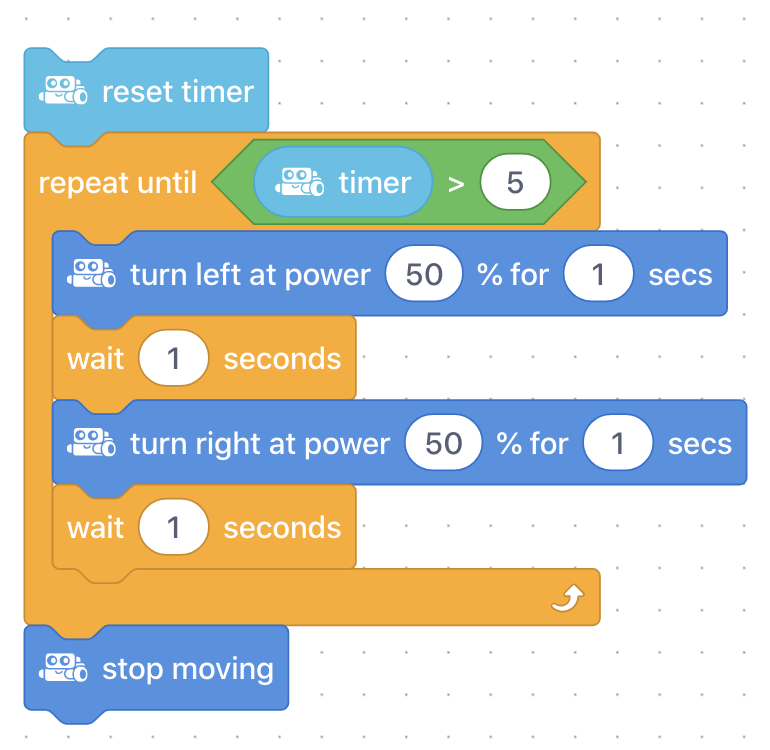
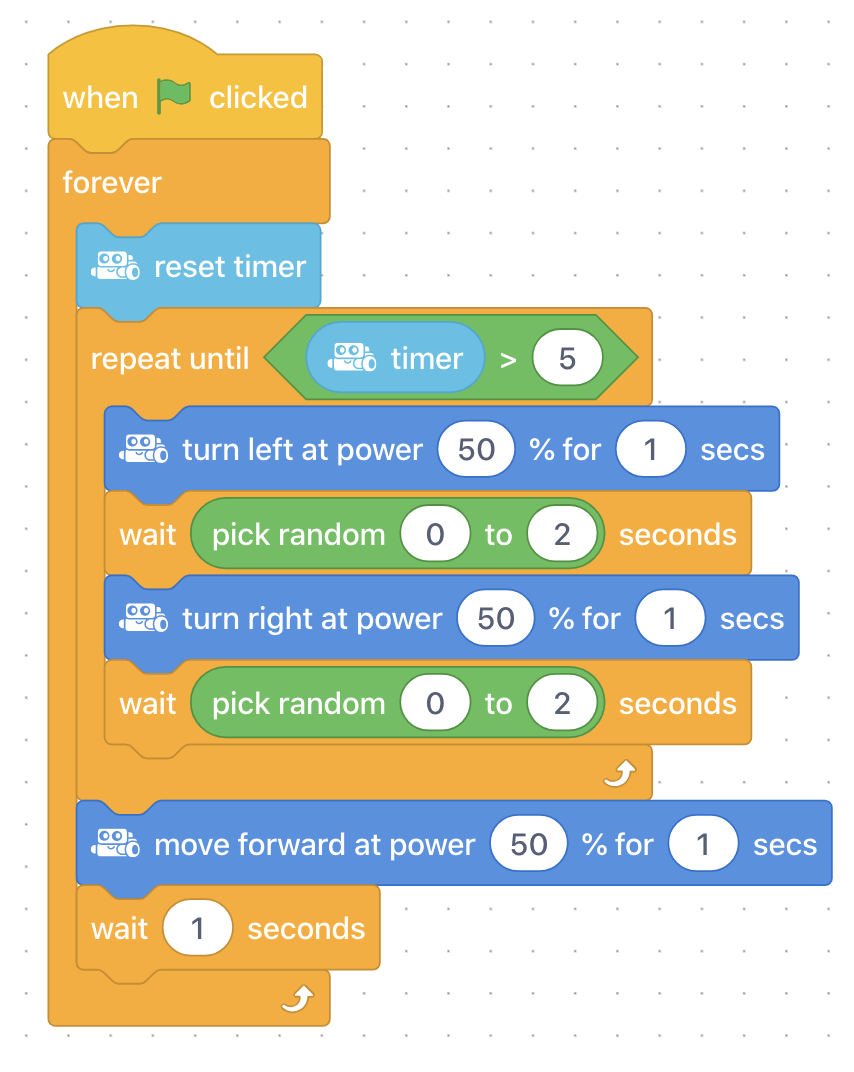
Say, "Your first challenge is to create a "scanning" program that has the mBot look back and forth slowly as if it is scanning the area for intruders. Use the Repeat until block to make sure the scanning sequence ends after 5 seconds of scanning, at which time the motor speeds go back to zero. These are the types of blocks you will need for this challenge."
Coding Challenge #1 - Example solution
Say, "Your second challenge is to add the "patrolling" phase to your program. This means that the breakdown of your mBot's actions should be as follows."
Scanning phase (code from challenge 1)
Patrolling phase where mBot drives in a straight line to a new area (driving for 1-2 seconds)
Loop back to start of program
HINT: Use a forever loop around the entire sequence to repeat the scanning and patrolling phases.
Coding Challenge #2 - Example solution
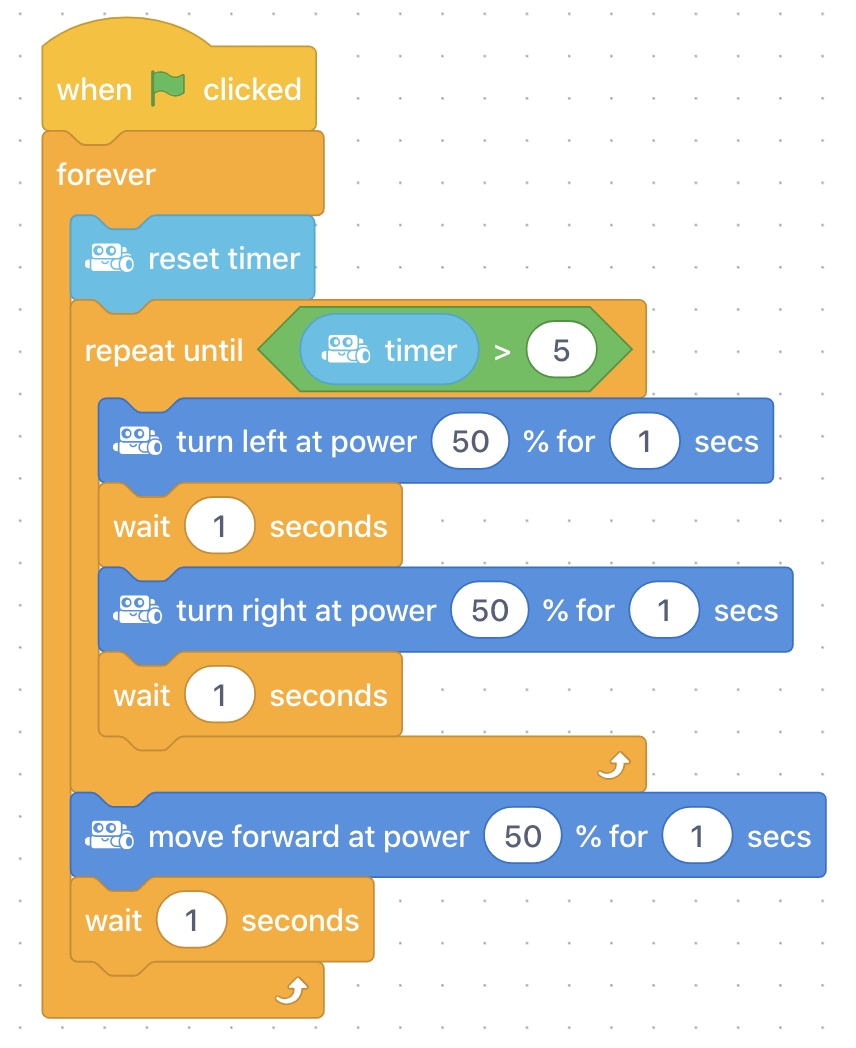
Ask, "When is your condition TRUE? When is it FALSE?" Sample response: The condition is TRUE when the timer is greater than 5 seconds. The condition is FALSE when the timer is less than 5 seconds.
Ask, "Does the sequence repeat until the condition is TRUE or FALSE?" Sample response: The scanning sequence repeats until the condition is TRUE, then moves on to the patrol sequence. Therefore, when the program begins (and the timer is less than 5 seconds) the condition is FALSE and the sequence repeats.
Say, "Now that you have created your mBot Patrol program, let's experiment with randomization to make your patrol programs more unpredictable! Recall that the pick random # block can be placed anywhere a number would normally go. That means you can use it to randomize your scanning speed or time, or your patrolling speed or time, or both! Now is your chance to get creative to make a patrol program that covers lots of ground but is unpredictable to would-be intruders!"
Coding Challenge #3 - Example solution
Ask, "What are conditions in computer programming?"
Discuss, "In what other ways might a program with a timer be useful? For example, what programs could you create for your home that rely on the condition of a timer?"
Discuss, "How did adding the pick random # block to your program change the way your mBot patrolled? If you really had to patrol an area for intruders, would you prefer to have a randomized patrol or a patrol with consistent timing?"
Use the Evaluation Rubric to review students' work.
[Optional] Share your students' work with the world using @logicsacademy and #mBot and #LearntoCode!
1A-AP-10 Develop programs with sequences and simple loops, to express ideas or address a problem.
1A-AP-11 Decompose (break down) the steps needed to solve a problem into a precise sequence of instructions.
1A-AP-14 Debug (identify and fix) errors in an algorithm or program that includes sequences and simple loops.
4D Students exhibit a tolerance for ambiguity, perseverance and the capacity to work with open-ended problems.
5D: Understand how automation works and use algorithmic thinking to develop a sequence of steps to create and test automated solutions.
7C: Contribute constructively to project teams, assuming various roles and responsibilities to work effectively toward a common goal.
• Make changes and test again, repeating until satisfied with the product
• Use materials, tools, and technologies in a safe manner, and with an awareness of the safety of others, in both physical and digital environments
• Identify the skills required for a task and develop those skills as needed
• Use familiar tools and technologies to extend their capabilities when completing a task
• Demonstrate a willingness to learn new technologies as needed
P2: Students will be expected to use digital tools to develop ideas and original works in innovative ways.
TOC1: Students will be expected to
safely use many forms of current technology for learning with growing competence
demonstrate conceptual understanding of how information and communication technology, digital tools, and authorized networks support their learning
use terminology related to information and communication technology
Algebra (Coding)
C3.1 solve problems and create computational representations of mathematical situations by writing and executing code, including code that involves conditional statements and other control structures.
Planning, creating, appraising and communicating in response to challenges.
Working independently and with others while exploring careers and technology