
Loading…
Loading…
Students take conditionals a step further and are introduced to IF-THEN-ELSE statements and defining conditions using an mBot sensor. Students create an algorithm that uses the ambient light sensor on the mBot. When the lights are on, the mBot does a calm sequence of commands. However, when the lights go out the mBot goes crazy with a sequence of erratic commands!
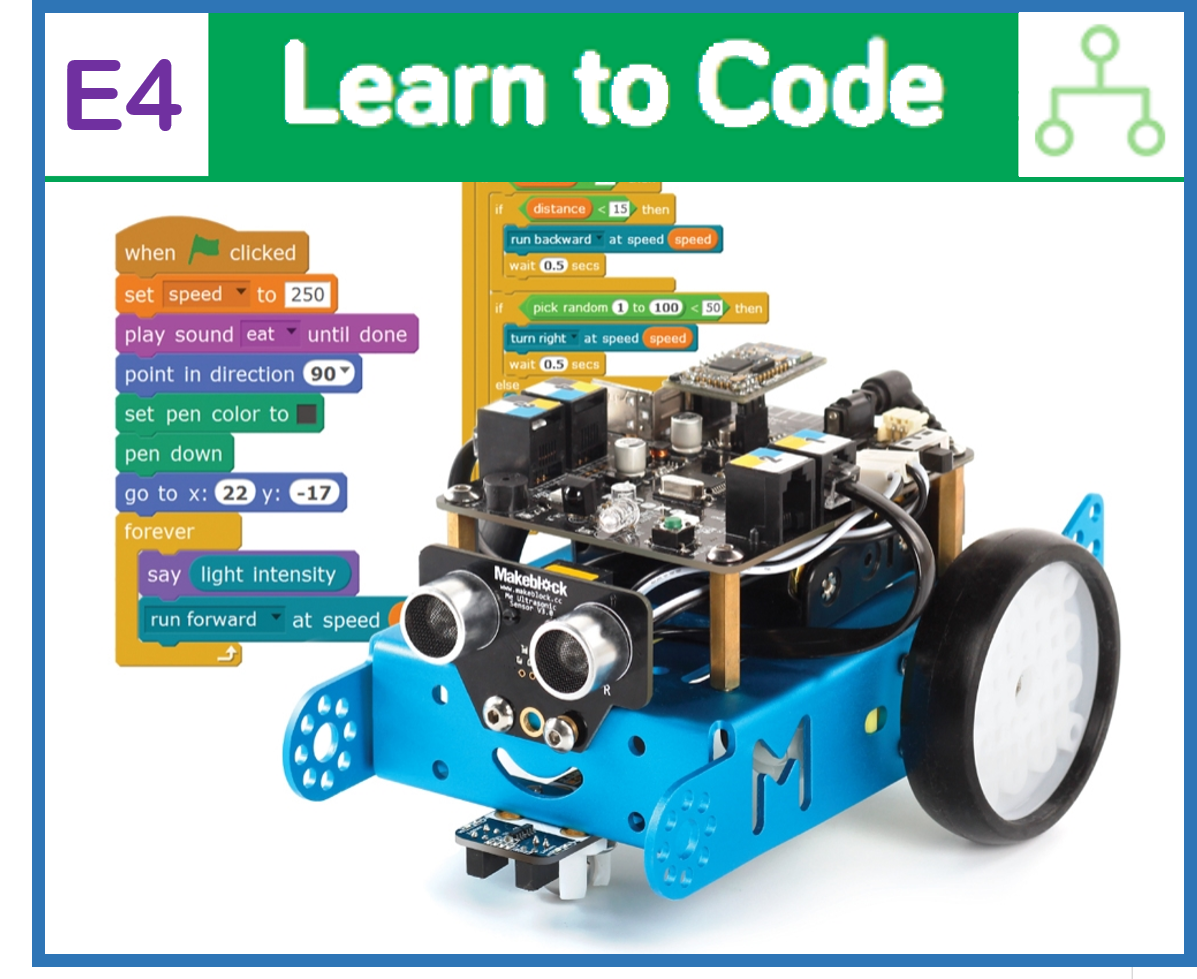
Students take conditionals a step further and are introduced to IF-THEN-ELSE statements and defining conditions using an mBot sensor. Activity: Students create an algorithm that uses the ambient light sensor on the mBot. When the lights are on, the mBot does a calm sequence of commands. However, when the lights go out the mBot goes crazy with a sequence of erratic commands!
For students to understand the definition and utility of IF-statements in computer programming
For students to create an algorithm using IF-statements that allows the mBot to react to its environment
For students to consider the power of this programming tool in daily life
Class set of mBots and devices
Install mBlock on all devices.
Fully charge mBots/devices.
See the Teacher's Guide [attached] to become familiar with the mBot hardware and the mBlock software.
Arrange classroom to allow lots of floor space for testing programs.
Ask, "What is a condition in computer programming?" Sample response: A condition is a situation or a circumstance that we can define and program our robot to react to.
Ask, "Why are conditions useful in computer programming?" Sample response: Conditions are useful because they allow us to create 'smarter' programs that can react to particular circumstances. This gives them greater autonomy, which means they can do more without human help.
Ask, "How have we used conditions so far?" Sample response: We created a patrol program that used a Repeat until block and the timer block to repeat a sequence for a specific amount of time in seconds.
Ask, "What is the role of Operator blocks when programming with conditions in mBlock?" Sample response: Operators allow us to define the condition with logical statements like, repeat until =, or repeat until <.
Say, "Today you will take the concept of conditions even further! In this lesson you will discover how to give your mBot the ability to react to its environment and to make some simple "decisions", all on its own! To do this, we will need to use a new programming tool: the IF-statement! In many ways, IF-statements are the core of computer programming. They allow us to create a set of rules for decision-making, also called an algorithm, that will guide the actions of our program or robot. This is how you build your robot a brain!"
Ask, "Can you think of any algorithms from your day-to-day life?" Sample response: We encounter algorithms all the time. Most commonly, probably, is the internet search! Each Google search you make sifts through millions of web pages to find ones that are most relevant to your search. This requires a clever algorithm, or set of search rules. Other common examples include board game rules and traffic signs and signals that guide drivers.
Say, "Today you will create your very own algorithm using IF-statements and the mBot ambient light sensor. This will allow your mBot to "see" whether the lights are on or off, and to act accordingly! Let's get started!"
This lesson uses the mBot motor commands, LED matrix, and the ambient light sensor. The ambient light sensor can be found at the back of the mBot between the coloured LEDs, just below the LED matrix. This sensor receives light from its surroundings and interprets the light as a number between 0 and 1000, where 0 means no light is reaching the sensor and 1000 means the sensor is saturated with light. Refer to the Teacher's Guide for additional information about this hardware.
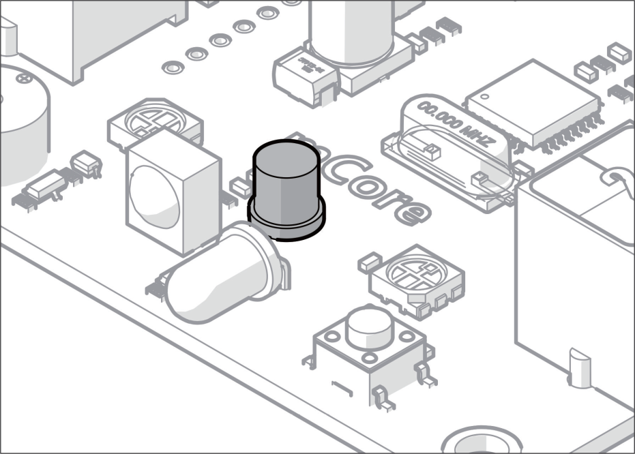
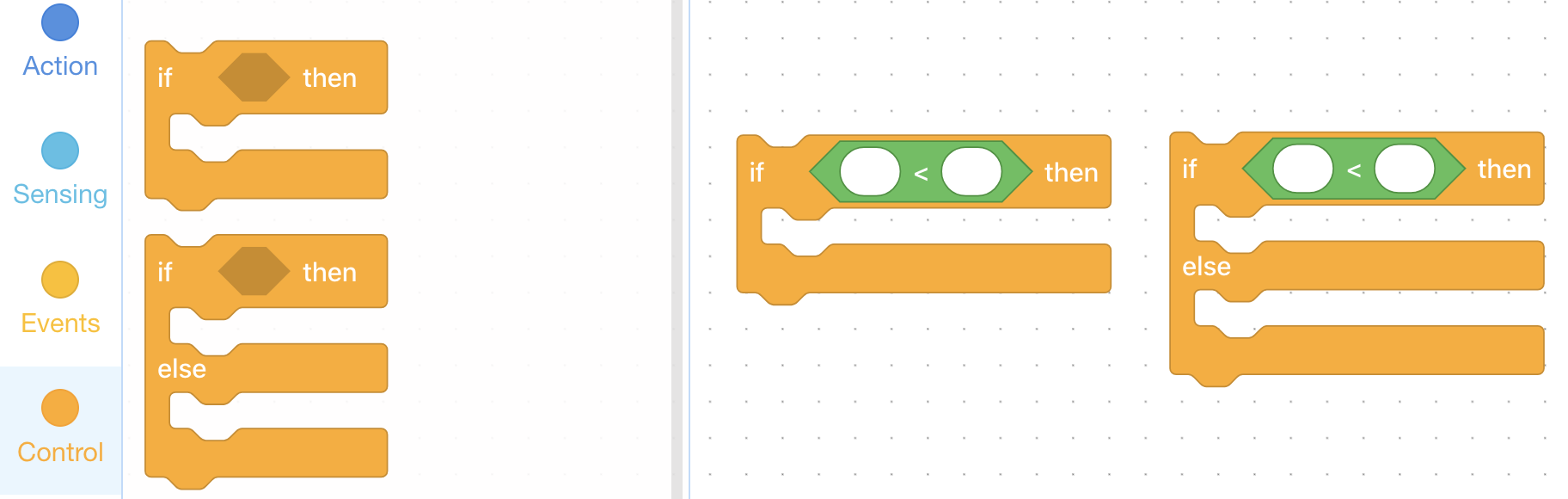
Say, "In mBlock there are two different IF blocks, both of which are found in the Control tab. They are, (1) the IF-THEN block, and (2) the IF-THEN-ELSE block. Today we will focus on the IF-THEN-ELSE block. Just like the Repeat until block that we saw in the previous lesson, IF blocks have a hexagonal space for defining conditions using the hexagonal operators from the Operators tab.
Say, "Today we will use the light sensor block, which is found in the Sensing tab, to define a condition. Just like the timer block and the pick random # block, the light sensor block is rounded and can be placed inside of other blocks anywhere you might also place numbers. The light sensor block always contains a number between 0 and 1000, which represents the amount of light that is reaching the sensor, with 0 indicating no light and 1000 indicating lots of light."
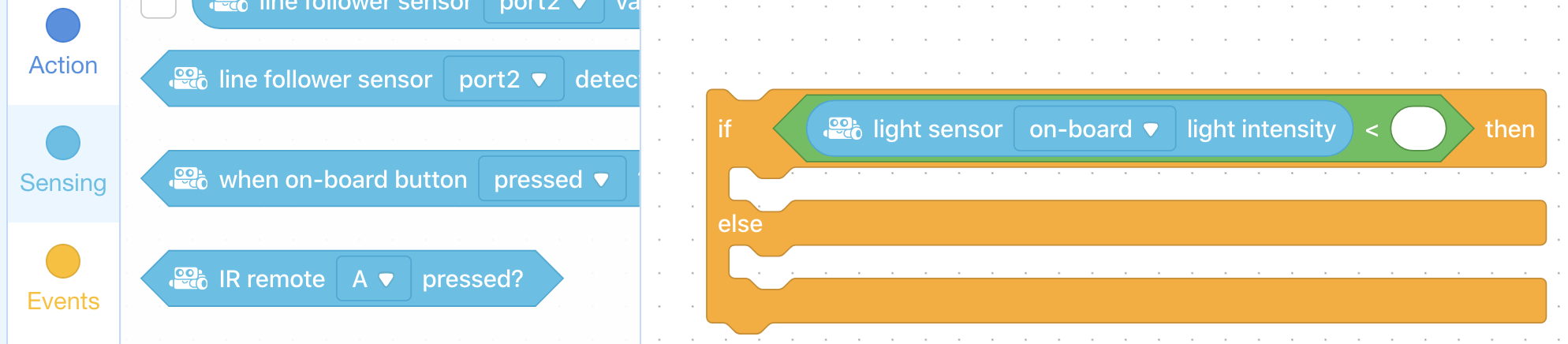
Say, "Below is an example of a simple algorithm that uses the light sensor. The IF-THEN-ELSE block provides two possible outcomes that the mBot might perform, based on how much light is reaching the light sensor."
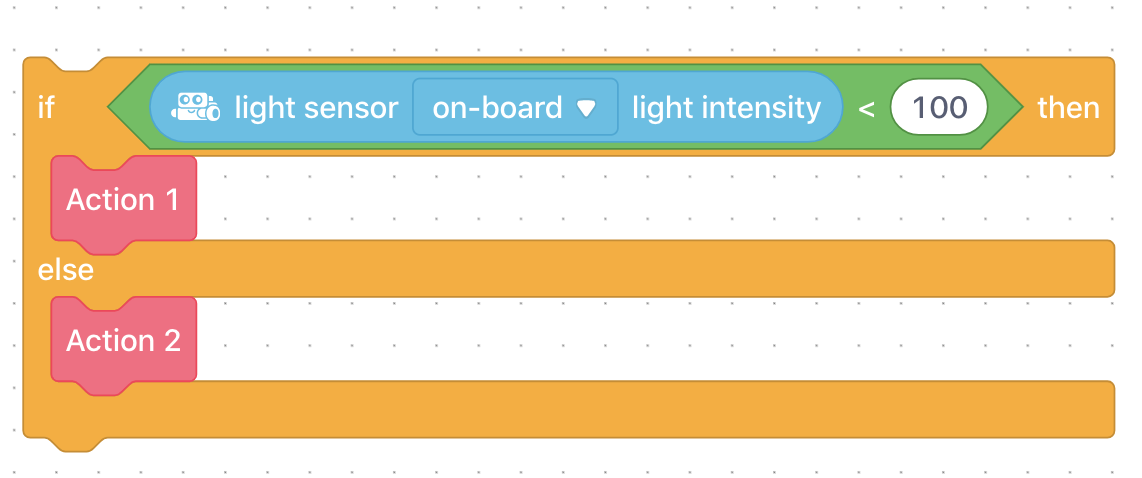
In plain language, the algorithm above can be read:
IF the light reaching the light sensor is less than 100 units, THEN
do Action 1
ELSE (meaning, if the light reaching the light sensor is greater than 100 units)
do Action 2
Ask, "What is an IF-statement in computer programming?" Sample response: IF-statements are powerful programming tools that allow us to define under what circumstances, or conditions, we would like actions to be taken by the program or robot.
Ask, "What is an algorithm?" Sample response: An algorithm is a set of rules or instructions for making decisions or completing a task.
Say, "Your main challenge for this lesson is to create a program that allows your mBot to react to the light conditions in the room! When the lights are on, your mBot will have a passive reaction and stop moving, and show a passive or happy animation on the LED matrix. However, when the lights go out, your mBot will go wild with erratic motor commands and a flashy animation on the LED matrix. That's why this activity is called, Afraid of the Dark! Let's get started!"
Say, "Your first challenge is to use an operator and the light sensor block to view the data coming from the light sensor. You will use this later to define the condition in your IF-THEN-ELSE block. In order to do this, we need to know how much light is reaching the light sensor when the lights are on and when the lights are off. Since you are all sitting in different places in the room, the amount of light reaching each mBot will be slightly different. Let's check the light conditions together."
Have students create the following simple program. In the Sensing tab, click on the box beside the light sensor on board light intensity block and that will provide a check mark in that box. What it will also do is place a box at the upper left hand side of the screen where the Sprite is, and that will indicate the actual value of the light intensity being measured by the mBot.
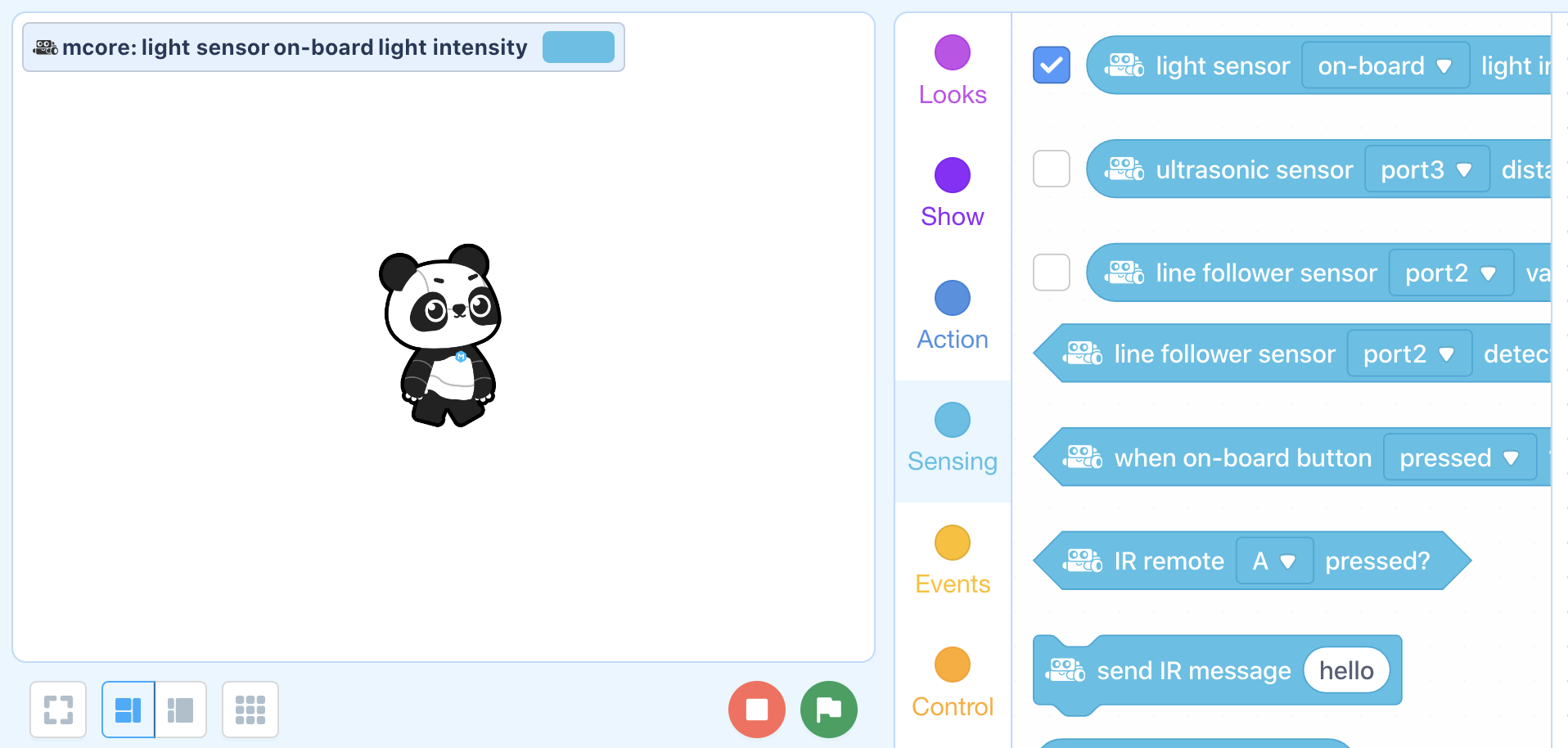
Once students have created this code, have them place their mBot on the floor. Then conduct the following activity:
Run the code and have students take note of the light sensor number while the lights are on (this should be a high number).
Turn the lights off.
Have students take note of the light sensor number while the lights are off (this should be a low number).
Repeat several times so students have a good idea of roughly how much light is reaching the sensor under each light condition.
NOTE: Make sure the coloured LEDs are turned off. If they are on, this will affect how much light reaches the sensor.
Say, "Now that you know how much light is reaching the sensor under each condition (lights on vs. lights off), you can define your condition and complete your Afraid of the Dark program! When defining your condition, keep the goal of our activity in mind. Your mBot should do the passive sequence when the lights are on (and the light sensor number is high) and your active sequence when the lights are off (and the light sensor number is low). You will need the following additional blocks to complete the program."
Coding Challenge #2 - Example solution

Say, "The next challenge is to create the two reaction sequences. Once you are happy with your two sequences, place the active reaction in the top slot of an IF-THEN-ELSE block after the THEN, and the passive reaction after the ELSE, in the second slot."
The active reaction should have:
Fast moving and erratic motor commands (e.g. turning back and forth or starting and stopping quickly).
A crazy animation on the LED Matrix (e.g. flashing between two 'drawings')
The passive reaction should:
Bring the motor speeds back to zero
Display a happy face or some other 'passive' animation on the LED matrix
Coding Challenge #2 - Example solution
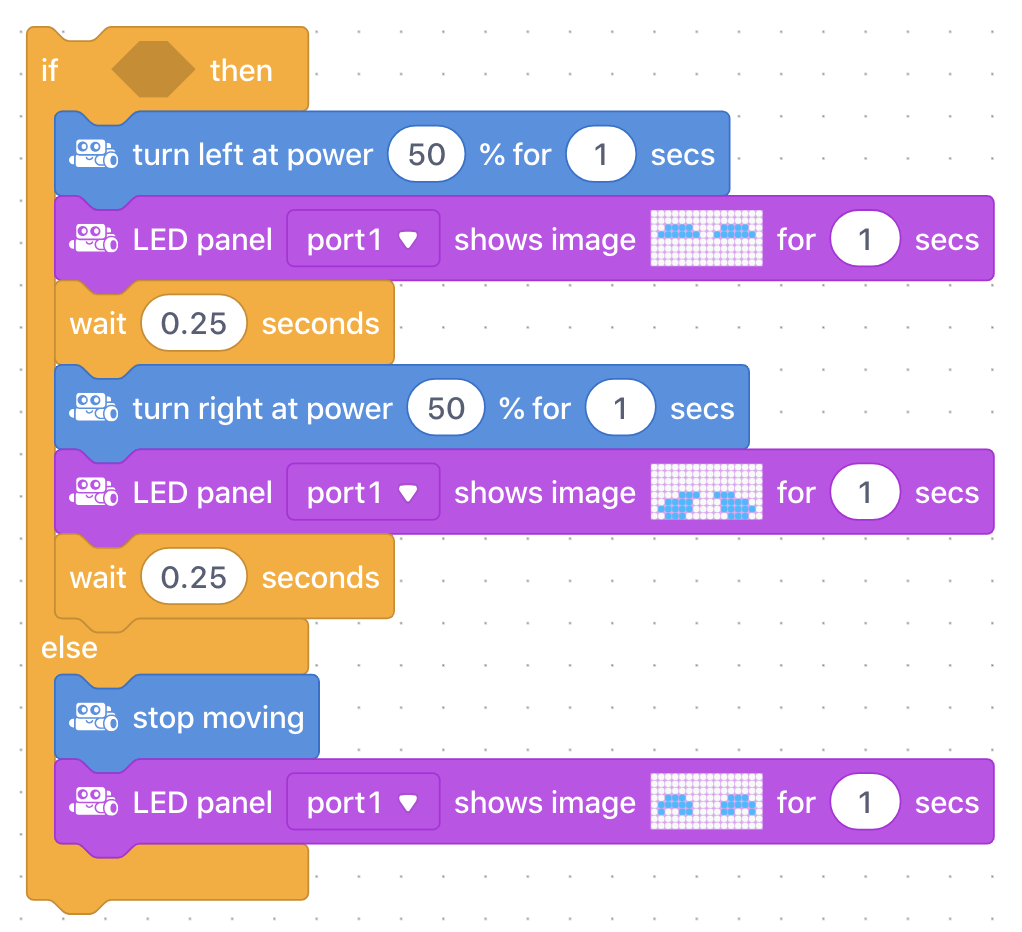
NOTE: Running the IF-THEN-ELSE block at this stage will not make the mBot do anything because we have not yet defined the condition!
Now have students complete the program by adding their condition from Challenge #1 to the IF-THEN-ELSE block, and placing the entire program inside a Repeat forever block.
Combining Challenge 1 and 2 - Example solution:
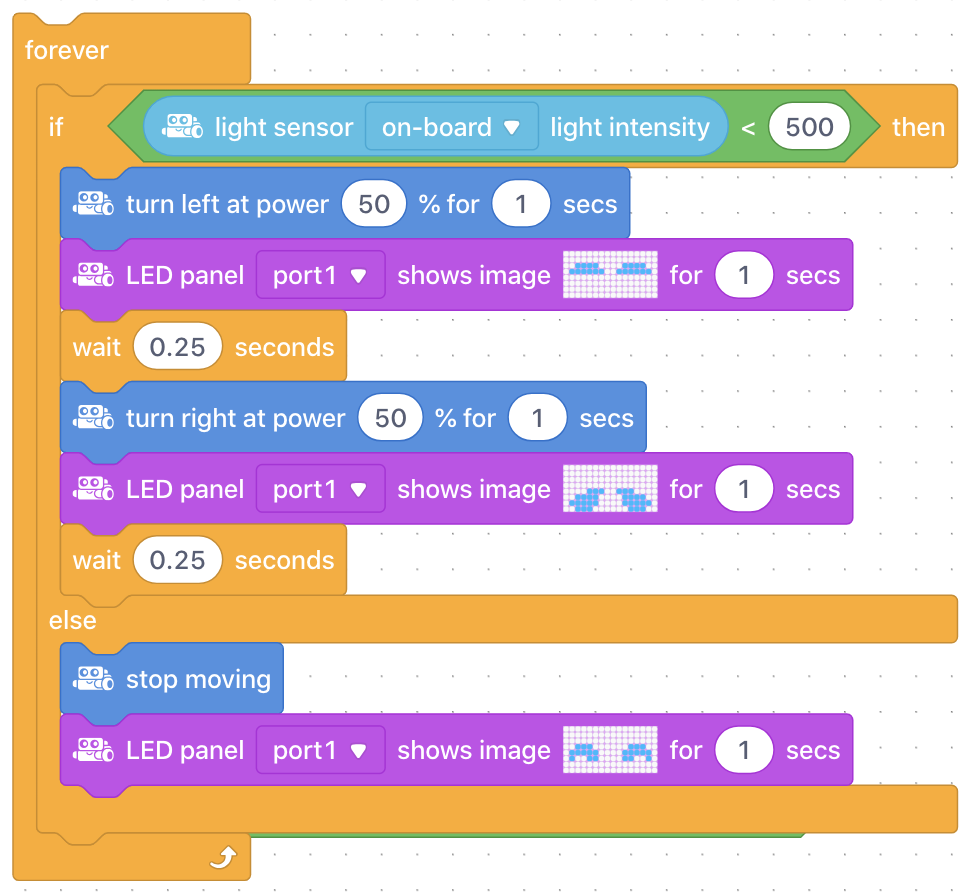
Ask, "What number did you use to define your condition? Why did you choose this number?" Sample response: I chose a number between the high number when the lights were on and the low number when the lights were off. I chose this number because if the light sensor is above this number, it will do the passive sequence and when it is below this number it will do the active sequence.
Ask, "How did you use the Repeat forever block and why is this necessary?" Sample response: I placed the entire IF-THEN-ELSE block inside of the Repeat forever block. Without this block, the code will run once based on the light conditions at that moment, but will not continually adjust the mBot's actions as the light conditions change.
Once students have completed both coding challenges, have them bring their mBots to a central location in the classroom. For the Afraid of the Dark activity, turn the lights on and off to see the mBots react on their own! Encourage students to keep testing and improving their code to make their mBot as responsive as possible to the changes in light conditions, and to make their active sequence as erratic and crazy as possible! Depending on the light conditions in the room, students may also need to adjust the light sensor number in their condition as they move their mBot around the room.
Ask, "Can you think of any other examples of programs that react to changes in light conditions?" Sample response: Most smartphones will adjust the screen brightness automatically depending on the light conditions in the room. This is exactly the same principle!
Discuss, "What conditional programs could you create for your home that use the same technology - light sensors and motors - as we used today?" Sample response: Field student responses and examples. Some examples: A program that opens your blinds (using a motor) once the sun comes up (light sensor). A program that opens the garage door (motor) when your car headlights are turned on (light sensor).
Use the Evaluation Rubric to review students' work.
[Optional] Share your students' work with the world using @logicsacademy and #mBot and #LearntoCode!
1A-AP-10 Develop programs with sequences and simple loops, to express ideas or address a problem.
1A-AP-11 Decompose (break down) the steps needed to solve a problem into a precise sequence of instructions.
1A-AP-14 Debug (identify and fix) errors in an algorithm or program that includes sequences and simple loops.
4D Students exhibit a tolerance for ambiguity, perseverance and the capacity to work with open-ended problems.
5D: Understand how automation works and use algorithmic thinking to develop a sequence of steps to create and test automated solutions.
7C: Contribute constructively to project teams, assuming various roles and responsibilities to work effectively toward a common goal.
• Make changes and test again, repeating until satisfied with the product
• Use materials, tools, and technologies in a safe manner, and with an awareness of the safety of others, in both physical and digital environments
• Identify the skills required for a task and develop those skills as needed
• Use familiar tools and technologies to extend their capabilities when completing a task
• Demonstrate a willingness to learn new technologies as needed
P2: Students will be expected to use digital tools to develop ideas and original works in innovative ways.
TOC1: Students will be expected to
safely use many forms of current technology for learning with growing competence
demonstrate conceptual understanding of how information and communication technology, digital tools, and authorized networks support their learning
use terminology related to information and communication technology
Algebra (Coding)
C3.1 solve problems and create computational representations of mathematical situations by writing and executing code, including code that involves conditional statements and other control structures.
Planning, creating, appraising and communicating in response to challenges.
Working independently and with others while exploring careers and technology