
Loading…
Loading…
Students are introduced to the concept of functions including definitions, examples, and how to create one in mBlock. Students create a driving sequence that includes left and right lane changing procedures. Students lane-change through a course filled with obstructions!
Students are introduced to the concept of functions including definitions, examples, and how to create one in mBlock. Activity: Students create a driving sequence that includes left and right lane changing procedures. Students lane-change through a course filled with obstructions!
For students to understand what functions are in computer programming and why they are useful
For students to practice creating and using their own functions
For students to practice an iterative approach to problem solving and design in which they break larger tasks down into their smaller components
Class set of mBots and devices
Masking tape (1 roll)
Lane obstacles for Lane Change activity (e.g. unused mBots, pencil cases, staplers, etc.)
Install mBlock on all devices.
Fully charge mBots/devices.
See the Teacher's Guide to become familiar with the mBot hardware and the mBlock software.
Arrange classroom to allow lots of floor space for testing programs.
Create the Lane Change Activity space on the floor using masking tape (see below).
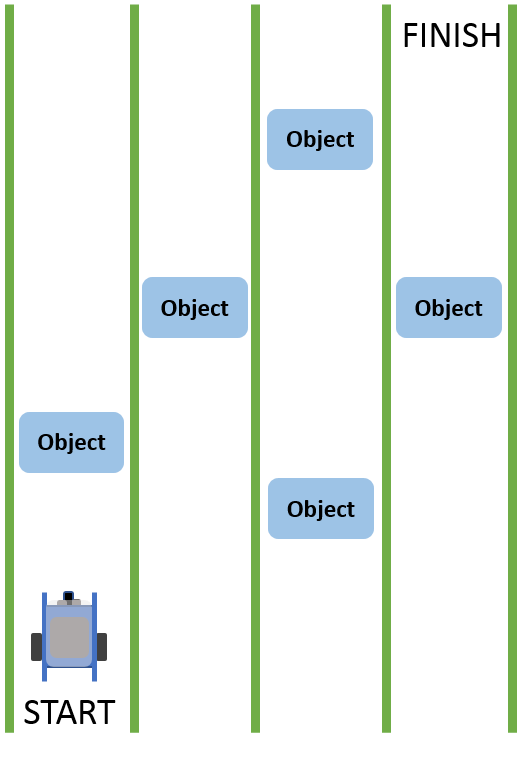
Ask, "How do you program the motor speeds in mBlock?" Sample response: In mBlock, motor speeds can be set independently using the set motor speed block.
Ask, "How do you calibrate the motors so that the mBlock drives in a perfectly straight line?" Sample response: To make the mBot drive in a perfectly straight line, start by setting the motor speeds to the same speed. If the mBot still arcs to the right or left, adjust the speed of one of the wheels until the mBot drives in a straight line. For instance, if the mBot arcs to the right, you could either reduce the speed of Motor 1 to match Motor 2, or increase the speed of Motor 2 to match Motor 1. This process is called calibration.
Ask, "What is the 4-step approach to problem solving in computer programming that we have discussed in previous lessons?" Sample response: The 4-step approach is: (1) Brainstorm, (2) Create, (3) Test, and (4) Improve.
Say, "Today you are going to discover a new programming tool: Functions! In computer programming, a function is simply a sequence or section of code that is given a name and 'stored' in a smaller piece of code. This is also called a procedure. Functions, or procedures, are incredibly useful because they allow us to easily reuse sections of code. Creating a function is most useful when we have a complex task that should be completed in the same way every time."
Ask, "Can you think of any simple or complex tasks that you complete in the same way every time?" Examples: Brushing your teeth, tying your shoes, parallel parking, baking a cake using a recipe, folding a shirt, etc.
Say, "Today we will use functions to create a self-driving car program for our mBots! You will create functions that will help you keep your program organized and help you quickly make changes to you program as the challenges change. Let's get started!"
This lesson uses the mBot motors exclusively. Refer to the Teacher's Guide for additional information about this hardware.
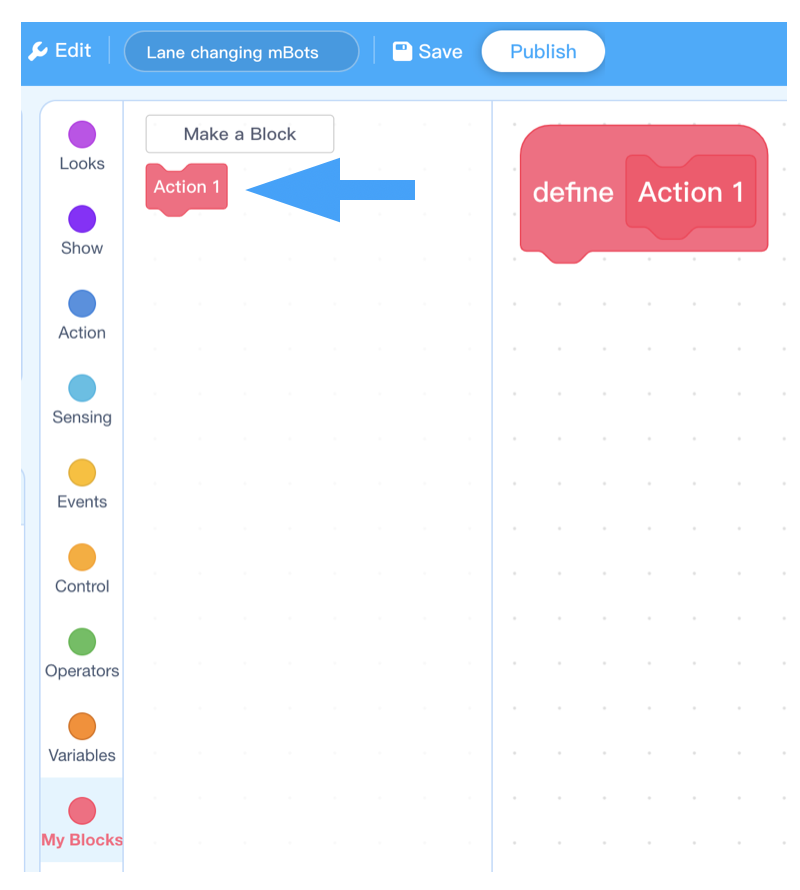
Say, "In mBlock, you can 'store' simple or complex sequences of code as a single block. This single block is your function! You can create your own block by clicking the Make a Block button in the My Blocks section."
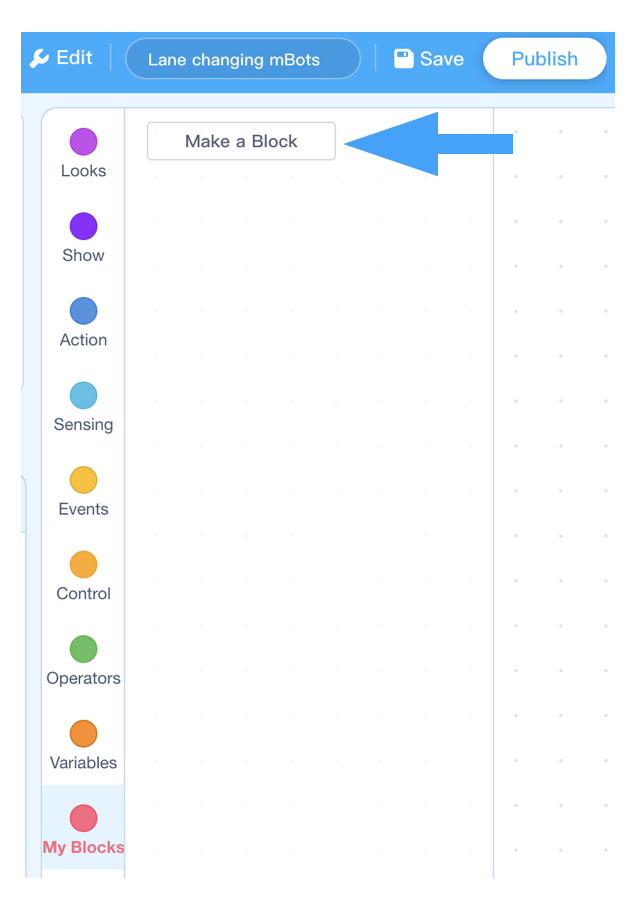
Say, "Clicking Make a Block will open a window that prompts you to give your function a name. In this example, the function is simply called, Action 1. This is to illustrate that you can name your functions anything. When you create your own functions however, give them a short name that describes what they do."
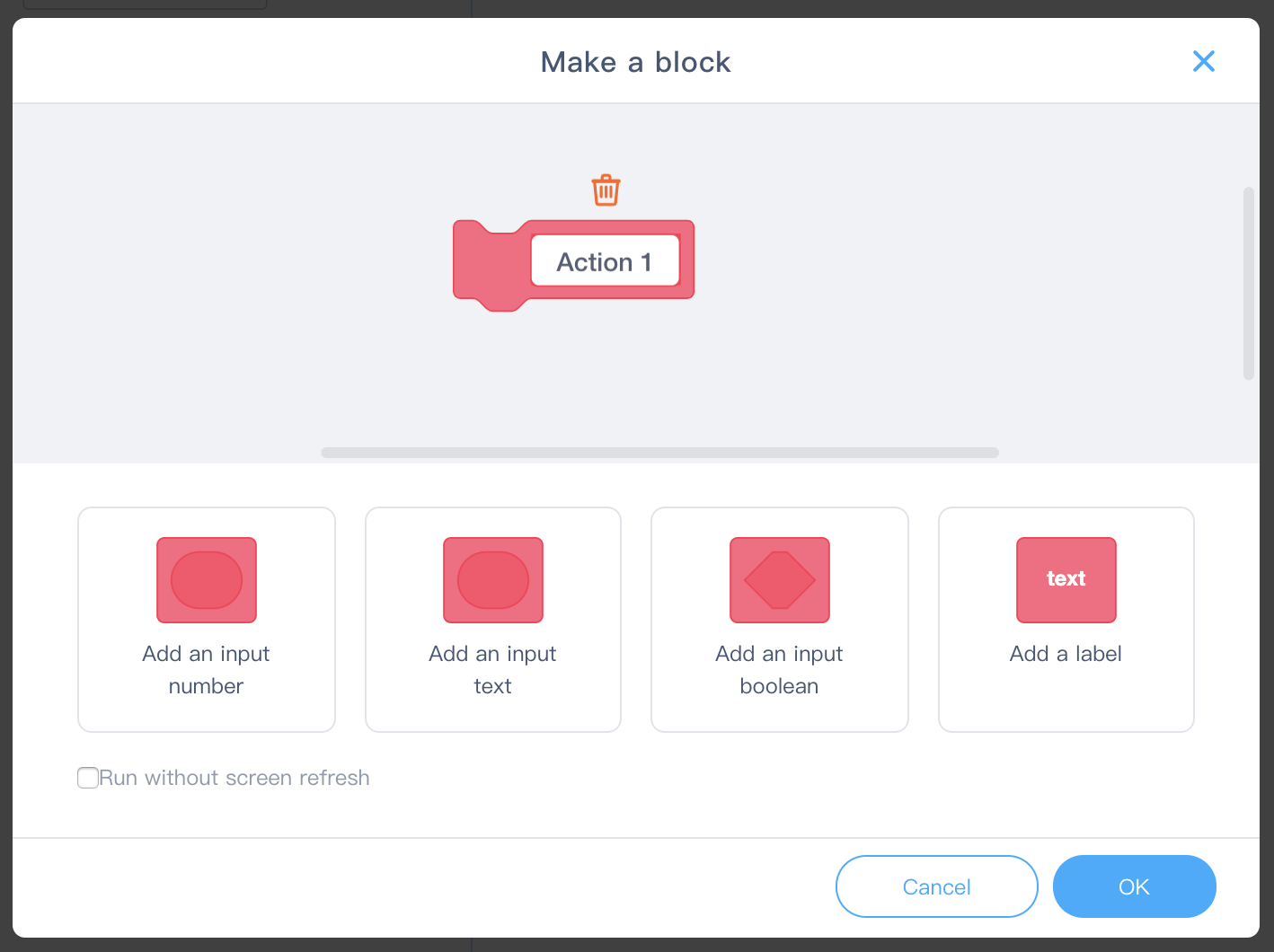
Say, "Once you have named the function, a large red block appears called, define Action 1. This is where you can define the function by placing a sequence of blocks underneath, much like an Event block. The new block itself can be found on the left and can be used just like a regular block. Whatever sequence is placed under the define Action 1 block will be run whenever the Action 1 block is run."
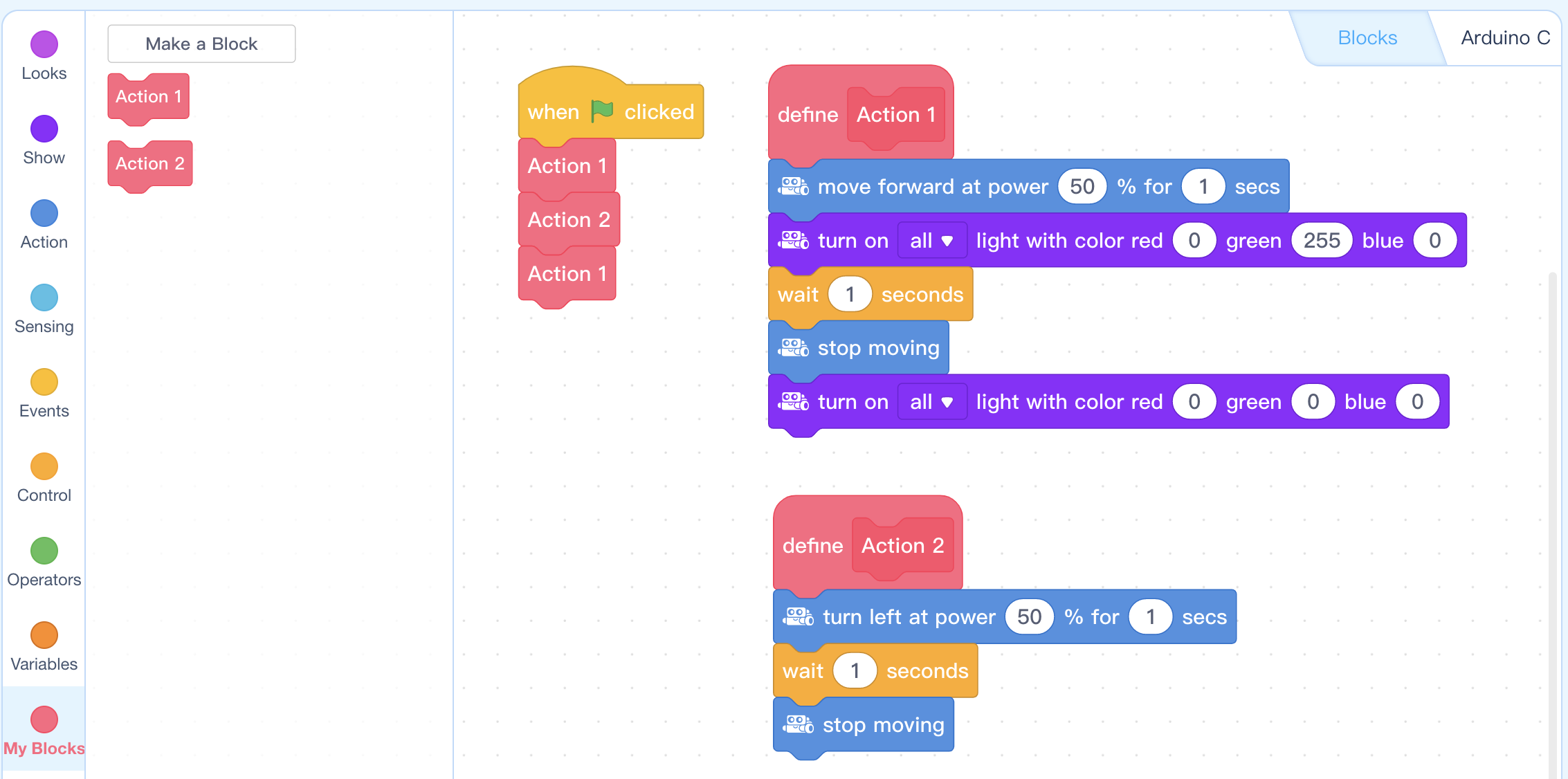
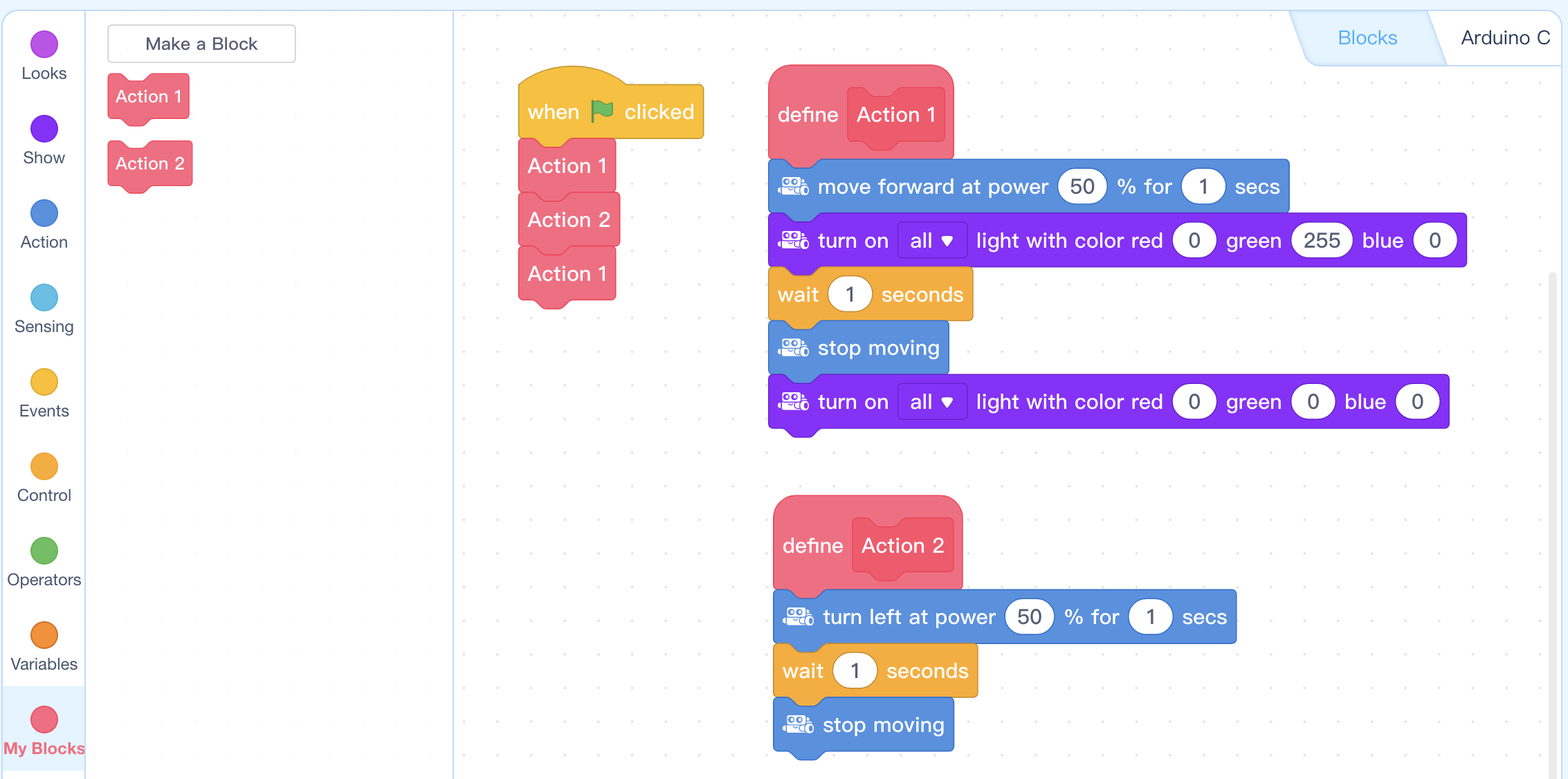
Say, "What do you think the mBot will do when the green flag is clicked in the example program below?" Answer: The mBot will do (1) Action 1: Drive straight for 1 second with green LED lights, then stop and switch LED lights off, (2) Action 2: Turn left for 1 second, (3) Action 1 again.
Ask, "What is a function in computer programming?" Sample response: A function is a sequence or section of code that is given a name and 'stored' in a smaller piece of code.
Ask, "How are functions created and used in mBlock?" Sample response: In mBlock, you can create a function by creating a new block. The function can be used like any other block, by dragging and clicking it together with other blocks to create a program.
Ask, "From looking at the example from the instructions (and below) what is one reason why using function might be useful?" Sample response: The main code (under the green flag) is much shorter than it would have been without the functions. Storing procedures in their own block also makes it easier to repeat the procedure within the program (which we can see when Action 1 is repeated in the example).
Say, "Your main challenge for today is to create a program that allows your mBot to drive through a highway filled with obstacles, all on its own! To do this you will need to create two functions: Right Lane Change and Left Lane Change. Let's get started!"
Discuss, "What are each of the smaller actions that make up the total procedure of changing lanes?" Field student responses. There are multiple correct answers since there are multiple ways of completing a lane change. You may wish to draw two lanes on the chalkboard/whiteboard and, with an mBot, simulate the action of a lane change with the students to help them visualize the process.
Say, "Your first challenge is to create a left lane change sequence and a right lane change sequence using the set motor speed block and wait blocks. Don't worry about creating the function quite yet. Remember to continually test your sequences as you go and improve your code after each test. Make sure to test your code in the Lane Change Activity area marked on the floor."
Coding Challenge #1 - Example solution
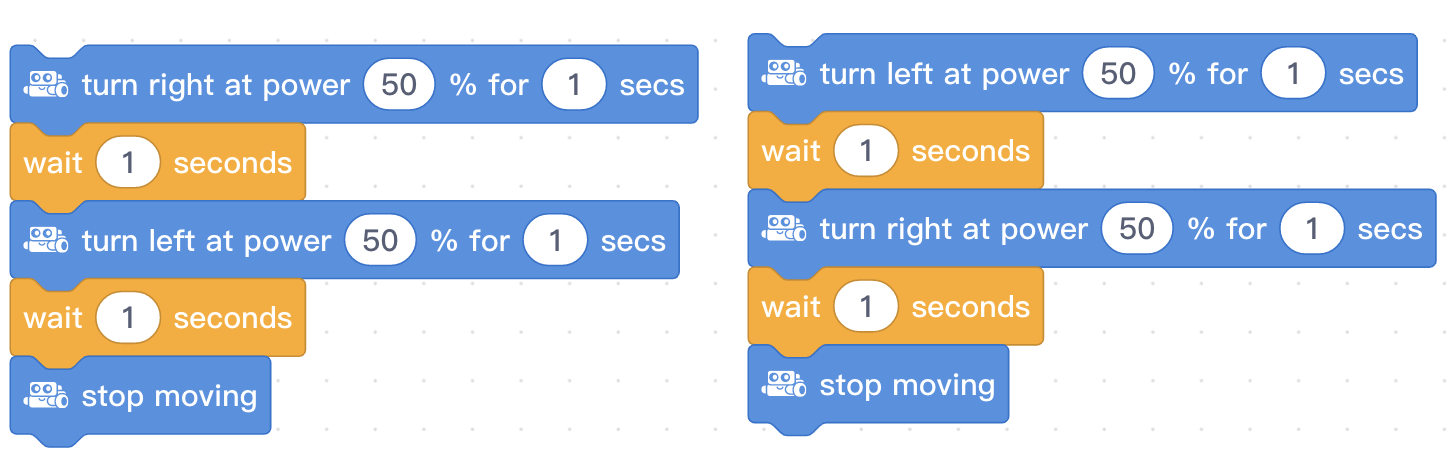
NOTE: The wait times in this program should be calibrated for the particular mBot and the size of the lanes. This example simply involves two turns in succession but there are many ways that a lane change could be achieved.
Say, "Your next challenge is to create new blocks, or functions, that will store your lane change sequences. Make sure to use a short but descriptive name for your block so that you can easily remember what each block does. Once you have created your blocks, create a sequence that has your mBot drive forward for 1 second, then complete a right lane change."
Coding Challenge #2 - Example solution
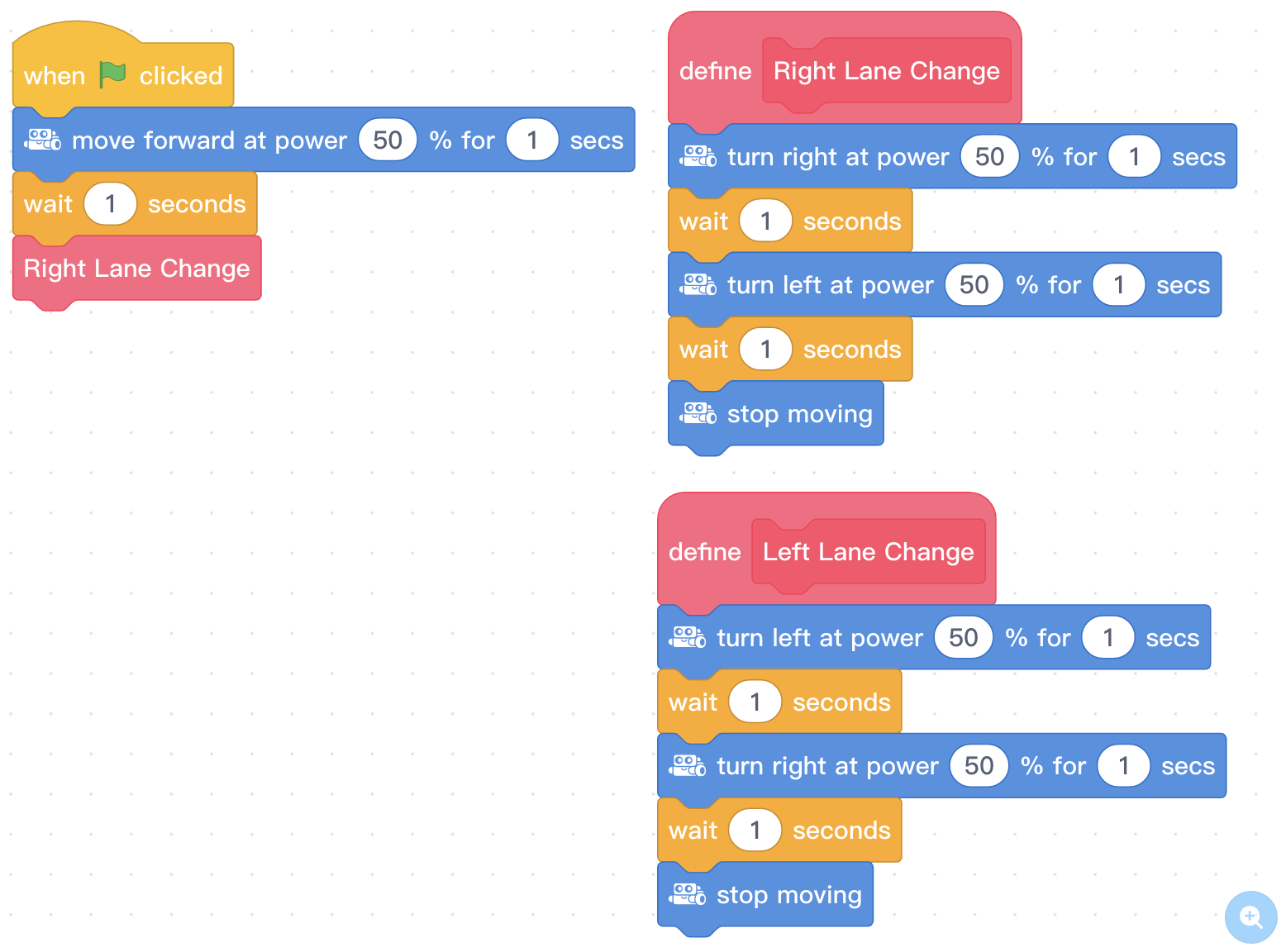
Ask, "What is the difference between the large blue "Define function" block and the smaller function block of the same color?" Sample response: The large block is used to store the sequence of commands that will make up your function, or procedure. The smaller block is what is actually used to run the function."
Ask, "How did you define your lane change?" Elicit several student responses since solutions should vary between groups.
Say, "Your final challenge for today is to create a sequence, using your lane change functions, that allows your mBot to make it from the start to the finish in the activity area, changing lanes to avoid colliding with the objects in the way!"
NOTE: Time permitting, change the orientation of the objects in the lanes to create new challenges for students to complete.
Coding Challenge #3 - Activity Setup Example
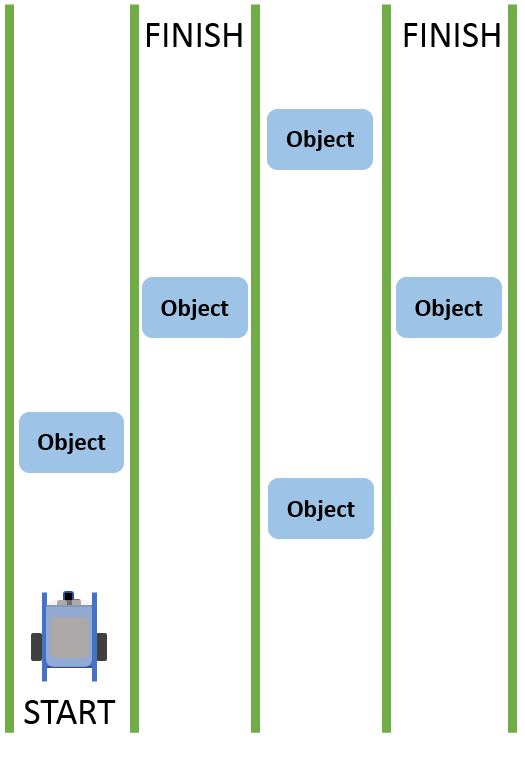
Coding Challenge #3 - Example solution
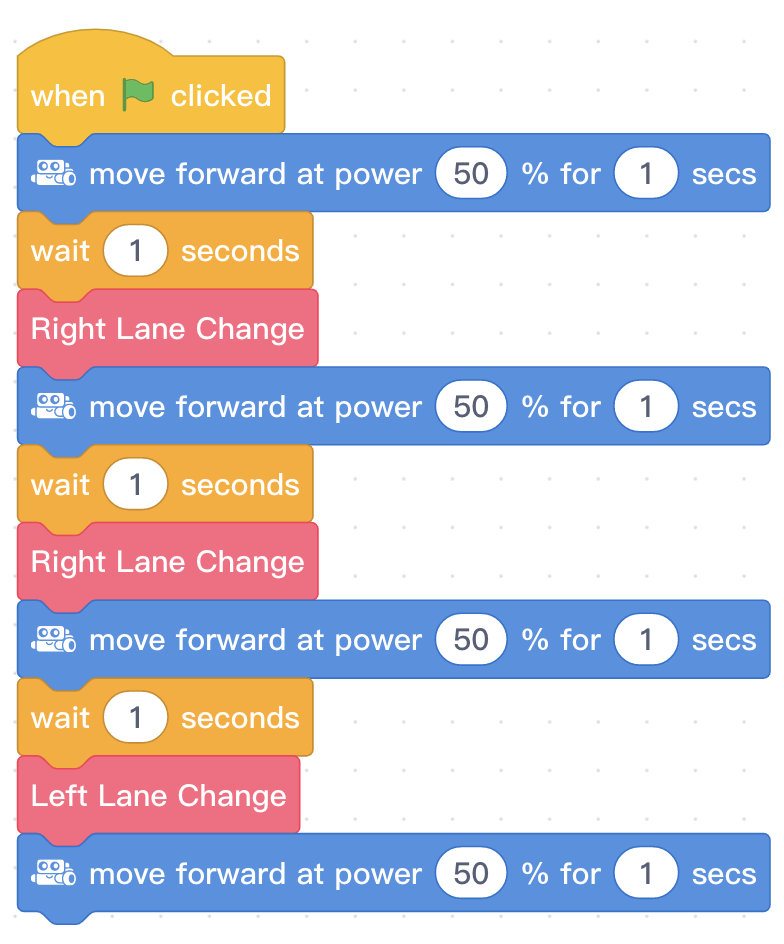
Note: the wait times and seconds used for moving forward in each lane will depend on the distance the objects are from the mBot. It will also depend on the power used in each "move forward at power ___ % for ___ secs" block.
Ask, "How might programming with functions make editing a long sequence with many lane changes easier?" Sample response: Using functions makes editing a larger program easier because instead of having to edit each and every section where a lane change appears in the program, one can simply change the content of the define Function block.
Discuss, "How did you program your lane-changing procedures? What smaller actions made up your complete lane change?" Try to field as many different solutions as possible to highlight the many different ways this problem can be solved.
Use the Evaluation Rubric to review students' work.
[Optional] Share your students' work with the world using @logicsacademy and #mBot and #LearntoCode!
1A-AP-10 Develop programs with sequences and simple loops, to express ideas or address a problem.
1A-AP-11 Decompose (break down) the steps needed to solve a problem into a precise sequence of instructions.
1A-AP-14 Debug (identify and fix) errors in an algorithm or program that includes sequences and simple loops.
4D Students exhibit a tolerance for ambiguity, perseverance and the capacity to work with open-ended problems.
5D: Understand how automation works and use algorithmic thinking to develop a sequence of steps to create and test automated solutions.
7C: Contribute constructively to project teams, assuming various roles and responsibilities to work effectively toward a common goal.
Planning, creating, appraising and communicating in response to challenges.
Working independently and with others while exploring careers and technology
Algebra (Coding)
C3.1 solve problems and create computational representations of mathematical situations by writing and executing code, including code that involves conditional statements and other control structures
P2: Students will be expected to use digital tools to develop ideas and original works in innovative ways.
TOC1: Students will be expected to
safely use many forms of current technology for learning with growing competence
demonstrate conceptual understanding of how information and communication technology, digital tools, and authorized networks support their learning
use terminology related to information and communication technology
• Generate potential ideas and add to others’ ideas
• Identify and evaluate the skills and skill levels needed, individually or as a group, in relation to a specific task, and develop them as needed
• Select, and as needed learn about, appropriate tools and technologies to extend their capability to complete a task