
Loading…
Loading…
Students take the concept of loops and variables further by creating a loop that changes the value of a variable with each new iteration. Students create a program that has the mBot drive in spiral. To do so, students will need to create a variable and consider which parameter in their program will need to change with each iteration to create the desired shape. The lesson culminates in an activity that incorporates all of the coding concepts that students have learned in this course: Sequences, Loops, Events, Conditions, Functions, and Variables!
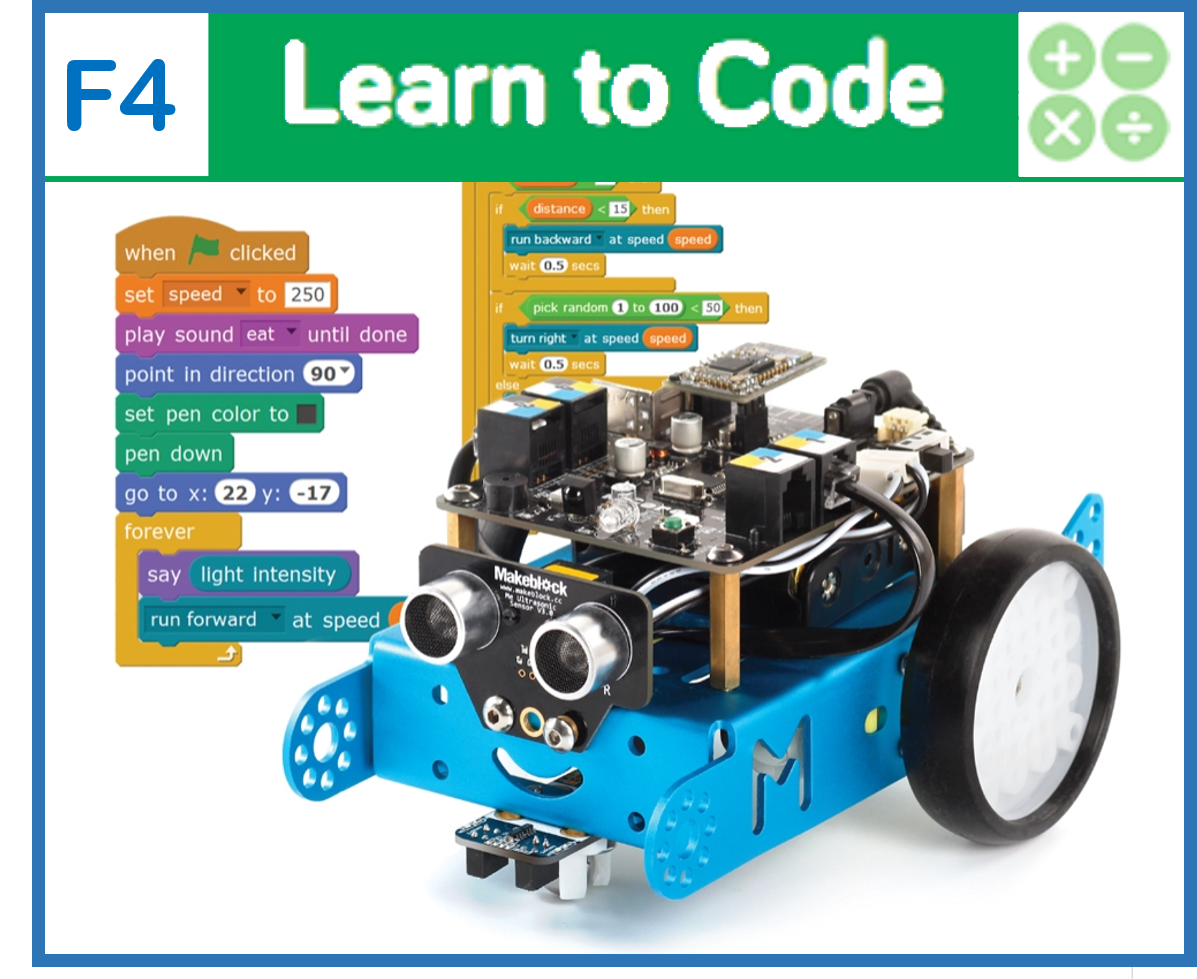
Students take the concept of loops and variables further by creating a loop that changes the value of a variable with each new iteration. Activity: Students create a program that has the mBot drive in spiral. To do so, students will need to create a variable and consider which parameter in their program will need to change with each iteration to create the desired shape. The lesson culminates in an activity that incorporates all of the coding concepts that students have learned in this course: Sequences, Loops, Events, Conditions, Functions, and Variables!
For students to discover a new ways to use variables and previously learned concepts such as a loop together
For students to understand how robotic actions can be changed by changing a variable
For students to use all of the coding concepts they have learned in a single program
Class set of mBots and devices
Install mBlock on all devices.
Fully charge mBots/devices.
See the Teacher's Guide [attached] to become familiar with the mBot hardware and the mBlock software.
Arrange classroom to allow lots of floor space for testing programs.
Ask, "What is a variable in computer programming?" Sample response: A variable is something that we can store information in (numbers or text).
Ask, "Once a variable is set, will it remain this value forever?" Sample response: Not necessarily. The value of variables can be changed.
Ask, "How do we use variables in mBlock? Do they click to other blocks like, say, the motor blocks?" Sample response: In mBlock, variables are rounded blocks that can be placed within other blocks anywhere a number value would normally go.
Ask, "What other rounded blocks have we used thus far in mBlock?" Sample response: In addition to variables, we have used the pick random # block and the light sensor block.
Ask, "How do you calibrate the motors so that the mBlock drives in a perfectly straight line?" Sample response: To make the mBot drive in a perfectly straight line, start by setting the motor speeds to the same speed. If the mBot still arcs to the right or left, adjust the speed of one of the wheels until the mBot drives in a straight line. For instance, if the mBot arcs to the right, you could either reduce the speed of Motor 1 to match Motor 2, or increase the speed of Motor 2 to match Motor 1. This process is called calibration.
Ask, "What is the 4-step approach to problem solving in computer programming that we have discussed in previous lessons?" Sample response: The 4-step approach is: (1) Brainstorm, (2) Create, (3) Test, and (4) Improve.
Say, "In this lesson you are going to take the concept of variables even further! In mBot F3 - Introduction to Variables you created a variable, and used event blocks to increase or decrease the number value of the variable. In this lesson, you will create a looped sequence that incorporates a variable that changes slightly with each iteration of the loop (meaning each time the sequence repeats), without any human intervention!"
Ask, "What other blocks have we used that can change while the program is running? How did these changes affect the actions of the robot?" Sample response: The pick random # block and the light sensor block are also blocks that hold values that can change. We used the pick random # block to make the mBot move erratically, and we used the light sensor block to make the mBot complete different actions, depending on the light conditions.
Say, "In the first two coding challenges of this lesson, you will combine a sequence, a loop, an event, and a variable to make mBot drive in a crazy shape: the spiraling square! In the final challenge you will use all the concepts you have learned by adding a condition, and a function to your program. Let's get started!"
This lesson primarily uses the mBot motors, but students may wish to use the coloured LEDs and the LED matrix in their solution to the final coding challenge. Refer to the Teacher's Guide for additional information about this hardware.
Say, "Today you will be creating a loop that contains a sequence of robotic actions, and also changes the value of a variable each time that it runs. To do so we first need to create and initialize the variable. Recall that variables are created in mBlock by clicking on the Make a Variable button in the Variables tab. You can give the variable an initial value using the set variable to block. Recall that the value of the variable can be seen on the Scratch sprite screen to the left of the blocks and tabs."
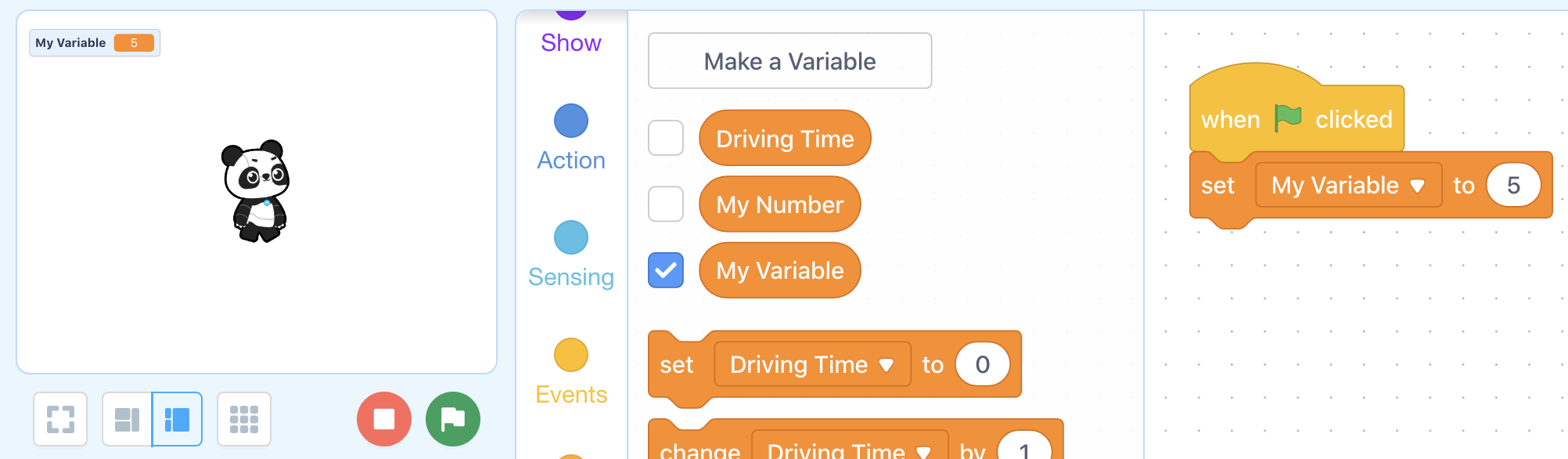
Say, "A loop can be used, in combination with the change variable to block, to create a program that autonomously changes the value of the variable. In this example, the value of the variable is decreased by 1 each time the loop repeats."
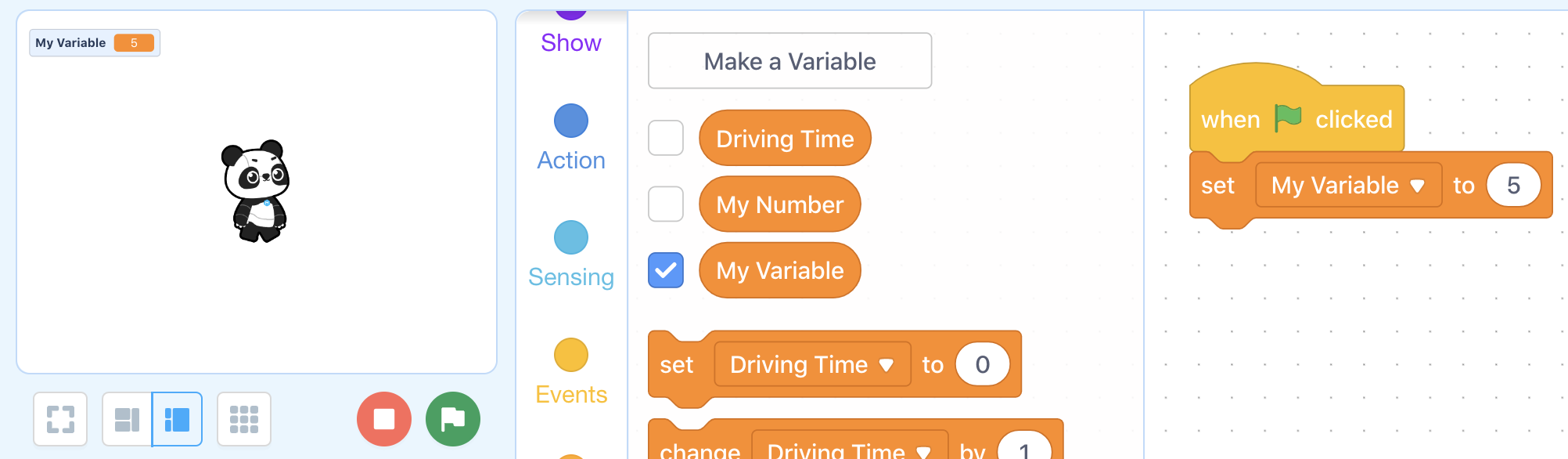
Ask, "In this example, what number will My Variable represent once the program has finished running?" Answer: It will represent the number 2 because the program repeats 3 times, changing My Variable by -1 each time. 5 - 3 = 2.
Say, "Now we can incorporate some robotic actions to the program. In this case, My Variable is being used instead of a fixed wait time."
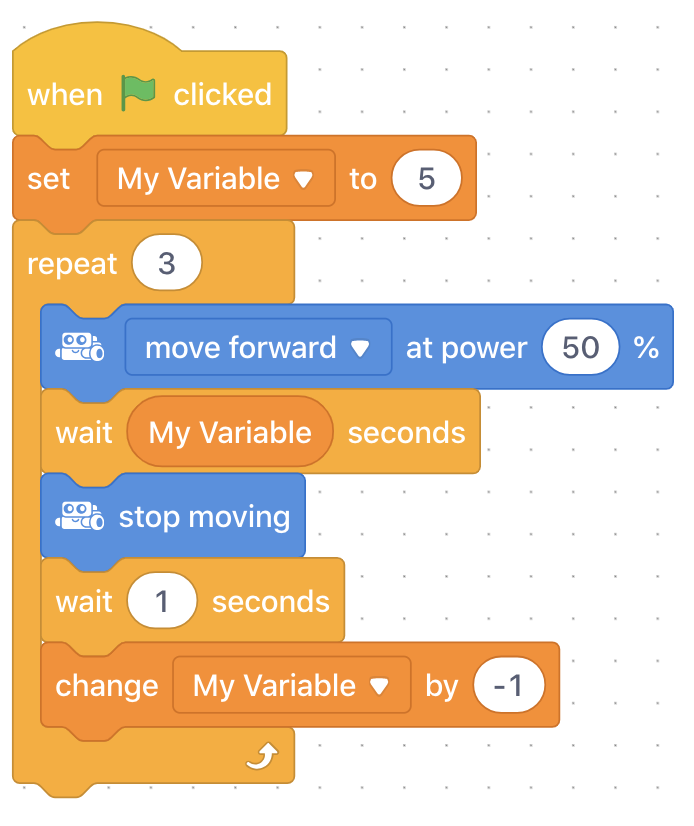
Ask, "What will this program cause the mBot to do? How does the variable change the actions of the mBot each time the driving sequence is repeated?" Sample response: This program repeats a sequence that has the mBot drive forward for some time, then stop for 1 second. Since the variable represents the drive forward time, the mBot will drive forward for 1 second less each time the sequence repeats.
Ask, "What are the 6 robotic actions in this program?" Answer:
Drive forward for 5 seconds
Stop for 1 second
Drive forward for 4 seconds
Stop for 1 second
Drive forward for 3 seconds
Stop (program ends)
Say, "Alternatively, if we wanted to get really clever with our programming, we could add a conditional loop that only repeats until the variable reaches a certain number. This can be done using the Repeat until block, and an operator. First, we need to define the condition by placing the variable inside of an operator, as in step (1) below. Next, the condition is placed inside of the Repeat until block, as in step (2). This means that whatever sequence of blocks is within the Repeat until block will repeat until the number value of My Variable is 1. Next, we add our event for setting the initial value of the variable (3), and finally, place our sequence from the previous example inside of the Repeat until block (4)."
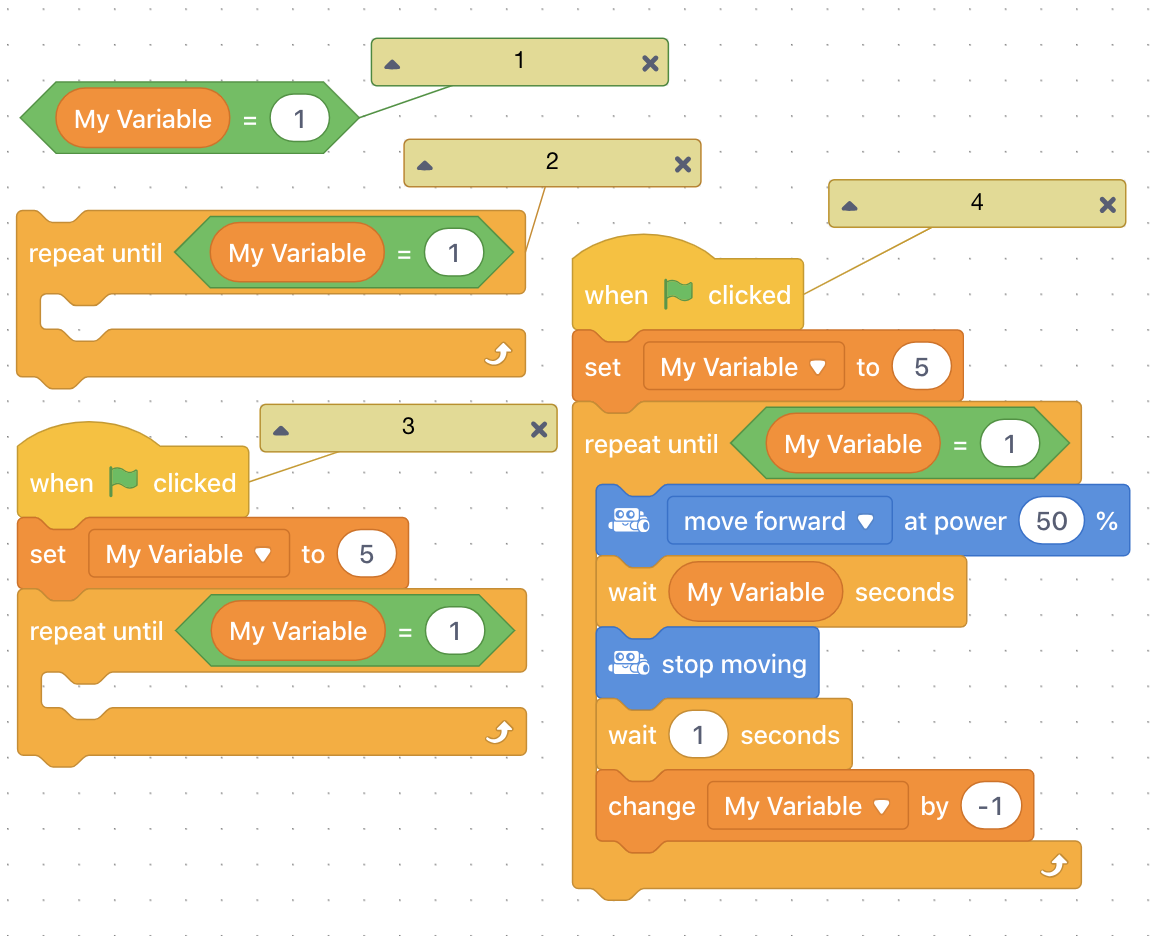
Ask, "How many times will this sequence repeat?" Answer: The sequence will repeat 4 times because the initial value of the variable is 5, it is deceased by 1 each time the sequence repeats, and the sequence will only repeat until My Variable = 1, so 4 times.
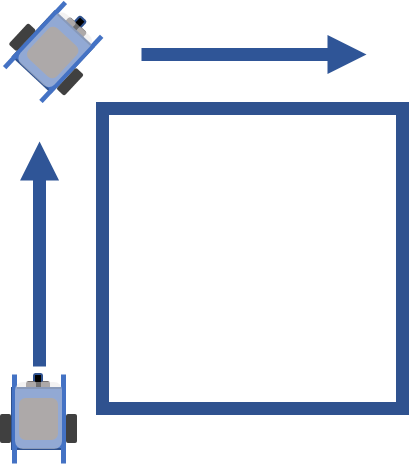
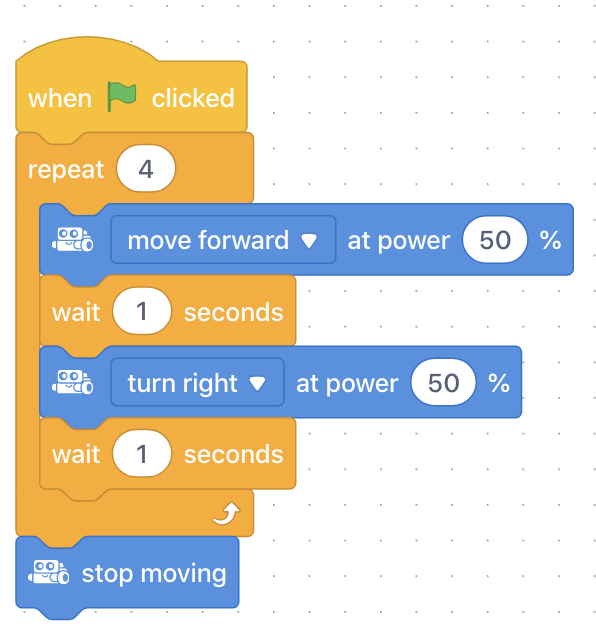
Say, "Your first coding challenge will sound familiar. You will be creating a looped sequence that has your mBot drive in a perfect square! Recall, the smaller actions that make up a square include: (1) Drive forward for some time, (2) Make a 90 degree turn. This sequence can then be repeated using a Repeat # block. Begin your program with an Event block. Let's get started!"
Coding Challenge #1 - mBot Actions example
Coding Challenge #1 - Example solution
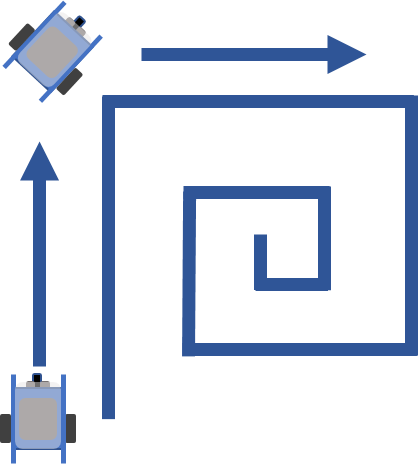
Say, "Now let's make this interesting! Your second coding challenge is to modify your program to have your mBot drive in a spiralling square, like so. To do so, you will need to create a variable that changes values each time the driving/turning sequence repeats."
Coding Challenge #2 - mBot Actions example
Say, "Before you begin programming, let's talk briefly about how you should modify your programs."
Ask, "How is the spiral shape different from the square? How is it the same?" Sample response: The side length of the spiral decreases after each turn. The turns remain the same, at 90 degrees.
Ask, "In your square program, which one of the following number values would need to change each time the sequence repeats to achieve a spiral effect? How should it change?" Sample response: There are two correct answers: (1) The wait time for the drive forward action could decrease each time. (2) The motor speed of the drive forward action could decrease each time.
Point out to students that the value that needs to decrease each time the sequence repeats is the one that needs to be replaced by a variable.
Challenge students to:
Create a variable and give it a short but descriptive name.
Add a set variable to block at the beginning of the program (under the event block ) and choose the initial value for the variable.
Add a change variable by block that decreases the variable by a value of their choice each time the program is run. This should be placed after the turn action.
Place the variable itself in the appropriate place so that the side of the square sequence decreases each time the sequence repeats.
Coding Challenge #2 - Example solution
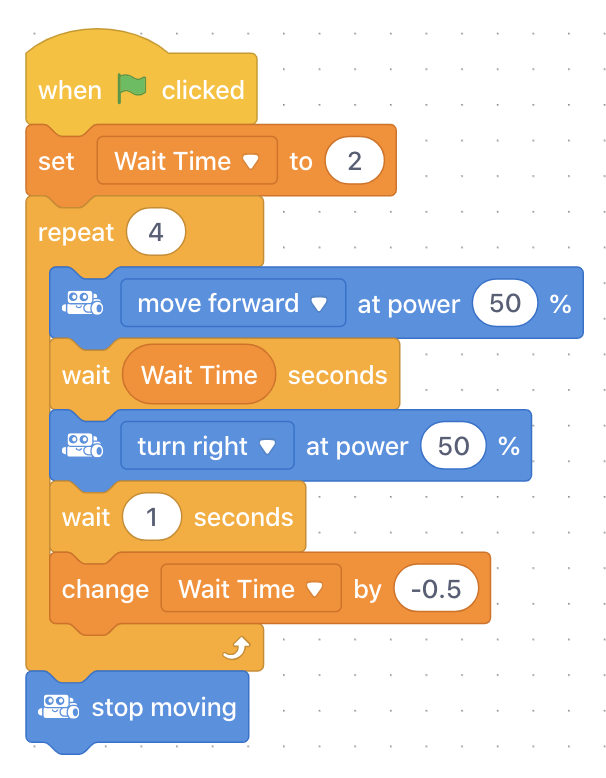
Ask, "Where did you place your variable?" Field student responses to get a sense of how many students changed the wait time and how many students changed the motor speed.
Ask, "By how much did you decrease the variable each time? Was this too much?" Field student responses. This question is to get students thinking about the shape of the spiral. Encourage students to modify the initial value of the variable and how much it is changed by until they get a spiral shape that they like.
Say, "Since this will be the final challenge of the lesson and of the course, you are going to get a chance to incorporate all six of the fundamental coding concepts that we have learned! From the first two coding challenges, you already have a program that uses a sequence, a loop, an event, and a variable. Now you will incorporate the final two concepts by modifying your programs to include a condition and a function!"
Challenge students to:
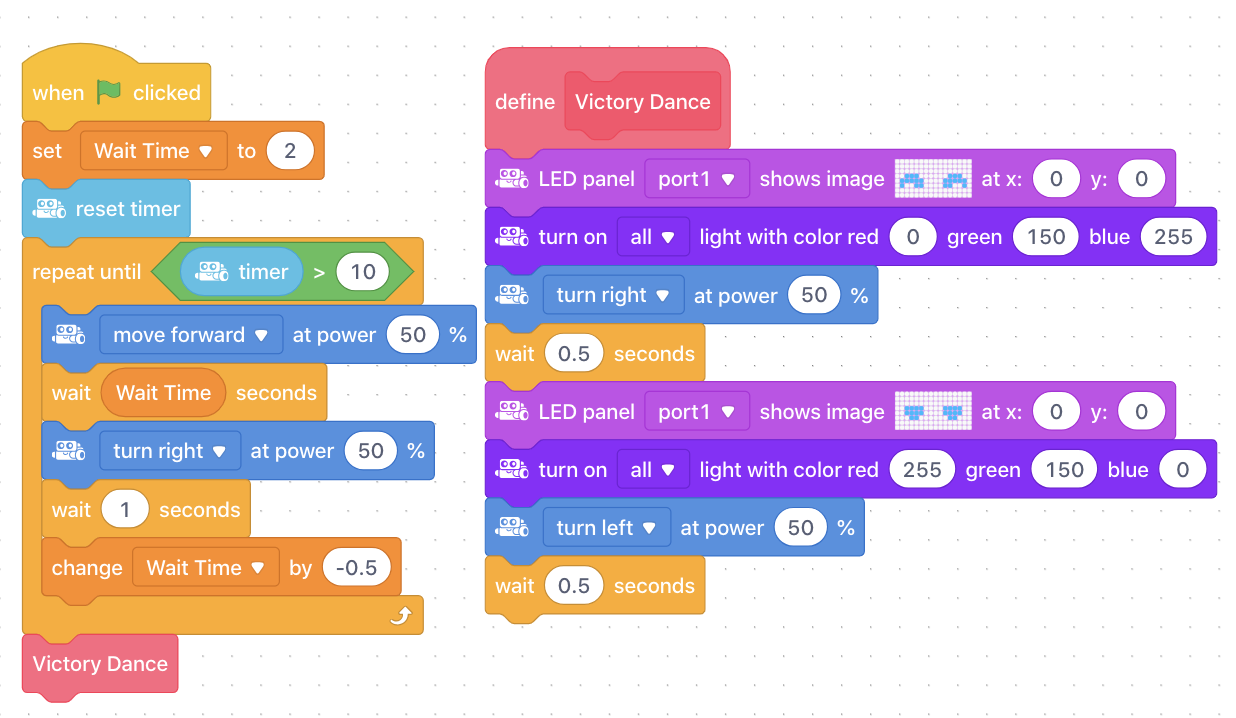
Include a conditional block by changing their Repeat # block to a Repeat until block. Remind students that they will need an operator to define the condition. Students may choose to define the condition using the timer block, like in mBot F1 - Conditions - Robot Patrol, or they may choose to define the condition using their variable, like they saw in the introduction of this lesson.
Create a "Victory Dance" block which causes the mBot to do a short dance movement (e.g. turn back and forth). Encourage students to jazz it up with coloured LEDs or the LED matrix.
Coding Challenge #3 - Example solution
Ask, "Can you think of any other examples of where variables might be used in the computer programs, apps, or video games that you have used?" Sample response: Variables are used any time numbers or text need to be recorded and saved in a program. Some examples: The lives you have left in a video game, the brightness of your phone or tablet, the date and time on your computer, etc.
Discuss, "What were your favorite programming tools to use (e.g. IF-statements, functions, loops, etc.)? What were your favorite programs from this course? What robotics or coding activities would you still like to try that we have not covered in this course?" Elicit student responses and reflections.
Use the Evaluation Rubric to review students' work.
[Optional] Share your students' work with the world using @logicsacademy and #mBot and #LearntoCode!
1A-AP-09 Model the way programs store and manipulate data by using numbers or other symbols to represent information.
1A-AP-10 Develop programs with sequences and simple loops, to express ideas or address a problem.
1A-AP-11 Decompose (break down) the steps needed to solve a problem into a precise sequence of instructions.
1A-AP-14 Debug (identify and fix) errors in an algorithm or program that includes sequences and simple loops.
4D Students exhibit a tolerance for ambiguity, perseverance and the capacity to work with open-ended problems.
5D: Understand how automation works and use algorithmic thinking to develop a sequence of steps to create and test automated solutions.
7C: Contribute constructively to project teams, assuming various roles and responsibilities to work effectively toward a common goal.
Algebra (Coding)
C3.1 solve problems and create computational representations of mathematical situations by writing and executing code, including code that involves conditional statements and other control structures
Planning, creating, appraising and communicating in response to challenges.
Working independently and with others while exploring careers and technology
P2: Students will be expected to use digital tools to develop ideas and original works in innovative ways.
TOC1: Students will be expected to
safely use many forms of current technology for learning with growing competence
demonstrate conceptual understanding of how information and communication technology, digital tools, and authorized networks support their learning
use terminology related to information and communication technology
• Generate potential ideas and add to others’ ideas
• Identify and evaluate the skills and skill levels needed, individually or as a group, in relation to a specific task, and develop them as needed
• Select, and as needed learn about, appropriate tools and technologies to extend their capability to complete a task