
Loading…
Loading…
In this lesson, students will be able to represent a particular topic and create a museum exhibit based on that topic. They will be able to create signs, slates, boards, and posters to describe their exhibits. This will include a video tour of their exhibit.
Welcome to this Minecraft: Education Edition lesson! Before you begin, take a few moments to let us know your thoughts or feedback on how we can improve this lesson in order to better enhance the learning experience that is delivered in your classroom!
Click here or follow the form below to complete the feedback survey once you've completed this lesson. Thank you!
Click and watch this teacher preparation video to help you understand how to teach this lesson.
Here is a YouTube link of the teacher video for your reference: https://youtu.be/IC1-DPumvns
Coordinate System Tutorial Teacher
Students will select artifacts to represent their selected topic and create a museum exhibit to match.
Students will create signs, slates, boards, and posters to describe their physical exhibits.
Students will create a video tour of their museum exhibit.
Creativity
Critical Thinking
Project Based Learning
What you have been learning lately? Whether it’s science, social sciences, mathematics, arts, literacy, computer science, or any other content area, it deserves a museum! Museums are spaces that help visitors understand, appreciate, and explore a topic. Students can use this world as a template to create displays, exhibits, interactive galleries, signage, and more to showcase their knowledge after a course of study. Imagine taking virtual field trips to each others’ museums inside the game! Students can even work collaboratively to build a museum together. The opportunities are endless.
How can you show what you’ve learned in a digital version of a physical space?
What is most important to showcase about your topic for your visitors?
How can you use the space to create a narrative through a logical flow of information?
Students should have already completed or plan to complete a course of study about a topic, either tied to your curriculum or one that you choose. This world and lesson are a culminating project that can be started at the beginning of the unit and then submitted as a final assessment of learning.
Consider having students complete a moderated Flipgrid topic or OneNote reflection page in advance explaining their prior knowledge of museums. It might be helpful to know if students have any experience visiting museums, but sensitivity to students who have not had the same opportunities as others is important.
You may wish to schedule a virtual field trip to one or more museums before you begin this project, as calendars fill up quickly. Visit Skype in the Classroom’s website to book a field trip. Select “virtual field trips” in the filter at left, then search for “museums.”
Begin by introducing the concept of a museum. Discuss what a museum is, and its purpose. Have students look up museums in the surrounding area in a Maps app, if any are available. If not, have them look in another urban area and explore what types of museums are there. Explain that students will be responsible for planning a museum based on the topic you or your students have selected.
Depending on the age and reading level of your students, select one or more articles for them to read about museum design. You can read these articles to your students, use Immersive Reader in Microsoft Edge browser to read them aloud, or summarize them for younger learners. There are a few suggested articles in the external links section of this lesson, but you may find others as well. Spend a few lessons reading and discussing the contents of these articles so students understand the value of planning a museum from concept to reality.
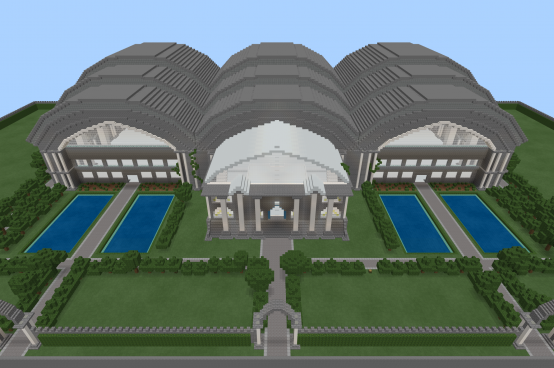
Have students download and open the Minecraft: Education Edition world Create Your Own Museum. They should first explore the grounds of the museum, and then the inside. Ask students to count the spaces. Together or independently, have students sketch the space as if from above: a blueprint view of the museum. Tell students to begin brainstorming what would go in each space, keeping in mind the flow, storytelling, and narrative that museums aim to create. Following this lesson, give students time to plan.
After students have had time to sketch their museums, place them in small groups to share their ideas and get feedback from their peers. This should happen before they begin building. This way students collect important perspectives about their plans prior to construction in the game. Following this lesson, give students time to build.
Once students have completed their builds, assign students to small groups to visit each others’ museums. You may choose to have students share join codes to visitors, create screencasts in Flipgrid, Stream, or PowerPoint, or other method for them to share their work.
Consider using a virtual “comment card” for students to leave feedback about their museum experiences by having students create their own Forms to receive comments, and adding the link in the game or in their video.
Museum Build
4 – Student created a museum full of displays, galleries, and exhibits that shows thoughtfulness of planning, attention to detail, and specific audience and purpose. Student used artifacts that well represent the selected topic. Signage is accurate, informative, and free from errors. The flow of the museum is clear.
3 – Student created a museum filled with content that shows an organized plan with selected details that contribute to the purpose. Student built content that represents the topic. Signage is accurate and informative.
2 – Student created a museum with content, but it needs additional organization or purpose to be clear to visitors. Some of the story may seem missing. Student built content but it is not always clear how it relates to the topic. Signage is missing in places or needs revision or editing.
1 – Student added to the museum, but it is not clear how the design supports the topic. Student needs to add content to support the topic, organization to the layout, and information to the exhibits. Signage is distracting or not available.
What Makes a Good Museum Article: https://news.artnet.com/art-world/what-makes-a-good-museum-exactly-64502
Create Your Own Museum Video Resource: https://www.youtube.com/watch?v=DrLD89FXb3c
10 Tips for Museum Exhibit Design: https://colorcraft3d.com/blog-post/10-tips-for-museum-exhibit-design-success/
How Can Museums Become Better Storytellers: https://www.museumnext.com/article/why-do-stories-matter-to-museums-and-how-can-museums-become-better-storytellers/
Check out the Tips & Tricks video playlist that will help you and your students better use Minecraft: Education Edition in the classroom:
https://youtube.com/playlist?list=PLkh9rrdH-ARER03ojhFYtmoFDVuACYJLa
More videos added periodically so make sure you check often for more content!
Click and watch the student pause and play video with your class, pausing and playing as needed. This will help your students understand how to navigate through this lesson and Minecraft world and complete the activities located within them. Enjoy!
Check out the YouTube link for your reference: https://youtu.be/xAiXaDKUPPA
Create Your Own Museum Student