
Loading…
Loading…
In this lesson, students build a statue which represents their country now and in the future.
Welcome to this Minecraft: Education Edition lesson! Before you begin, take a few moments to let us know your thoughts or feedback on how we can improve this lesson in order to better enhance the learning experience that is delivered in your classroom!
Click here or follow the form below to complete the feedback survey once you've completed this lesson. Thank you!
Click and watch this teacher preparation video to help you understand how to teach this lesson.
Check out the YouTube link of the video for your reference: https://youtu.be/Hl2vdSi_kPo
Start Here: Teacher Preparation Video
Discuss what makes your community unique and what it could look like by the end of the 21st Century
Design and build a sculpture which represents your community
Collaboration
Creativity
Critical Thinking
Citizenship
In this lesson, students will think about what makes their community unique and what it could look like by the end of the 21st Century. Student will work collaboratively to investigate:
What is special about their community or what makes it famous/unique
What issues/problems face their community and discuss how they could be resolved
How they would like their community to be represented to the rest of the world
What they would build to represent their community, taking into consideration both image and materials used
Students will be asked to build a sculpture which represents their community in the 21st Century. In preparation for this assignment it is important to consider:
How students will share their sculpture - I recommend a gallery walk (if you are building in a shared world), Flipgrid screen recording, 3D modelling using a structure block, or exporting a portfolio created with the in-game camera
The size of the sculpture - you may want to give students a designated area for building
How long you give the students to build - I would recommend between 30-60 minutes
Introduce learning objectives with students
Collaboration/ Discussion: In groups, students discuss what makes their community unique and what makes it known or famous. What sculptures currently exist in your community? Do they represent your community well? By the end of the 21st century will it is still be famous for these things? Consider what problems/issues face their community. If they were going to build a statue which represents their country in the 21st Century what would it be?
Planning: After students have discussed and researched their community, have them create an outline of what they would like to build. Find images online to serve as a guide then sketch them out, taking into consideration size, dimension, and materials used.
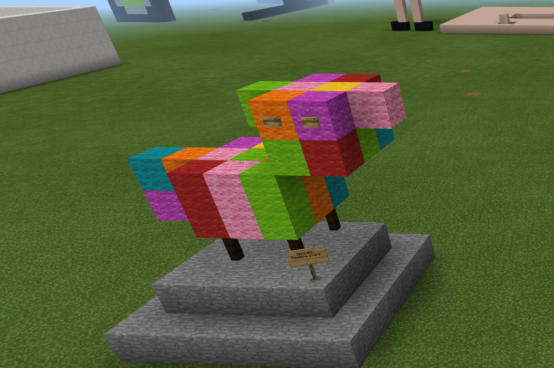
Building: Students build their 21st Century sculptures in Minecraft Education Edition (shared world for synchronous learning and gallery walks, or individual/small group worlds for asynchronous or other sharing options such as flipgrid, structure blocks, or portfolio using the in-game camera). Groups/pairs can work collaboratively on a statue or students could work individually. Encourage students to reflect on how they are creating their statues and if they are meeting the learning objectives. Ask them to name their statues and create a sign to place next to it.
Sharing: When it's time to share, go through the world on a gallery walk, or explore other builds through flipgrid or other shared digital spaces. Have students do peer assessments by feedback in the form of Stars & Wishes (things the team did well, and things they wish were a little different). Have them perform this same exercise as a self-assessment, giving their own work Stars & Wishes. If time permits, have students create revisions of their sculptures based on this feedback. And finally have them reflect on the process through either an exit slip, flipgrid post, or class discussion about what worked well, what was challenging, and what they would do differently in terms of planning, researching, building, or team work.
By the end of the session all students will:
Discuss their own community and consider its place within the 21st Century World.
Plan and design a 21st Century sculpture to represent their own community.
Build their 21st Century sculpture using Minecraft Education Edition.
Discuss sculptures created by their peers and offer feedback.
Refine their own sculptures based on the feedback of others.
Share their 21st Century sculptures in the form of a presentation.
Check out the Tips & Tricks video playlist that will help you and your students better use Minecraft: Education Edition in the classroom:
https://youtube.com/playlist?list=PLkh9rrdH-ARER03ojhFYtmoFDVuACYJLa
More videos added periodically so make sure you check often for more content!
Click and watch the student pause and play video with your class, pausing and playing as needed. This will help your students understand how to navigate through this lesson and Minecraft world and complete the activities located within them. Enjoy!
Check out the YouTube link to this video for your reference: https://youtu.be/kTuSdrXwtlo
Student 'Pause & Play' Video