
Loading…
Loading…
In this lesson, students will explore the probability problem of two dice rolling together. Students will create a simulation, calculate the sum of the numbers of two dice each round and the probability of certain results. Students will learn how to create lists to store and read data as well as execute some of the commonly used functions in the random module during this probability experiment.
In this lesson, students will explore the probability problem of two dice rolling together. Students will create a simulation, calculate the sum of the numbers of two dice each round and the probability of certain results. Students will learn how to create lists to store and read data as well as execute some of the commonly used functions in the random module during this probability experiment.
The concept of the list
The similarity and difference between the variable and the list
Use lists to store and modify data
Use the ‘index()’ method to identify the index of the specified item in the list
Calculate the probability of rolling two dice through computational modelling
Welcome to this Python Coding lesson! Before you begin, take a few moments to let us know your thoughts or feedback on how we can improve this lesson in order to better enhance the learning experience that is delivered in your classroom!
Click here or follow the form below to complete the feedback survey once you've completed this lesson. Thank you!
In this lesson, students will explore the probability problem of two dice rolling.
Students will create a simulation, calculate the sum of the numbers of two dice each round and the probability of certain results.
Students will learn how to create lists to store and read data.
Students will also learn to execute some of the commonly used functions in the random module during this probability experiment.
Students should have a laptop or device with mBlock 5 installed (desktop version or cloud-based version) and mBlock Python editor (mLink) installed.
Worksheet: Lesson Roll the Dice
Example Program: Lesson Roll the Dice
1. What is sample space?
The total number of outcomes for tossing a coin is two: either heads up or tails up. How about rolling dice? There are six outcomes: Number 1, Number 2, Number 3, Number 4, Number 5, and Number 6. The set of all the possible outcomes for an experiment is called the sample space of the experiment. The sample space of a coin-tossing experiment contains ‘heads up’ and ‘tails up’. The sample space of a dice-rolling experiment contains ‘1’, ‘2’, ‘3’, ‘4’, ‘5’, and ‘6’.
How about rolling two dices together and calculate the sum of the two dice? What is the sample space of this experiment? What is the probability of the sum being 10?
To investigate the probability of the experiment of rolling two dice, we can use a sample space diagram to list all the possible outcomes and identify the pattern:
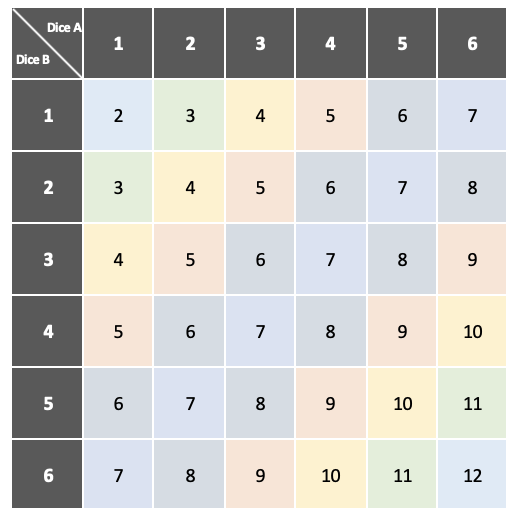
The above two-way table shows all the possible outcomes in terms of the sum of two dice.
We can find out that the sample space contains 36 outcomes and the probability of the sum being 10 is ‘1/12’ (i.e., ‘3/36’).
In the above example, ‘the sum being 10’ is the set of outcomes that we want to investigate. It is called an event in the probability experiment. An event can include only one outcome as specified. For example, in the coin-tossing or dice-rolling experiment, the event can be ‘getting heads’ for tossing a coin or ‘getting Number 6’ for rolling dice. An event can include more than one outcome – for example, an event can be ‘getting an even number’ for rolling a dice, or ‘the sum being greater than 7’ for rolling two dice.
2. Definitions:
Event: A set of outcomes of an experiment that has some properties for investigation.
Experiment: An occurrence with an uncertain outcome
Frequency: How many times an outcome occurs.
Outcome: The result of an experiment.
Probability: The extent to which something is likely to happen. Probabilities are written as fractions, decimals, or percentages with values between 0 and 1.
Probability Scale: The extent that starts at the extreme of ‘impossible’ and ends at the extreme of ‘certain’.
Sample Space: The set of all possible outcomes for the experiment.
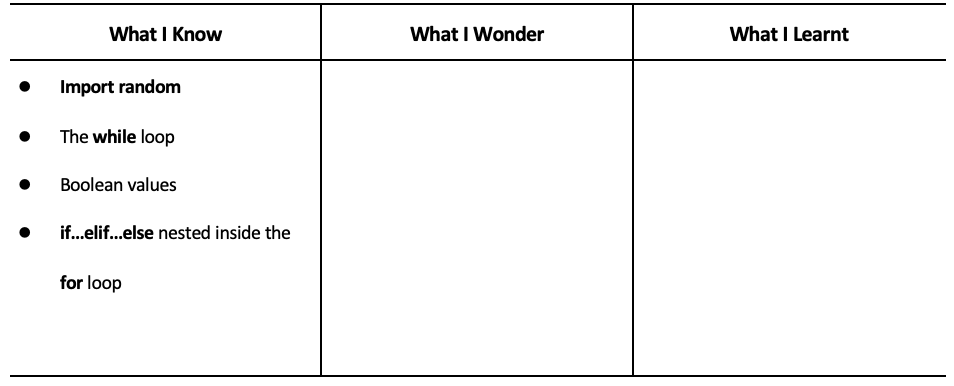
3. Have students fill out the ‘What I Know’ column of the K-W-L chart before the class.
1. When you open the editor for the first time you will see these explanations mapping the interface. Encourage students to thoroughly read through it. Below are the screen captures if you ever need to reference them again.
Figure 1: To connect your CyperPi
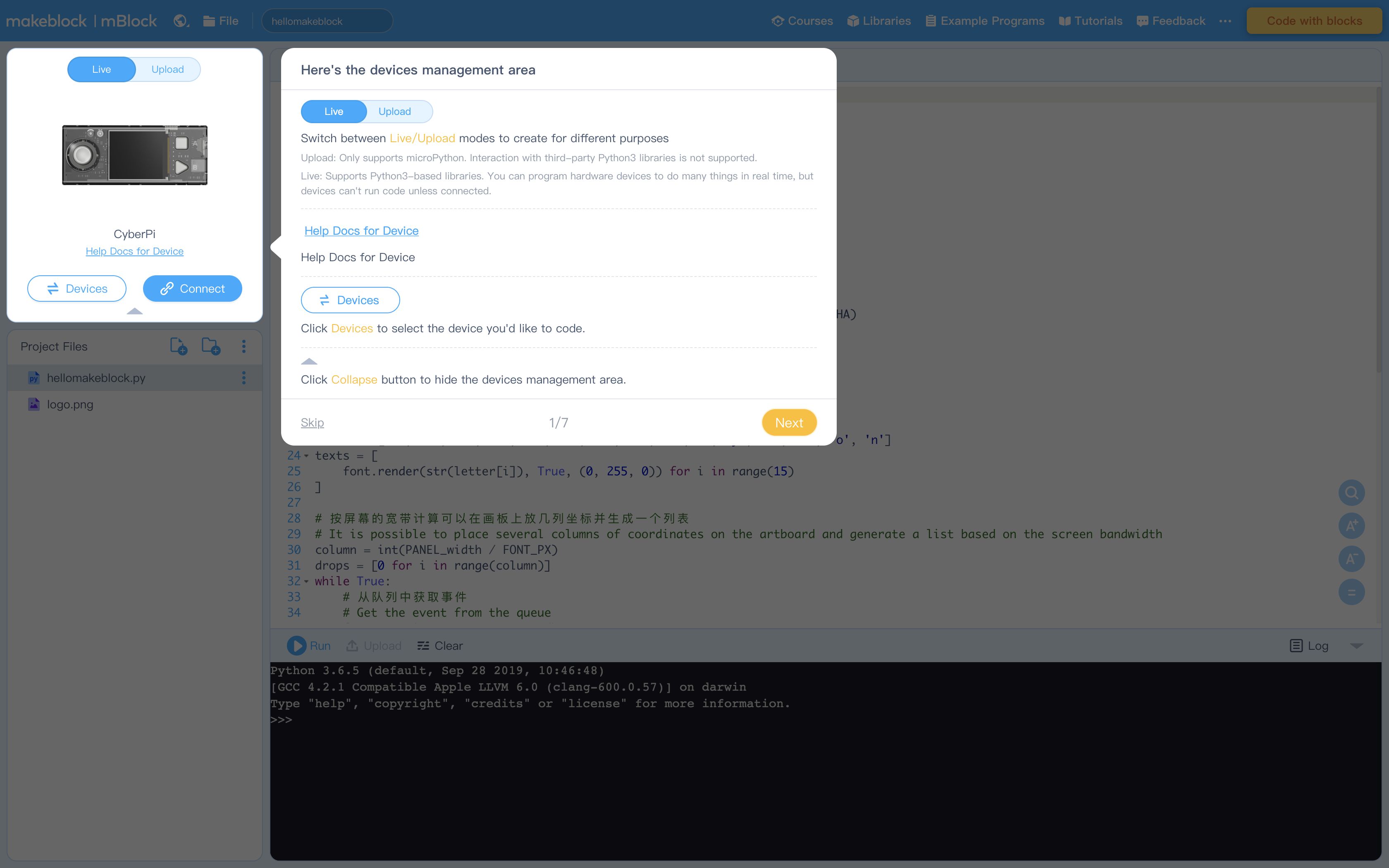
Figure 2: Creating Projects and Project files (see How to Create, Open, Import, or Export Project Files)
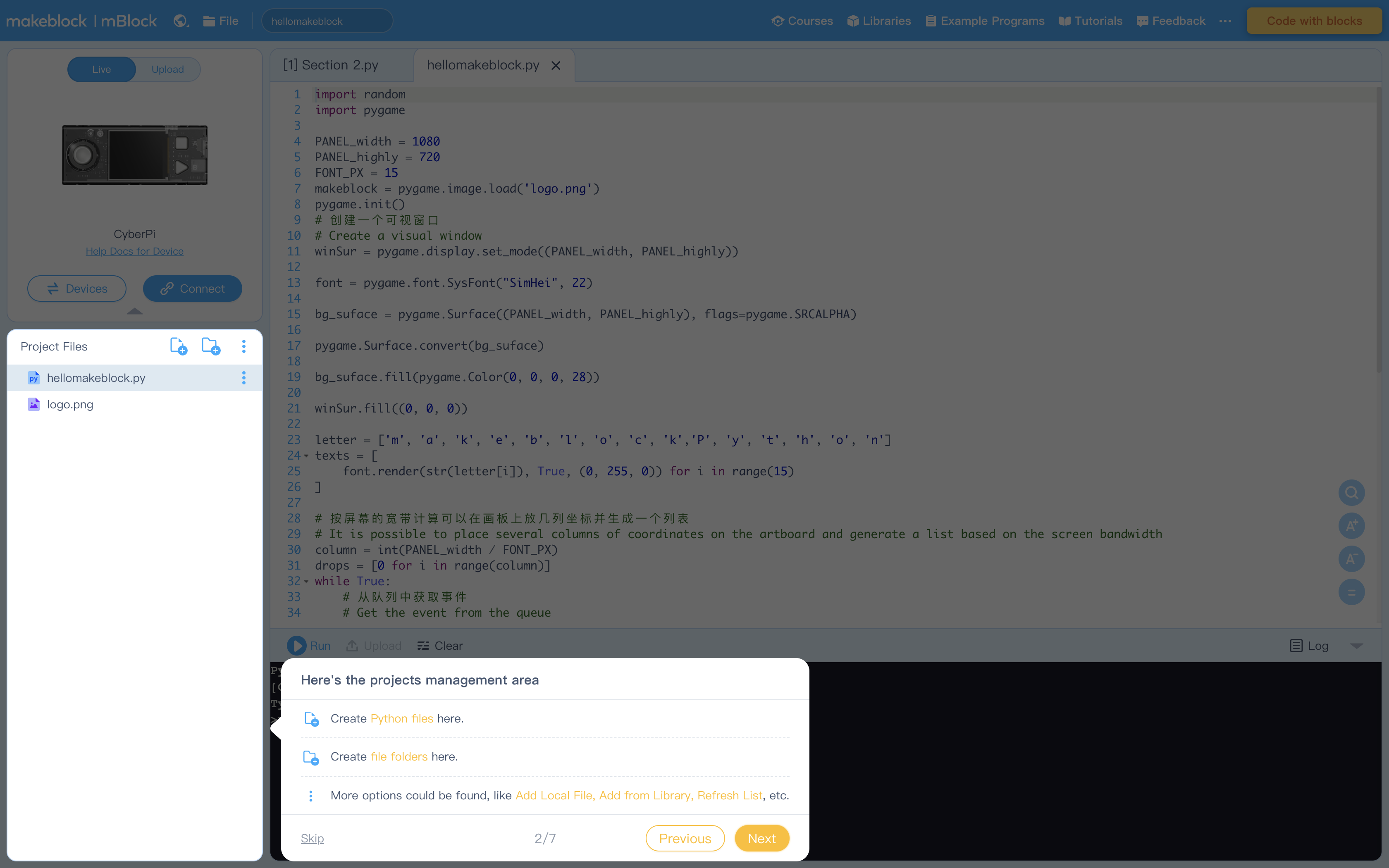
Figure 3: Editing Area
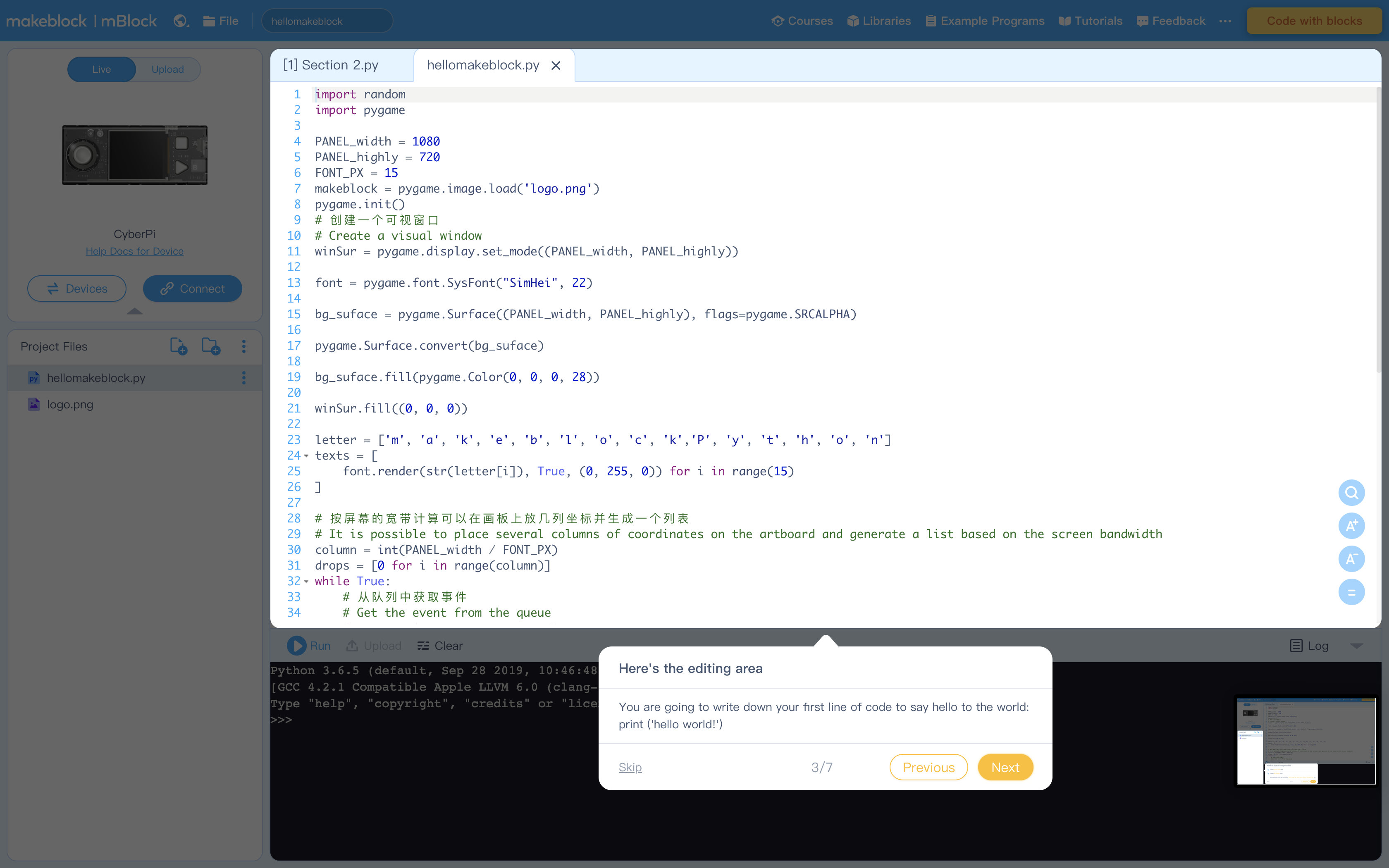
Figure 4: Console Commands to run code and more
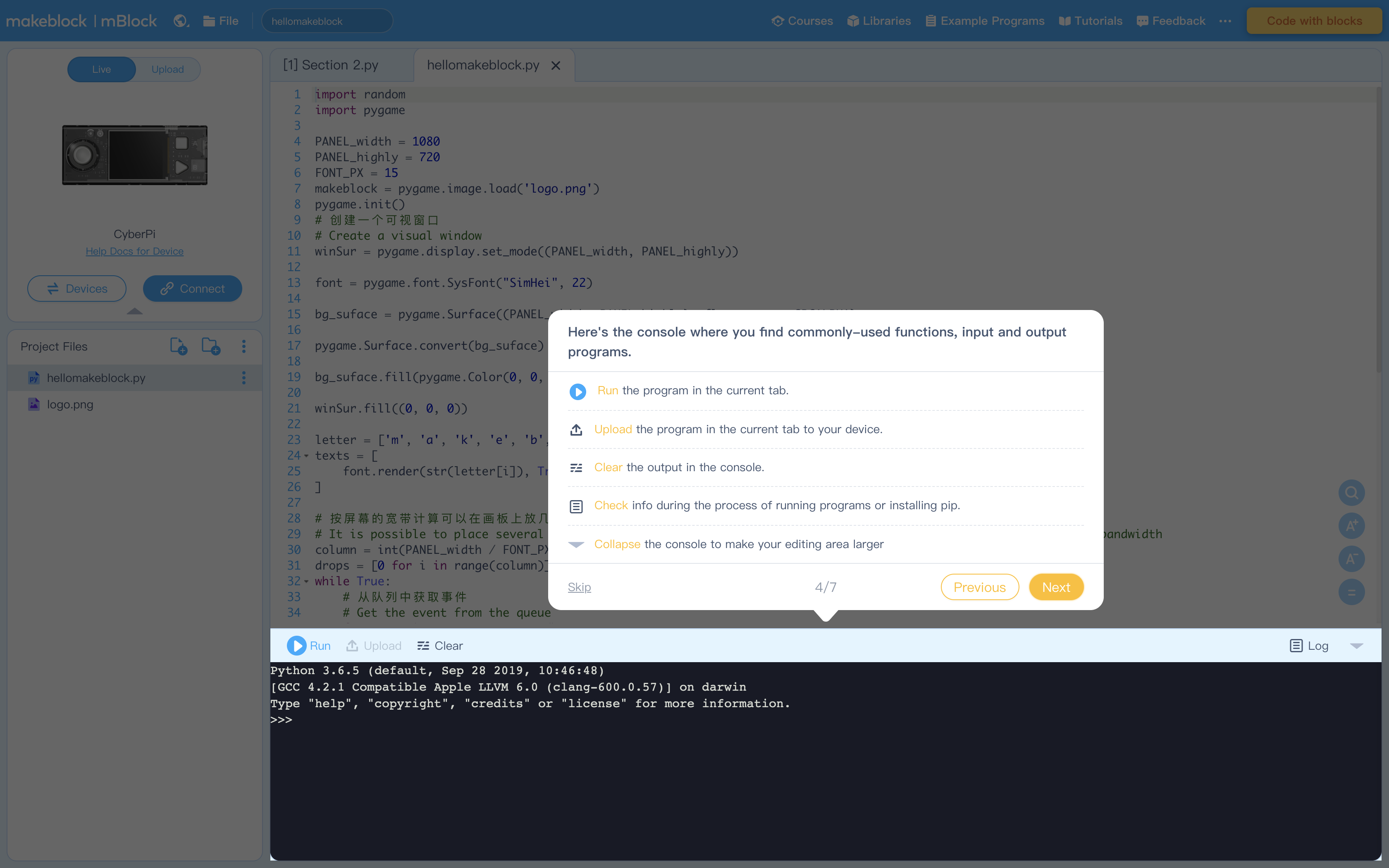
Figure 5: Terminal (Console) to display output from Editing Area
Figure 6: Libraries containing example program. Feel free to explore these at your leisure
Figure 7: Click "Tutorials" to view these helpful instructions anytime
1. Briefly review the concept of probability.
Say: Do you still remember the two rules of probability we have summarized?
In a probability experiment, each event or possible outcome has the same chance of occurring.
The probabilities of all possible outcomes sum to 1.
2. Have students recall the dice rolling experiment mentioned in Lesson 7.
Say: We used Python to calculate the probability of rolling one dice through a simulation. We calculate probabilities of each dice occurred in the simulation and find that each dice has the same chance.
Ask: If we roll two dice together and calculate the sum of the two dice, will each result still have the same chance?
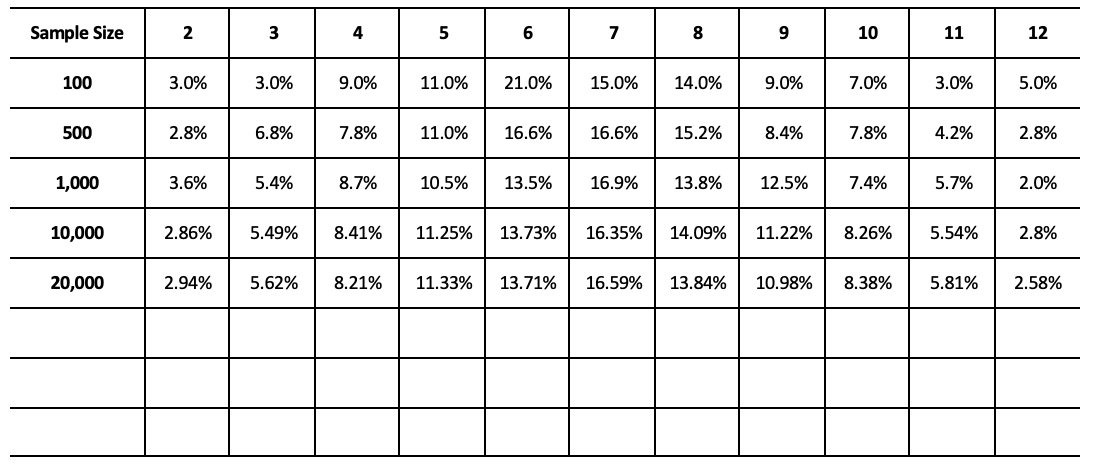
Ask students to write down and summarize all the possible results of the sum of two dice as well as the frequency of occurrence:
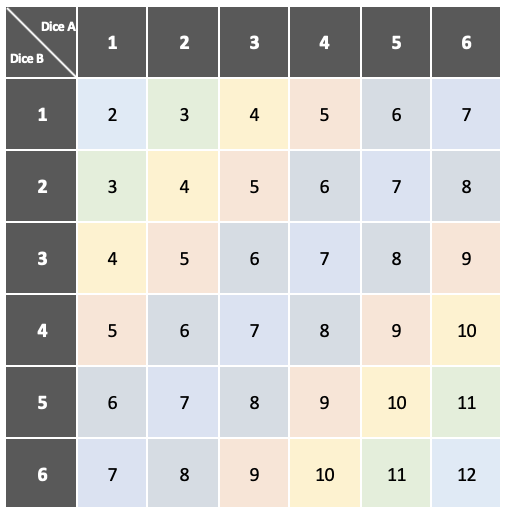

Based on the above tables, instruct students to figure out the rules. Ask them to think about the difference between the possible outcomes of rolling one dice and the possible outcomes of calculating the sum of the numbers on two dice.
1. Have students read "Activity 1" in the example program.
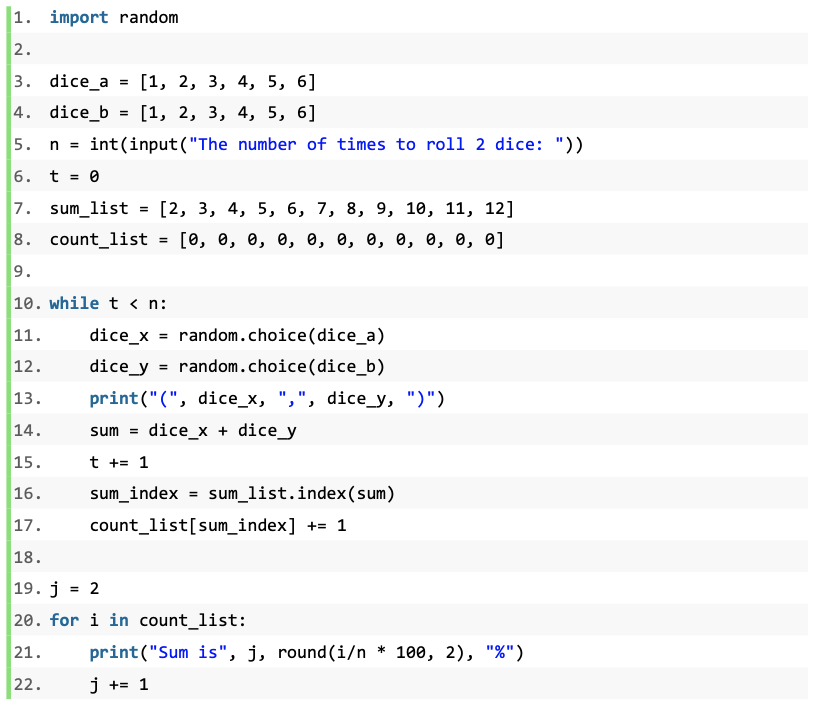
2. Ask students to think about the questions below:
What is special about the four variables below?
‘dice_a’, ‘dice_b’, ‘result_list’, ‘count_list’
How to record an event for getting a sum if two dice are rolled?
When will the while loop be stopped?
How to calculate the probability of getting a specific sum if two dice are rolled?
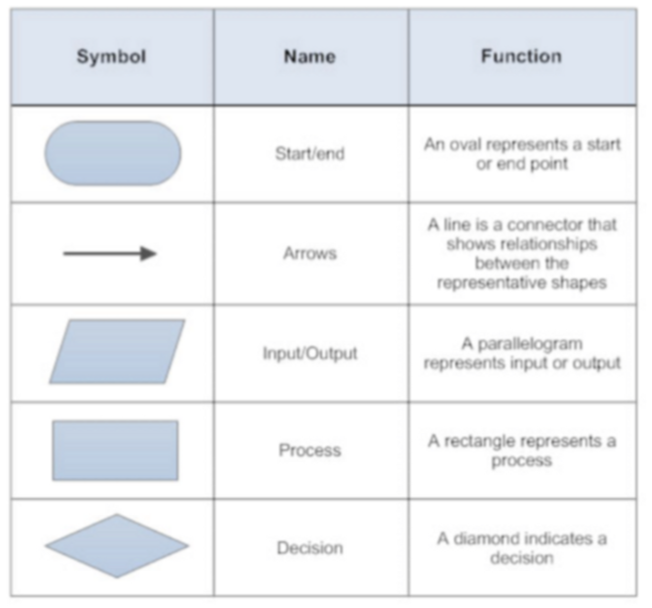
3. Ask students to explain the program and draw a flowchart.
4. Introduce the concept of the list.
Say: ‘dice_a’, ‘dice_b’, ‘result_list’, and ‘count_list’ are different from the variables we created and used before. They have a pair of square brackets and within the brackets there are a set of numbers.
Explain: This is called lists in Python. A list is a collection of data. ‘dice_a’ or ‘dice_b’ contains the set of dice; in other words, the list ‘dice_a’ or ‘dice_b’ represents Number 1 to 6 rather than a single piece of data. Lists can contain not only numeric data but also strings.
Ask: How do we assign a value from the list to another variable? Let’s take the variables ‘dice_a’ and ‘dice_b’ as an example. Use what you have learnt to rewrite the code below.
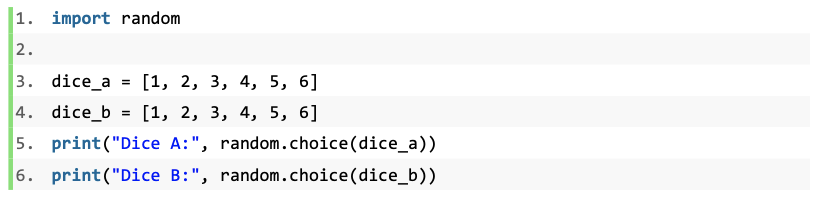
Ask students to use the functions they have learnt to rewrite the above example code. Instruct them to think about an alternative method to show the dice without creating lists.
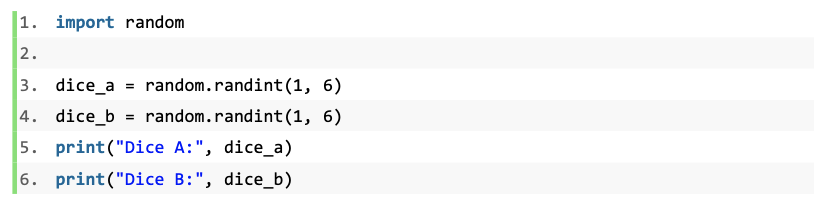
Note: Have students compare the two pieces of code and find the similarity.
Explain: To assign a value to represent the dice, we need to use a function to produce a value randomly. In the first example, it uses the ‘random.choice()’ function to return a number from the list ‘dice_a’ or ‘dice_b’. However, in the second example, the values are assigned directly to the variables ‘dice_a’ and ‘dice_b’ by using the ‘random.randint()’ function.
Summarize: Both the ‘random.randint()’ and ‘random.choice()’ functions are built in the ‘random’ module. The ‘random.randint()’ function returns an integer from a set of integers. The ‘random.choice()’ function can select an element from a list that contains a collection of data.
5. Instruct students to explore the use of lists and the ‘random.choice()’ function further through another example.
Ask: Use the lists and ‘random.choice()’ function to create the ‘Lucky Draw’ program. Create a list to store five kinds of vouchers: $500, $200, $100, $50, and $10. A voucher will be allotted to each participant running the program as a prize.
Instruct students to create a simple program and see how a list assigns a string to a variable.
6. Introduce the list index.
Explain: A list is an ordered collection of elements. In the example program, it uses the ‘index()’ method to check the order of the sum of the two dice. The ‘index()’ method returns the order of the given number in a list.
Remind students that the index of a list starts from ‘0’. Have students write and run the code below to figure out the index of a list.
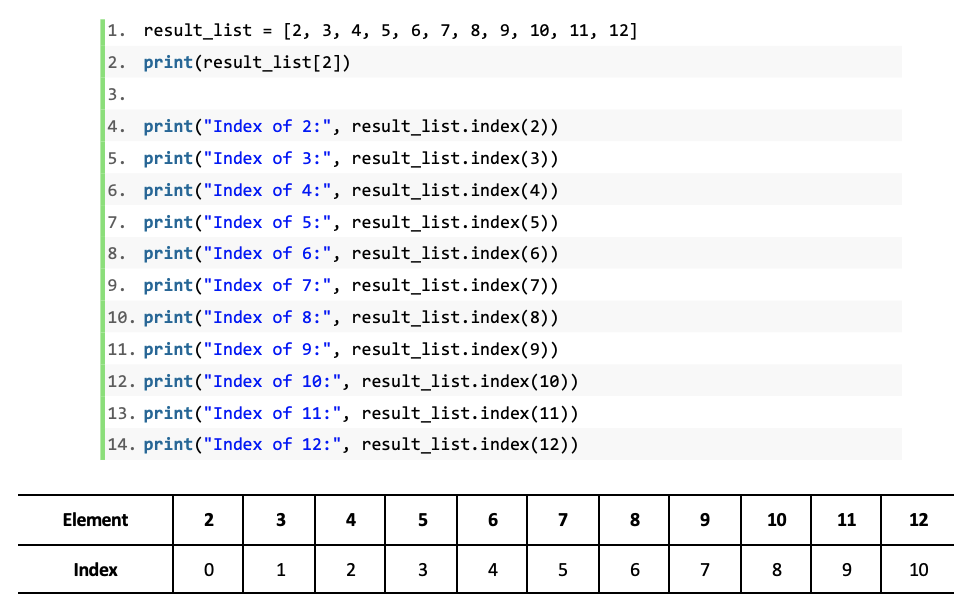
Remind students that they can use the ‘list.index[]’ expression to return an element of the list by specifying the index in the parenthesis, for example:
result_list = [2, 3, 4, 5, 6, 7, 8, 9, 10, 11, 12]
print(result_list[2])
In the above example, this expression returns the element ‘4’ of the list.
7. Explain how to read and rewrite the value of an element of the list.
Explain: The ‘list.index[]’ expression can not only return the value of an element in the list according to the given index in the square brackets but can also modify the value. In the example program, the ‘count_list[result_index] += 1’ expression is to add ‘1’ to an element.
Explain the relation between the ‘result_list’ and ‘count_list’: The example program creates two lists: the ‘result_list’ represents all the possible results of the sum of the two dice, and the ‘count_list’ is to record the frequency of the corresponding sum occurrence. The ‘count_list[result_index] += 1’ expression counts the frequency of the sum and modify the value in the corresponding sequence.
8. Have students try different sample sizes and calculate the probability of each sum.
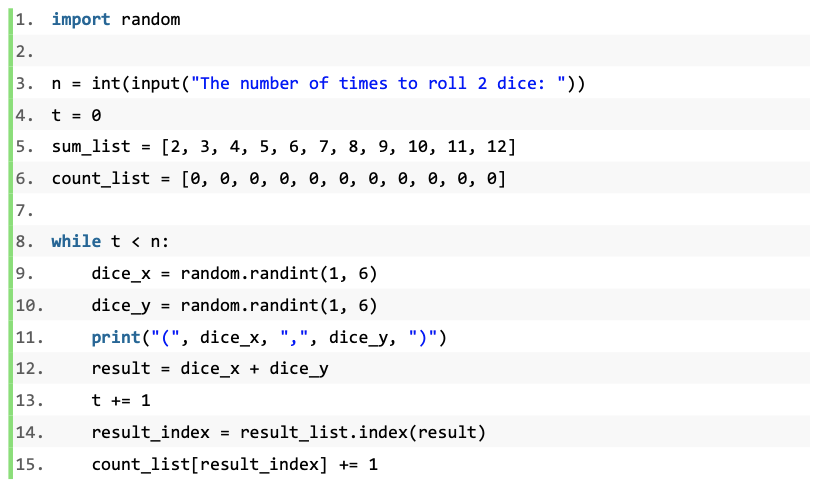
Instruct students to work in pairs to modify the example program by completing the task below:
Task 1: Use the ‘random.randint()’ functions to replace the lists of two dice.
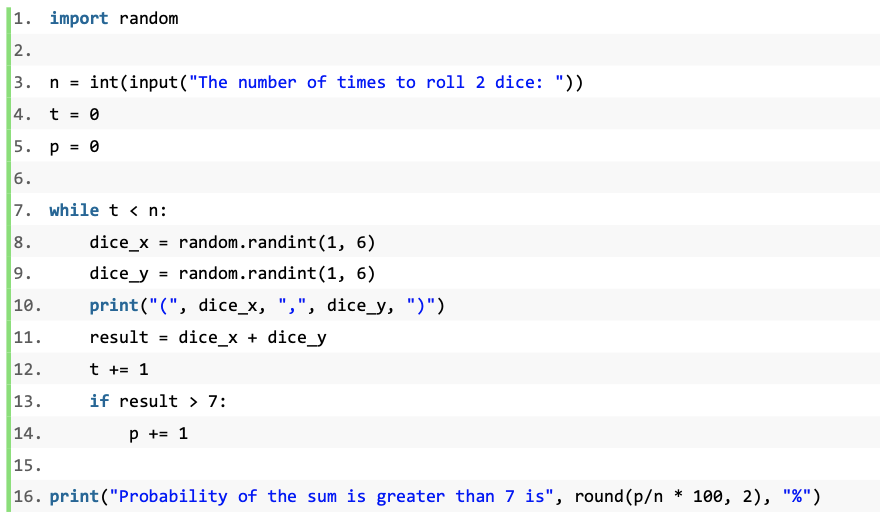
Task 2: Rewrite the program that can calculate the probability of getting a sum greater than 7.
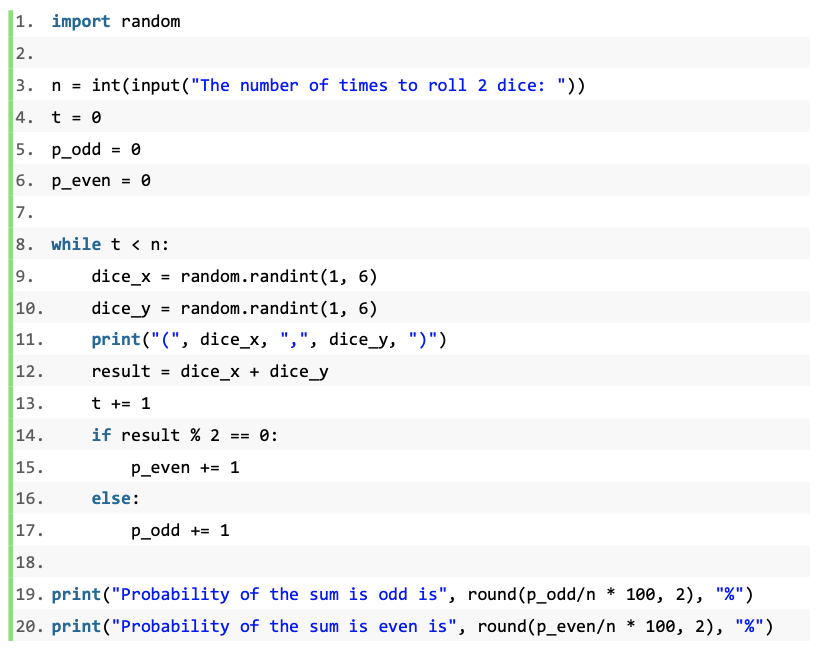
Task 3: Rewrite the program that can calculate the probabilities of the sum being odd and the sum being even.
Task 4: Based on the example program, Task 2 and Task 3, create the program that does the calculation as follows:
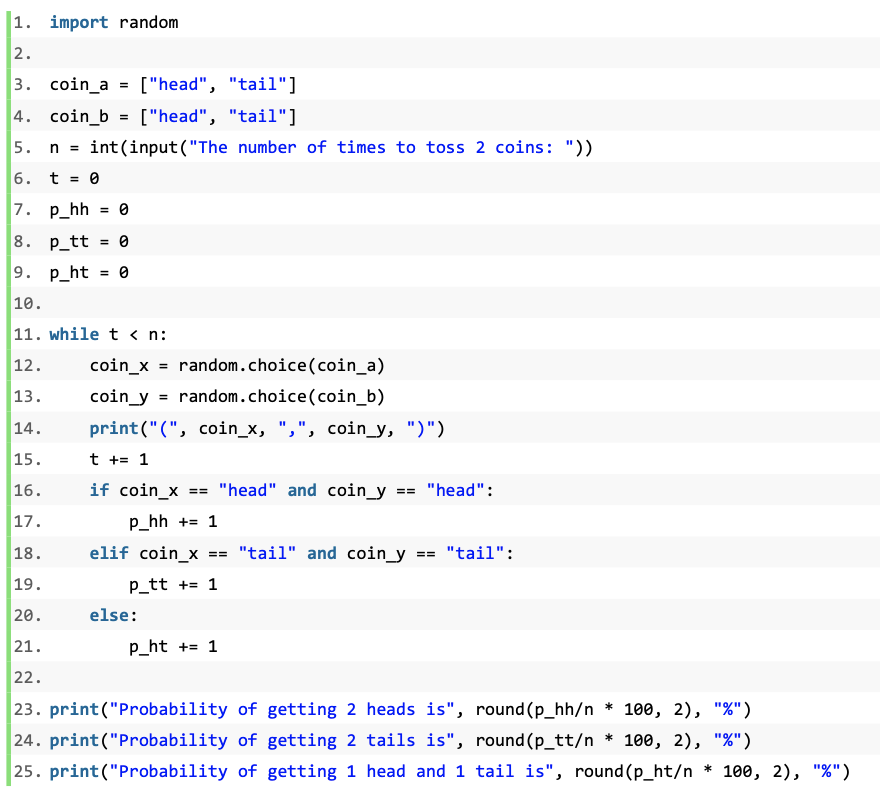
The program is to simulate situation where two coins are tossed together. Calculate the probabilities of three events: getting two heads; getting two tails; and getting one head and one tail
Use lists in your program. Consider the control flow structures needed in this computational model.
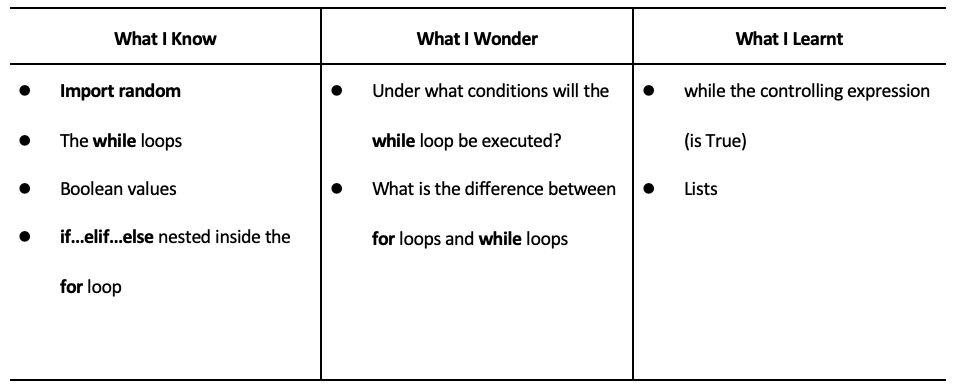
Have students fill out the K-W-L chart
Remind students to always comment their code, regardless of the simplicity
Lists are a very powerful tool in Python
Python has prebuilt functions just for lists like index
Explore more functions and see how you can use them in your code
Examples: .clear(), .count(), .reverse()
1. The concept of the list
2. The similarity and difference between the variable and the list
3. Use lists to store and modify data
4. Use the ‘index()’ method to identify the index of the specified item in the list
5. Calculate the probability of rolling two dice through computational modelling
A. Programming Concepts and Skills
A1. Data types and Expressions
A1.1 use constants and variables, including integers, floating points, strings, and Boolean values, correctly in computer programs;
A1.3 use assignment statements correctly with both arithmetic and string expressions in computer programs;
A1.4 demonstrate the ability to use Boolean operators (e.g., AND, OR, NOT), comparison operators (i.e., equal to, not equal to, greater than, less than, greater than or equal to, less than or equal to), arithmetic operators (e.g., addition, subtraction, multiplication, division, exponentiation, parentheses), and order of operations correctly in computer programs;
A1.5 describe the structure of one-dimensional arrays and related concepts, including elements, indexes, and bounds;
A1.6 write programs that declare, initialize, modify, and access one-dimensional arrays.
A2. Control Structures and Simple Algorithms
A2.1 write programs that incorporate user input, processing, and screen output;
A2.2 use sequence, selection, and repetition control structures to create programming solutions;
A2.3 write algorithms with nested structures (e.g., to count elements in an array, calculate a total, find highest or lowest value, or perform a linear search).
A3. Subprograms
A3.1 demonstrate the ability to use existing sub- programs (e.g., random number generator, substring, absolute value) within computer programs;
A3.2 write subprograms (e.g., functions, procedures) that use parameter passing and appropriate variable scope (e.g., local, global), to perform tasks within programs.
A4. Code Maintenance
A4.1 demonstrate the ability to identify and correct syntax, logic, and run-time errors in computer programs;
A4.2 use workplace and professional conventions (e.g., naming, indenting, commenting) correctly to write programs and internal documentation;
A4.3 demonstrate the ability to interpret error messages displayed by programming tools (e.g., compiler, debugging tool), at different times during the software development process (e.g., writing, compilation, testing);
A4.4 use a tracing technique to understand pro- gram flow and to identify and correct logic and run-time errors in computer programs;
A4.5 demonstrates the ability to validate a program using a full range of test cases.
B. Software Development
B1. Problem-solving Strategies
B1.2 demonstrate the ability to solve problems independently and as part of a team;
B2. Designing Software Solutions
B2.1 design programs from a program template or skeleton (e.g., teacher-supplied skeleton, Help facility code snippet);
B2.2 use appropriate vocabulary and mode of expression (i.e., written, oral, diagrammatic) to describe alternative program designs, and to explain the structure of a program;
B2.4 represent the structure and components of a program using industry-standard program- ming tools (e.g., structure chart, flow chart, UML [Unified Modeling Language], data flow diagram, pseudocode);
B2.5 design user-friendly software interfaces (e.g., prompts, messages, screens, forms).
B3. Designing Algorithms
B3.1 design simple algorithms (e.g., add data to a sorted array, delete a datum from the middle of an array) according to specifications;
B3.2 solve common problems (e.g., calculation of hypotenuse, determination of primes, calculation of area and circumference) by applying math- ematical equations or formulas in an algorithm;
A. Programming Concepts and Skills
A1. Data Types and Expressions
A1.1 use constants and variables, including integers, floating points, strings, and Boolean values, correctly in computer programs;
A1.3 use assignment statements correctly with both arithmetic and string expressions in computer programs (e.g., numStudents = 4 + 2, name = “Devi”);
A1.4 use Boolean operators (e.g., AND, OR, NOT), comparison operators (i.e., equal to, not equal to, greater than, less than, greater than or equal to, less than or equal to), arithmetic operators (e.g., addition, subtraction, multiplication, divi- sion, exponentiation, parentheses), and order of operations correctly.
A2. Control Structures and Simple Algorithms
A2.1 write programs that incorporate user input, processing, and screen output;
A2.2 use sequence, selection, and repetition control structures to create programming solutions;
A2.3 Demonstrate the ability to write algorithms with nested structures.
A3. Code Maintenance
A3.2 demonstrate the ability to correct syntax, logic, and run-time errors in computer programs;
A3.3 use workplace and professional conventions (e.g., naming, indenting, commenting) correctly to write programs and internal documentation;
A3.4 demonstrate the ability to interpret error messages displayed by programming tools (e.g., compiler, debugging tool), at different times during the software development process (e.g., writing, compilation, testing);
A3.5 demonstrate the ability to validate a program using test cases.
B. Software Development
B1. Problem-solving Strategies
B1.1 use various problem-solving strategies (e.g., divide and conquer, working backwards, process analysis, examples, extreme cases, tables and charts, trial and error) to solve program- ming problems;
B2. Designing Software Solutions
B2.1 design a simple program from a program template or skeleton (e.g., teacher-supplied skeleton, Help facility code snippet);
B2.2 use appropriate vocabulary and mode of expression (i.e., written, oral, diagrammatic) to describe alternative program designs and to explain the structure of a program;
B2.3 write subprograms (e.g., functions, procedures) that perform one well-defined task and use parameter passing and appropriate variable scope (e.g., local, global);
B2.4 use industry-standard programming tools (e.g., structure chart, flow chart, UML [Unified Modelling Language], data flow diagram, pseudo- code) to represent the structure and components of a computer program;
B2.5 design user-friendly software interfaces (e.g., prompts, messages, screens, forms).
B3. Designing Simple Algorithms
B3.1 use simple algorithms (e.g., validate entered data, count, accumulate, use random numbers) to design a program according to specifications;
B3.2 solve problems (e.g., calculation of gross pay; fuel consumption on a car trip; average of students’ marks; temperature at a given altitude, using the environmental lapse rate) by applying mathematical equations or formulas in an algorithm;