Loading…
Loading…
Cue

Cue robots (1 per group)
tablets or compatible devices (1 per group)
chart paper
markers
pencils
projector or interactive display with mirroring capability
Before this lesson, it is recommended that students:
complete all previous lessons in Unit 1.
Fully charge the devices and robots.
Install the Wonder Workshop Cue app on each device.
1. Have students briefly describe the differences and similarities between programming in Block & JavaScript and Wonder.
Sample response: “In Block & JavaScript, you can only program Cue to perform one action at a time, whereas in Wonder, you can program Cue to perform multiple actions at once.”
2. Ask, “What is easier to use? Are some tasks easier to solve in Block & JavaScript than in Wonder?”
Sample response: “I think it’s easier to program in Block & JavaScript. In Block & JavaScript, I was able to program a series of steps more easily. However, if I wanted Cue to perform more than one action at once, it was easier to use groups in Wonder.”
[Optional] Create a Venn Diagram to record and group tasks that are easier in Block & JavaScript, tasks that are easier in Wonder, and tasks that are equally easy to perform in both paradigms.
If you have completed Code.org’s Analysis of Design lesson with your class, review the lesson by asking the following question:
“What were the design stages that were introduced in the lesson?”
“What helped you make decisions about which teapot to give to which user?”
“What is one thing that you use every day that you feel could benefit from a change in design? What is ineffective about the current design and how could it be improved?”
1. Ask, “What are some books or movies that you like? What techniques did the writer use to capture your attention?”
Sample response: “I really like Harry Potter. The writer appealed to me by writing about someone my age who goes to school and has similar experience to mine, but in the world of magic. She used a lot of descriptive language and also included some humor.”
2. Say, “In today’s lesson, you will begin learning about the Design Thinking Process. Going through the steps of this process can help make your writing more appealing to the audience you are trying to reach.”
1. Project the Evaluation Rubrics and say, “You will be working on activities and a creative writing project using Cue and the Design Process Notebook. At the end, I will evaluate your work using this rubric.”
Encourage students to ask questions about any of the rubric criteria.
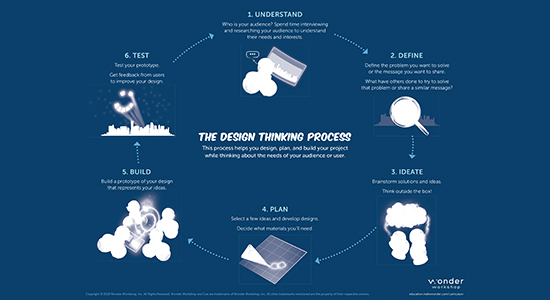
2. Project the Design Thinking Process Slides.
Walk students through the steps of the Design Thinking Process shown on Slide 1.
Say, “In this lesson, we’ll be focusing mainly on the first three steps of the process: Understand, Define, and Ideate.”
Refer to Slide 2 and say, “In the Understand stage, you try to understand the audience you are writing for. You learn about the way they do things and why, how they think about world, and what is meaningful to them.”
Refer to Slide 3 and say, “In the Define stage, you should begin to define the topic you want to write about. You should consider what topics your audience cares or is most concerned about.”
Refer to Slide 4 and say, “In the Ideate stage, you need to consider the most appropriate format to deliver your message. How will you convey your feelings and ideas with language?”
Ask student volunteers to take turns summarizing each step of the Design Thinking Process.
1. Divide the students into small groups and distribute chart paper and markers.
2. Lead a discussion about the different people on the Design Thinking Process Slides. Have the students discuss the following questions in their groups:
Understand: What topic would this audience be interested in? (Sample response: “Grandparents might be interested in the news or international developments.”)
Understand: What language could be used for this audience? (Sample response: “Children may need simpler vocabulary and short, easy-to-understand sentences.”)
Define: What message might this audience care about? (Sample response: “A farmer might care about how to conserve water while still maximizing crop growth.”)
Ideate: What would be creative ways get the attention of this audience so that they get the message? (Sample response: “Teenagers would probably respond well to videos.”)
3. Encourage the students to identify which step of the Design Thinking Process each of their responses addresses: Understand, Define, or Ideate.
How does the target audience change the topic you write about? (Sample response: “Different audiences have different interests. For example, my parents aren’t interested in the shows I watch.”)
How does the target audience change the way you deliver the message? (Sample response: “Not all target audiences interact with media the same way. For example, my grandparents don’t use YouTube as much as me and my friends.”)
Have students work on the following Design Process Notebook content in small groups (ideally 2–3 students per robot). Provide each group with a device and a robot.
Encourage students to share device and robot time. Have them establish and rotate through roles such as:
Lead Programmer: Holds the device and manipulates the code.
Robot Wrangler: Retrieves and resets the robot after every program attempt.
When students work together while coding, they’re able to help each other identify mistakes and develop creative solutions!
1. In their Unit 1 Design Process Notebooks, have student groups turn to Project Pathways: Pick a Project on pages 7–8.
2. Have student groups read the project options and select a project path.
3. After selecting a project path, have students read and respond to the prompts on pages 9–12 to help them define their project.
4. Once all student groups have completed the prompts, have them take turns presenting the project path and idea they selected to the class.
Encourage students to provide feedback to each other by offering suggestions on how they can improve their project ideas.
1. In their Unit 1 Design Process Notebooks, have student groups turn to Project Pathways: Move and Show on pages 13–14.
2. Have student groups read the directions for their selected project path.
3. Have students read and respond to the prompts on pages 15–18 to help them incorporate movement, lights, and sounds in their project.
1. Have student groups take turns sharing one of their programs with the class. Encourage them to:
Discuss the topic they would like to address. They should describe their intended audience and how this audience shaped their ideas. Were there any ideas that were eliminated because they would not have appealed to the target audience? (E.g., “We wanted to make a music video about bullying in school for our grandparents, but then we realized that the topic would not be very relevant to them.”)
Share any obstacles and difficulties they overcame during the process.? (E.g., “We realized that it was really hard to copy dancers in a music video with Cue, so we simplified the dance moves.”)
2. Encourage students to ask each other why they believe their topics are interesting and give each other feedback. Possible questions/feedback includes:
“Why did you (think that topic would appeal to your audience)?”
“I like how you (identified a topic that you are very knowledgeable about).”
“What if you (looped custom sounds in your music video)?"
Was it difficult defining a project that both you and your audience care about? (Sample response: “Yes, since we realized we don’t have many interests in common with our audience.”)
Use our Evaluation Rubrics to review students’ work and presentations.
CCSS.ELA-Literacy.SL.6.6: Adapt speech to a variety of contexts and tasks, demonstrating command of formal English when indicated or appropriate.
CCSS.ELA-Literacy.W.6.2.b: Develop the topic with relevant facts, definitions, concrete details, quotations, or other information and examples.
CCSS.ELA-Literacy.SL.6.4: Present claims and findings, sequencing ideas logically and using pertinent descriptions, facts, and details to accentuate main ideas or themes; use appropriate eye contact, adequate volume, and clear pronunciation.
CCSS.ELA-Literacy.SL.6.1.c: Pose and respond to specific questions with elaboration and detail by making comments that contribute to the topic, text, or issue under discussion.
CCSS.ELA-Literacy.W.6.2: Write informative/explanatory texts to examine a topic and convey ideas, concepts, and information through the selection, organization, and analysis of relevant content.
CCSS.ELA-Literacy.W.6.7: Conduct short research projects to answer a question, drawing on several sources and refocusing the inquiry when appropriate.
2-AP-15: Seek and incorporate feedback from team members and users to refine a solution that meets user needs.
2-AP-18: Distribute tasks and maintain a project timeline when collaboratively developing computational artifacts.
1B-AP-10: Create programs that include sequences, events, loops, and conditionals.
1B-AP-16: Take on varying roles, with teacher guidance, when collaborating with peers during the design, implementation, and review stages of program development.
1B-AP-15: Test and debug (identify and fix errors) a program or algorithm to ensure it runs as intended.
1B-AP-17: Describe choices made during program development using code comments, presentations, and demonstrations.
2-AP-17: Systematically test and refine programs using a range of test cases.
1B-AP-13: Use an iterative process to plan the development of a program by including others' perspectives and considering user preferences.
2-AP-13: Decompose problems and subproblems into parts to facilitate the design, implementation, and review of programs.
2-AP-19: Document programs in order to make them easier to follow, test, and debug.
6a: Choose the appropriate platforms and tools for meeting the desired objectives of their creation or communication.
6c: Communicate complex ideas clearly and effectively by creating or using a variety of digital objects such as visualizations, models, or simulations.
6d: Publish or present content that customizes the message and medium for their intended audiences.
4a: Know and use a deliberate design process for generating ideas, testing theories, creating innovative artifacts or solving authentic problems.
7c: Contribute constructively to project teams, assuming various roles and responsibilities to work effectively toward a common goal.
4d: Exhibit a tolerance for ambiguity, perseverance, and the capacity to work with open-ended problems.
3d: Build knowledge by actively exploring real-world issues and problems, developing ideas and theories and pursuing answers and solutions.
6b: Create original works or responsibly repurpose or remix digital resources into new creations.
3-5-ETS1-2: At whatever stage, communicating with peers about proposed solutions is an important part of the design process, and shared ideas can lead to improved designs.
MS-ETS1-3: Analyze data from tests to determine similarities and differences among several design solutions to identify the best characteristics of each that can be combined into a new solution to better meet the criteria for success.
Measurement
E2.4 explain how protractors work, use them to measure and construct angles up to 180°, and use benchmark angles to estimate the size of other angles
Algebra
C3.1 solve problems and create computational representations of mathematical situations by writing and executing code, including code that involves conditional statements and other control structures.
Speaking & Listening
- 2.2 demonstrate an understanding of appropriate speaking behaviour in a variety of situations, including paired sharing, dialogue, and small and large group discussions.
- 2.7 use a variety of appropriate visual aids to support or enhance oral presentations.
Reading
- 3.1 automatically read and understand most words in common use.
- 3.2 predict the meaning of and rapidly solve unfamiliar words using different types of cues.
Writing
- 1.6 determine whether the ideas and information they have gathered are relevant, appropriate, and adequate for the purpose, and do more research if necessary.
- 2.2 establish an appropriate voice in their writing, with a focus on modifying language and tone to suit different circumstances or audiences.
- identify 90° angles.
- design and construct different rectangles, given either perimeter or area, or both (whole numbers), and make generalizations.
- Present information: organize ideas and information in presentations to maintain a clear focus and engage the audience and purpose.
- Enhance presentation: use effective openings and closings that attract and sustain reader or audience interest and enjoyment.
- Use effective oral and visual communication: adjust volume, tone of voice and gestures to engage the audience; arrange presentation space to focus audience attention.
- Demonstrate attentive listening and viewing: identify and interpret the purpose of verbal and nonverbal messages and the perspectives of the presenter, show respect for the presenter's opinions by listening politely and providing thoughtful feedback.
- Cooperate with others: accept and take responsibility for fulfilling own role as a group member discuss and decide whether to work individually or collaboratively to achieve specific goals.
- Work in groups: formulate questions to guide research or investigations, with attention to specific audiences and purposes contribute ideas to help solve problems, and listen and respond constructively.
- Evaluate group process: show appreciation for the contributions of others, and offer constructive feedback to group members.
CTF is planning, creating, appraising and communicating in response to challenges.
I plan in response to challenges.
I make decisions in response to challenges.
I adapt to change and unexpected events.
I solve problems in response to challenges.
I create products, performances or services in response to challenges.
I appraise the skills, knowledge and technologies used to respond to challenges.
I communicate my learning.
CTF is working independently and with others while exploring careers and technology.
I determine how my actions affect learning.
I develop skills that support effective relationships.
I collaborate to achieve common goals.
Curricular Competencies:
- Use technology to explore mathematics.
- Develop, demonstrate, and apply mathematical understanding through play, inquiry, and problem solving.
- Develop and use multiple strategies to engage in problem solving.
Curricular Competencies:
- Exchange ideas and perspectives to build shared understanding.
- Use writing and design processes to plan, develop, and create texts for a variety of purposes and audiences.
- Use language in creative and playful ways to develop style.
Applied Skills
- Use materials, tools, and technologies in a safe manner, and with an awareness of the safety of others, in both physical and digital environments
- Identify the skills required for a task and develop those skills as needed
Applied Technologies
- Use familiar tools and technologies to extend their capabilities when completing a task
- Choose appropriate technologies to use for specific tasks
- Demonstrate a willingness to learn new technologies as needed
- SS7: Perform a single transformation (translation, rotation, or reflection) of a 2-D shape (with and without technology) and draw and describe the image.
- read a wide variety of words automatically, including content-specific words.
- make personal connections, relate relevant prior knowledge and make logical text-to-text comparisons.
- SS5.1 Design and construct different rectangles given either perimeter or area, or both (whole numbers), and draw conclusions.
- SS5.7 Identify, create, and analyze single transformations of 2-D shapes (with and without the use of technology).
- CC5.3 Speak to express and support a range of ideas and information in formal and informal speaking situations for particular audiences and purposes.
- AR5.1 Identify strengths in viewing, listening, reading, speaking, writing, and other forms of representing.
draw rectangles for a given perimeter (distance around the outside)
identify a translation (slide) of a 2-D shape
identify a rotation (turn) of a 2-D shape
identify a reflection (flip) of a 2-D shape
describe the direction and magnitude of a translation (slide)
describe the direction of turn of a rotation (turn)
describe the line of reflection (e.g., horizontal, vertical) and the distance from the line of reflection (flip)
identify transformations (flips, slides, and turns) found in the everyday world
perform a translation (slide) of a 2-D shape
perform a rotation (turn) of a 2-D shape
perform a reflection (flip) of a 2-D shape
predict the result of a transformation (a flip, a slide, or a turn) and verify the prediction
P2: Students will be expected to use digital tools to develop ideas and original works in innovative ways.
TOC1: Students will be expected to
safely use many forms of current technology for learning with growing competence
demonstrate conceptual understanding of how information and communication technology, digital tools, and authorized networks support their learning
use terminology related to information and communication technology
5SS1: Design and construct different rectangles, given either perimeter or area, or both (whole numbers), and draw conclusions
5SS7: Perform a single transformation (translation, rotation or reflection) of a 2-D shape, and draw and describe the image.
GCO1: Communicate information and ideas effectively and clearly, and to respond personally and critically
SS1 Design and construct different rectangles, given either perimeter or area, or both (whole numbers), and draw conclusions.
SS7 Perform a single transformation (translation, rotation, or reflection) of a 2-D shape (with and without technology) and draw and describe the image.
Speaking and Listening
communicate information and ideas effectively and clearly, and to respond personally and critically
5.SS.1 Design and construct different rectangles, given either perimeter or area, or both (whole numbers), and draw conclusions
5.SS.7 Perform a single transformation (translation, rotation, or reflection) of a 2-D shape and draw and describe the image.
Language as Exploration and Design
Research and study topics and ideas
Manage information and ideas
Calculates the perimeter of plane figures
Observes and produces frieze patterns and tessellations
Using translations