Loading…
Loading…
Cue

Sketch

Cue robots (1 per group)
tablets or compatible devices (1 per group)
Unit 2 Design Process Notebooks (1 per group)
Lesson 6 Starter Code (1 per group, if printing)
projector or interactive display with mirroring capability
Before this lesson, it is recommended that students:
Complete all previous lessons in Units 1 and 2.
Fully charge the devices and robots.
Install the Wonder Workshop Cue app on each device.
1. Ask, “How have variables allowed us to better control our robot's actions?”
Sample response: "Variables let us keep track of how the player interacts with the robot."
2. Ask, “How have functions allowed us to better control our robot's actions?”
Sample response: “Functions let us do the same action with small changes, depending on which button is pressed."
Elicit what students already know about conditionals.
Explain, "We use conditionals in our everyday life. A conditional is when you decide between two or more options. For example, I might think: ‘If I have milk in the refrigerator, I’ll eat cereal for breakfast; or else, I'll have toast and jam.’ That would be an example of an if/else statement! Conditionals are extremely useful in programming because they let the program decide what to do based on the data stored in variables."
Write the following on the board: If____, then____; else, _____ .
Below it, write an example if/else statement, such as: If I have homework to do, then I'll do it; else, I'll go ride my bike.
Ask students to come up with examples of conditionals in their own lives, filling in the blanks in the if/else statement on the board.
1. Ask, “How do you program in Wonder?”
Sample response: “You program instructions by connecting different Groups to each other. You can drag an action from the bottom left of your screen into the group.”
2. Ask, “How is programming in Wonder different from programming in Block & JavaScriptⓇ?”
Sample response: “In Block & JavaScript, you can only program one action at a time. In Wonder, you can program Cue to perform multiple actions at the same time.”
3. Project the Wonder program below.
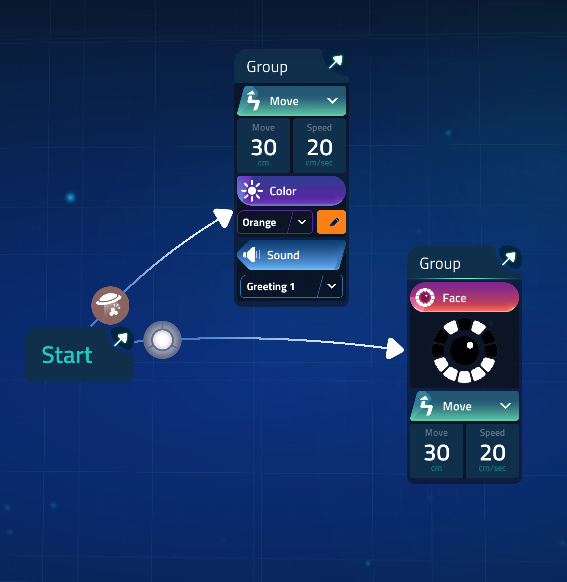
4. Say, “Wonder is also an ideal paradigm to use for programming conditionals. In Wonder, you can connect the groups you create by using events. These events might include whether the robot’s button is pushed or whether it senses an obstacle, for example. When the program starts, the robot moves from one group of actions to another based on whether or not these event conditions are met. In this program, if the robot’s button is pressed, it will smile and move. If the robot is picked up, it will make a sound and show orange lights.”
1. Have students navigate to the Code with Wonder section of the app.
For Chromebook/Microsoft platforms, have students go to the Challenges section and try the Wonder examples in the Decide section.
For iOS/Android platforms, have students go to the Examples section and try the following examples:
Decision Time
So Random
2. Invite student volunteers to add more conditionals to the Wonder Example programs.
When do we use conditionals in our real lives? (Sample response: "When we’re trying to decide what to do based on what is happening.")
1. Have students form groups with their robots and devices.
2. Either project the Lesson 6 Starter Code on the board or distribute a PDF to the students.
Ask students to predict what they think the program will do.
3. Have the students recreate the program on their own devices and then run the program with their robots.
Ask the students, "What does the program do?" (Sample response: "It changes the robot's face after the button has been pressed a certain number of times.")
Ask the students, "What happens after you press the button a fourth time?" (Sample response: "It changes back to the way the robot’s face looked at first.")
4. Ask students to take a couple minutes to make one or two changes to the program. Point out that they can click on the + symbol to add more sections to the if/else block. If they do this, they can add different faces to correspond with different numbers in the variable.
5. Have students find another group and share their changes with them.
What changes did you make to the program? (Sample response: “I made the face change when the variable was number 4,” "I made the ‘if’ statement use ‘greater than’ instead of ‘less than,’ so the face won't change after the number 3.")
How is the + sign useful in the if/else blocks? (Sample response: “It lets you check for more than one condition.")
Provide each group with a device and a robot. Have students complete the following Unit 2 Challenges/Adventures in Code with Block & JavaScript:
Decide (blocks)
(Optional) Decide (text)
Have students work on the following Design Process Notebook content in small groups (ideally 2 students per robot).
Encourage students to share device and robot time. Have them establish and rotate through roles such as:
Lead Programmer: Holds the device and manipulates the code.
Robot Wrangler: Retrieves and resets the robot after every program attempt.
When students work together while coding, they’re able to help each other identify mistakes and develop creative solutions!
In their Unit 2 Design Process Notebooks, have student groups turn to Try It Out: Button Wars on pages 41–42.
Ask students to recreate the program shown in the Notebook in block or text code.
Have students run their programs to see what happens.
In their Unit 2 Design Process Notebooks, have student groups turn to Activity Menu: Decide on pages 43–44.
Have students select an activity to complete.
Tell students that they can choose to complete the activity using using Block, JavaScript, or Wonder.
Have students use the space provided under PLAN & BUILD on page 45 of their Notebooks to plan out their solutions.
Encourage students to draw diagrams and list steps before they begin coding.
After coding and implementing their programs, have students use the space under TEST & RECORD on page 46 to record their results.
If there’s time, have students complete additional activities from the Activity Menu and record their results under ADDITIONAL ACTIVITIES on page 47.
Have students write about their reflections on their experience under REFLECT on page 48.
1. Have student groups take turns sharing one of their programs with the class. Encourage them to:
Explain the ways that they used conditionals. (E.g., "We used a conditional to determine the correct answer in our quiz show," "We used a conditional to determine which direction the robot should turn.")
Share any obstacles or difficulties they overcame during the activity. (E.g., "We had a hard time knowing when to use if or if/else. We found out that ‘if’ is good when you want to check a variable and have the robot respond only if the variable meets a condition, and ‘if else’ is good when you want something to always happen but the robot needs to decide what to do," "We couldn't decide between using different events or conditionals. We realized that using conditionals was more useful because we needed one button event to do different things.")
2. Encourage students to ask each other how they accomplished different objectives and give each other feedback on their programs. Possible questions/feedback includes:
“Why did you (have the user push the main button here)?”
“I like how you (made the robot move to the next question).”
“What if you (let people enter their own points)?”
What are some places we might use conditionals in our projects? (Sample response: “When we want to determine if someone has won," "When we want to know if the robot should do the next step or not.")
What is the difference between if and if/else commands? (Sample Response: "If will run only when a specific condition is met. If/else will always run: the ‘if’ part of the statement when the condition is true and the ‘else’ part of the statement when it isn’t.")
Use our Evaluation Rubrics to review students’ work and presentations.
CCSS.ELA-LITERACY.RST.6-8.3: Follow precisely a multi-step procedure when carrying out experiments, taking measurements, or performing technical tasks.
CCSS.ELA-LITERACY.RST.6-8.4: Determine the meaning of symbols, key terms, and other domain-specific words and phrases as they are used in a specific scientific or technical context relevant to grades 6-8 texts and topics.
CCSS.ELA-Literacy.SL.7.1: Engage effectively in a range of collaborative discussions (one-on-one, in groups, and teacher-led) with diverse partners on grade 7 topics, texts, and issues, building on others' ideas and expressing their own clearly.
CCSS.ELA-Literacy.SL.7.4: Present claims and findings, emphasizing salient points in a focused, coherent manner with pertinent descriptions, facts, details, and examples; use appropriate eye contact, adequate volume, and clear pronunciation.
CCSS.Math.Content.7.EE.B.4: Use variables to represent quantities in a real-world or mathematical problem, and construct simple equations and inequalities to solve problems by reasoning about the quantities.
CCSS.Math.Content.7.G.A.2: Draw (freehand, with ruler and protractor, and with technology) geometric shapes with given conditions. Focus on constructing triangles from three measures of angles or sides, noticing when the conditions determine a unique triangle, more than one triangle, or no triangle.
2-AP-11: Create clearly named variables that represent different data types and perform operations on their values.
2-AP-12: Design and iteratively develop programs that combine control structures, including nested loops and compound conditionals.
2-AP-13: Decompose problems and subproblems into parts to facilitate the design, implementation, and review of programs.
2-AP-14: Create procedures with parameters to organize code and make it easier to reuse.
2-AP-15: Seek and incorporate feedback from team members and users to refine a solution that meets user needs.
2-AP-16: Incorporate existing code, media, and libraries into original programs, and give attribution.
2-AP-17: Systematically test and refine programs using a range of test cases.
2-AP-18: Distribute tasks and maintain a project timeline when collaboratively developing computational artifacts.
4c: Develop, test, and refine prototypes as part of a cyclical design process.
4d: Exhibit a tolerance for ambiguity, perseverance, and the capacity to work with open-ended problems.
5c: Break problems into component parts, extract key information, and develop descriptive models to understand complex systems or facilitate problem-solving.
7c: Contribute constructively to project teams, assuming various roles and responsibilities to work effectively toward a common goal.
3-5-ETS1-2: Generate and compare multiple possible solutions to a problem based on how well each is likely to meet the criteria and constraints of the problem.
MS-ETS1-3: Analyze data from tests to determine similarities and differences among several design solutions to identify the best characteristics of each that can be combined into a new solution to better meet the criteria for success.
Algebra (Coding)
C1.2 create and translate repeating, growing, and shrinking patterns using various representations, including tables of values, graphs, and, for linear growing patterns, algebraic expressions and equations
C3.1 solve problems and create computational representations of mathematical situations by writing and executing code, including code that involves conditional statements and other control structures
Data
D2.1 use fractions, decimals, and percents to express the probability of events happening, represent this probability on a probability line, and use it to make predictions and informed decisions
D2.2 determine and compare the theoretical and experimental probabilities of two independent events happening
Speaking & Listening
- 2.2 demonstrate an increasingly sophisticated understanding of appropriate speaking behaviour in a variety of situations, including paired sharing, dialogue, and small and large-group discussions.
- 2.7 use a variety of appropriate visual aids to support or enhance oral presentations.
- 3.1 identify, in conversation with the teacher and peers, what strategies they found most helpful before, during, and after listening and speaking and what steps they can take to improve their oral communication skills
- 3.2 identify, in conversation with the teacher and peers, how their skills as viewers, representers, readers, and writers help them improve their oral communication skills
Reading
- 3.1 automatically read and understand most words in a range of reading contexts.
- 3.2 predict the meaning of and rapidly solve unfamiliar words using different types of cues.
Writing
- 1.6 determine whether the ideas and information they have gathered are relevant, appropriate, and adequate for the purpose, and do more research if necessary.
- 2.2 establish a distinctive voice in their writing appropriate to the subject and audience.
- Classify, measure and draw angles and triangles.
- Generalize the sum of interior angles for triangles and quadrilaterals.
- Present information: use various styles and forms of presentations, depending on content, audience and purpose.
- Enhance presentation: emphasize key ideas and information to enhance audience understanding and enjoyment.
- Use effective oral and visual communication: demonstrate control of voice, pacing, gestures and facial expressions; arrange props and presentation space to enhance communication.
- Demonstrate attentive listening and viewing: identify the tone, mood and emotion conveyed in oral and visual presentations respond to the emotional aspects of presentations by providing nonverbal encouragement and appreciative comments.
- Cooperate with others: assume a variety of roles, and share responsibilities as a group member; identify and participate in situations and projects in which group work enhances learning and results.
- Work in groups: contribute to group knowledge of topics to identify and focus information needs, sources and purposes for research or investigations; address specific problems in a group by specifying goals, devising alternative solutions and choosing the best alternative.
- Evaluate group process: assess own contributions to group process, and set personal goals for working effectively with others.
CTF is planning, creating, appraising and communicating in response to challenges.
I plan in response to challenges.
I make decisions in response to challenges.
I adapt to change and unexpected events.
I solve problems in response to challenges.
I create products, performances or services in response to challenges.
I appraise the skills, knowledge and technologies used to respond to challenges.
I communicate my learning.
CTF is working independently and with others while exploring careers and technology.
I determine how my actions affect learning.
I develop skills that support effective relationships.
I collaborate to achieve common goals.
Curricular Competencies:
- Use tools or technology to explore and create patterns and relationships, and test conjectures.
- Develop, demonstrate, and apply mathematical understanding through play, inquiry, and problem solving.
Content:
- Angle measurement and classification.
Curricular Competencies:
- Exchange ideas and viewpoints to build shared understanding and extend thinking.
- Use writing and design processes to plan, develop, and create engaging and meaningful literary and informational texts for a variety of purposes and audiences.
Applied Design
Sharing
Decide on how and with whom to share their product
Demonstrate their product and describe their process, using appropriate terminology and providing reasons for their selected solution and modifications
Evaluate their product against their criteria and explain how it contributes to the individual, family, community, and/or environment
Reflect on their design thinking and processes, and evaluate their ability to work effectively both as individuals and collaboratively in a group, including their ability to share and maintain an efficient co-operative work space
Identify new design issues
Applied Skills
Demonstrate an awareness of precautionary and emergency safety procedures in both physical and digital environments
Identify and evaluate the skills and skill levels needed, individually or as a group, in relation to a specific task, and develop them as needed
- SS1: Demonstrate an understanding of angles by:
• identifying examples of angles in the environment.
• classifying angles according to their measure.
• estimating the measure of angles using 45°, 90° and 180° as reference angles.
• determining angle measures in degrees.
• drawing and labeling angles when the measure is specified.
- SS6: Perform a combination of translation(s), rotation(s) and/or reflection(s) on a single 2-D shape, with and without technology, and draw and describe the image.
- read a wide variety of words automatically, including subject-specific terminology and words from oral language.
- use context clues, prior knowledge/experiences and knowledge of text forms/features to verify and adjust predictions while reading.
- SS6.1 Demonstrate understanding of angles including:
• identifying examples
• classifying angles
• estimating the measure
• determining angle measures in degrees
• drawing angles
• applying angle relationships in triangles and quadrilaterals.
- SS6.4 Demonstrate understanding of the first quadrant of the Cartesian plane and ordered pairs with whole number coordinates.
- SS6.5 Demonstrate understanding of single, and combinations of, transformations of 2-D shapes (with and without the use of technology) including:
• identifying
• describing
• performing
- CC6.4 Create and present a variety of representations that communicate ideas and information to inform or persuade and to entertain an audience, including illustrations, diagrams, posters, displays, and cartoons.
- CC6.5 Use oral language to interact appropriately with others in pairs, and small and large group situations.
- CC6.6 Use oral language appropriately to express a range of information and ideas in formal and informal situations including presenting an oral report based on research, a demonstration, and a short dramatization.
6SS1 Demonstrate an understanding of angles by:
identifying examples of angles in the environment
classifying angles according to their measure
estimating the measure of angles, using 45°, 90° and 180° as reference angles
determining angle measures in degrees
drawing and labelling angles when the measure is specified.
6SS6 Perform a combination of translations, rotations and/ or reflections on a single 2-D shape, with and without technology, and draw and describe the image.
6SS8 Identify and plot points in the first quadrant of a Cartesian plane, using whole number ordered pairs.
GCO 1: Students will be expected to speak and listen to explore, extend, clarify, and reflect on their thoughts, ideas, feelings, and experiences
GCO 2: Students will be expected to communicate information and ideas effectively and clearly, and to respond personally and critically.
SS1 Demonstrate an understanding of angles by:
identifying examples of angles in the environment
classifying angles according to their measure
estimating the measure of angles using 45°, 90 and 180° as reference angles
determining angle measures in degrees
drawing and labelling angles when the measure is specified.
SS6 Perform a combination of translation(s), rotation(s) and/or reflection(s) on a single 2-D shape, with and without technology, and draw and describe the image.
SS8 Identify and plot points in the first quadrant of a Cartesian plane using whole number ordered pairs.
Speaking and Listening
contribute thoughts, ideas, and questions to discussion and compare their own ideas with those of peers and others
Contribute to and respond constructively in conversation, small-group and whole-group discussion
6.SS.1 Demonstrate an understanding of angles by
identifying examples of angles in the environment
classifying angles according to their measure
estimating the measure of angles using 45º, and 90º, and 180º as reference angles
determining angle measures in degrees
drawing and labelling angles when the measure is specified
6.SS.6 Perform a combination of transformations (translations, rotations, or reflections) on a single 2-D shape, and draw and describe the image.
6.SS.8 Identify and plot points in the first quadrant of a Cartesian plane using whole-number ordered pairs.
Language as Exploration and Design
Manage information and ideas.
Angles
Compare angles
Estimate and determine the degree measurement of angles
Locates points in a Cartesian plane
In all four quadrants
describe angles as a measure of rotation (turn)
identify and classify angles as acute, obtuse, right, straight, or reflex
estimate the measure of an angle using a referent
sketch angles without using a protractor
measure angles using a protractor
draw angles using a protractor
plot points on the first quadrant of the Cartesian plane using ordered pairs
match points on the first quadrant of the Cartesian plane with the corresponding ordered pairs
draw shapes/designs on the first quadrant of the Cartesian plane when given ordered pairs
create shapes/designs on the first quadrant of the Cartesian plane and identify the ordered pairs used to create them
perform transformations (flips, slides, and turns) on the first quadrant of the Cartesian plane and identify the ordered pairs of the original shape and its image
describe the change in the position of the vertices of a 2-D shape after a transformation has occurred
P2: Students will be expected to use digital tools to develop ideas and original works in innovative ways.
TOC1: Students will be expected to
safely use many forms of current technology for learning with growing competence
demonstrate conceptual understanding of how information and communication technology, digital tools, and authorized networks support their learning
use terminology related to information and communication technology