Loading…
Loading…
Cue

Sketch Kit

* Cue robot (1 per group)
* tablets (1 per group)
* Sketch Kit marker attachment (1 per group)
* Sketch Kit dry erase markers (1 set per group)
* Wonder Whiteboard Mat and/or butcher paper (1 per every 2 groups)
* Polygon Functions worksheet (1 per student)
* whiteboard erasers (1 per group)
* masking tape
* Paper Polygon Manipulatives (1 set per 2 students)
Before this lesson, it is recommended that students:
complete the Introduction to Sketch Kit lesson.
understand how to program a function in the Cue app.
practice measuring and identifying different angles.
be able to distinguish between interior and exterior angles.
practice identifying different regular polygons and determining the number of sides.
Fully charge the Cue robots and tablets.
Install the Wonder Workshop Cue app on each tablet.
Attach the Sketch Kit marker attachment to each robot.
Arrange the classroom to make room for the Whiteboard Mat(s) and/or butcher paper to accommodate small-group work.
Save the six functions from the Polygon Function worksheet into the Cue app on your tablet. See “Programming Basic Polygon Functions” in the Review section for sample values.
Print out one Paper Polygon Manipulatives PDF per two students. Cut out the shapes from the PDFs.
Review how to attach the Sketch Kit marker attachment to Cue and insert a marker.
Refer to the Start Here Card that came with your Sketch Kit or visit the Wonder Workshop website for instructions and images to guide you.
1. Review the purpose of a function:
Say, “A function is a self-contained sequence of code that can be labeled and called over and over again. Think of it like a routine in your life. Everyone has a morning routine that they repeat to get ready for their day, and we ‘call’ that routine when we wake up in the morning.”
2. Say, “Functions are similar to loops in that they both repeat sequence of codes and help us keep our programs as efficient as possible, but functions differ mainly because they can be labeled and called in different sections of your code.”
Project the Polygon Functions worksheet onto the whiteboard.
Distribute the Polygon Functions worksheet and pencils.
2. Ask the class to complete each function on their worksheet by filling in values for the blank repeat and turn angle blocks.
Triangle (Sample response: Repeat 3 times, Turn Angle 120°)
Square (Sample response: Repeat 4 times, Turn Angle 90°)
Pentagon (Sample response: Repeat 5 times, Turn Angle 72°)
Hexagon (Sample response: Repeat 6 times, Turn Angle 60°)
Heptagon (Sample response: Repeat 7 times, Turn Angle 51°)
Octagon (Sample response: Repeat 8 times, Turn Angle 45°)
3. Ask the class to check their work with a partner. Then ask:
“How did you determine the number that should go in each repeat block?” (Sample response: “The number in the repeat block was the same as the number of sides in each polygon.”)
“What is the product of the turn angle and the number of repeats?” (Sample response: “The product of the turn angle and the number of repeats is 360°.”)
“Is Cue’s turn angle the same as the interior angle of each polygon?” (Sample response: “No, Cue’s turn angle is actually the exterior angle of each angle in the polygon.”)
“What block determines the size of each polygon?” (Sample response: “The size of each polygon is determined by the move distance block.”)
What is a function? (Sample response: “A function is a sequence of code that has a unique label and can be called at different places throughout your program.”)
What is the difference between a loop and a function? (Sample response: “Functions have labels and can be reused throughout a program, whereas a loop is restricted to repeating one section of code.”)
Say, “Today, we will explore the mathematics of mandalas. Mandalas are spiritual symbols from Hindu and Buddhist cultures that represent eternity, and they are used extensively in meditation practice. Mandalas are often confined to a circle and include intricate symmetrical patterns. You can find them across cultures, in art and architecture, and even in nature.”
2. Project the Mandalas PDF.
Ask, “What do you notice about these mandala examples? Do you have any particular favorites? Are there any mandala examples that you’ve encountered in your life?”
Project your tablet screen and open the Cue app.
Say, “Traditional mandalas are symbols which represent a microcosm—or miniature version―of the universe, represented by an outer circle. How might we program a function to have Cue sketch a circle?”
Project a blank circle function onto the board and ask students discuss how to fill in the blanks with a partner.
Call on volunteers to share answers.
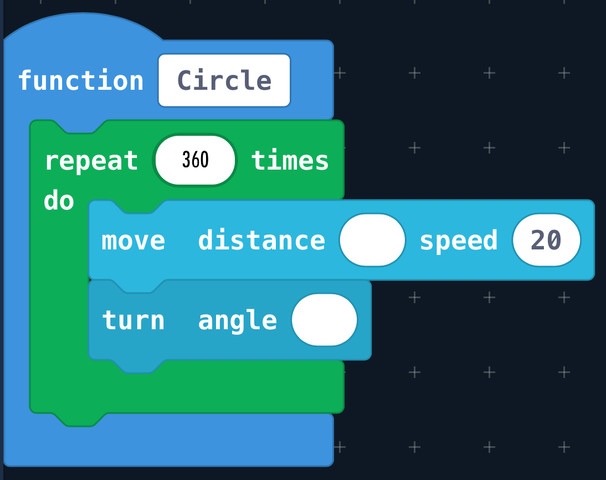
4. Say, “While technically Cue may be able to repeat a code 360 times, it would take a long time for our circle to be sketched. What would the turn angle be if we limited the number of repeats to 180? What about 120? What is the fewest number of repeats we can use that might still lead Cue to sketch a circle (or circle-like shape)?”
Sample responses: “If we limited the number of repeats to 180, then we would need to turn the robot at a 2° angle. If we limited the number of repeats to 120, then we would need to turn the robot at a 3° angle.”
5. Ask, “What is the fewest number of repeats we can use that might still lead Cue to sketch a circle (or circle- like shape)?”
Sample response: “18 repeats.”
6. Insert a dry erase marker into Cue’s Sketch Kit marker attachment and test out students’ responses on the Whiteboard Mat.
The function that is most successful at sketching a circle with the fewest number of repeats will be used later in the lesson.
Say, “Symmetrical patterns make mandalas a pleasure to look at. In order to design our mandala patterns, we must first be able to recognize lines of symmetry in our shapes. A line of symmetry is the line by which the shape can be folded into equal parts.”
Distribute the equilateral triangle and square Paper Polygon Manipulatives (one triangle and one square per student).
Say, “Take the equilateral triangle manipulative and fold it down the middle so that both halves of the triangle are identical. The crease represents the line of symmetry. Do you notice any more lines of symmetry for the triangle?
Sample response: “There are two more diagonal lines of symmetry.”
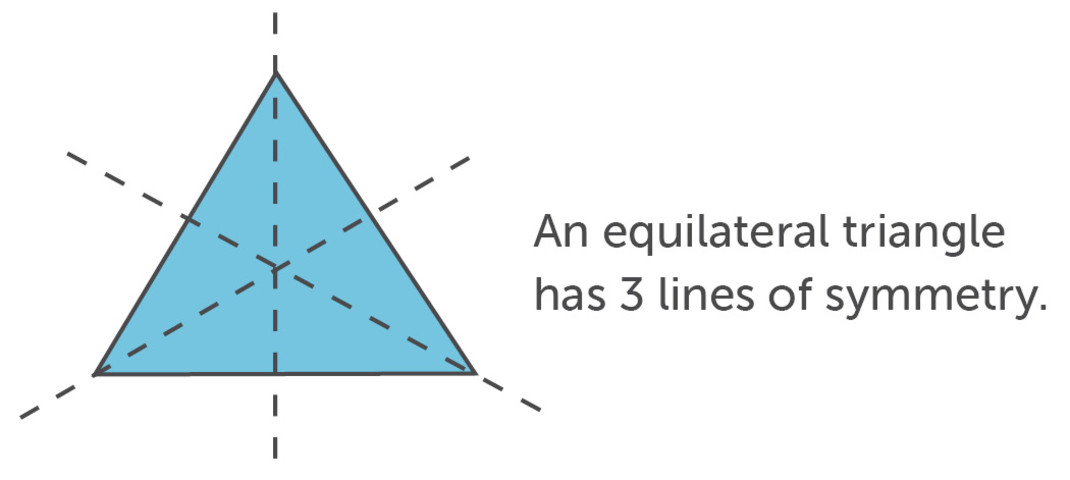
4. Say, “Fold the square manipulative to find all of its lines of symmetry.”
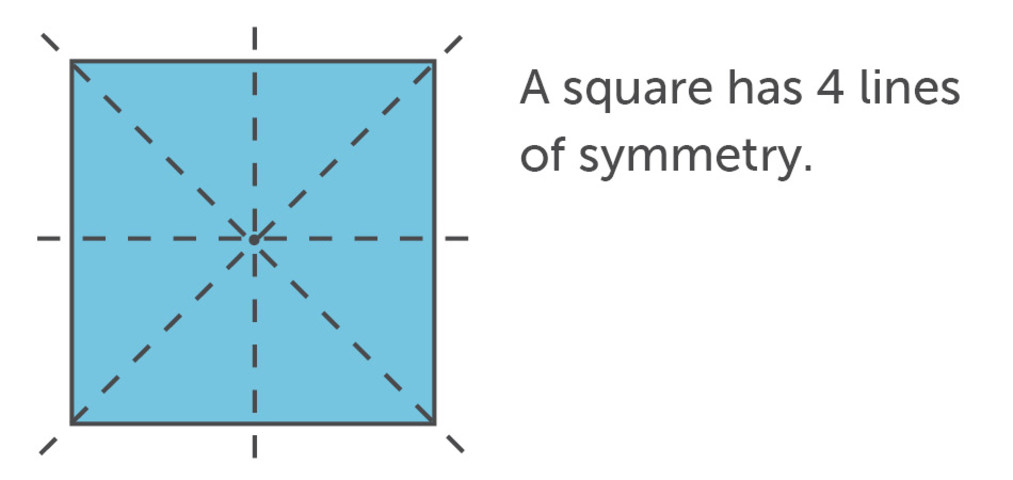
5. Ask, “Is there a relationship between the number of lines of symmetry and the number of sides in the polygon?”
Sample response: “The number of lines of symmetry is equivalent to the number of sides in the polygon.”
6. Ask, “How many lines of symmetry does a hexagon have? An octagon? What about a circle?”
Sample response: “A hexagon has six lines of symmetry. An octagon has eight. A circle has an infinite number of lines of symmetry.”
Say, “When we add patterns to our mandalas, we want to make sure that our patterns repeat across the lines of symmetry.”
Model taking your square manipulative and adding a simple geometric doodle to one of the eight triangle sections. Then model folding across the lines of symmetry and tracing the lines.
Have students do the same with their square manipulatives.
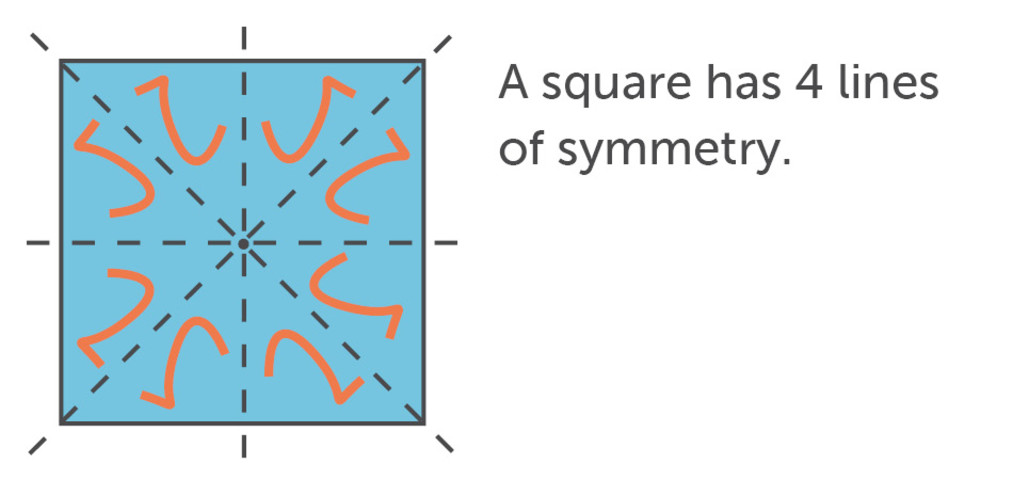
2. Have students pass their squares to their neighbors. Have pairs mirror each other’s doodles across the lines of symmetry.
Arrange the students so that they can see the Whiteboard Mat.
Mark the starting spot for the Cue with masking tape so that the robot always returns to the same spot as you cycle through code.
2. Say, “First, we want to use our circle function from earlier to sketch the outer circle.”
Run the circle function and adjust the number in the move distance block to have Cue sketch a circle with your desired perimeter.
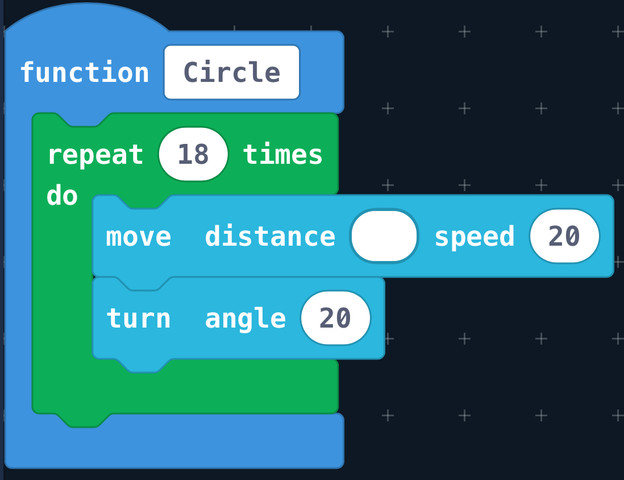
3. Ask, “Once we’ve sketched our outer circle, what do we need to add to our code in order to sketch the line of symmetry?”
Sample response: “We need to program Cue to turn 90° and travel the diameter of the outer circle.”
Note that the length entered into the move distance block may vary depending on size of circle. To estimate the diameter length, use the grid on the Whiteboard Mat.
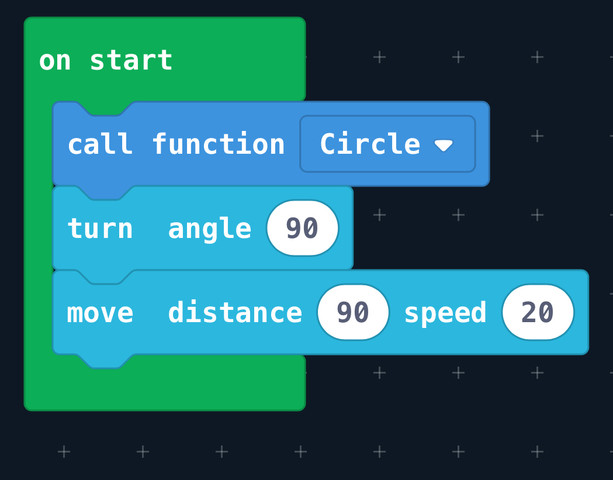
4. Say, “If we wanted, we could make this another function that includes the circle function plus blocks that create the line of symmetry. How might we make that function?”
Sample response: “Label a new function Symmetry and move the code that’s in your On Start block inside that function.”
Say, “Now we want to add some geometric shapes inside our outer circle. In order to do that, we will need to program Cue to travel back to the center of our circle.”
Say, “Cue is facing away from the center. What angle does Cue need to turn to travel back to the center?” (Sample response: “180°.”)
Ask, “How do we figure out how far Cue needs to travel to return to the center?” (Sample response: “We need to calculate the radius of the outer circle.”)
Ask, “Is there another way to program Cue to travel back to the center?" (Sample response: “Set the move distance block to the negative radius of the outer circle.”)
2. Say, “I want to add a revolving pentagon pattern in my mandala. First, I’m going to call our pentagon function from the beginning of class. It doesn’t matter how big or small it is, as long as it fits within our circle. If we wanted to make the pentagon bigger or smaller, what number would we change in the function code?”
Sample response: “To change the size of the pentagon, adjust the move distance length in the pentagon function.”
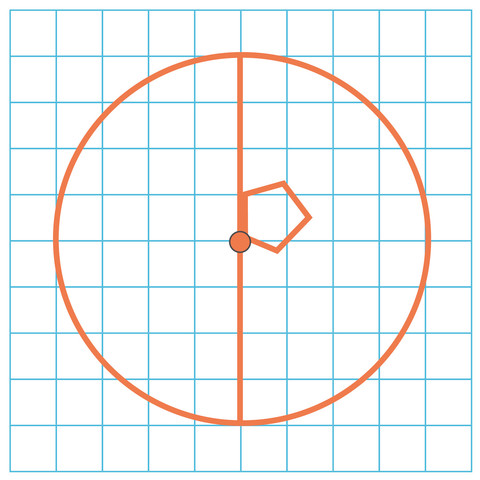
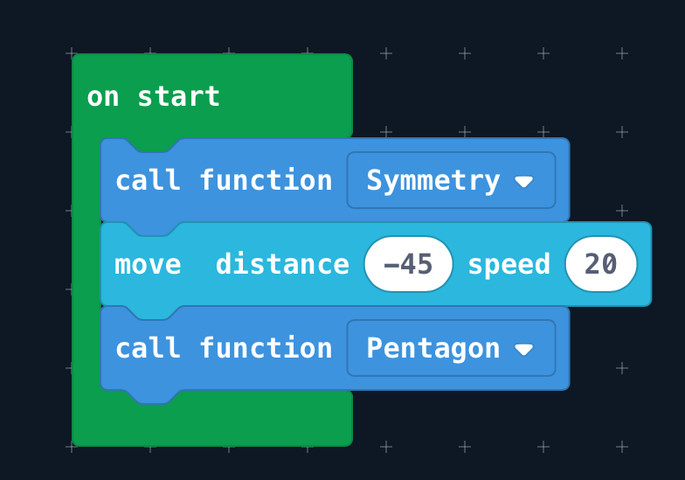
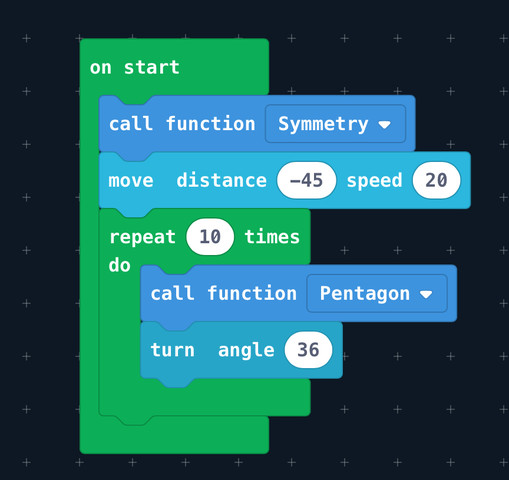
3. Say, “Now I want to make my pentagon repeat 10 times in a circle, so I’m going to place the function within a repeat block and program it to repeat 10 times. If I run the program now, Cue will sketch the pentagon shape 10 times in the exact same position and it won’t look very interesting, so we want to rotate the robot after it sketches each pentagon. How should we do that?”
Sample response: “Add a turn block to the code.”
4. Ask, “What angle should we turn Cue so that the robot sketches exactly 10 pentagons around the entire circle?”
Sample response: “We should turn Cue 36° because 360° divided by 10 is 36.”
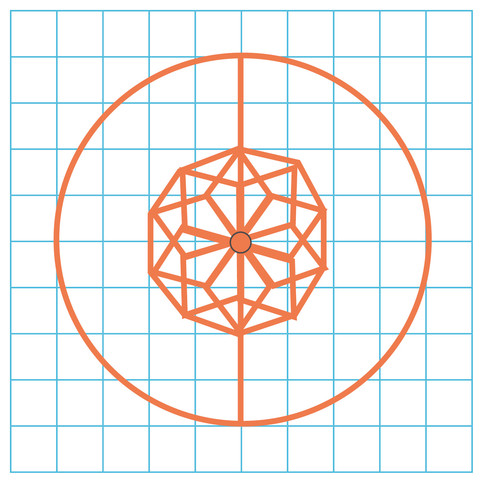
5. Work with the students to add one more pattern to the mandala before they start their own designs. Here are some different patterns to try:
Make a layer of different sized pentagons. Ask, “How do you make the pentagons bigger? Smaller?” (Sample response: “To change the size of a pentagon, you change the move distance value in the Pentagon function.”)
Make a layer of different shapes. Ask, “Can you call different shape functions in the same layer?” (Sample response: “Yes. To call different shape functions in the same layer, add multiple shape functions inside the repeat block.”)
Make a layer with different turn angles. Ask, “What’s the fewest number of shapes I can sketch in a layer and still keep it symmetrical? What’s the greatest number of shapes I can sketch in a layer without it looking like a mess?” (Sample response: “The fewest number of shapes would be two because you need a shape on both sides of the line of symmetry to keep it symmetrical. The greatest number is dependent on the size of the circle and size of the shape.”)
Arrange students into small groups (ideally 2–3 students) around the Whiteboard Mat and distribute robots, dry erase markers, and whiteboard erasers. Have each group program the six functions from the Polygon Worksheet into the Cue app on their tablet. Depending on time and the interest/ability of students, pick one of these activities or offer them as simultaneous options: Collaborative Mandala or Mandala Challenge.
Have each student modify an existing polygon function or design their own shape function from scratch. Then have them program Cue to sketch each shape in one collaborative mandala.
Ask, “Can you create a shape function that mixes straight lines and curves?”
Ask, “Can you make different kinds of line patterns (dotted, zigzag, etc.)?"
2. Once the mandala is completed, have students use multi-colored dry erase markers to color in the various shapes.
Divide students into two teams.
Ask each team to design a mandala using the polygon functions. Then have them erase half of the mandala and ask the other team to figure out the code.
Once teams have completed each other’s halves, ask them to design another. Then have them erase three quarters of the circle and compete again
Have students share their mandalas with the class. Ask them to showcase both the aesthetic design and the code.
Encourage students to give feedback on each other’s mandalas and ask them to look for moments where the code could be simplified.
Sample response: “I think you could have shortened your code by adding a repeat block.”
How might you add more visual rhythm and variance to your mandala pattern?
Sample response: “I could create a variable and change polygon side lengths by a regular interval, or I could add a random number block to mix up the angles and sides.”
The Mandala Book: Patterns of the Universe by Lori Bailey Cunningham
4D: Exhibit a tolerance for ambiguity, perseverance and the capacity to work with open-ended problems.
5A: Formulate problem definitions suited for technology-assisted methods such as data analysis, abstract models and algorithmic thinking in exploring and finding solutions.
5C: Break problems into component parts, extract key information, and develop descriptive models to understand complex systems or facilitate problem-solving.
6C: Communicate complex ideas clearly and effectively by creating or using a variety of digital objects such as visualizations, models or simulations.
7C: Contribute constructively to project teams, assuming various roles and responsibilities to work effectively toward a common goal.
1A-AP-08: Model daily processes by creating and following algorithms (sets of step-by-step instructions) to complete tasks.
1A-AP-10: Develop programs with sequences and simple loops to express ideas or address a problem.
1A-AP-11: Decompose (break down) the steps needed to solve a problem into a precise set of instructions.
1A-AP-14: Debug (identify and fix) errors in an algorithm or program that includes sequences and simple loops.
Spatial Sense
E1.4 describe and perform combinations of translations, reflections, and rotations up to 360° on a grid, and predict the results of these transformations
Algebra
C3.1 solve problems and create computational representations of mathematical situations by writing and executing code, including code that involves conditional statements and other control structures
- demonstrate an understanding of how to read and interpret signs, symbols, and style in art works.
- identify and describe some of the ways in which art forms and styles reflect the beliefs and traditions of a variety of communities, times, and places.
- describe and compare the angles and sides of regular polygons and irregular polygons.
- generalize the sum of interior angles for triangles and quadrilaterals.
- Component 10 (iii) - MEDIA AND TECHNIQUES: Students will use media and techniques, with an emphasis on more indirect complex procedures and effects in drawing, painting, print making, sculpture, fabric arts, photography and technographic arts.
CTF is planning, creating, appraising and communicating in response to challenges.
I plan in response to challenges.
I make decisions in response to challenges.
I adapt to change and unexpected events.
I solve problems in response to challenges.
I create products, performances or services in response to challenges.
I appraise the skills, knowledge and technologies used to respond to challenges.
I communicate my learning.
CTF is working independently and with others while exploring careers and technology.
I determine how my actions affect learning.
I develop skills that support effective relationships.
I collaborate to achieve common goals.
Curricular Competencies:
- Use tools or technology to explore and create patterns and relationships, and test conjectures.
- Engage in problem-solving experiences that are connected to place, story, cultural practices, and perspectives relevant to local First Peoples communities, the local community, and other cultures.
- Represent mathematical ideas in concrete, pictorial, and symbolic forms.
Content:
- increasing and decreasing patterns, using expressions, tables, and graphs as functional relationships.
Curricular Competencies:
- Demonstrate an understanding and appreciation of personal, social, cultural, historical, and environmental contexts in relation to the arts.
- Create artistic works collaboratively and as an individual using ideas inspired by imagination, inquiry, experimentation, and purposeful play.
Content:
- a variety of national and international works of art and artistic traditions from diverse cultures, communities, times, and places.
- symbolism and metaphor to explore ideas and perspective.
Applied Technologies:
- Select, and as needed learn about, appropriate tools and technologies to extend their capability to complete a task.
- Identify the personal, social, and environmental impacts, including unintended negative consequences, of the choices they make about technology use.
- Identify how the land, natural resources, and culture influence the development and use of tools and technologies.
- SS1: Demonstrate an understanding of angles by:
• identifying examples of angles in the environment
• classifying angles according to their measure
• estimating the measure of angles using 45°, 90° and 180° as reference angles
• determining angle measures in degrees
• drawing and labelling angles when the measure is specified
- SS2: Demonstrate that the sum of interior angles is:
• 180° in a triangle
• 360° in a quadrilateral
- SS3: Develop and apply a formula for determining the perimeter of polygons.
- 6.5.2 investigate art styles from a variety of social, historical, and cultural contexts.
- 6.5.4 develop awareness of the ethnic diversity, cultural uniqueness, and influence of the visual arts in our society.
- 6.5.5 increase their understanding of the contributions of various artists, past and present, to the field of visual art.
- 6.5.6 demonstrate an awareness that many works of art can be studied according to their context.
- 6.4.1 Analyze how the arts reflect beliefs and values in a selected cultural region.
6SS1 Demonstrate an understanding of angles by:
identifying examples of angles in the environment
classifying angles according to their measure
estimating the measure of angles, using 45°, 90° and 180° as reference angles
determining angle measures in degrees
drawing and labelling angles when the measure is specified
6SS6 Perform a combination of translations, rotations and/or reflections on a single 2-D shape, with and without technology, and draw and describe the image.
Demonstrate and apply knowledge of basic art skills, techniques, processes, and language.
Explore images from a variety of times and cultures to understand connections with their own time and place
SS6.1 Demonstrate understanding of angles including:
identifying examples classifying angles
estimating the measure
determining angle measures in degrees
drawing angles
applying angle relationships in triangles and quadrilaterals.
SS6.5 Demonstrate understanding of single, and combinations of, transformations of 2-D shapes (with and without the use of technology) including:
identifying
describing
performing.
CP6.10 Create visual art works that express ideas about identity and how it is influenced (e.g., factors such as pop culture, cultural heritage, peer groups, personal and family interests, gender).
SS1 Demonstrate an understanding of angles by:
identifying examples of angles in the environment
classifying angles according to their measure
estimating the measure of angles using 45°, 90 and 180° as reference angles
determining angle measures in degrees
drawing and labelling angles when the measure is specified
SS6 Perform a combination of translation(s), rotation(s) and/or reflection(s) on a single 2-D shape, with and without technology, and draw and describe the image.
develop an understanding of the elements and principles of art and design in creating and viewing art work
6.SS.1 Demonstrate an understanding of angles by
identifying examples of angles in the environment
classifying angles according to their measure
estimating the measure of angles using 45º, and 90º, and 180º as reference angles
determining angle measures in degrees
drawing and labelling angles when the measure is specified
6.SS.6 Perform a combination of transformations (translations, rotations, or reflections) on a single 2-D shape, and draw and describe the image.
A–U1 students experience and develop awareness of artworks from various times, places, social groups, and cultures
describing quadrilaterals, including trapezoids and parallelograms: parallel segments, perpendicular segments, right angles, acute angles, obtuse angles
G03: Students will be expected to perform a combination of translation(s), rotation(s), and/or reflection(s) on a single 2-D shape, with and without technology, and draw and describe the image.
Students will explore the creative process, individually and collaboratively, using a range of materials and technologies, to create with respect and sensitivity a variety of artworks that express feelings, ideas, and understandings.
P2: Students will be expected to use digital tools to develop ideas and original works in innovative ways.
TOC1: Students will be expected to
safely use many forms of current technology for learning with growing competence
demonstrate conceptual understanding of how information and communication technology, digital tools, and authorized networks support their learning
use terminology related to information and communication technology