Loading…
Loading…
Cue robots (1 per group)
tablets or compatible devices (1 per group)
[Optional] Sketch Kit marker attachment (1–2 per class)
[Optional] Sketch Kit dry erase markers (1–2 sets per class)
[Optional] Wonder Whiteboard Mat and/or butcher paper (1–2 per class)
[Optional] materials to create a drawing attachment, if Sketch Kit unavailable (e.g., cardboard sheets and rolls, pipe cleaners, foam packing, tape, rubber bands, paper clips, etc.)
Cue’s Vocabulary Cards (1 per group)
pencils
scissors (1 per group)
black markers (1 per group)
metric ruler (1 per group)
protractor (1 per group)
lined paper
Before this lesson, it is recommended that students:
review the list of vocabulary words and their meanings.
practice programming actions, controls, and events in the Cue app.
practice programming Cue to draw using the Sketch Kit.
Fully charge the tablets and robots.
Install the Wonder Workshop Cue app on each device.
Create a sample Pool Table using butcher paper. Draw a 3 x 5 table with each square measuring 30 cm x 30 cm on the Whiteboard Mat or the butcher paper. Mark six corner pockets with a black marker. Mark START in the bottom left corner of the table. See illustration below.
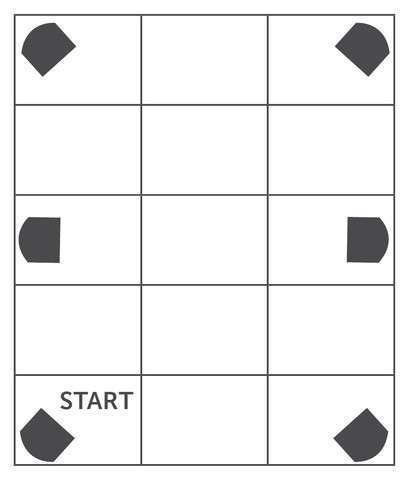
Create sample vocabulary cards using Cue's Vocabulary Cards. On each of the six cards in the template, record a vocabulary word on the front and a definition on the back. Then tape one card to the side of each pocket of the Pool Table, word up.
Set up a station with the Whiteboard Mat and/or butcher paper, Sketch Kit marker attachments, and Sketch Kit dry erase markers. If Sketch Kit is unavailable, lay out materials to create a drawing attachment and markers.
Ask, “Have you ever played pool or billiards? How are speed, distance, and angles a part of the game?"
Guide the conversation with additional questions such as:
Does speed affect the ball’s accuracy as it travels towards the pocket?
Can we measure the distance the ball travels? How?
Does the angle of the first shot determine the subsequent angles as the ball bounces off the side walls?
Review how to attach the Sketch Kit marker attachment to Cue and insert a marker.
Refer to the Start Here Card that came with your Sketch Kit or visit the Wonder Workshop website for instructions and images to guide you.
Explain the goal of the lesson: Say, “During this lesson, you will work in pairs to program Cue like a pool ball. The object of the game is for Cue to roll into each of the six pockets of a pool table in the fewest moves possible in one program. Once Cue lands in a pocket, Cue must say the meaning of a vocabulary of the adjacent vocabulary word.”
1. Project your tablet screen and open the Cue app.
2. Using the sample Pool Table you created, use a pencil, protractor, and ruler to draw the best path for Cue to take to “land” in one of the pockets.
Say, “Once you've decided on a path, count up the total number of moves it will take to get Cue to land in each pocket. Any time Cue moves forward, backward, or turns will be counted as a move. Record the number of moves before going onto the next step.”
Say, "Cue must begin on START and bounce off a wall in the first move. Cue must bounce off two other walls somewhere else in the program.”
3. Place Cue on the designated START position to begin programming. (Note: The first move must bounce off a wall.)
Attach the Sketch Kit marker attachment to a Cue robot and insert a marker.
4. Project your device screen and open the Cue app.
Navigate to the Code with Block and JavaScriptⓇ section.
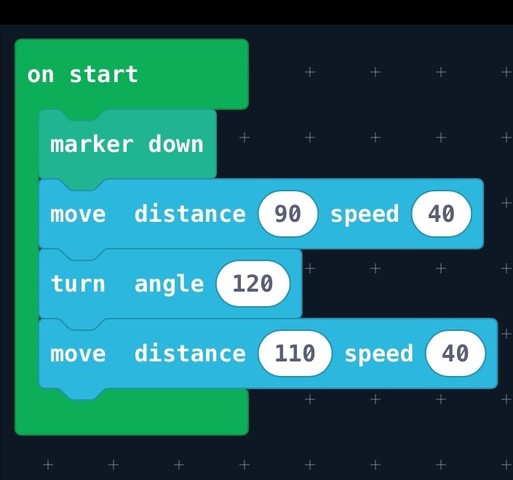
5. Demonstrate programming a first move for Cue as in the example shown below.
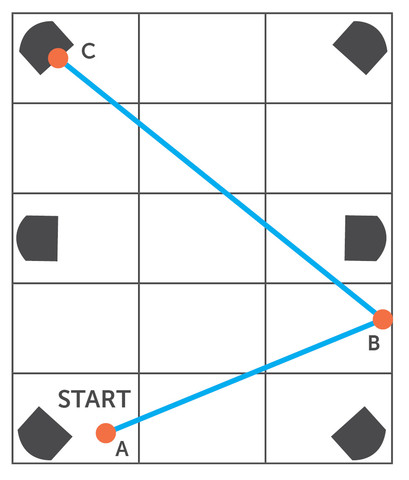
Example: Land Cue in the left-corner pocket in the least number of moves. Note how this could be done in three moves.
Ask students whether it could be done in fewer moves.
Note that students can program Cue to land in each of the six pockets in any order.
Example of programming that involves three moves:
6. Model programming Cue to roll over each pocket in the fewest moves possible. Remember that Cue must bounce of two other walls somewhere in the program. Invite students to take turns assisting you.
Model using movement blocks to program distance in centimeters and degree of angles.
Mention that speed will not affect the number of moves or the outcome. *In a subsequent challenge, you can have students program for speed.
Tell students that they may program sound with an event using sensors, buttons and/or voice/claps to initiate customized (recorded) sounds.
7. Model programming Cue to say the definition of each pocket's vocabulary word before moving onto the next pocket.
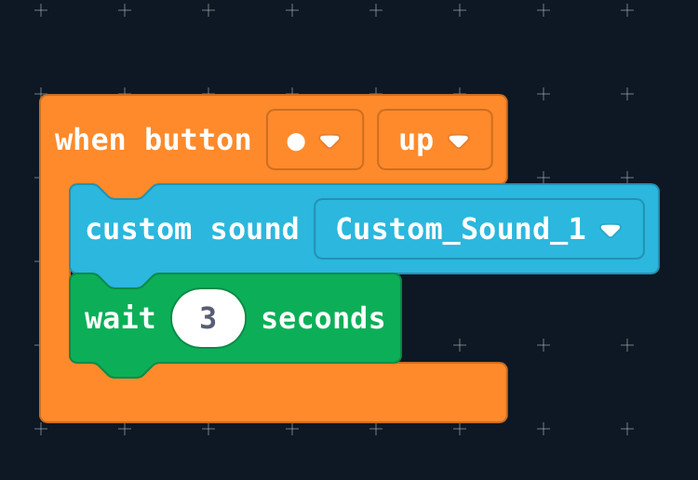
8. Run and test the program. Note any patterns created by the lines and angles drawn.
9. Model recording the number of moves it took Cue to get to each pocket.
What are the objectives of this assignment? (Sample response: “Program Cue to roll into each pocket in the fewest moves possible. The first move must bounce of a wall, two other moves in the program must bounce off a wall. Program Cue to say the word and definition of each vocabulary word as Cue rolls over each pocket.")
How will your group overcome challenges?
1. Divide students into pairs.
2. Distribute protractors, pencils, rulers, butcher paper, markers, scissors, and Cue's Vocabulary Card Templates.
3. Have pairs create a Pool Table using butcher paper.
Have students draw a 3 x 5 table with each square measuring 30cm x 30cm on the butcher paper and cut it out. Then have them mark six corner pockets with a black marker. Have them mark START in the bottom left corner of their table.
Tape the Pool Table paper down to the floor so it won't slip and move during programming.
4. Have pairs create vocabulary cards using Cue's Vocabulary Card Template. On each of the six cards in the template, have students record a vocabulary word on the front and a definition on the back.
Then have them tape one card near each pocket of their Pool Table, word up.
5. On their Pool Tables, have students use their protractors, pencils, and rulers to sketch out a plan for a program to get Cue to “land” in each pocket with the fewest moves possible.
Remind students that Cue must bounce off the wall in the first move and two more times somewhere else in the program.
6. Check students work before distributing Cue robots, Sketch Kits, tablets, and lined paper.
Have students attach the Sketch Kit marker attachment to their robot and insert a marker.
7. Have pairs work together to program Cue according to their plan.
Have them record the number of moves it took Cue to get to each pocket.
Circle to assist and assess as students work.
Have students repeat the same activity:
with a different size table (e.g., 2 x 3, 1 x 7, 2 x 4, 6 x 4).
with a different shape table (e.g., triangle, parallelogram, octagon).
focusing on speed instead of moves. Have them program Cue to roll into each of the six pockets and say the words and meanings in the fastest time possible.
After students are finished, have each pair share their program and the pattern illustrated by the lines that Cue traced on their Pool Table.
Have pairs give each other positive and constructive feedback on their programs.
Have pairs compare the number of moves it took Cue to get to each pocket of their Pool Table. Discuss what made some pairs’ programs more efficient than others.
What strategies did your pair use to figure out how to program the fewest number of moves?
Which controls, events, and/or buttons did you use to program Cue to say the meanings of your vocabulary words?
Did you notice any patterns in the lines Cue sketched while running your program?
Use our Evaluation Rubric to review students’ work and presentations.
[Optional] Share your students’ work with the world using @logicsacademy and #Cue
CCSS.ELA-LITERACY.W.6.2.D: Use precise language and domain-specific vocabulary to inform about or explain the topic.
CCSS.MATH.CONTENT.7.G.B.5: Use facts about supplementary, complementary, vertical, and adjacent angles in a multi-step problem to write and solve simple equations for an unknown angle in a figure.
MS-ETS1-1: Define the criteria and constraints of a design problem with sufficient precision to ensure a successful solution,
MS-ETS1-2: Evaluate competing design solutions using a systematic process to determine how well they meet the criteria and constraints of the problem.
1B-AP-10: Create programs that include sequences, events, loops, and conditionals.
1B-AP-15: Test and debug (identify and fix errors) a program or algorithm to ensure it runs as intended.
1B-AP-16: Take on varying roles, with teacher guidance, when collaborating with peers during the design, implementation, and review stages of program development.
1B-AP-17: Describe choices made during program development using code comments, presentations, and demonstrations.
2-AP-13: Decompose problems and subproblems into parts to facilitate the design, implementation, and review of programs.
2-AP-15: Seek and incorporate feedback from team members and users to refine a solution that meets user needs.
2-AP-17: Systematically test and refine programs using a range of test cases.
1A: Articulate and set personal learning goals, develop strategies leveraging technology to achieve them and reflect on the learning process itself to improve learning outcomes.
1B: Build networks and customize their learning environments in ways that support the learning process.
1C: Use technology to seek feedback that informs and improves their practice and to demonstrate their learning in a variety of ways.
4D: Exhibit a tolerance for ambiguity, perseverance and the capacity to work with open-ended problems.
5A: Formulate problem definitions suited for technology-assisted methods such as data analysis, abstract models and algorithmic thinking in exploring and finding solutions.
5C: Break problems into component parts, extract key information, and develop descriptive models to understand complex systems or facilitate problem-solving.
6C: Communicate complex ideas clearly and effectively by creating or using a variety of digital objects such as visualizations, models or simulations.
6D: Students publish or present content that customizes the message and medium for their intended audiences.
7A: Use collaborative technologies to work with others, including peers, experts or community members, to examine issues and problems from multiple viewpoints.
7C: Contribute constructively to project teams, assuming various roles and responses.
assume a variety of roles, and share responsibilities as a group member
identify and participate in situations and projects in which group work enhances learning and results
CTF is planning, creating, appraising and communicating in response to challenges.
I plan in response to challenges.
I make decisions in response to challenges.
I adapt to change and unexpected events.
I solve problems in response to challenges.
I create products, performances or services in response to challenges.
I appraise the skills, knowledge and technologies used to respond to challenges.
I communicate my learning.
CTF is working independently and with others while exploring careers and technology.
I determine how my actions affect learning.
I develop skills that support effective relationships.
I collaborate to achieve common goals.
contribute collaboratively in group situations, by asking questions and building on the ideas of others
take responsibility for assuming a variety of roles in a group, depending on changing contexts and needs
CTF is planning, creating, appraising and communicating in response to challenges.
I plan in response to challenges.
I make decisions in response to challenges.
I adapt to change and unexpected events.
I solve problems in response to challenges.
I create products, performances or services in response to challenges.
I appraise the skills, knowledge and technologies used to respond to challenges.
I communicate my learning.
CTF is working independently and with others while exploring careers and technology.
I determine how my actions affect learning.
I develop skills that support effective relationships.
I collaborate to achieve common goals.
propose ideas or advocate points of view that recognize the ideas of others and advance the thinking of the group
use opportunities as a group member to contribute to group goals and extend own learning
CTF is planning, creating, appraising and communicating in response to challenges.
I plan in response to challenges.
I make decisions in response to challenges.
I adapt to change and unexpected events.
I solve problems in response to challenges.
I create products, performances or services in response to challenges.
I appraise the skills, knowledge and technologies used to respond to challenges.
I communicate my learning.
CTF is working independently and with others while exploring careers and technology.
I determine how my actions affect learning.
I develop skills that support effective relationships.
I collaborate to achieve common goals.
Comprehend and connect (reading, listening, viewing)
Access information and ideas for diverse purposes and from a variety of sources and evaluate their relevance, accuracy, and reliability
Apply appropriate strategies to comprehend written, oral, and visual texts, guide inquiry, and extend thinking
Synthesize ideas from a variety of sources to build understanding
Construct meaningful personal connections between self, text, and world
Recognize how literary elements, techniques, and devices enhance and shape meaning
Create and communicate (writing, speaking, representing)
Exchange ideas and viewpoints to build shared understanding and extend thinking
Use writing and design processes to plan, develop, and create engaging and meaningful literary and informational texts for a variety of purposes and audiences
Use an increasing repertoire of conventions of Canadian spelling, grammar, and punctuation
Applied Technologies:
- Select, and as needed learn about, appropriate tools and technologies to extend their capability to complete a task.
- Identify the personal, social, and environmental impacts, including unintended negative consequences, of the choices they make about technology use.
- Identify how the land, natural resources, and culture influence the development and use of tools and technologies.
contribute to and respond constructively in conversation, small-group and whole-group discussion
give and follow instructions and respond to a variety of questions and instructions
follow instructions and respond to questions and directions
build and rely upon a broad knowledge base of how words are spelled and formed; use such knowledge to spell unfamiliar words and expand vocabulary;regularly use resource texts to verify spelling; use punctuation and grammatical structures capably and accurately; use a variety of sentence patterns, vocabulary choices, and paragraphing with flexibility and creativity to engage readers
1.2 demonstrate an understanding of appropriate listening behaviour by adapting active listening strategies to suit a variety of situations, including work in groups
2.4 use appropriate words and phrases from the full range of their vocabulary including inclusive and non-discriminatory language, and stylistic devices appropriate to the purpose and context, to communicate their meaning accurately and engage the interest of their intended audience
3.3 confirm spellings and word meanings or word choice using a variety of resources appropriate for the purpose
Algebra
C3.1 solve problems and create computational representations of mathematical situations by writing and executing code, including code that involves conditional statements and other control structures
C3.2 read and alter existing code, including code that involves conditional statements and other control structures, and describe how changes to the code affect the outcomes and the efficiency of the code
2.4 use appropriate words, phrases, and terminology from the full range of their vocabulary, including inclusive and non-discriminatory language, and a range of stylistic devices, to communicate their meaning accurately and engage the interest of their intended audience
Algebra
C3.1 solve problems and create computational representations of mathematical situations by writing and executing code, including code that involves events influenced by a defined count and/or sub-program and other control structures
C3.2 read and alter existing code, including code that involves events influenced by a defined count and/or sub-program and other control structures, and describe how changes to the code affect the outcomes and the efficiency of the code
3.1 automatically read and understand most words in a wide range of reading contexts
3.2 predict the meaning of and rapidly solve unfamiliar words using different types of cues
Algebra
C3.1 solve problems and create computational representations of mathematical situations by writing and executing code, including code that involves the analysis of data in order to inform and communicate decisions
C3.2 read and alter existing code involving the analysis of data in order to inform and communicate decisions, and describe how changes to the code affect the outcomes and the efficiency of the code
CR6.3 Use pragmatic (e.g., function and purpose of texts), textual (e.g., form/ genre, sequence of ideas), syntactic (e.g., word orderand emphasis on particular words), semantic/lexical/ morphological (e.g., capture particular aspect of intended meaning), graphophonic (e.g., sound-symbol patterns and relationships), and other cues (e.g., the speaker’s non-verbal cues) to construct and confirm meaning.
CR7.3 Use pragmatic (e.g., author’s purpose and point of view), textual (e.g., how author organized text),syntactic (e.g., main and subordinate ideas), semantic/lexical/morphological (e.g.,figurative language and specific word meanings by their context, common affixes,and allusions), graphophonic (e.g., word patterns), and other cues (e.g., non-verbal cues, headings, charts, and diagrams) to construct and confirm meaning when viewing, listening, and reading.
CR8.3 Use pragmatic (e.g., intended audience and tone), textual (e.g., how author organized text to achieve unity and coherence), syntactic (e.g., variety of sentence structures), semantic/ lexical/morphological (e.g., imagery), graphophonic (e.g., stress, pitch, and juncture of a word), and other cues (e.g., layout and accompanying graphics) to construct and to confirm meaning.
GCO 4: Students will be expected to select, read, and view with understanding a range of literature, information, media, and visual texts.
GCO 5: Students will be expected to interpret, select, and combine information using a variety of strategies, resources, and technologies
Reading and Viewing
Interpret, select, and combine information using a variety of strategies, resources, and technologies
Language as Sense Making
Access, use, build, and refine schema.
Select from and use a variety of strategies
Language as System
Recognize, apply, and adapt rules and conventions.
Identify, analyze, and apply understandings of whole-part-whole relationships.
During reading/viewing
Uses a variety of reading strategies to make meaning of different text types
Applies knowledge of cueing systems to construct meaning
GCO 4: Students will be expected to select, read, and view with understanding a range of literature, information, media and visual texts.
GCO 5: Students will be expected to interpret, select, and combine information using a variety and strategies, resources, and technologies.
P2: Students will be expected to use digital tools to develop ideas and original works in innovative ways.
TOC1: Students will be expected to
safely use many forms of current technology for learning with growing competence
demonstrate conceptual understanding of how information and communication technology, digital tools, and authorized networks support their learning
use terminology related to information and communication technology
GCO 4: Students will be expected to select, read, and view with understanding a range of literature, information, media and visual texts.
GCO 5: Students will be expected to interpret, select, and combine information using a variety and strategies, resources, and technologies.
GCO1: Students will be expected to design, develop, evaluate, and articulate technological solutions
GCO2: Students will be expected to operate and manage technological systems