
Loading…
Loading…
Students will be introduced to and define the terms “sequencing” and “algorithms.” Students will learn how coding relates to their lives.
Students will be introduced to and define the terms “sequencing” and “algorithms.” Students will learn how coding relates to their lives.
define sequences and algorithms
relate coding to their lives at home and school
design an algorithm navigating Dash through a maze to find Dot
Cut sheets of paper into quarters until you have at least 9 pieces of paper.
Cut out the arrows from the Arrow PDF.
If you don't have a Dash and/or Dot, cut out the Dash and Dot images from the Arrow PDF.
Ask, “What is a recipe?”
Sample response: “A recipe is a set of directions for how to make something.”
Ask, “Who has ever used a recipe to make something? Or who has seen a member of your family use a recipe to cook with?”
Say, “Writing code is like writing a recipe, and following code is similar to following a recipe. When we write a recipe for a computer to follow, it’s called an algorithm.”
Watch Code.org’s video about algorithms: https://studio.code.org/s/coursea-draft/stage/3/puzzle/1
Say, “An algorithm is a fancy way to say 'directions.'”
Say, “When we use algorithms, we give directions to the computer.”
Say, “We have to be careful with algorithms because computers can only follow the instructions we give, so if we give bad instructions, the computer follows the bad instructions.”
(Optional) Watch this Exact Instructions Challenge video and end at 4:33. In this video, a little girl writes an algorithm for her dad to follow to make orange juice.
What happens?
Were the little girl’s instructions specific?
This is an example of what happens when your algorithm is not specific enough.
Introduction
What is an algorithm? (Sample response: “An algorithm is a set of instructions written for a computer to follow.”)
How do you use algorithms in your life? (Sample response: “I use algorithms every time I give someone else directions. I also use algorithms when I follow someone else’s directions.")
Have students work on the following activities in pairs.
When students work together while coding, they’re able to help each other identify mistakes and develop creative solutions!
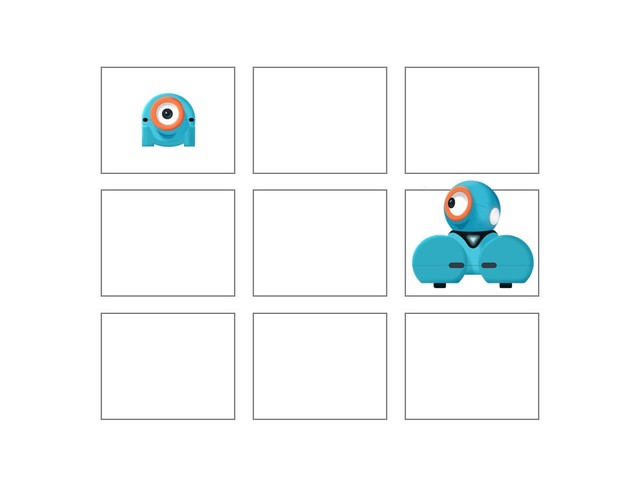
Have each pair place 9 pieces of paper on the floor in the shape of a square (see the diagram below).
Have them place Dot on one piece of paper.
Place Dash on another piece of paper. It doesn’t matter which pieces of paper the children choose.
If you don’t have Dot or Dash, use the pictures of the robots in the Arrow PDF.

Have students cut out the arrows in the Arrow PDF.
Have students lay the arrows on the floor or desk in a sequence that will direct Dash to find Dot.
Have student pairs switch algorithms with another group.
Have each new group follow the arrow algorithm exactly as is and leave a sticky note of feedback for the algorithm owners.
Have the algorithm owners return to their algorithms and respond to the feedback in the Wonder Journal: Reflection Worksheet. If the sequence of arrows in the algorithm is wrong, encourage the algorithm owner to make changes.
Have groups rotate to another algorithm and repeat the process.
[Optional] After each rotation group, students can move Dash and Dot to create another algorithm using the arrows.
What were the challenges with this activity?
Sample response: “I thought it was hard to figure out which direction Dash needed to move. Sometimes we chose the wrong direction.”
Remember how recipes are like algorithms? What happens when the recipe is written in the wrong sequence?
Sample response: “Our finished product probably wouldn’t taste very good.”
Use our Evaluation Rubric to review students' work and presentations.
[Optional] Share your students' work with the world using @logicsacademy and #dashanddot!
CSTA
1A-AP-08: Model daily processes by creating and following algorithms (sets of step-by-step instructions) to complete tasks.
1B-AP-16: Take on varying roles, with teacher guidance, when collaborating with peers during the design implementation and review stages of program development.
1A-AP-11: Decompose (break down) the steps needed to solve a problem into a precise sequence of instructions.
1A-AP-12: Develop a plan that describes a program’s sequence of events, goals, and expected outcomes.
1A-AP-14: Debug (identify and fix) errors in an algorithm or program that includes sequences and simple loops.
1A-AP-15: Using correct terminology, describe steps taken and choices made during the iterative process of program development.
ISTE
5a: Students formulate problem definitions suited for technology-assisted methods such as data analysis, abstract models, and algorithmic thinking in exploring and finding solutions.
NGSS
K-2-ETS1-2: Develop a simple sketch, drawing, or physical model to illustrate how the shape of an object helps it function as needed to solve a given problem.
Common Core
CCSS.ELA-LITERACY.W.2.8: Recall information from experiences or gather information from provided sources to answer a question.
CCSS.ELA-LITERACY.SL.3.4: Report on a topic or text, tell a story, or recount an experience with appropriate facts and relevant, descriptive details, speaking clearly at an understandable pace.
CCSS.ELA-LITERACY.SL.3.3: Ask and answer questions about information from a speaker, offering appropriate elaboration and detail.
CCSS.ELA-LITERACY.SL.3.1: Engage effectively in a range of collaborative discussions (one-on-one, in groups, and teacher-led) with diverse partners on grade 3 topics and texts, building on others' ideas and expressing their own clearly.
Grade 1
Mathematics: Algebra (Coding)
C3.1 solve problems and create computational representations of mathematical situations by writing and executing code, including code that involves sequential events
Kindergarten
ADST
• Use trial and error to make changes, solve problems, or incorporate new ideas from self or others
• Develop their skills and add new ones through play and collaborative work
Kindergarten
ICT
C5: Students will use technology to aid collaboration during inquiry.
C6: Students will use technology to investigate and/or solve problems.
F6: Students will demonstrate a basic understanding of the operating skills required in a variety of technologies.
Kindergarten
ICT
C5: Students will use technology to aid collaboration during inquiry.
C6: Students will use technology to investigate and/or solve problems.
F6: Students will demonstrate a basic understanding of the operating skills required in a variety of technologies.