
← Back to Library
Lesson PlanFreeEN

A4: Sequences - Coding Adventures with Matatalab

In this lesson, we will first review the Matatalab Coding Set and the ways in which it receives and sends messages. Next students will be reintroduced to mazes. Students will use Matatalab Challenge Booklets 2 and 3 to gain an understanding of the use of parameters, loops and functions in conjunction with direction blocks.
Gr. K–3
A4: Sequences - Coding Adventures with Matatalab

Lesson

Overview

Description

In this lesson, we will first review the Matatalab Coding Set and the ways in which it receives and sends messages. Next students will be reintroduced to mazes. Students will use Matatalab Challenge Booklets 2 and 3 to gain an understanding of the use of parameters, loops and functions in conjunction with direction blocks.

Objectives

  • Describe function of the Matatalab Coding Set components.

  • Explain the difference between sending and receiving messages.

  • Program MatataBot using direction blocks.

  • Collaborate with other students to program MatataBot.

  • Code MatataBot using direction, parameter and function blocks to complete challenge activities

Materials

1 paper maze per student

1 pencil per student

Laptop and projector

For each student group:

  • 1 Matatalab Coding Set - Parts used in this lesson will include:

  • Command Tower

  • Control Board

  • MatataBot

  • Direction, Parameter, Loop, and Function Blocks

  • Music Block

  • Obstacles

  • Flags

  • Nature Map

  • City Map

  • Challenge Booklet 2

  • Challenge Booklet 3

Student journals

Before the Lesson

Preparation

  • Charge all Matatalab Command Towers and MatataBots.

For each group of students:

  • Print a set of 12 directional symbols (4-forward, 3-back, 3-right turn, 2-left turn).

  • Organize 1 set of Matatalab parts used in this lesson.

  • Ensure students have access to Challenge Booklet 1

  • Download PDF Maze, found as a template at the end of this lesson, to project during introductory activity.

  • Make 1 copy of PDF maze for each student.

  • Organize 1 Matatalab Coding Set for each student group.

  • Ensure all students have access to Challenge Booklets 2 and 3.

  • Ensure all students have access to Matatalab Nature Map and City Map.

Learning about Matatalab

To learn more about the Matatalab Coding Set refer to the following videos:

Review

Review with Challenge Booklet One

Say, “The Matatalab Coding Set is made up of a command tower, a control board, different types of coding blocks, musical coding blocks, and a wheeled robot. In this lesson, we will review the important parts of the Matatalab Coding Set, understand the way in which the robot moves through a nature map, and complete Matatalab Challenge Booklet 1.”

  • Ask students the purpose of a turning signal in an automobile. What happens when their parent uses the turning signal? (The car turns left or right.) Ask students what other directions a car can move. (Forward and reverse).

  • Tell students to stand up and form a horizontal line and stand arm’s length apart. Ask students to move forward one step, turn right, move backward one step, turn left. Repeat this once or twice more to gauge how well students understand directional movement. Reinforce directional movement with students as needed.

  • Assign groups of 3-4 students. Define a space in the room, hallway, etc. for each group. Each group will work collaboratively to complete the following sequence. Place a forward directional card down on the floor. Place the remaining direction cards in a sequence through which students will advance. Student groups work collaboratively to complete the sequence.

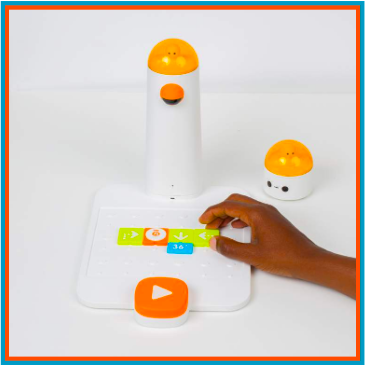
Say, “The Matatalab Coding Set is based upon arranged coding blocks placed on the control board and read by the command tower. The command tower takes a picture of the arrangement of coding blocks and through Bluetooth communication sends a picture of instructions to the MatataBot. The command tower sends the instructions and the robot receives the instructions. This allows the robot to perform the movements that were instructed by the arrangement of blocks on the control board.”

Say, “What does it mean to send? What does it mean to receive?”

  • Allow students to discuss the difference between sending and receiving.

Command Tower = Sends

Robot = Receives

Guided Practice

Activity

Hand out Challenge Booklet 1 for students to use, similarly to A1.

Ask students to open the Matatalab nature map. Ask students to open their Challenge Booklet 1.

Name (or have students name) the various ecosystems on the nature map. Point out the start and end symbols and have students locate these symbols on the map in Challenge Booklet 1. Have students place MatataBot on the Forest square with eyes pointing towards the Volcano square.

Ask students how many steps MatataBot needs to take to move to the Volcano. (1 step) Have students place one direction arrow block on the Control Board. Point out to students the line on the bottom of the direction blocks. Tell students that the block needs to be placed on the Control Board with the line on the bottom. Students can check coding by looking on the next page in the booklet.

Tell students to push the large white arrow on the Control Board. There may be a pause of a few seconds, but the MatataBot eyes will turn green and the robot will move forward one block to the Volcano. (Students remove coding block from Control Board.)

Ask students to look at the next page in their booklet. Explain that the robot will complete a turn. Ask students to find a turn block which they think will allow MatataBot to make a right turn. Students will place the block on the Control Board, press the large white arrow and observe how MatataBot turns. Did it work? Do students need to try a different block?

Independent Practice

Mazes

Say, “Mazes are paths through which you try your best to move successfully. Mazes have a start or beginning, a path that includes a set of movements and directional changes, and they have endpoints or finishing points. This lesson will allow students to work through a maze and to re-complete or look at challenges in Matatalab Challenge Booklets 2 and 3.”

Distribute one PDF paper copy of the maze per student. Maze in Resources below.

Instruct students to begin at start, and without lifting a pencil or erasing mistakes draw a path to end of the maze.

Ask students to share their success or challenges. Do they see where they had to go backward, turn in a different direction, rethink their movement?

Project teacher copy of maze and point out correct solution, reinforcing movement directions (right, left, forward)

Activity

Distribute 1 Matatalab Coding Set and Challenge Booklet 2 to each student group.

Point out each of the new blocks: parameter, loop, function and music blocks.

Ask students to open the Matatalab Nature map.

Challenge Booklet 2:

Ask students to open their Challenge Booklet 2 to Stage 2-1. Have students place MatataBot on the Forest square with eyes pointing towards the Lake square. Point out the symbols at the top right page.

Ask students how they might program MatataBot to move to the Lake, but point out that the robot needs to go around the obstacle. Students can check coding by looking on the next page in the booklet.

Students work together to code a path and test their coding, debugging code if needed.

Before students begin Stage 2-2 introduce the use of a parameter. Placing a number under a direction block indicates that this movement will be repeated a certain number of times. In Stage 2-2, the parameter 2 means that the robot will move two steps forward when it reads this direction block. Explain to students that this is a way to use fewer tiles but get the same results.

At this point students should be allowed to work collaboratively in their groups and continue with activities in Challenge Booklet 2 or look over the work already completed. Teacher circulates to encourage and help students with coding as needed.

Ask students to open their Challenge Booklet 3 to Stage 3-1. Have students place MatataBot on the Home square with the eyes pointing towards the school. Have students place a flag at the ending location for this challenge. Ask students to arrange the obstacles according to the diagram.

  • Challenge Booklet 3:

Explain that the distance the MatataBot needs to travel is much further and there aren’t enough coding blocks to accomplish this. Introduce the Loop blocks. Loop blocks are used along with Parameter blocks to have a sequence repeated. Point out the difference between the opening and closing loop blocks. Students may find this concept difficult to understand. The teacher may choose to help students create the correct code for this challenge. Students should test the code and then discuss how the loop blocks created the correct path for MatataBot to successfully travel to the bakery

Allow students to collaborate in their groups and complete Stage 3-2. Teacher circulates to encourage and help students with coding as needed.

Ask students to look at Stage 3-3 and set up their board to match the picture. Ask students to explain where the ending point is located. (Students will likely state that the ending point is in the corner of the mat.) Point out the letters and numbers along the sides of the mat. Ask students to identify the ending point or ordered pair using a letter and number. (F,1) At this point students do not need a more in depth explanation to a coordinate plane.

Explain to students that another way to use few coding blocks is to create a function. This involves two steps. First, a function block is placed on the Control Board, followed by a coding sequence.

Second, another line of code is placed on the Control Board. This code incorporates a function block which will recognize and execute the first line coding sequence. The second line can also include other coding. The Command Tower takes a picture of both lines of code. MatataBot will execute the function code by reading only the Function block and any other code added to the second line. As with Loop blocks, Function blocks can be incorporated in coding to simplify the coding and use fewer coding blocks.

Students may find this concept difficult to understand. The teacher may choose to help students create the correct code for this challenge. Students should test the code and then discuss how the Function blocks created the correct path for MatataBot to successfully travel to its ending point, (F,1).

At this point, students should be allowed to work collaboratively in their groups and continue with activities in Challenge Booklet 3. Teacher circulates to encourage and help students with coding as needed.

Wrap Up

Follow-Up Questions/Discussion

Say, "We have investigated the use of Matatalab directional movement blocks. We have learned about the way in which Bluetooth communication allows the Matatalab command tower, in conjunction with the control board and coding blocks, to send messages to the robot in order to effect movement and direction on a map.”

Have students answer the following questions:

  • What role do the labels on the Matatalab coding blocks play?

  • How important is bluetooth technology to the Matatalab Coding Set?

  • What did you learn from your directional movement cards activity?

  • How would you change the way in which you worked with the directional movement cards?

  • How successful was your group in completing challenges in Challenge Booklet 1?

  • What is meant by sending?

  • What is meant by receiving?

Once students have been given a chance to answer these questions, students will use their journals to draw pictures of their directional activity, the arrangement of coding blocks on the Matatalab control board, and write about their experiences with their activities.

After the second activity:

Say, “Today we have worked with mazes. We also used the Matatalab coding blocks and helped MatataBot move around the Nature map.”

Have students answer the following questions:

  • How is a maze like the Nature map?

  • What are the similarities between a maze and a map?

  • How successful were you in making your robot follow your program according to the way you arranged the coding blocks on the control board?

  • How successful were your in completing Challenge Booklets 2 and 3?

Once students have been given a chance to answer and discuss these questions, ask students to draw or write about their experiences with the maps and the coding blocks in their journals.

Downloadable Material

Worksheets and Printouts

Educational Standards

ISTE

ISTE

1c: Students use technology to seek feedback that informs and improves their practice and to demonstrate their learning in a variety of ways

1d: Students understand the fundamental concepts of technology operations, demonstrate the ability to choose, use and troubleshoot current technologies and are able to transfer their knowledge to explore emerging technologies

3d: Students build knowledge by actively exploring real-world issues and problems, developing ideas and theories and pursuing answers and solutions

6c: Students communicate complex ideas clearly and effectively by creating or using variety of digital objects such as visualizations, models or simulations

7a: Students use digital tools to connect with learners from a variety of backgrounds and cultures, engaging with them in ways that broaden mutual understanding and learning

7c: Students contribute constructively to project teams, assuming various roles and responsibilities to work effectively toward a common goal

CSTA

CSTA

1A-CS-01 K-2 - Select and operate appropriate software to perform a variety of tasks, and recognize that users have different needs and preferences for the technology they use.

1A-AP-14 K-2 - Debug (identify and fix) errors in an algorithm or program that includes sequences and simple loops.

1A-AP-15 K-2 - Using correct terminology, describe steps taken and choices made during the iterative process of program development.

NGSS

NGSS

K-2-ETS1-1: Ask questions, make observations, and gather information about a situation people want to change to define a simple problem that can be solved through the development of a new or improved object or tool.

K-2-ETS1-2: Develop a simple sketch, drawing, or physical model to illustrate how the shape of an object helps it function as needed to solve a given problem.

K-2-ETS1-3: Analyze data from tests of two objects designed to solve the same problem to compare the strengths and weaknesses of how each performs.

Ontario - Grade 1 - Mathematics

Grade 1

Mathematics

Algebra (Coding)

C3.1 solve problems and create computational representations of mathematical situations by writing and executing code, including code that involves sequential events

C3.2 read and alter existing code, including code that involves sequential events, and describe how changes to the code affect the outcomes

British Columbia - K - Grade 1 - ADST

Kindergarten - Grade 1

ADST

Generate ideas from their experiences and interests

Add to others’ ideas

Use trial and error to make changes, solve problems, or incorporate new ideas from self or others

Use materials, tools, and technologies in a safe manner in both physical and digital environments

Develop their skills and add new ones through play and collaborative work 

Explore the use of simple, available tools and technologies to extend their capabilities 

Alberta - K - Grade 1 - ICT

Kindergarten - Grade 1

ICT

C5: Students will use technology to aid collaboration during inquiry.

C6: Students will use technology to investigate and/or solve problems.

F6: Students will demonstrate a basic understanding of the operating skills required in a variety of technologies.

P1: Students will compose, revise and edit text

Nova Scotia - Grade P-3 - ICT & Mathematics

Grade 1

ICT

Outcome 5: Students will be expected to, with teacher assistance, use grade-appropriate digital tools to explore ideas, create original works, and represent their learning, both individually and collaboratively.

Outcome 9: Students will be expected to, with teacher assistance,

- use grade-appropriate ICT terminology 

- follow verbal instructions and visual reminders to begin safely operating computers and grade-appropriate digital devices

Grade Primary

Mathematics

N01: Students will be expected to say the number sequence by 

• 1s, from 1 to 20 

• 1s, starting anywhere from 1 to 10 and from 10 to 1 

Performance Indicators: 

N01.01 Recite the number sequence from 1 to 20 and from 10 to 1. 

N01.02 Name the number that comes after a given number, 1 to 9. 

N01.03 Name the number that comes before a given number, 2 to 10. 

N01.04 Recite number names from a given number to a stated number (forward 1 to 10, backward 10 to 1) using visual aids. 

N02: Students will be expected to recognize, at a glance, and name the quantity represented by familiar arrangements of one to five objects or dots. 

Performance Indicators: 

N02.01 Look briefly at a given familiar arrangement of one to five objects or dots and identify the number represented without counting. 

N02.02 Identify the number represented by a given dot arrangement on a five-frame. 

N03: Students will be expected to relate a numeral, 1 to 10, to its respective quantity. 

Performance Indicators: 

N03.01 Name the number for a given set of objects. 

N03.02 Match numerals with their given pictorial representations. 

N03.03 Hold up the appropriate number of fingers for a given numeral. 

N03.04 Construct a set of objects corresponding to a given numeral. 

N03.05 Record the numeral that represents the quantity of a given set of objects. 

N06: Students will be expected to demonstrate an understanding of counting to 10. 

Performance Indicators: 

N06.01 Answer the question, How many are in the set? using the last number counted in a set. 

N06.02 In a fixed arrangement, starting in different locations, show that the count of the number of objects in a set does not change. 

N06.03 Count the number of objects in a given set, rearrange the objects, predict the new count, and recount to verify the prediction. 

PR01: Students will be expected to demonstrate an understanding of repeating patterns (two or three elements) by identifying, reproducing, extending, and creating patterns using manipulatives, sounds, and actions. 

Performance Indicators: 

PR01.01 Distinguish between repeating patterns and non-repeating sequences in a given set by identifying the part that repeats. 

PR01.02 Reproduce a given repeating pattern and describe the pattern. 

PR01.03 Extend a variety of given repeating patterns to two more repetitions. 

PR01.04 Create a repeating pattern using manipulatives, musical instruments, or actions, and describe the pattern. 

PR01.05 Identify and describe a repeating pattern containing two or three elements in its core in the classroom, the school, and outdoors. 

Grade 1

Mathematics

N01: Students will be expected to say the number sequence by: 

▪ 1s, forward and backward between any two given numbers, 0 to 100 

▪ 2s to 20, forward starting at 0 

▪ 5s to 100, forward starting at 0, using a hundred chart or a number line 

▪ 10s to 100, forward starting at 0, using a hundred chart or a number line 

Performance Indicators: 

N01.01 Recite forward by 1s the number sequence between two given numbers, 0 to 100. 

N01.02 Recite backward by 1s the number sequence between two given numbers, 0 to 100. 

N01.03 Record a given numeral, 0 to 100, presented orally. 

N01.04 Read a given presented numeral, 0 to 100. 

N01.05 Skip count by 2s to 20 starting at 0. 

N01.06 Skip count by 5s to 100 starting at 0, using a hundred chart or a number line. 

N01.07 Skip count forward by 10s to 100 starting at 0, using a hundred chart or a number line. 

N01.08 Identify and correct errors and omissions in a given number sequence 

N02: Students will be expected to recognize, at a glance, and name the quantity represented by familiar arrangements of one to ten objects or dots. 

Performance Indicators: 

N02.01 Look briefly at a given familiar arrangement of objects or dots and identify the number represented without counting. 

N02.02 Identify the number represented by a given arrangement of counters or dots on a ten-frame. 

N03: Students will be expected to demonstrate an understanding of counting to 20 by 

▪ indicating that the last number said identifies “how many” 

▪ showing that any set has only one count 

▪ using the counting-on strategy 

Performance Indicators: 

N03.01 Answer the question, How many are in the set? using the last number counted in a given set. 

N03.02 Identify and correct counting errors in a given counting sequence. 

N03.03 Show that the count of the number of objects in a given set does not change regardless of the order in which the objects are counted. 

N03.04 Record the number of objects in a set using the numeral symbol. 

N03.05 Determine the total number of objects in a given set, starting from a known quantity and counting on. 

PR01: Students will be expected to demonstrate an understanding of repeating patterns (two to four elements) by identifying, describing, reproducing, extending, and creating patterns using manipulatives, diagrams, sounds, and actions. 

Performance Indicators: 

PR01.01 Describe a given repeating pattern containing two to four elements in its core. 

PR01.02 Identify errors in a given repeating pattern. 

PR01.03 Identify the missing element(s) in a given repeating pattern. 

PR01.04 Create and describe a repeating pattern using a variety of manipulatives, musical instruments, and actions. 

PR01.05 Reproduce and extend a given repeating pattern using manipulatives, diagrams, sounds, and actions. 

PR01.06 Identify and describe a repeating pattern in the environment (e.g., classroom, outdoors) using everyday language. 

PR.01.08 Identify the core of a repeating pattern 

Grade 2

Mathematics

N01: Students will be expected to say the number sequence by 

▪ 1s, forward and backward, starting from any point to 200 

▪ 2s, forward and backward, starting from any point to 100 

▪ 5s and 10s, forward and backward, using starting points that are multiples of 5 and 10 respectively to 100 

▪ 10s, starting from any point, to 100 

Performance Indicators: 

N01.01 Extend counting sequence (by 1s), forward and backward. 

N01.02 Extend a given skip counting sequence (by 2s, 5s, or 10s) forward and backward. 

N01.03 Skip count by 10s, given any number as a starting point. 

N01.04 Identify and correct errors and omissions in a given skip counting sequence. 

N01.05 Count a given sum of money with pennies, nickels, or dimes (to 100¢). 

N01.06 Count quantity using groups of 2s, 5s, or 10s and counting on. 

N02: Students will be expected to demonstrate if a number (up to 100) is even or odd. 

Performance Indicators: 

N02.01 Use concrete materials or pictorial representations to determine if a given number is even or odd. 

N02.02 Identify even and odd numbers in a given sequence, such as on a hundred chart. 

PR01: Students will be expected to demonstrate an understanding of repeating patterns (three to five elements) by describing, extending, comparing, and creating patterns using manipulatives, diagrams, sounds, and actions. 

Performance Indicators: 

PR01.01 Identify the core of a given repeating pattern. 

PR01.02 Describe and extend a given double attribute pattern. 

PR01.03 Create a repeating non-numerical pattern and explain the rule. 

PR01.04 Predict an element of a given repeating pattern using a variety of strategies and extend the pattern up to the tenth element to verify the prediction. 

PR01.05 Translate a repeating pattern from one mode to another. 

PR01.06 Compare two given repeating patterns, and describe how they are alike/different. 

Grade 3

Mathematics

N01: Students will be expected to say the number sequence forward and backward by: 

▪ 1s through transitions to 1000 

▪ 2s, 5s, 10s, or 100s, using any starting point to 1000 

▪ 3s, using starting points that are multiples of 3 up to 100 

▪ 4s, using starting points that are multiples of 4 up to 100 

▪ 25s, using starting points that are multiples of 25 up to 200. 

Performance Indicators: 

N01.01 Extend the number sequence by 1s, particularly through transition from decade to decade and century to century. 

N01.02 Extend a given skip counting sequence by 2s, 5s, 10s, or 100s, forward and backward, using a given starting point. 

N01.03 Extend a given skip counting sequence by 3s, forward and backward, starting at a given multiple of 3 up to 100. 

N01.04 Extend a given skip counting sequence by 4s, forward and backward, starting at a given multiple of 4 up to 100. 

N01.05 Extend a given skip counting sequence by 25s, forward and backward, starting at a given multiple of 25 up to 200. 

N01.06 Identify and correct errors and omissions in a given skip counting sequence. 

N01.07 Determine the value of a given set of coins (nickels, dimes, quarters, and loonies) by using skip counting. 

N01.08 Identify and explain the skip counting pattern for a given number sequence. 

PR01: Students will be expected to demonstrate an understanding of increasing patterns by describing, extending, comparing, and creating numerical (numbers to 1000) patterns and non-numerical patterns using manipulatives, diagrams, sounds, and actions. 

Performance Indicators: 

PR01.01 Identify and describe increasing patterns. 

PR01.02 Describe a given increasing pattern by stating a pattern rule that includes the starting point and a description of how the pattern continues. 

PR01.03 Extend a pattern, using the pattern rule, for the next three terms. 

PR01.04 Compare numeric patterns. 

PR01.05 Identify and explain errors in a given increasing pattern. 

PR01.06 Create a concrete, pictorial, or symbolic representation of an increasing pattern for a given pattern rule. 

PR01.07 Create a concrete, pictorial, or symbolic increasing pattern and describe the pattern rule. 

PR01.08 Solve a given problem using increasing patterns. 

PR01.09 Identify and describe the strategy used to determine a missing term in a given increasing pattern. 

PR01.10 Use ordinal numbers (to 100th) to refer to or to predict terms within an increasing pattern.