
Loading…
Loading…
In this lesson, students will work in small groups, using Dash to solve a problem at home. Students will use the Design Thinking Process to identify a problem and possible solution(s). Then they will plan an attachment for Dash, along with an algorithm.
In this lesson, students will work in small groups, using Dash to solve a problem at home. Students will use the Design Thinking Process to identify a problem and possible solution(s). Then they will plan an attachment for Dash, along with an algorithm.
Fully charge the tablets and robots.
Install the Wonder Workshop Blockly app on each tablet.
Prepare to model the activity with a large sheet of bulletin board paper and markers.
It is recommended that students complete:
Level A-B: All previous lessons
[Optional] Level A-B Challenge Cards: All
You can purchase our Learn to Code Challenge Card sets and Curriculum Guide here: https://store.makewonder.com/#/education
Fully charge the tablets and robots.
Install the Wonder Workshop Blockly app on each tablet.
Prepare to model the activity with a large sheet of bulletin board paper and markers.
Have students review and discuss this lesson’s coding concepts in groups. Each group should share a tablet.
Discuss how we program a set of instructions for Dash/Dot to follow in the order we want them to happen.
Remind students that loops is a coding term for repeating a bit of code more than once. Elicit real-world examples of repeated instructions/patterns, such as a dance or brushing your teeth.
Have students briefly review the differences between the Repeat and Repeat Forever blocks. (E.g., “The Repeatblock lets you repeat steps for a specific number of times.”)
Remind students how a Wait For block puts a hold on the program until a programmed event occurs.
Have students point out the different events in the Wait For block: Button 1, Button 2, Button 3, Obstacle on Left, Obstacle on Right, Object Behind, Hear Clap, Hear Voice, Picked Up, Stuck, See Dot.
Remind students how they can change the distance and speed that Dash can move forward.
Say, “Programming specific parameters helps us be more specific and accurate with our programming. What other parameters can we change in Blockly? The number of times we repeat our code? The types of sounds?"
Have students identify other parameters that can be modified.
Say, “Today, you will work in groups to design an accessory for Dash to help solve a problem in your house."
[Optional: Steps 2–4] Say, “Before we get started, let’s read a story about a little boy who designed robots, like Dash, to make life easier around his house. While I’m reading, decide which one of these robots would improve life in your home.”
Read aloud If I Built a House with the class.
Discuss the types of inventions the boy designed to improve his home. Then ask:
Which ones did the students like best? Why?
What types of problems did each invention solve?
How does the robot improve life around the house for his family? (Sample response: “The robot saves time, is more accurate, finds the best recipes, allows Mom or Dad to rest or play with their children.”)
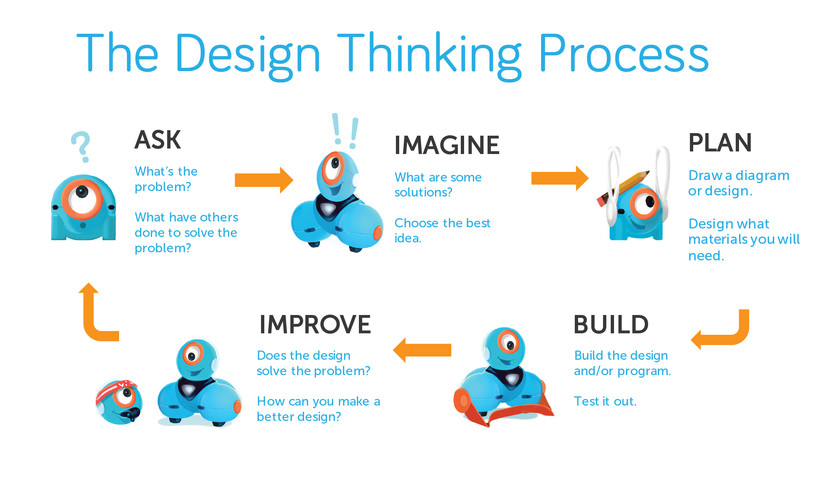
Use the K-1 Design Thinking Presentation to introduce the Design Thinking Process to the class.
Highlight how inventors and engineers design things to improve our world.
Encourage students to brainstorm inventions that they use every day. (Sample response: “I use a car to get to school. I call my grandparents with a phone.”)
Discuss how inventors and engineers use a special way of thinking when they design called Design Thinking. Then walk through each step of the process outlined in the K–1 Design Thinking Presentation.
Encourage students to discuss how they think robots can solve problems. (Sample response: “They can help clean your house or drive a car.”)
If a robot completes a task faster than a human, what problem could this solve for a family? (Sample response: “The family might have more free time to spend together.”)
What if the robot was faster but did not perform the task well? For example, what if the robot dropped dishes while washing or drying them?
How could Dash improve life around your home?
Who could Dash make life easier for you around your home? How?
Say, “Today we will all ‘think’ like designers as we work together using the Design Thinking Process. Inventors and engineers Ask, Imagine, Plan, and Build. That’s what we are going to do today.”
ASK: Explain: “Every invention begins with a question. I am going to ask you a question. What types of problems do you have at home?”
Get them started by suggesting a few ideas. (Examples: “I hate making the bed.” “I have no time for vacuuming.” “Everyone forgets to feed our poor pet goldfish.” “My soup is always too hot!”)
IMAGINE: Have students select a particular problem based on a popular vote. Ask them, “Can you imagine a solution to our hot soup problem using Dash and an accessory that you design?”
Have students brainstorm possible accessory ideas. Record a list of all of their ideas. Discuss the importance of having a good imagination in design.
Say, “Designers work in a group to share their ideas. They take turns talking and listening to each other. The more ideas, the better!” Model this by selecting the best of their ideas and discussing how they can be combined into one accessory. (Example: For a “Soup Cooler” accessory: a Dollar Store fan combined with a plastic spoon and outdoor thermometer.)
PLAN: In this stage, you are sharing how designers must come up with a plan before going any further.
On a large sheet of white bulletin board paper, draw 3 large circles to represent Dash.
Then have students help you draw the “Soup Cooler” accessory that was discussed. Consider students’ feedback and ideas for improvements.
Have students take turns coming up to add improvements using different-colored markers.
Have students explain how their addition improves the accessory.
Ask them if there are any limitations to their design.
BUILD & PROGRAM: Place a bowl of soup on a table. Ask, “What will happen if Dash blows on my soup in just one spot?”
Ask, “Can you help me program a set of instructions for Dash to move around my bowl and blow on all parts of my soup?”
Although students will not be programming in this lesson, it’s still important to have this conversation. Discuss how Dash could be programmed similarly to the path taken in Challenge Card 2.5: Forward ___, Turn 90°, Turn 90°, Turn 90°.
“Could we program Dash to make a sound if the soup is too hot? Example: Transport: Fire Siren. “Could we include an animation if the soup is just right?” Example: Dash Dance. “Could we program lights for Dash?” Example: Red [Soup too hot], Green [Soup too cold], Yellow [Soup just right!].
Discuss the following blocks and parameters and how they could be used in a “Soup Cooler” program: Repeat Forever, Repeat X times, Wait for __, Wait for __ seconds.
Why is it important to ask questions before we design a new attachment for Dash? (Sample response: “Asking questions helps us define the problem we want to solve.”)
Why is it important to use your imagination when you are trying to solve problems?
What is the problem that we tried to solve? (Sample response: "Cooling the hot soup.")
What were some of the parts we designed for our accessory? (Sample: "Thermometer, fan, spoon.")
How does a group work together successfully? (Sample response: Taking turns talking, listening, compromising.")
What problems did we run into during the design process? How did we fix them?
Have students repeat the same Design Process in small groups.
ASK: Students work with their group to choose a problem from the class’ brainstormed list.
Say, “I am going to ask you a question. Which problem on our list do you feel is most important and why?”
Have students discuss with group members. Stress how designers must work together to listen and agree.
IMAGINE: Prompt students to imagine an accessory that their group could design to solve their group’s selected problem.
Say, “Close your eyes. Can you imagine an accessory that you can design for Dash to solve your group’s problem?”
Prompt students to work together to pick the best design.“Now discuss your ideas with your group members. Plan how you can combine your best ideas together into one accessory. That’s what great designers do!”
PLAN: Give each group member a different-colored marker and the first page of the Dash and Dot Design Challenge. Instruct students to take turns planning and designing a part of Dash’s accessory.
After each contribution, the student must stop and explain to his or her group what has been added and how it improves their accessory.
Have students share their drawing with the class, allowing each member to explain and answer questions. You will be able to identify each student’s contribution by the marker color.
BUILD & PROGRAM: What instructions/algorithm will Dash need to follow while using their accessory? (e.g., back and forth, in circles, left and right, etc.)
Allow students to move Dash by hand rather than programming to demonstrate their ideas. What sounds, lights, and animations could you use?
Have students chart an algorithm to go along with their accessory on a large sheet of construction paper. Using blocks, students should chart commands from top to bottom. Select criteria for their program based on the ability and needs of the students. They may include: Drive, Sound, Animation, Repeat, Repeat Forever, and/or Wait For blocks.
Have students share in a “Show and Tell” type format, explaining:
the problem they selected.
how their accessory solves the problem.
the algorithm they planned for Dash.
What did you like best about the Design Thinking Process?
What do you think is the hardest part of the Design Thinking Process?
Is there anything you’d like to change about your accessory? Why?
How could you improve your accessory?
Do you think your group could actually build your accessory? How? Would you like to try?
Use our Evaluation Rubric to review students' work and presentations.
[Optional] Share your students' work with the world using @logicsacademy and #dashanddot!
Chunk this design lesson into individual steps. Call students back to whole-group at the end of each step to explain the next step before moving on.
Create heterogeneous groupings based on ability levels to help those who struggle.
Create homogenous groupings of intellectual peers for enrichment.
Check in with groups as you circle the room. Ask guided questions such as:
Which problem did your group select? Why?
How are you going to solve the problem?
What are some things you should do when working together? (e.g., listening, taking turns)
How did each of you contribute to your design?
While some students are challenged by the basic requirements of this lesson, challenge students who have demonstrated mastery by having them add more to their design. This may include:
Building their accessory using classroom materials.
Using the Blockly app to program a demo of their accessory with Dash.
For struggling students, have them use the Path app to program Dash.
Have one student become the programmer and read his or her algorithm aloud. Have a second student “become” Dash, following each instruction. Instruct a third student to observe what works and does not work in their program for Dash.
Students create a picture gallery around the room of their Dash Accessory Designs. Have students take a walk around the room to admire each other’s designs.
Have students build a model of their design using recycled elements.
Students work together to program their sequenced algorithm in Blockly.
Students keep a journal at home, drawing pictures of problems that Dash can solve around the house.
1A-AP-08: Model daily processes by creating and following algorithms (sets of step-by-step instructions) to complete tasks.
1A-AP-11: Decompose (break down) the steps needed to solve a problem into a precise sequence of instructions.
1A-AP-13: Give attribution when using the ideas and creations of others while developing programs.
1A-AP-15: Using correct terminology, describe steps taken and choices made during the iterative process of program development.
1A-IC-16: Compare how computing technology has changed the way people live and work.
1A-IC-17: Work respectfully and responsibly with others online.
3D: Build knowledge by actively exploring real-world issues and problems, developing ideas and theories and pursuing answers and solutions. Innovative Designer
4D: Exhibit a tolerance for ambiguity, perseverance and the capacity to work with open-ended problems.
5C: Break problems into component parts, extract key information, and develop descriptive models to understand complex systems or facilitate problem-solving.
6C: Communicate complex ideas clearly and effectively by creating or using a variety of digital objects such as visualizations, models or simulations.
6D: Students publish or present content that customizes the message and medium for their intended audiences.
7A: Use collaborative technologies to work with others, including peers, experts or community members, to examine issues and problems from multiple viewpoints.
7C: Contribute constructively to project teams, assuming various roles and responsibilties to work effectively toward a common goal.
K-2-ETS1-1. Ask questions, make observations, and gather information about a situation people want to change to define a simple problem that can be solved through the development of a new or improved object or tool.
K-2-ETS1-2. Develop a simple sketch, drawing, or physical model to illustrate how the shape of an object helps it function as needed to solve a given problem.
K-2-ETS1-3. Analyze data from tests of two objects designed to solve the same problem to compare the strengths and weaknesses of how each performs.
CCSS.ELA-LITERACY.SL.K.2 Confirm understanding of a text read aloud or information presented orally or through other media by asking and answering questions about key details and requesting clarification if something is not understood.
CCSS.ELA-LITERACY.SL.K.3 Ask and answer questions in order to seek help, get information, or clarify something that is not understood
CCSS.ELA-LITERACY.SL.K.5 - Add drawings or other visual displays to descriptions as desired to provide additional detail.
C5: Students will use technology to aid collaboration during inquiry.
C6: Students will use technology to investigate and/or solve problems.
F6: Students will demonstrate a basic understanding of the operating skills required in a variety of technologies.
C3.1 solve problems and create computational representations of mathematical situations by writing and executing code, including code that involves sequential events
C3.2 read and alter existing code, including code that involves sequential events, and describe how changes to the code affect the outcomes
Outcome 5: Students will be expected to, with teacher assistance, use grade-appropriate digital tools to explore ideas, create original works, and represent their learning, both individually and collaboratively.
Outcome 9: Students will be expected to, with teacher assistance,
use grade-appropriate ICT terminology
follow verbal instructions and visual reminders to begin safely operating computers and grade-appropriate digital devices
• Use trial and error to make changes, solve problems, or incorporate new ideas from self or others
• Develop their skills and add new ones through play and collaborative work