
Loading…
Loading…
Students will explore adding more complexity to their codes by programming Dash to look in a variety of directions and turn. They will use Blockly preset programs and Challenge Cards to practice their new skills.
Students will explore adding more complexity to their codes by programming Dash to look in a variety of directions and turn. They will use Blockly preset programs and Challenge Cards to practice their new skills.
experiment with more complex programming by changing the direction that Dash looks and turns
use complex parameters to revise code and complete coding challenges in an iterative process
It is recommended that students complete:
Levels A-B Lessons: All
[Optional] Level A-B Challenge Cards: All
You can purchase our Learn to Code Challenge Card sets and Curriculum Guide here: https://store.makewonder.com/#/education
Fully charge the tablets and robots.
Install the Wonder Workshop Blockly app on each tablet.
Briefly review how students used the Wait For block during the previous lesson by asking:
“What does the Wait For block do?” (Sample response: “The Wait For block makes Dot or Dash wait for a specific event or cue in order to continue the sequence of code.”)
Say, “In the Cookie Jar Trap program, Dot acted like an alarm. How did the Wait For block help Dot act like an alarm?”
Sample response: “If you hid Dot inside a cookie jar, when someone reached in to grab a cookie, they would grab Dot instead. When Dot was moved, the Wait For block was triggered and the alarm sequence began.”
Project your tablet screen, open the Blockly app, and go to the menu at the top left of the screen.
Go to the Create New Project menu and choose “blank project.”
Say, “We can program Dash to do many complex behaviors. In this lesson, we will learn how to add more complexity to our coding sequences.”
Tap on the Look menu.
Ask the students to tell you what they see. (Sample response: “I see Look Up, Look Left, and Look Towards Voice blocks.”)
Explain that those blocks make Dash turn in the direction indicated.
Tap on the Drive menu and choose Turn Left.
Ask the students to tell you what they see. (Sample response: “I see a circle with one quarter colored yellow and the number 90 at the top.”)
Explain that you can control the degree to which Dash turns left by adjusting the pointer on the circle.
Say, “In Blockly, we call these types of code complex parameters. 'Complex' means 'complicated,' and 'parameters' is another word for 'measurements.' We are going to use complex parameters to revise code today.”
What are parameters? (Sample response: “Parameters are measurements.”)
What are some of the things we can do by setting parameters in our code? (Sample response: “We can tell Dash to look in different directions and turn at different angles.”)
Why are complex parameters important? (Sample response: “Using complex parameters gives us more options when writing code and telling stories with code.”)
In the Blockly app, select the Nuh Uh preset program. Then tap “create.”
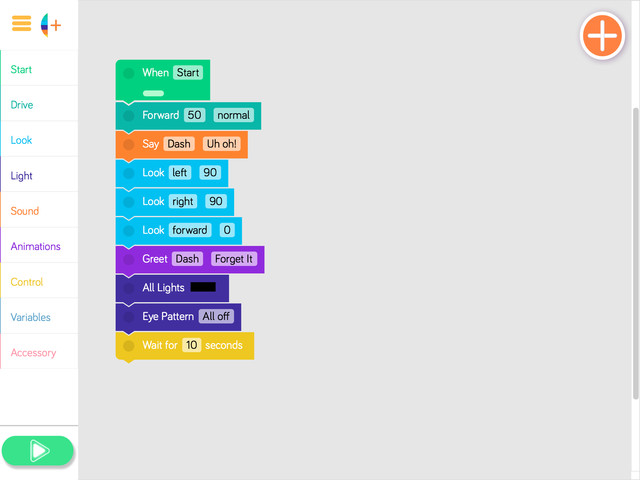
Play the program and have students share what they notice. Then say, “We are going to add some complex parametersto this program.”
Tap on the first Look Left block.
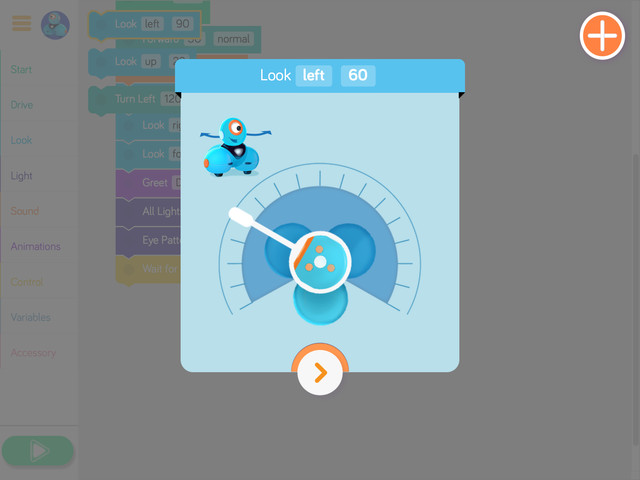
Show students how the image of Dash’s head on the screen indicates the direction Dash’s head will turn.
Tap on the Look Up block.
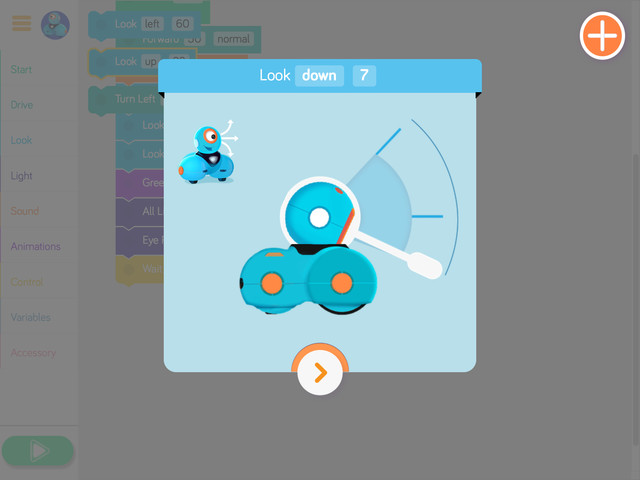
Show students how the image of Dash’s head on the screen indicates how far up or down Dash will look.
Say, “Now that you know about these two complex parameters, we’re going to learn about how to turn Dash in any direction we choose.” Go to the Drive menu and tap on Turn Left.
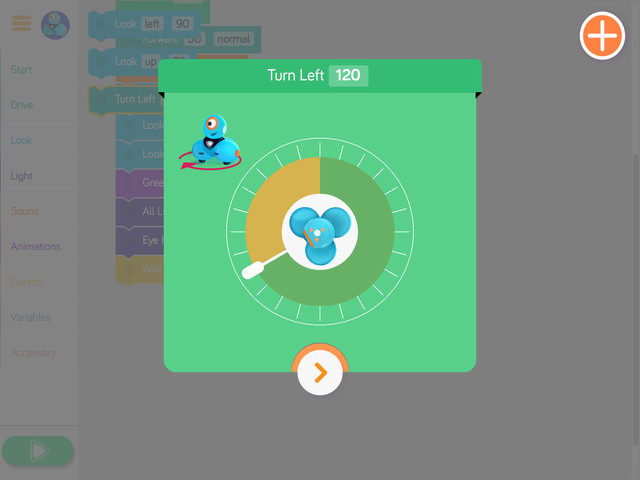
Say, “Notice how there is a circle surrounding the image of Dash with a pointer. We can move that pointer to face the specific direction we want Dash to turn.”
Say, “The program Nu Uh does not use a turn block. Where do you think we should add a turn block? In which direction and to what degree should we have Dash turn?”
Run the program with a turn block in one or two different places so the students can see what it does.
Give an example of a complex parameter in the Blockly app. (Sample response: “Turning Dash’s head.”)
Why are complex parameters important? (Sample response: “Complex parameters keep our code interesting and give us more coding options.”)
Have students work on the following activities in small groups (ideally 2-3 students per robot).
Encourage students to share tablet and robot time. Have them establish and rotate through roles such as:
Lead Programmer: Holds the tablet and manipulates the code.
Robot Wrangler: Retrieves and resets the robot after every program attempt.
Documentarian: Records group results, thoughts, and progress. Illustrates group designs and ideas.
When students work together while coding, they're able to help each other identify mistakes and develop creative solutions!
Have students use the Wonder Journal: Dash Planning and/or General Planning worksheets to design ways to add to or alter the Square Dance preset program. They can:
Change the sequence by adding light, sound, and/or drive blocks.
Add/change complex parameters.
After they finish revising the program, have students:
Complete a Wonder Journal: Reflection worksheet.
Take a screenshot of their Blockly code.
Take a video of Dash while the code is running.
You can purchase our Learn to Code Challenge Card sets and Curriculum Guide here: https://logicsacademy.com/store/
Have students complete the following Challenge Cards:
C 1.1: No Homework!
C 1.2: Come Back!
C 1.3: Wait!
For each challenge, encourage students to:
Use the Wonder Journal: Dash Planning and/or General Planning worksheets to discuss how they can complete the challenge.
Review the Troubleshooting and Problem Solving & Debugging worksheets if they run into any problems with their code.
After they finish each challenge, have students:
Complete a Wonder Journal: Reflection worksheet.
Take a screenshot of their Blockly code.
Take a video of Dash while the code is running.
Update their Challenge Card Checklists.
Have student groups take turns sharing one of their programs with the class. Encourage them to:
Explain their design thinking. (e.g., “We wanted Dash to turn 165 degrees, so we added a Turn Left and set the pointer to 165.”)
Share any obstacles and difficulties they overcame during the activity (e.g., “At first it was a challenge to figure out how to change the direction Dash looked, but then we remembered to tap on the Look Up block”).
Encourage students to ask each other how they accomplished different objectives and give each other feedback on their programs. Possible questions/feedback includes:
“How did you (change the program)?”
“I like how you (added a Turn Right block).”
How did using complex parameters affect your program? (Sample response: “Using complex parameters made my program more interesting.”)
Give an example of how complex parameters are used in Blockly. (Sample response: “Complex parameters help us make Dash’s head turn or tilt. They also help Dash turn in a specific direction.”)
Use our Evaluation Rubric to review students' work and presentations.
[Optional] Share your students' work with the world using @logicsacademy and #dashanddot!
1A-AP-10: Develop programs with sequences and simple loops, to express ideas or address a problem.
1A-AP-11: Decompose (break down) the steps needed to solve a problem into a precise sequence of instructions.
1A-AP-12: Develop a plan that describes a program’s sequence of events, goals, and expected outcomes.
1A-AP-14: Debug (identify and fix) errors in an algorithm or program that includes sequences and simple loops.
1A-AP-15: Using correct terminology, describe steps taken and choices made during the iterative process of program development.
4d: Exhibit a tolerance for ambiguity, perseverance, and the capacity to work with open-ended problems.
5a: Formulate problem definitions suited for technology-assisted methods such as data analysis, abstract models and algorithmic thinking in exploring and finding solutions.
6b: Create original works or responsibly repurpose or remix digital resources into new creations.
7c: Contribute constructively to project teams, assuming various roles and responsibilities to work effectively toward a common goal.
3-5-ETS1-2: Generate and compare multiple solutions to a problem based on how well they meet the criteria and constraints of the design problem.
3-5-ETS1-3: Tests are often designed to identify failure points or difficulties, which suggest the elements of the design that need to be improved.
CCSS.ELA-LITERACY.W.2.8: Recall information from experiences or gather information from provided sources to answer a question.
CCSS.ELA-LITERACY.SL.1.1: Participate in collaborative conversations with diverse partners about grade 1 topics and texts with peers and adults in small and larger groups.
CCSS.ELA-LITERACY.SL.1.2: Ask and answer questions about key details in a text read aloud or information presented orally or through other media.
C5: Students will use technology to aid collaboration during inquiry.
C6: Students will use technology to investigate and/or solve problems.
F6: Students will demonstrate a basic understanding of the operating skills required in a variety of technologies.
C3.1 solve problems and create computational representations of mathematical situations by writing and executing code, including code that involves sequential and concurrent events
Outcome 5: Students will be expected to select and use, with teacher support, grade-appropriate digital tools to develop and represent learning for various purposes, both individually and collaboratively.
Outcome 9: Students will be expected to
use grade-appropriate ICT terminology
follow verbal instructions and visual reminders to safely operate computers and digital devices
• Use trial and error to make changes, solve problems, or incorporate new ideas from self or others
• Develop their skills and add new ones through play and collaborative work