
Loading…
Loading…
Students will learn the definition and function of event handlers. Students will use event handlers to “program” their classmates using Dot’s buttons.
Students will learn the definition and function of event handlers. Students will use event handlers to “program” their classmates using Dot’s buttons.
define an event handler
locate examples of how they use event handlers in their lives
use event handlers to “program” their classmates using Dot’s buttons
Before this lesson, we recommend that students complete:
Level A-B Lessons: All
Level C: Lesson 1
[Optional] Level A-B Challenge Cards: All
[Optional] Level C Challenge Cards: C 1.1-1.3
Ask, “What is an algorithm?”
Sample response: “An algorithm is a series of directions for a computer or robot to follow.”
Ask, “Why is it important that the sequences in the code you write be correct?”
Sample response: “Robots only follow the directions you give, so if your sequences are not in the right order, then the robot will not do what you want it to do.”
Ask, “Why do we use loops in our algorithms?”
Sample response: “Using loops in our algorithms helps us write code more quickly and easily.”
Ask, “What is an event?”
Sample response: “An event is an action that causes something to happen.”
Ask, “What kind of events can Dash and Dot sense?”
Sample response: “Dash and Dot can sense a button push, sounds, and movements.”
Watch the Code.org video about event handlers: https://studio.code.org/s/coursec-draft/stage/10/puzzle/1. Then ask:
“What are event handlers?” (Sample response: “Event handlers are things that the computer constantly looks for.”)
“Why are event handlers important?” (Sample response: “Event handlers allow us to control our program while it is running.”)
Say, “We just watched a video about Nat, who helped program the first Xbox.”
Ask, “Why did he use event handlers?” (Sample response: “Nat used event handlers to help make the video games he designed more interesting.”)
Ask, “How did Nat use event handlers in his video games?” (Sample response: “Nat used event handlers to make the players on the screen jump and walk forward.”)
Ask, “What is an example of an event handler in your life?”
Sample response: “When I hear my stomach growl, I eat a snack.”
Why are event handlers important?
When are event handlers used? (Sample response: “Event handlers are used throughout programs whenever we want something to happen at the press of a button or the push of a lever.”)
Would a video game be interesting to play without event handlers? Why or why not? (Sample response: “No, a video game would not be interesting to play without event handlers because we would have no way to interact with the game. Without event handlers, the game would simply be a sequence of events that we would have no control over.”)
Say, “Today, we are going to use Dot’s buttons to control a human robot.”
Select a student volunteer to be the “human robot.”
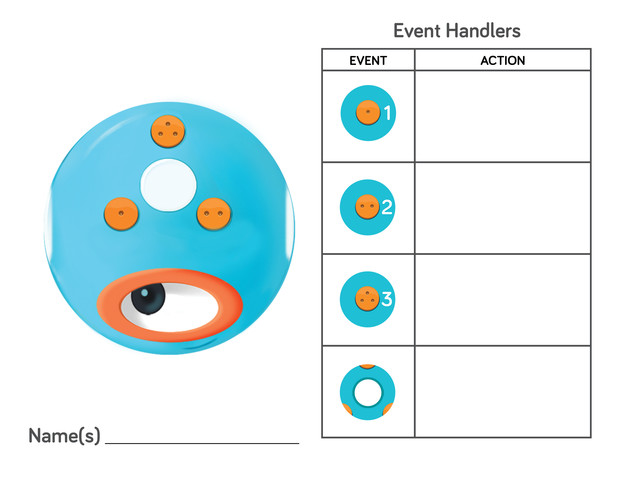
Show or project the Event Handlers Worksheet and say, “We are going to program the human robot with event handlers. The event handlers will tell the human robot to perform an action each time one of Dot’s buttons is pressed. The button press is an event and what the human robot does is an action.”
Ask the students to decide what action the human robot should do for each button press. Then model filling out the Event Handlers Worksheet with the class’s decisions.
For example: If Button 1 is pressed, the human robot will wave his or her hands. If Button 2 is pressed, the human robot will make an animal sound. If Button 3 is pressed, the human robot will spin around. If the Top Button is pressed, the human robot will sing a song.
Have students take turns pressing Dot’s buttons on the Event Handlers Worksheet.
After each button press, have the human robot perform the corresponding action.
(Optional) If you have a Dot robot, have students press the buttons on the actual robot.
Select different student volunteers to be the “human robot” and repeat the activity in the same manner.
Say, “Using Dot’s buttons as event handlers works very similarly to using a video game controller. Dot is the game controller, and the human robot is the character in the game. When you press one of Dot’s buttons, you create an event that causes the human robot to perform an action.”
In this activity, what were the events that happened? (Sample response: “Pressing the buttons.”)
What happened after each event? (Sample response: “The human robot performed a different action.”)
What kinds of event handlers did we make in the activity? (Sample response: “We had the human robot jump up and down when we pressed Button 1.”)
Arrange students into small groups and distribute an Event Handlers Worksheet to each group.
(Optional) If available, distribute a Dot robot to each group.
Have students design their own event handlers. Then have students take turns being the “human robot” and the button presser.
(Optional) If Dot robots are available, have groups press the actual buttons on Dot when trying out their event handlers.
If time permits, have student groups swap worksheets and try out each other’s event handlers.
Have students use the Wonder Journal: Reflection Worksheets to describe what happened during the activity.
(Optional) Have students use When and My sounds blocks in Blockly to program Dot to call out the assigned action when each button is pressed (e.g., “Spin around!”).
Have student groups take turns sharing their event handlers with the class. Encourage them to:
Explain their design thinking (e.g., “We wanted to make the human robot move a lot, so our event handlershad the robot move forward, turn right, and spin”).
Share any obstacles and difficulties they overcame during the activity (e.g., “Our human robot had problems seeing what buttons we were pressing, so we called out the button name before we pressed it”).
Encourage students to ask each other how they accomplished different objectives and give each other feedback on their event handlers. Possible questions/feedback includes:
“I like how you (had the human robot sing when the Top Button was pressed.)”
“What if you (had the human robot sing AND dance when the Top Button is pressed)?”
How could you have changed the event handlers to make the human robot perform a dance? (Sample response: “We could have the human robot wiggle when Button 1 is pressed and have the human robot spin when Button 2is pressed. ”)
When did you use an event handler in your real life today? (Sample response: “When the bell rang, I put my backpack in my locker.”)
Use our Evaluation Rubric to review students' work and presentations.
[Optional] Share your students' work with the world using @logicsacademy and #dashanddot!
1A-AP-08: Model daily processes by creating and following algorithms (sets of step-by-step instructions) to complete tasks.
1B-AP-16: Take on varying roles, with teacher guidance, when collaborating with peers during the design implementation and review stages of program development.
1A-AP-11: Decompose (break down) the steps needed to solve a problem into a precise sequence of instructions.
1A-AP-12: Develop a plan that describes a program’s sequence of events, goals, and expected outcomes.
1A-AP-14: Debug (identify and fix) errors in an algorithm or program that includes sequences and simple loops.
1A-AP-15: Using correct terminology, describe steps taken and choices made during the iterative process of program development.
4a: Students know and use a deliberate design process for generating ideas, testing theories, creating innovative artifacts or solving authentic problems.
4d: Students exhibit a tolerance for ambiguity, perseverance and the capacity to work with open-ended problems.
5d: Students understand how automation works and use algorithmic thinking to develop a sequence of steps to create and test automated solutions.
K-2-ETS1-1: Ask questions, make observations, and gather information about a situation people want to change to define a simple problem that can be solved through the development of a new or improved object or tool.
CCSS.ELA-LITERACY.W.2.8: Recall information from experiences or gather information from provided sources to answer a question.
CCSS.ELA-LITERACY.SL.3.4: Report on a topic or text, tell a story, or recount an experience with appropriate facts and relevant, descriptive details, speaking clearly at an understandable pace.
CCSS.ELA-LITERACY.SL.3.3: Ask and answer questions about information from a speaker, offering appropriate elaboration and detail.
CCSS.ELA-LITERACY.SL.3.1: Engage effectively in a range of collaborative discussions (one-on-one, in groups, and teacher-led) with diverse partners on grade 3 topics and texts, building on others' ideas and expressing their own clearly.
C5: Students will use technology to aid collaboration during inquiry.
C6: Students will use technology to investigate and/or solve problems.
F6: Students will demonstrate a basic understanding of the operating skills required in a variety of technologies.
C3.1 solve problems and create computational representations of mathematical situations by writing and executing code, including code that involves sequential and concurrent events
Outcome 5: Students will be expected to select and use, with teacher support, grade-appropriate digital tools to develop and represent learning for various purposes, both individually and collaboratively.
Outcome 9: Students will be expected to
use grade-appropriate ICT terminology
follow verbal instructions and visual reminders to safely operate computers and digital devices
• Use trial and error to make changes, solve problems, or incorporate new ideas from self or others
• Develop their skills and add new ones through play and collaborative work