
Loading…
Loading…
In this lesson, students will work in small groups, using Dash to solve a classroom problem. Students will use the Design Thinking Process to design an accessory and code for Dash as a solution. Then they will plan, build, test and retest.
In this lesson, students will work in small groups, using Dash to solve a classroom problem. Students will use the Design Thinking Process to design an accessory and code for Dash as a solution. Then they will plan, build, test and retest.
brainstorm solutions to a classroom problem
demonstrate and use the coding concepts introduced in Level D to program a set of instructions for Dash to follow, including: nested loops, event handlers, and conditionals
determine and/or clarify the meaning of terminology related to coding and design
apply the steps of the Design Thinking Process to construct a new accessory for Dash
document the Design Thinking Process in their Design Thinking Group Workbook
explain their ideas with peers and teachers
create an engaging presentation about their design to share with the class
It is recommended that students complete:
Level A-D: All previous lessons
[Optional] Level A-D Challenge Cards: All
You can purchase our Learn to Code Challenge Card sets and Curriculum Guide here: https://store.makewonder.com/#/education
Fully charge the tablets and robots.
Install the Wonder Workshop Blockly app on each tablet.
Have recycled materials organized in a way that gives students easy access to them.
Have students review and discuss this lesson’s coding concepts in groups. Each group should share a tablet. Concepts include:
Review how students can create more complex repeating patterns by nesting loops inside other loops.
Remind students how they can use event handlers/When blocks to have Dash and Dot interact with each other.
Review how students can use conditionals to help Dash make decisions about how to react to the environment.
Say, “Today, you will design a new accessory for Dash to solve a classroom problem. It’s time for you all to become designers!”
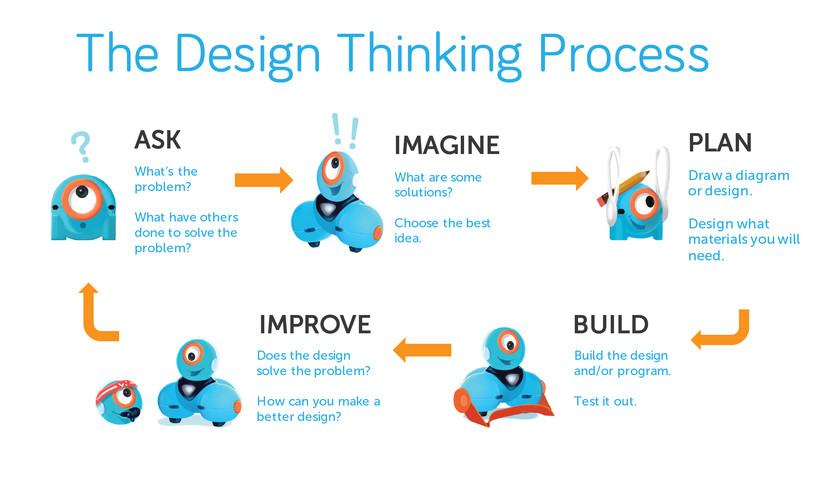
Use the 2-5 Design Thinking Presentation to introduce the iterative design thinking process to the class. Say, “Design Thinking has been used to develop all kinds of inventions we use each day, like smartphones, cars, board games and video games. We can use design thinking to improve conditions in our classroom.”
Understand: “Of course we understand what we are feeling, but it’s important to ask how those around us feel about things, too. When we understand how users are feeling and the problems they face, we can learn about problems that we all might share.”
Define: “Designers must be able to identify a problem or a need that they will attempt to solve. For example: Our classroom floor gets messy after craft activities. That’s a problem.”
Ideate: “The word ‘idea’ is the root word of the word ‘ideate.’ That’s because when we ideate, we come up with ways to solve the problem. Brainstorming allows us to come up with all kinds of ideas and then work together to decide on which ideas we’d like to try first. For example: Designing a program and accessory for Dash to sweep up the floor.”
Plan: “Once designers select the best solution, they make a plan. They draw a diagram of their design and figure out what materials they will need. For example: You will probably need legos to build a sweeper for Dash to clean the floor.”
Build: “We begin by building a rough version of your group’s design. This rough version is called a prototype. We do this in the same way that we would create a rough draft when we write. It’s okay to make mistakes, because that’s how we learn to make improvements. During construction, we frequently stop to test and retest our prototype. Then we ask: How can we improve it? Each time we make a change in our design, we retest our prototype. It does not need to be perfect. It just needs to work well enough to test out the features of your group’s design.”
Test: “Once we’ve built a Dash accessory that sweeps the floor, we must test it out. Does it work? Does it solve the problem? If not, can we tweak it in some way to make it work? Is the problem in the accessory or the program we’ve written? It’s okay to make mistakes. The important thing is to learn from our mistakes and make changes, when needed. We can also get feedback from our peers and from the people who will be using the accessory. We can use that feedback to improve our designs!”
What are the different stages of the design thinking process?
Why is it important to have different stages?
What does the word “ideate” mean, and why is it an important part of the design process?
Which stage is most important, and why?
Ask, “What kinds of problems do we run into in the classroom?”
Select student volunteers to call out a few example problems (e.g., trash on the floor, the classroom getting too noisy, papers being left out, the lights being left on).
Work with the class to brainstorm the problems that bothers them in the classroom. List the problems on the whiteboard or poster paper.
Do not judge ideas as good or bad at this time.
Once you've gotten all ideas written down, read them aloud.
Discuss what accessories students could design for Dash that could help solve some of the identified problems.
Could Dash have a bulldozer to sweep the floor?
Could Dash have a hand to help turn off the lights?
Discuss how students could program Dash and Dot to demonstrate the accessory.
Could you use a nested loop to have Dash move back and forth while sweeping the floor?
Could you use an event handler to have Dot ask Dash to deliver something?
Could you use a conditional to have Dash react to obstacles while delivering things to someone?
What is the problem that you would like to solve?
What will you build as an accessory for Dash to solve that problem?
How will you use the blocks in Blockly to solve your problem?
How could you include the nested loops or conditionals in your program?
Will you have Dash and/or Dot say something or make a sound?
Divide the class into small groups (ideally 2–3 students per robot) and distribute a Design Thinking Workbook to each group.
Have groups use the Design Thinking Workbook to guide them through the design process. Make sure students get their work approved before they advance to the next design stage.
Share the Evaluation Rubric with the class so that students are aware of your learning and performance expectations.
Have student groups use the Design Thinking Workbook to:
Record the list of classroom problems that was created by the class.
Discuss and add any other classroom problems to the list.
Narrow this list down to a top classroom problem.
Explain the selected problem in detail.
Have student groups use the Design Thinking Workbook to:
Brainstorm and record possible solutions for their selected problem.
Select their top solution.
Explain the selected solution in detail with words and diagrams.
Have students use the Design Thinking Workbook to:
Establish team roles such as:
Lead Programmer: Holds the tablet and integrates group member ideas to create the program in Blockly.
Documentarian: Records, writes, and/or draws all group results, thoughts, and progress. Illustrates group designs and ideas.
Lead Builder: Collects the materials needed to build the accessory. The lead builder oversees the building and testing of the prototype.
Draft a detailed sketch of their accessory idea for Dash.
Each student in the group should contribute to the sketch by using different-colored pencils/markers/crayons.
By giving each student a different-colored pencil to draw, you can tell that all students have participated in the planning of their group’s accessory.
Have each group share their sketch with you.
Have students make any needed adjustments to their original plan based on your feedback.
Have students use the Design Thinking Workbook to:
Make a list of the recycled materials they will need to build a prototype of their design.
Gather the necessary materials.
Build the prototype.
Have each group share their prototype with you.
Have them make any needed adjustments based on your feedback.
Have students use the Design Thinking Workbook to:
Plan a program for Dash that will help demonstrate their accessory design.
Explore incorporating Dot as part of the demonstration.
Use the Blockly app to develop their program.
Record the results of their code and prototype.
Make any improvements based on their test.
The program should contain criteria that you’ve established based on students’ coding abilities. For example, the criteria could include: nested loops, event handlers, and/or conditionals.
Remind students of the criteria. (e.g., “Don’t forget to include a When block and a Repeat block. Think about which portion of the program Dash must repeat more than once.”)
Have students create a presentation that includes the following elements:
Description of the problem the group selected.
Description of group members and roles.
Explanation of the thinking that went into the design of their accessory.
Description of the problems they ran into and how they were solved.
List of next steps: Where can they go from here with their invention?
Images of the invented accessory for Dash.
Screenshot of the final program created in the Blockly app
Video of Dash using the accessory.
Students can organize their presentation using posters or digital platforms such as Seesaw, iMovie, or Google Slides.
Have student groups take turns presenting their projects to the class.
Encourage students to give each other feedback on their designs, programs, and/or presentations. Possible questions/feedback includes:
“How did you (build that accessory and what did you use)?”
“I like how you (added lights and sounds to your program).”
“What if you (recorded a sound for your program)?”
Did your design work as planned? Why or why not?
How could this design be scaled up for use in the real world?
Do you think other classes could use your accessory/program?
What was the hardest part of the design process?
If you had time to redesign, what would you change?
Use our Evaluation Rubric to review students’ work and presentations.
[Optional] Share your students’ work with the world using @logicsacademy and #dashanddot!
Make sure that all groups have drafted a plan for their program that includes your established criteria before giving them a tablet to code.
Check in with groups as you circle the room. Ask guided questions such as:
What is your group’s classroom problem?
How are you going to solve the problem?
What challenges have you faced?
How did you overcome them?
Create heterogeneous ability groupings so that those who are stronger can help those in need.
Use a talking object for the brainstorming stage. When the object is passed to the student, he or she may share an idea. This avoids students talking over one another.
While some students are challenged by the basic requirements of this lesson, incorporate more complex programming requirements for students who have demonstrated mastery. This can include:
Using multiple event handlers, nested loops, and/or conditionals.
Developing another accessory that solves a different problem.
Using the Wonder app to program Dash and Dot.
For struggling students, scale down the project by minimizing the programming requirements. For example, they can:
Only include an event handler or a conditional.
Develop a plan for the program and have other teammates execute it.
Students can:
Take a picture and share their designs with each other to get feedback.
Record videos to share their ideas with the school community.
Write a persuasive pitch about their innovation.
Create a pencil/paper or online Glogster.edu poster to explain how their innovation works.
1B-AP-08: Compare and refine multiple algorithms for the same task and determine which is the most appropriate.
1B-AP-10: Create programs that include sequences, events, loops, and conditionals.
1B-AP-11: Decompose (break down) problems into smaller, manageable sub-problems to facilitate the program development process.
1B-AP-13: Use an iterative process to plan the development of a program by including other’s perspectives and considering user preferences.
1B-AP-15: Test and debug (identify and fix errors) a program or algorithm to insure it runs as intended.
1B-AP-16: Take on varying roles, with teacher guidance, when collaborating with peers during the design, implementation and review stages of program development.
1B-AP-17: Describe choices made during program development via code comments, presentations, and demonstrations.
1B-IC-18: Discuss computing technologies that have changed the world and express how those technologies influence, and are influenced by, cultural practices.
1B-IC-19: Brainstorm ways to improve the accessibility and usability of technology products for the diverse needs and wants of users.
1B-IC-20: Seek diverse perspectives for the purpose of improving computational artifacts.
1B-DA-06: Organize and present collected data visually to highlight relationships and support a claim.
1B-DA-07: Use data to highlight or propose cause and effect relationships, predict outcomes, or communicate an idea.
3D: Build knowledge by actively exploring real-world issues and problems, developing ideas and theories and pursuing answers and solutions.
4D: Exhibit a tolerance for ambiguity, perseverance and the capacity to work with open-ended problems.
5C: Break problems into component parts, extract key information, and develop descriptive models to understand complex systems or facilitate problem-solving.
6C: Communicate complex ideas clearly and effectively by creating or using a variety of digital objects such as visualizations, models or simulations.
6D: Students publish or present content that customizes the message and medium for their intended audiences.
7A: Use collaborative technologies to work with others, including peers, experts or community members, to examine issues and problems from multiple viewpoints.
7C: Contribute constructively to project teams, assuming various roles and responsibilities to work effectively toward a common goal.
3-5-ETS1-1: Define a simple design problem reflecting a need or a want that includes specified criteria for success and constraints on materials, time, or cost.
3-5-ETS1-2: Generate and compare multiple possible solutions to a problem based on how well each is likely to meet the criteria and constraints of the problem.
3-5-ETS1-3: Plan and carry out fair tests in which variables are controlled and failure points are considered to identify aspects of a model or prototype that can be improved.
CCSS.ELA-LITERACY.SL.3.2: Determine the main ideas and supporting details of a text read aloud or information presented in diverse media and formats, including visually, quantitatively, and orally.
CCSS.ELA-LITERACY.SL.3.3: Ask and answer questions about information from a speaker, offering appropriate elaboration and detail.
CCSS.ELA-LITERACY.SL.3.5: Create engaging audio recordings that demonstrate fluid reading at an understandable pace; add visual displays when appropriate to emphasize or enhance certain facts or details.
C5: Students will use technology to aid collaboration during inquiry.
C6: Students will use technology to investigate and/or solve problems.
F6: Students will demonstrate a basic understanding of the operating skills required in a variety of technologies.
C3.1 solve problems and create computational representations of mathematical situations by writing and executing code, including code that involves sequential, concurrent, and repeating events
C3.2 read and alter existing code, including code that involves sequential, concurrent, and repeating events, and describe how changes to the code affect the outcomes
Outcome 5: Students will be expected to select and use, with teacher support, grade-appropriate digital tools to develop and represent learning for various purposes, both individually and collaboratively.
Outcome 9: Students will be expected to
use grade-appropriate ICT terminology
safely operate computers and digital devices
• Use trial and error to make changes, solve problems, or incorporate new ideas from self or others
• Develop their skills and add new ones through play and collaborative work
• Explore the use of simple, available tools and technologies to extend their capabilities