
Loading…
Loading…
Students will learn how and why to use functions to create their own version of a familiar chant.

Students will learn how and why to use functions to create their own version of a familiar chant.
understand the definition and uses of a function
understand the correlation between a song’s chorus and a function
write an original song/chant using a function
Before this lesson, we recommend that students complete:
Level A-D Lessons: All
Level E: Lessons 1-2
[Optional] Level A-D Challenge Cards: All
[Optional] Level E Challenge Cards: E 1.1-2.3
Say, “We have learned quite a bit about programming. Turn to your partner and tell him or her two things you have learned about programming.”
Sample response: “I have learned that when I use a loop, whatever is inside it is repeated. I have also learned that another word for If statements is conditionals.”
Say, “How can loops and conditionals help us make our code more efficient?”
Sample response: “Loops help us repeat parts of the code so you don’t have to list those steps over and over again.”
Say, “Today we are going to learn about a new coding concept: functions.”
“You use functions everyday for the routines in your life. Often, when you do things over and over, you don’t have to think about each separate part of the task; your body knows what to do automatically.” Discuss real-life examples of functions.
When you brush your teeth, you don’t think, “I’m going to put water on my toothbrush. I’m going to open the toothpaste. I’m going to put toothpaste on my toothbrush. I’m going to brush my front teeth. I’m going to brush my back teeth. I’m going to put water in my mouth and spit out the water and toothpaste into the sink.” Instead, you think, “I’m going to brush my teeth.” This is an example of a function.
Watch Code.org’s video about functions: https://studio.code.org/s/coursee-draft/stage/6/puzzle/1.
Say, “A function is when a part of a code is repeated and can be called throughout the program. Functions are used when you need to repeat a piece of code several times.”
Discuss examples of when you would want to use a function in a program (e.g., when you want Dash to perform the same dance at different times in the program).
What is a function and when do you use it? (Sample response: “Functions are used when you need to repeat a piece of code several times.”)
When might you use a function in real life? (Sample response: “You might use a function when you write or sing a song because the choruses of songs are like functions.”)
Ask, “What are functions?”
Sample response: “Functions are pieces of code that can be repeated over and over, just like the chorus of a song.”
Say, “We will be using the song 'Going on a Bear Hunt' to practice using functions.”
Watch Michael Rosen and Helen Oxenbury’s version of 'Going on a Bear Hunt' on TeacherTube: http://www.teachertube.com/video/we8217re-going-on-a-bear-hunt-274958.
Have students follow along with the song two or three times.
Put students in groups of 2–3 and pass out the Bear Hunt Student Worksheet.
Ask groups to discuss things that they notice about the song. (Sample responses: “The lyrics of the song are not in the proper order,” or “Parts of the song repeat themselves.”)
Ask students to cut out the boxes in the Bear Hunt Student Worksheet and place the pieces of the song in order.
Ask, “If I had asked you to write this entire song out by hand, it would take a very long time. What could we do to make the song shorter and faster to write?”
Sample response: “Label the parts of the song that repeat as Chorus. Therefore, after the first time they are used, you can simply write Chorus in place of those lyrics.”
Say, “A chorus of a song and a function in coding are similar. A function is a piece of code that repeats, and a chorus is a part of a song that repeats. They can both be called upon without having to rewrite them each time.”
Ask, “Why is knowing how to use functions important?” (Sample Response: “It makes writing code more efficient.”)
Have students work on the following activities in small groups. We recommend 2–3 students per group.
When students work together while coding, they’re able to help each other identify mistakes and develop creative solutions!
Say, “We will be writing our own version of 'Going on a Bear Hunt,' but this time we will use functions to make it easier. Your song will be called 'Going on a Dash Hunt.'"
On the board, write Chorus and write the chorus of the song below it:

Say, “The chorus of this song will act as our Function. Whenever we want to repeat the chorus, we will write “Chorus.” This is how we call our “Chorus” Function instead of writing all the words each time.”
On an index card, have each group of students write their own verse of the song about obstacles to get through while looking for Dash. Write the following sample lyrics on the board for the students to reference:

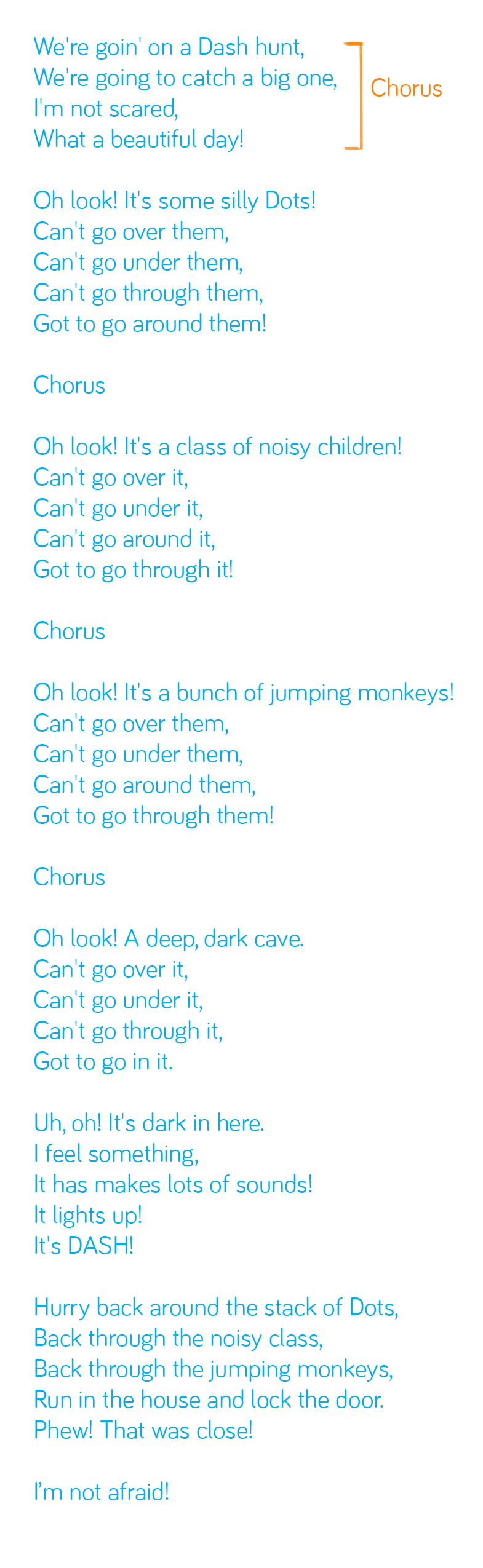
Collect all the index cards that contain the verses and tape them to the board in order. Work with the class to rewrite the remaining lyrics of the song, based on a scary place they might find Dash and the obstacles students have provided in their verses. The lyrics should be similar to the following:

Say, “We already have our “Chorus” Function written. Every time the chorus repeats, we’re just going to write Chorus on the board.” The finished song should look something like the following:


Ask, “After writing our own version of this song, are you glad you used functions? Why or why not?
Sample Response: “I am glad I used functions because using them made writing this chant much easier and faster.”
Optional: Have the class perform the song, with each group acting out their verse and the whole class acting out the remaining lyrics.
Invite one student to play the role of Dash.
Have student groups take turns sharing their verses with the class. Encourage them to:
Explain their thinking (e.g., “We chose to add this obstacle to our verse because we thought it was funny”).
Encourage students to give each other feedback on their verses. Possible questions/feedback includes:
“How did you (come up with those obstacles)?”
“What if you (added another verse)?”
How do you use functions in your real life? (Sample response: “I use functions when I take a bath or get dressed.”)
Why are functions important? What would happen in our lives if we didn’t use functions? (Sample response: “Functions help us to do basic tasks in our lives without too much thought. If we didn’t use functions, it would take us a very long time to do the most basic activities.”)
Use our Evaluation Rubric to review students' work and presentations.
[Optional] Share your students' work with the world using @logicsacademy and #dashanddot!
1B-AP-08: Compare and refine multiple algorithms for the same task and determine which is the most appropriate.
1B-AP-11: Decompose (break down) problems into smaller, manageable sub-problems to facilitate the program development process.
1B-AP-12: Modify, remix and incorporate portions of an existing program into one’s own work to develop something new or add more advanced features.
1B-AP-16: Take on varying roles, with teacher guidance, when collaborating with peers during the design, implementation and review stages of program development.
4d: Students exhibit a tolerance for ambiguity, perseverance and the capacity to work with open-ended problems.
5a: Students formulate problem definitions suited for technology-assisted methods such as data analysis, abstract models and algorithmic thinking in exploring and finding solutions.
6b: Students create original works or responsibly repurpose or remix digital resources into new creations.
7c: Students contribute constructively to project teams, assuming various roles and responsibilities to work effectively toward a common goal.
3-5-ETS1-2: Generate and compare multiple solutions to a problem based on how well they meet the criteria and constraints of the design problem.
CCSS.ELA-LITERACY.W.3.10: Write routinely over extended time frames (time for research, reflection, and revision) and shorter time frames (a single sitting or a day or two) for a range of discipline-specific tasks, purposes, and audiences.
CCSS.ELA-LITERACY.W.2.8: Recall information from experiences or gather information from provided sources to answer a question.
CCSS.ELA-LITERACY.SL.3.1: Engage effectively in a range of collaborative discussions (one-on-one, in groups, and teacher-led) with diverse partners on grade 3 topics and texts, building on others' ideas and expressing their own clearly.
CCSS.ELA-LITERACY.SL.3.3: Ask and answer questions about information from a speaker, offering appropriate elaboration and detail.
CCSS.ELA-LITERACY.SL.3.4: Report on a topic or text, tell a story, or recount an experience with appropriate facts and relevant, descriptive details, speaking clearly at an understandable pace.
C5: Students will use technology to aid collaboration during inquiry.
C6: Students will use technology to investigate and/or solve problems.
F6: Students will demonstrate a basic understanding of the operating skills required in a variety of technologies.
C3.1 solve problems and create computational representations of mathematical situations by writing and executing code, including code that involves sequential, concurrent, repeating, and nested events
P2: Students will be expected to use digital tools to develop ideas and original works in innovative ways.
TOC1: Students will be expected to
safely use many forms of current technology for learning with growing competence
demonstrate conceptual understanding of how information and communication technology, digital tools, and authorized networks support their learning
use terminology related to information and communication technology
• Make changes and test again, repeating until satisfied with the product
• Use materials, tools, and technologies in a safe manner, and with an awareness of the safety of others, in both physical and digital environments
• Identify the skills required for a task and develop those skills as needed
• Use familiar tools and technologies to extend their capabilities when completing a task
• Demonstrate a willingness to learn new technologies as needed