
Loading…
Loading…
Students will learn about the benefits of using variables when coding and in real life. Students will then practice using variables to create stories.
Students will learn about the benefits of using variables when coding and in real life. Students will then practice using variables to create stories.
Define a variable. Identify and use variables in real life.
Before this lesson, we recommend that students complete:
Level A-E Lessons: All
Level F: Lesson 1
[Optional] Level A-E Challenge Cards: All
[Optional] Level F Challenge Cards: F 1.1-1.3
Create a labeled envelope for each of the following word categories: Adjectives, Verbs, Names, Locations, Colors.
How have you used functions to program Dash?
Sample response: “We used functions to program dances for Dash. We used the dance function over and over again when we were coding.”
How did functions help make your code more efficient?
Sample response: “We only had to code Dash’s dance one time. Then we could call that function over and over again.”
Review Code.org’s activities about functions: https://studio.code.org/s/coursee-draft/stage/9/puzzle/9
Say, “In these puzzles, you used functions to help you gather crops.”
Ask, “What would your code look like without functions?”
Sample response: “If I did not use functions, my code would be very long, as I would have to write the same bits of code over and over.”
Ask, “How are functions different than loops?”
Sample response: “Loops repeat bits of code over and over in the same location in the sequence, whereas functions can repeat bits of code in different places throughout the sequence where the user calls them.”
Show Code.org’s video about variables: https://studio.code.org/s/coursef-draft/stage/5/puzzle/1
Review the definition of variables: “Variables are placeholders for pieces of information that can change.”
Brainstorm with students to come up with real-life examples of variables. For example:
When you’re playing a game, you need to keep track of each person’s score. Each person’s score is a variable because it is a piece of information that changes over time as you play the game. You need to update the score each time someone earns a point in the game.
Your username and password are variables on a website. On the login page, the username and password are blank because each user has a different username and password. These blank spaces are placeholders that can be filled in by each user.
Predict how you think variables will be used in coding. (Sample response: “Variables will save pieces of information in our code.”)
Say, “You know you can use variables to keep score in a game, but did you know you can use variables to write a story? Today we are going to use variables to complete a story. This story has placeholders (variables) for several missing words. We are going to come up with different pieces of information that can fit into these placeholders.”
Show the class the labeled envelopes (i.e., Adjectives, Verbs, Names, Locations, Colors). Say, “These are the variables for our story. Each envelope represents a different type of variable.” Work with the class to brainstorm words/phrases for each envelope.
Review parts of speech such as “verb” and “adjective,” as necessary.
Write each word/phrase on a separate index card and place it in the corresponding envelope. For example, write the word “fly” on an index card and place it in the envelope labeled “Verbs.”
Continue doing so until there are at least 4 index cards in each envelope.
Alternatively, arrange students into 5 different groups. Assign each group a word category (e.g., “Locations”). Have them write down word/phrase ideas on separate index cards (e.g., park, pet store, Mars). Then have them place those cards in the corresponding envelope.
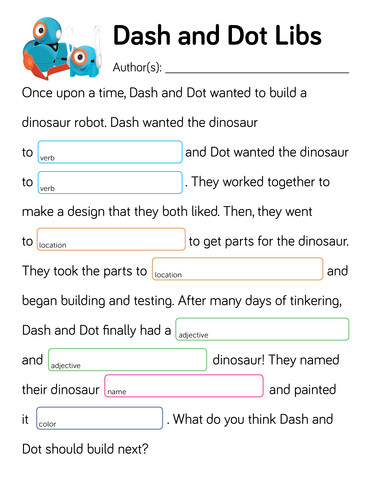
Project a copy of the Dash and Dot Libs Worksheet.
Read aloud the story with the class.
For every blank space, have a student volunteer draw an index card from the matching envelope (e.g., “Colors”) and read aloud the word.
Read the story a few times in the same manner.
Encourage students to share their observations about how the story changed each time, depending on what cards were pulled from each envelope.
How are variables used in your life? (Sample response: “I use variables when I log in to a website or game.”)
How did we use variables to write a story? (Sample response: “The story had placeholders or variables. We then came up with pieces of information that could fit into each of the variables.”)
Have students work on the following activity in small groups (ideally 2–3 students).
Distribute a Dash and Dot Libs Worksheet, 5 envelopes, and at least 20 index cards or pieces of cut paper to each group.
Have groups create a labeled envelope for each of the following word categories: Adjectives, Verbs, Names, Locations, Colors.
Have each group fill their envelopes by writing word/phrase ideas on separate index cards and placing them in the corresponding envelope.
Have each group complete the story in the Dash and Dot Libs Worksheet by pulling words from their envelopes.
Have them record their results by filling in the blanks.
Encourage them to fill in multiple worksheets in the same manner.
If time permits, have student groups write their own Dash and Dot stories that include the same types of variableplaceholders (e.g., adjectives, verbs, names, locations, colors).
Have groups swap stories and complete each other's stories using words pulled out from their envelopes.
Have student groups take turns sharing one of the stories they created. Encourage them to:
Share the word/phrase ideas that they placed in each envelope (e.g., “We chose to use silly verbs because we wanted the dinosaur robot to be silly”).
Describe how their story changed depending on which words were pulled out from each envelope.
Encourage students to give each other feedback on their stories. Possible questions/feedback includes:
“How did you (decide on which names to add to the ‘Names’ envelope)?”
“What if you (added more planet names to your ‘Locations’ envelope)?”
How did variables help us complete the story? (Sample response: “Using variables allowed us to add our own words to a story in an easy way without having to rewrite the entire story.”)
What would happen if we placed the wrong words in the wrong envelopes? How would the story change? (Sample response: “The story wouldn’t make sense. The color placeholder could be filled with a verb like ‘jump.’”)
How could/did you write your own Dash or Dot story using variables?” (Sample response: “I could write a story using Dash or Dot but leave blanks for specific types of words so someone else could complete it.”)
Use our Evaluation Rubric to review students' work and presentations.
[Optional] Share your students' work with the world using @logicsacademy and #dashanddot!
1B-AP-09: Create programs that use variables to store and modify data.
1B-AP-11: Decompose (break down) problems into smaller, manageable subproblems to facilitate the program development process.
1B-AP-16: Take on varying roles, with teacher guidance, when collaborating with peers during the design, implementation, and review of program development.
4d: Students exhibit a tolerance for ambiguity, perseverance and the capacity to work with open-ended problems.
5a: Students formulate problem definitions suited for technology-assisted methods such as data analysis, abstract models and algorithmic thinking in exploring and finding solutions.
6b: Students create original works or responsibly repurpose or remix digital resources into new creations.
7c: Students contribute constructively to project teams, assuming various roles and responsibilities to work effectively toward a common goal.
3-5-ETS1-2: Generate and compare multiple solutions to a problem based on how well they meet the criteria and constraints of the design problem.
CCSS.ELA-LITERACY.SL.3.1: Engage effectively in a range of collaborative discussions (one-on-one, in groups, and teacher-led) with diverse partners on grade 3 topics and texts, building on others' ideas and expressing their own clearly.
CCSS.ELA-LITERACY.SL.3.3: Ask and answer questions about information from a speaker, offering appropriate elaboration and detail.
CCSS.ELA-LITERACY.SL.3.4: Report on a topic or text, tell a story, or recount an experience with appropriate facts and relevant, descriptive details, speaking clearly at an understandable pace.
CCSS.ELA-LITERACY.W.5.3: Write narratives to develop real or imagined experiences or events using effective technique, descriptive details, and clear event sequences.
Planning, creating, appraising and communicating in response to challenges.
Working independently and with others while exploring careers and technology
C3.1 solve problems and create computational representations of mathematical situations by writing and executing code, including code that involves conditional statements and other control structures.
P2: Students will be expected to use digital tools to develop ideas and original works in innovative ways.
TOC1: Students will be expected to
safely use many forms of current technology for learning with growing competence
demonstrate conceptual understanding of how information and communication technology, digital tools, and authorized networks support their learning
use terminology related to information and communication technology
• Make changes and test again, repeating until satisfied with the product
• Use materials, tools, and technologies in a safe manner, and with an awareness of the safety of others, in both physical and digital environments
• Identify the skills required for a task and develop those skills as needed
• Use familiar tools and technologies to extend their capabilities when completing a task
• Demonstrate a willingness to learn new technologies as needed