
← Back to Library
Lesson PlanFreeFR
(Francais) A5: Loops - Repeat Forever
Description Level A, Lesson 5: Students will review their previous programming with sequencing and explore using loops with the Repeat Forever block. They will use Blockly preset programs and Challeng
Educational Standards
CSTA
ISTE
NGSS
Common Core
Wrap Up
Student Presentations
- Have student groups take turns sharing one of their programs with the class. Encourage them to:
- Explain their design thinking (e.g., “We added another Repeat Forever block because we wanted to repeat more sequences of code”).
- Share any obstacles and difficulties they overcame during the activity (e.g., “When we deleted the Repeat Forever block, Dash did not repeat the actions anymore, so we added it back in”).
- Encourage students to ask each other how they accomplished different objectives and give each other feedback on their programs. Possible questions/feedback includes:
- “How did you (program Dash to create a loop)?”
- “I like how you (changed Dash’s sequence).”
- “What if you (had Dash create two different loops)?”
Follow-Up Questions/Discussion
- How did sequencing help you with your program?
- How did the Repeat Forever block change your code?
Assessment
- Use our Evaluation Rubric to review students' work and presentations.
- [Optional] Share your students' work with the world using @logicsacademy and #dashanddot!
Before the Lesson
Prior Experience
It is recommended that students complete:
- Level A: Lesson 1-4
- [Optional] Level A Challenge Cards: A 1.1-2.6
You can purchase our Learn to Code Challenge Card sets and Curriculum Guide here: https://store.makewonder.com/#/education
Preparation
- Fully charge the tablets and robots.
- Install the Wonder Workshop Blockly app on each tablet.
Instructions
Introduction
- Ask, “How is sequencing used in coding?” (Sample response: “Sequencing is used to create a list of steps.”)
- Ask, “What if we wanted to repeat the steps used in a sequence? In this activity, we will use the Repeat Foreverblock. This block lets us make loops by repeating pieces of code over and over.”
Quick Check
- What is a sequence?
- What does it mean to repeat something?
- What does a Repeat Forever block do? (Sample response: “A Repeat Forever block repeats pieces of code over and over.”)
Guided Practice
Activity: Let's Do It
- Project your tablet screen, open the Blockly app, and go to the menu at the top left of the screen.
- Go to the Create New Project menu and select the Let’s Do It preset program. Then tap “create.”
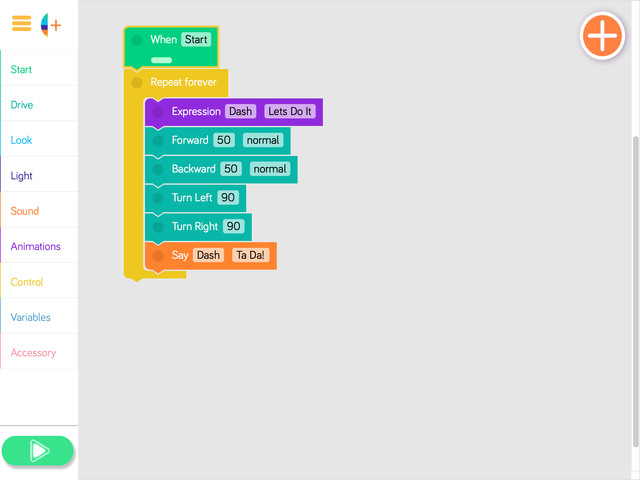
- Say, “Dash wants to repeat fun movements!”
- Play the program and have students share what they notice. (Sample response: “Dash repeated the movements!”)
- Select a student volunteer to point out the Repeat Forever block.
- Select a student to point out the sequence.
- Ask, “What would happen if you changed the sequence but left in the Repeat Forever block?”
- Have students take turns sharing their guesses. (Sample response: “Dash would repeat the new sequence.”)
Quick Check
- Why do we use Repeat Forever blocks? (Sample response: “Repeat Forever blocks let us repeat pieces of code over and over.”)
- Look at the Let’s Do It code. What blocks in the Repeat Forever sequence tell Dash to drive? (Sample response: “Drive Forward, Drive Backward, Turn Left, and Turn Right.”)
Independent Practice
Instructions
Have students work on the following activities in small groups (ideally 2-3 students per robot).
Encourage students to share tablet and robot time. Have them establish and rotate through roles such as:
- Lead Programmer: Holds the tablet and manipulates the code.
- Robot Wrangler: Retrieves and resets the robot after every program attempt.
- Documentarian: Records group results, thoughts, and progress. Illustrates group designs and ideas.
When students work together while coding, they're able to help each other identify mistakes and develop creative solutions!
Let's Do It Extension
- Have students use the Wonder Journal: Dash Planning worksheet to design ways to add to or alter the Let’s Do It preset program. They can:
- Change the sequence.
- Move the Repeat Forever block.
- Add more drive or sound blocks in the Repeat Forever block.
- After they finish revising the program, have students:
- Complete a Wonder Journal: Reflection worksheet.
- Take a screenshot of their Blockly code.
- Take a video of Dash while the code is running.
Challenge Cards
- You can purchase our Learn to Code Challenge Card sets and Curriculum Guide here: https://logicsacademy.com/store/
- Have students complete the following Challenge Cards:
- A 3.1: The Forever Light Show
- A 3.2: Dance, Dash, Dance!
- A 3.3: Dash Guards a Lot!
- For each challenge, encourage students to:
- Use the Wonder Journal: Dash Planning and Dot Planning worksheets to discuss how they can complete the challenge.
- Review the Troubleshooting and Problem Solving & Debugging worksheet if they run into any problems with their code.
- Use the Wonder Journal: Dash Planning and Dot Planning worksheets to discuss how they can complete the challenge.
- After they finish each challenge, have students:
- Complete a Wonder Journal: Reflection worksheet.
- Take a screenshot of their Blockly code.
- Take a video of Dash while the code is running.
- Update their Challenge Card Checklists.
Review
Sequencing Review
- Briefly review how students used sequencing with Dash during the previous lesson by asking:
- “What sequences did you create with Dash in the last lesson?” (Sample response: “We created sequencesthat made Dash drive forward and backward to act like a guard.”)
- “Why would you use sequencing when programming Dash or Dot?”(Sample response: “I would use sequencing in order to help predict what the outcome of my program was going to be.”)
- Remind students that sequencing is a set of steps, such as the steps they take when getting ready for school.