
← Back to Library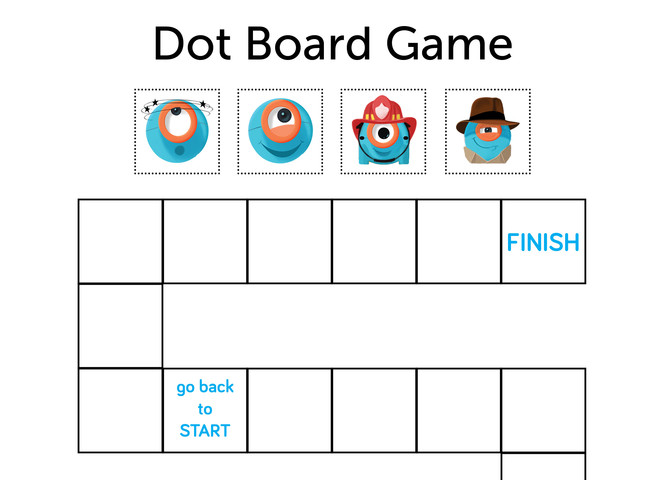
Lesson PlanFreeFR
(Francais) D3: Unplugged - Conditionals
Level D, Lesson 3: Students will learn the definition and function of conditionals. Students will learn how conditionals are used in real life and in coding. Objectives Students will: Define a conditi
Educational Standards
CTSA
ISTE
NGSS
Common Core
Before the Lesson
Prior Experience
Before this lesson, we recommend that students complete:
- Level A-C Lessons: All
- Level D: Lessons 1-2
- [Optional] Level A-C Challenge Cards: All
- [Optional] Level D Challenge Cards: D 1.1-2.3
Preparation
- Cut out the Dot images from a Dot Board Game printout. These will be used as game pieces.
Review
Loops Review
- Discuss the purpose of loops in programming. (Sample response: “Loops allow us to write code more efficiently. Our code is faster to write, and fewer lines of code need to be used.”)
- Ask, “How have you used loops in your programming? Give an example of when you used one. Why did you choose to use it?”
Events Review
- Ask, “What is an event?”
- Sample response: “An event is an action that causes something to happen.”
- Ask, “What kind of events can Dash and Dot sense?”
- Sample response: “Dash and Dot can sense a button push, sounds, and movements.”
Instruction
Introduction
- Watch the Code.org video about conditionals.
- Review a few Code.org maze puzzles that use conditionals: https://studio.code.org/s/coursed-draft/stage/10/puzzle/2
- Ask, “What did you notice about the code in these puzzles?”
- Sample responses: “If the bee is at a flower, then it will get nectar.”
- Have students work with a partner to write their own definition of a conditional.
- Have pairs share their definitions and compare them with the definition on Code.org: Conditionals are statements that only run under certain conditions.
- Ask, “Can you think of ways you use conditional statements in your life?” Sample responses:
- “If you say ‘Trick or Treat’ after knocking on a door on Halloween, you’ll most likely get candy. If it’s not Halloween when you say ‘Trick or Treat,’ you probably won’t get candy.”
- “If you shoot a ball and score a goal in a soccer game, you will celebrate. If you miss the shot, you will continue to play.”
- Say, “Think of a game that uses conditional statements. Why are conditional statements important in games?”
- Sample response: “Conditional statements in games allow players to do different things. For example, when you play Monopoly, you keep moving forward. However, if you pass go, you collect $200. When you play Uno, you draw cards on your turn. However, if you have one card left, you must say, ‘Uno.’"
Introduction
Video player coming soon
Quick Check
- What is a conditional? (Sample response: “A conditional is a statement that only runs under certain conditions.”)
- Why are conditionals important? (Sample response: “Conditionals allow the user to add variety to a program.”)
Wrap Up
Student Presentations
- Have student groups take turns sharing their games with the class. Encourage them to:
- Explain their design thinking (e.g., “We chose to make this rule because we thought it would make it easier to win the game”).
- Share any obstacles and difficulties they overcame during the activity (e.g., “Nobody won the first time we played the game, so we changed the rules”).
- Encourage students to give each other feedback on their games:
- “I liked your conditional statement that said ‘Move forward 2 spaces every time a red card is drawn.’”
- “What if you added a conditional statement that moved the game pieces backward?”
Follow-Up Questions/Discussion
- What did you like about this activity? What did you not like?
- What could you have done to make this activity more interesting? Sample responses:
- “Make it a competition to see who can get Dot to the end first.”
- “Add more than one conditional statement to our game.”
Assessment
- Use our Evaluation Rubric to review students' work and presentations.
- [Optional] Share your students' work with the world using @logicsacademy and #dashanddot!
Guided Practice
Activity: Conditionals Game
- Say, “We are going to use conditionals to create our own game. We’re going to use a game board, game pieces, and a deck of cards.”
- Lay out the Dot Board Game and place a Dot game piece on the START square.
- Say, “First, we need to make rules for our game.” Show or project the Dot Conditionals Worksheet and work with students to define conditional rules for the game. For example:
- If a red card is drawn, then we will move the Dot game piece forward 2 spaces on the game board.
- If a black card is drawn, then we will move the Dot game piece backward 2 spaces.
- If an even number is drawn, then we will move the Dot game piece forward 3 spaces.
- If an odd number is drawn, then we will move the Dot game piece backward 4 spaces.
- Demonstrate playing the game by drawing cards and moving Dot based on the conditional statements the students created.
- Add more Dot game pieces to the board and invite student volunteers to take turns drawing cards to advance their selected Dot game piece.
- Point out how some cards, such a red 7, can trigger multiple conditionals at once. For the example rules listed above, drawing a red 7 will move Dot forward 2 spaces because the card is red and then move Dot backward 4 spaces because the card is odd.
Quick Check
- Ask, “What board games do you play that use conditional statements? What are they?” (Sample response: “Sorry uses conditional statements. If you land on a space with another player on it, then that player must move back to the start.”)
Independent Practice
Instructions
Have students work on the following activities in small groups.
When students work together while coding, they’re able to help each other identify mistakes and develop creative solutions!
- Give each group a Dot Board Game printout, a Dot Conditionals Worksheet, and a deck of cards.
- Have students place the game pieces on the START square.
- Have each group use the Dot Conditionals Worksheet to write conditional statements that indicate which cards will help Dot move forward and backward on the game board.
- Have group members take turns drawing cards and moving their Dot game pieces forward or backward on the game board based on the conditional statements they created. Have them continue playing to see which Dot game piece reaches the end of the game board path first.
- If time permits, have groups try out each other’s games.